How to Make a Knowledge Panel on Google: What Works and What Does Not
Google builds knowledge panels automatically, and no form creates one. Here is the evidence that helps a panel appear, how to claim one, and the limits to expect.

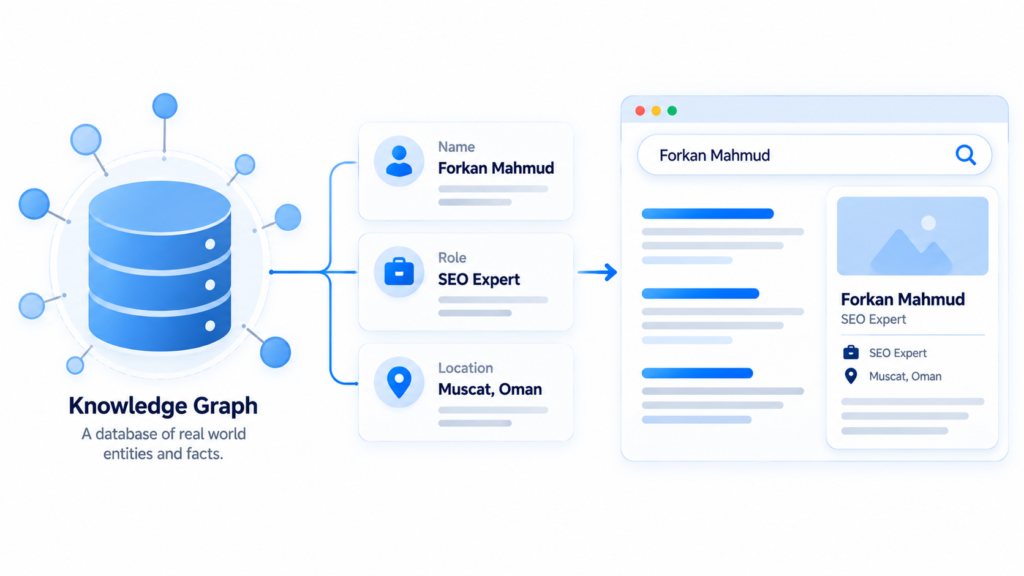
You cannot create a Google knowledge panel by request. Google builds panels on its own from its Knowledge Graph. No form, submission button, or paid shortcut forces one to appear. This guide explains how to make a knowledge panel on Google in the only way that works.
You give Google enough consistent, verifiable evidence that you are a distinct entity. Then you claim the panel once it exists. The sections below cover five situations, seven steps, the claim process, and the limits you should expect.
Short answer: you cannot create a knowledge panel on Google by request
A knowledge panel appears when Google’s systems decide that an entity is well known enough and described consistently enough across the open web. You cannot request one, buy one, or trigger it with a single action. You can improve the evidence Google reads, and you can claim the panel after it appears. That is why the honest answer to how to make a knowledge panel on Google starts with evidence, not with a request.
What Google’s help pages say about automatic generation
You cannot create a Google knowledge panel by request. Google’s help pages state that panels are generated automatically. They appear when there is enough data on the open web. The same pages explain that facts come from public sources, licensed data, and edits from verified entities. Google also says that automated systems decide when and where a panel appears.
Why a paid “panel creation” service cannot guarantee a result
No service can guarantee a knowledge panel. Google does not sell placement, and there is no order form. A seller can improve the same signals you can improve: profile consistency, structured data, and independent mentions. Some sellers also submit feedback edits for you. Google reviews those like any other suggestion. Paying for the work is a business decision. The guarantee is the part nobody can keep.
What a Google knowledge panel is, and where it comes from
The information box beside a search result is called a knowledge panel. It describes a person, place, organization, or thing that Google recognizes as an entity. The box is a display layer. Behind it sits the Knowledge Graph, a database of facts. That database connects names, attributes, and relationships.
Knowledge graph and knowledge panel are not the same thing
The Knowledge Graph is Google’s database of facts about entities. The knowledge panel is the visible box that shows selected facts from that database. One is storage. The other is a display. The difference matters because you cannot edit the database directly. You can change what Google reads. For a claimed panel, you can also suggest corrections to what it shows.
What counts as an entity in Google’s index
An entity is a distinct thing with a stable identity. It is not just a string of words. Entities differ by attributes and relationships. A person has a role, an employer, and a birthplace. A company has a founding date, a location, and a service. Two businesses with the same name are two entities. Matching details, repeated across sources, keep them apart. This idea sits under semantic SEO, where meaning comes from relationships rather than repeated words.
Knowledge panel vs Google Business Profile vs featured snippet
The three look similar in a search result. They serve different purposes. A knowledge panel describes an entity. A Business Profile manages a location-based business presence on Search and Maps. A featured snippet answers a question with an excerpt from a page. Google says Business Profiles fit businesses that serve customers at a particular location or within a designated service area.
| Feature | Knowledge panel | Business Profile | Featured snippet |
|---|---|---|---|
| What it shows | Facts about an entity | Business details, hours, and reviews | An excerpt that answers a query |
| Who controls it | Google, with suggestions from the entity | The business owner | The ranking page |
| How you get it | Automatic generation, then a claim | Create and verify a profile | Earn the position with content |
| Best for | People, brands, artists, and organizations | Local service businesses | Informational queries |
Which of the five situations describes you?
The right next step depends on what Google already shows for your name. Search your name and your brand name in a private window. Match what you see to one of the five rows below. The table separates cases that are often mixed together.
| Situation | What you will see | Correct next step | Realistic expectation |
|---|---|---|---|
| A person or personal brand | None, some social profiles | Build an entity home and align profiles | Weeks to months, no guarantee |
| A local business with a service area | A Business Profile box, not a knowledge panel | Manage the Business Profile | Immediate for local queries |
| An artist, musician, or creator | Partial or absent | Align credits, official profiles, and discography | Varies by coverage |
| An entity with an unclaimed panel | Present, sometimes with a claim option | Claim it, then suggest edits | Days to claim, weeks for edits |
| A business with little coverage | Nothing | Earn independent mentions first | Months |
A local business usually needs a Business Profile first. The Google Business Profile optimization checklist covers that work in order. A knowledge panel for a service business is a side effect of strong local signals, not a replacement for them.
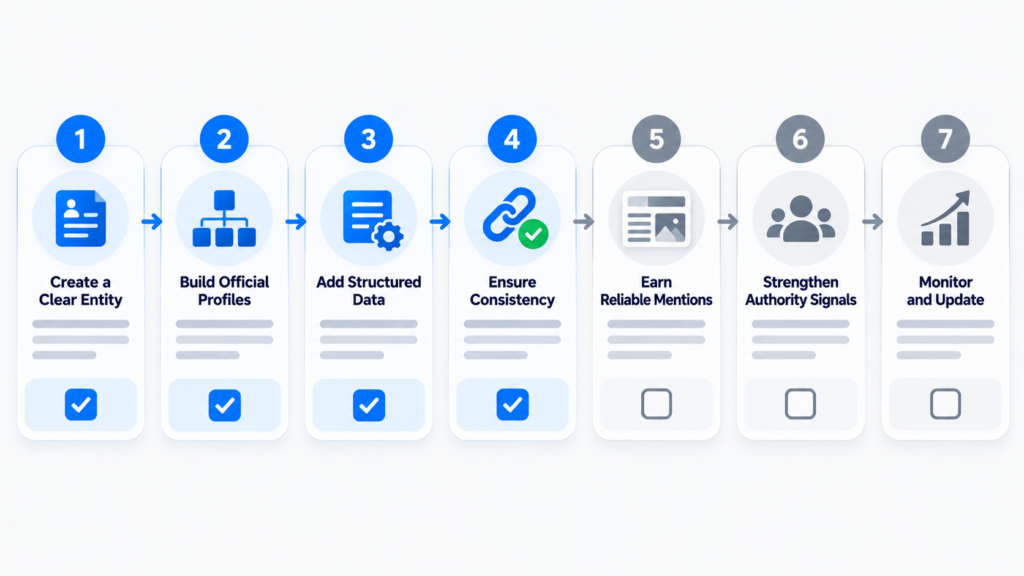
How to make a knowledge panel on Google: seven steps that matter
The work is a sequence, not a switch. Each step makes what Google can read more consistent. Consistency is what separates an entity from a name. Do the steps in order and keep a record. Progress is measured in months.
Step 1: Audit what Google already shows for your name
Search your exact name and your common variants in a private window. Record what you see. Note whether a panel exists, which facts it shows, which image it uses, and which sites Google treats as authoritative about you. This audit is the baseline. Without it, you cannot tell whether a later change helped. You also cannot spot a wrong fact that is already circulating. Write the notes in a simple table with four columns: query, date, panel state, and the first three sources shown. That table becomes the document you compare against in month two.
Step 2: Write one identity statement and reuse it everywhere
Write one sentence that states who you are, what you do, and where you operate. Use the same wording, in the same order, on your site, your profiles, and your press mentions. Google compares descriptions across sources. Small differences are normal. Contradictions are not. A job title that changes on every profile is a contradiction, and it slows entity recognition.
Step 3: Fix the entity home page
Your entity home is the page you control that describes the entity best. It needs a clear headline, a short factual description, a photo, contact details, and links to official profiles. It should state facts, not slogans. Google’s people-first content guidance applies here. The page exists to help a reader understand who you are.
Step 4: Add Person or Organization schema with sameAs links
Structured data states facts in a machine-readable format. sameAs links connect your page to profiles that describe the same entity. Use Person for an individual and Organization for a company. Every value must match the visible page. Google’s structured data policies require markup to describe what users see. Schema helps Google read facts. It does not create a panel on its own. The
entity SEO guide explains how these signals fit the wider topical structure. The
local business schema markup guide shows the markup in detail.
Step 5: Correct conflicting records on third-party sites
Most entity confusion comes from pages you do not own. Old job titles on conference sites, duplicate company listings, and outdated press pages all send conflicting facts. Request corrections where you can. Add a current, consistent profile where you cannot. One high-authority page with wrong facts can outweigh ten correct ones. Fix the visible errors first. A speaker bio that still names your previous employer is a common example, and an email usually corrects it.
Step 6: Earn independent mentions and a Wikidata record where justified
You need sources you did not write yourself. Interviews, conference listings, trade publications, and directory entries all count when they describe you consistently. A Wikidata entry can help. Wikidata has its own notability rules, and a record must meet them. Treat an entry as a possible result of coverage, not a step you can simply complete.
Step 7: Recheck monthly and keep a change log
Recheck the same queries in the same way each month. Log what changed. Record the date, the query, the panel state, and any fact that moved. This log turns a vague hope into a record you can read. It also shows which sources Google started citing. That is the most useful signal available without access to internal data.
How do I claim a knowledge panel that already exists?
Claiming does not create anything. It verifies that you are the person or the official representative of the entity described. That verification lets you suggest edits with more weight. The claim option is not available on every entity. Google states that not all panels are claimable.
Claiming through YouTube, Search Console, Twitter, or Facebook
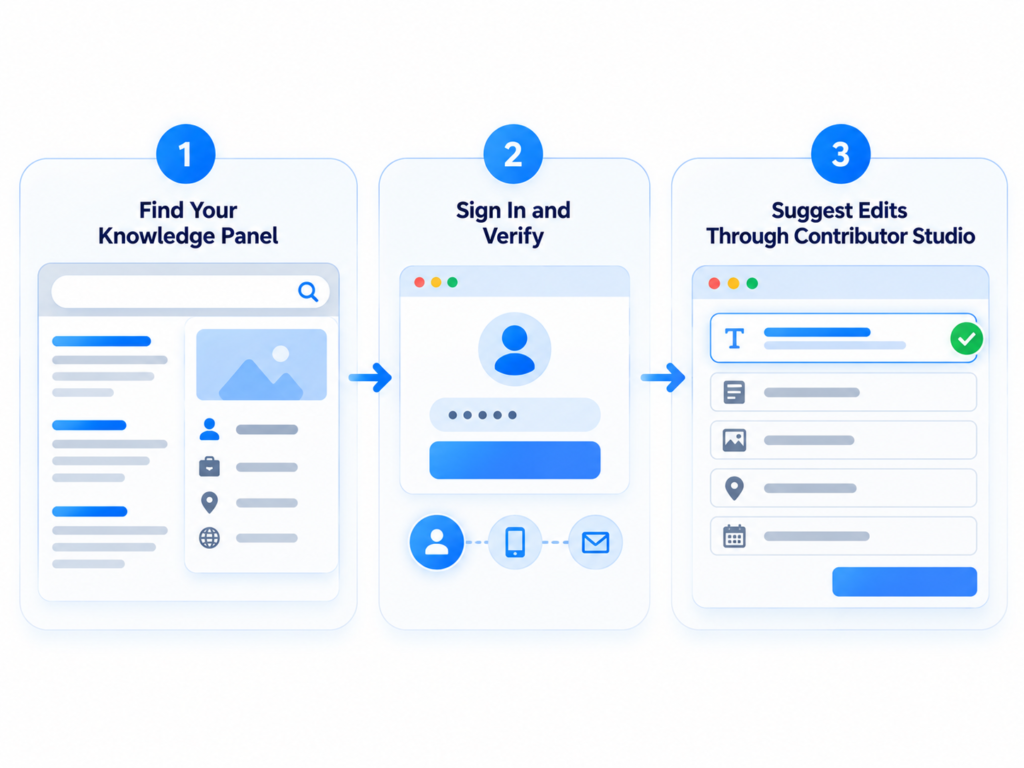
Sign in to a Google Account. Search for the entity and open the panel. Select “Claim this knowledge panel” at the bottom, or from the menu on a mobile device. Google then asks you to sign in to an official site or profile: YouTube, Search Console, Twitter, or Facebook. When Google cannot identify associated sites, it asks for more data to verify you.
Adding managers and contributors in Contributor studio
After verification, you can add other people at google.com/search/contributions/manage. Google defines three roles: owner, manager, and contributor. Managers can suggest changes and add or remove users. Contributors can only suggest changes. Keep the owner account under the organization’s control, not a contractor’s personal address, so access survives staff changes. Review the user list every quarter, because old access is the usual reason a claim gets locked later.
When the claim button does not appear
A missing claim button usually means the entity is not claimable yet, or someone already manages it. Google advises checking periodically. In the meantime, use the Feedback option. Suggestions from a verified account carry more weight, so verify the profiles you control even before a claim option appears.
How to suggest edits when a panel cannot be claimed
Feedback is the only route when the claim option is missing. Select Feedback at the bottom of the result. Flag the specific fact, describe the correction, and include links that prove it. Google reviews the suggestion. It does not promise that the change will be applied.
Flagging one fact with evidence
Flag the single fact that is wrong. Do not describe the whole panel. State the current value and the correct value. Add one or two links that show the correct value on a page Google already trusts. Screenshots are not evidence a system can check, and a live page is. Google’s documentation asks for exactly this: what should change, what it should change to, and links that verify it.
What happened to Google Knowledge Panels, and why they disappear
Panels disappear when Google’s automated systems decide that a query no longer needs one. Google says it determines when, where, and how a panel displays, and that this happens automatically. A panel that vanished is not proof of a penalty. No removal request restores one.
What Google says about panels that stop showing
Google’s Knowledge Graph help page says a panel may stop appearing over time. The decision is automated. Two causes are common in practice. Either a query that used to trigger a panel now returns a different mix of results, or the entity data became inconsistent. Contacting Google fixes neither cause. Both are addressed by improving the underlying evidence.
Knowledge panel eligibility: what “enough information” means
Google publishes no threshold, checklist, or score. It says panels appear when there is enough data on the open web. In practice that means three things. Independent sources exist. The facts agree. A clear boundary separates you from anyone with a similar name.
Common reasons a panel is never generated
Four causes explain most missing panels. The entity is not distinct enough from others with the same name. The facts contradict each other across sources. Nearly all coverage is self-published. The entity is too new for independent sources to exist. Each cause has a different fix. None of them is solved by a form.
Does a knowledge panel improve rankings or AI citations?
There is no published ranking boost for having a panel. A panel can support visibility and trust because it shows verified facts beside the result. It is not a ranking factor you can add. Claims that a panel lifts rankings by a fixed amount are not supported by anything Google publishes.
How panels appear in AI Overviews and AI Mode
AI Overviews and AI Mode use the same Search fundamentals as regular results. Google says no special markup or trick is required. A panel can appear in those experiences when the entity is relevant to the query. Consistent entity data helps Google describe you accurately. Accuracy is useful. Citation is not something you can force. The semantic SEO for AI Overviews guide covers the wider approach.
How to measure progress when there is no panel yet
Measure the inputs you control, not the outcome you cannot. Branded search volume, profile consistency, and the accuracy of facts Google shows are all observable. A panel is either there or not, and that can change without warning. That makes it a poor primary metric.
Branded search, panel stability, and what cannot be measured
Track branded queries in Search Console. Count the sources that describe you consistently. Check whether the facts Google shows stay correct. What you cannot measure is why Google decided to show or hide a panel. Any tool that claims to report that reason is guessing.
Mistakes that delay a knowledge panel
Most delays come from contradictions, not from missing tricks. A name spelled three ways, a schema block that disagrees with the page, or a paid promise that replaces real coverage will each slow the process.
Name variants, contradictory schema, and paid shortcuts
Pick one spelling of your name and use it everywhere. Keep schema values identical to the visible text. One common case is a job title in schema that no longer matches the About page. Another is a middle initial that appears in one place and disappears on the next. Treat paid panel offers as marketing services with uncertain outcomes, not as purchases. Each mistake adds noise to the evidence Google reads. Noise works against entity recognition.
How long does it take to get a Google knowledge panel?
Google publishes no timeline. Some entities see a panel within weeks of consistent coverage. Others wait years, and some never get one. The variable is how much independent, consistent evidence exists, not how much work happens in a single month. One press mention rarely changes anything, and a pattern of coverage does.
Conclusion
A knowledge panel is an outcome, not a deliverable. Google decides when an entity is clear enough to display. No form, payment, or schema block changes that rule. What you control is the evidence: one identity, one entity home, matching structured data, and independent coverage that repeats the same facts. Do that work, claim the panel when the option appears, and keep the facts accurate afterward. For the wider structure that supports this work, the semantic SEO guides on this site cover the next layer.
Frequently asked questions
Can I create a Google knowledge panel myself?
No. Google generates panels on its own and does not accept requests. You can improve the evidence Google reads and claim an existing panel. No form creates one.
How do I get a Google knowledge panel?
Build one consistent identity across your site and profiles. Add matching Person or Organization schema. Earn independent coverage that repeats the same facts. Google then decides whether a panel appears.
How long does it take to get a Google knowledge panel?
Google publishes no timeline. Reports range from weeks to years, and many entities never receive one. The deciding factor is how much consistent, independent evidence exists.
Is a Google knowledge panel free?
Yes. Claiming a panel and suggesting edits cost nothing. Paid services sell supporting work such as profile cleanup and schema. No payment can guarantee a panel.
What is the difference between a knowledge graph and a knowledge panel?
The Knowledge Graph is Google’s database of facts about entities. A knowledge panel is the visible box that displays selected facts from that database. One is storage and the other is a display.
Why is my knowledge panel not showing?
Google may decide that a query does not need a panel. Or the entity data may be inconsistent. Google states that display decisions are automated and that it does not influence them on request.
What if the claim button is missing?
Not every panel can be claimed. Check periodically. Use the Feedback option to suggest corrections in the meantime. Verified profiles strengthen later suggestions.
Do I need a Wikipedia page to get a knowledge panel?
No. Wikipedia is one possible source among many, and Google does not require it. Independent press, official profiles, and consistent data can support a panel without one.
How do I create an artist profile on Google?
Google offers no artist panel form. Musicians and artists strengthen their case with official profiles, consistent credits, discography pages, and coverage in music publications. They then claim a panel if one appears.
What happened to Google knowledge panels?
Some of them stop showing when automated systems change how a query is answered. Google says this is automatic and not something it can or would influence. Improving consistent evidence is the practical response.