Local Business Schema Markup Guide: Setup, Examples, and Testing
Learn how to implement Local Business Schema Markup with JSON-LD, choose the right schema type, validate structured data, and fix common errors.


Local Business Schema Markup Guide helps business owners and SEO professionals understand how to describe a local business to search engines using structured data. When implemented correctly, this markup can clarify details such as a business name, physical address, opening hours, and contact information. However, valid schema does not guarantee higher rankings, Google Maps placement, or a rich result. This guide explains how to choose a suitable schema type, write JSON-LD, add it to a website, and test it against Google’s guidance.
Use the most specific suitable LocalBusiness subtype, provide accurate business details, add structured data to the page it describes, and validate the implementation before and after publishing. Keep the markup consistent with information visible to visitors.
What Is Local Business Schema Markup and Why Does It Matter?
Local business schema markup is structured data that describes a business using a standard vocabulary understood by search engines and other systems. It gives machines a clearer way to interpret details that might otherwise appear only as text on a webpage.
How Structured Data Helps Search Engines Understand a Business
Structured data organizes information into named properties and values. For example, a page might show a clinic’s name, address, phone number, and opening hours in ordinary text. Schema markup identifies those details using properties such as name, address, telephone, and openingHoursSpecification.
This additional context can help Google interpret the page and determine whether it qualifies for supported search features. Read Google’s structured data overview for a general explanation of how structured data works.
LocalBusiness Schema vs. Google Business Profile
Schema markup and Google Business Profile serve different purposes. Schema is code added to your website, while a Google Business Profile is a business listing managed through Google.
They can communicate consistent business information, but one does not replace the other. Adding schema does not automatically create, verify, or optimize a Business Profile. If you need help with your listing, see the Google Business Profile optimization service.
What Schema Markup Can and Cannot Do for Local SEO
Schema can clarify business details and make a page eligible for certain supported search appearances. It cannot guarantee rankings, reviews, a knowledge panel, or inclusion in Google Maps results.
Local visibility also depends on factors beyond structured data, including relevance, distance, prominence, website quality, and the searcher’s context. Treat schema as one technical part of a wider local SEO strategy, not a shortcut around other work.
Which LocalBusiness Schema Type Should You Choose?
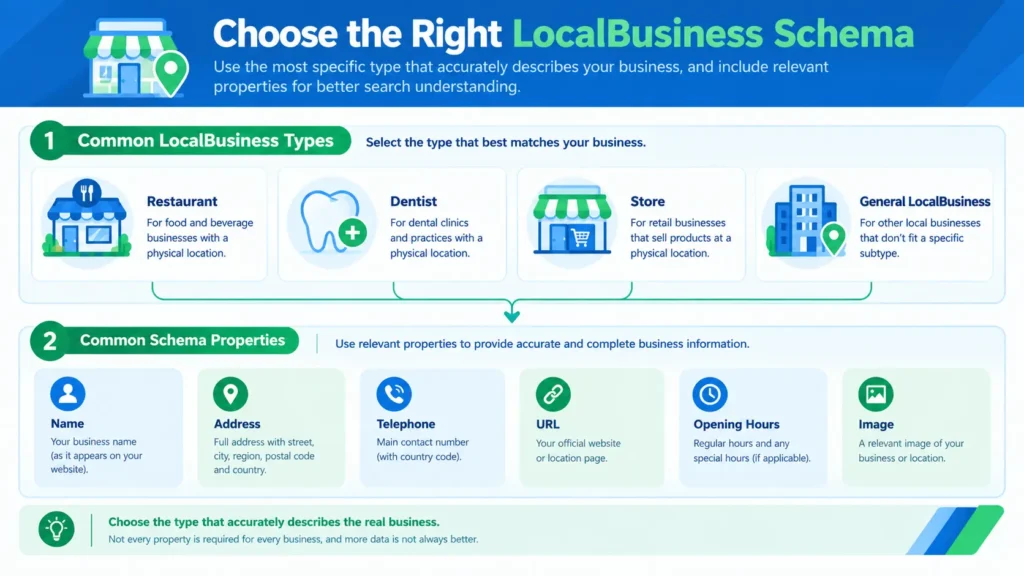
Choose the most specific Schema.org business type that accurately describes the real business represented on the page. A suitable subtype provides more precise context than a generic type when the vocabulary supports it.
General LocalBusiness vs. a Specific Business Subtype
LocalBusiness is a general type for a business or branch with a physical location. Schema.org provides more specific subtypes, including Restaurant, Dentist, and Store.
Review the Schema.org LocalBusiness definition before selecting a type. Use a subtype only when it genuinely describes the business. A company should not use Restaurant simply because it sells food, for example, if it is actually a packaged-food retailer.
Choosing Schema for Restaurants, Clinics, Retailers, and Service Businesses
A restaurant may use Restaurant, a dental practice may use Dentist, and a qualifying retail location may use Store. Other organizations should select the closest valid subtype available in the vocabulary.
The type should describe the actual entity, not the keywords a business wants to rank for. When no specific subtype fits, a more general type may be appropriate.
Schema Considerations for Single-Location and Multi-Location Businesses
A single-location business can describe its location on a relevant business or contact page. A company with several branches should represent each real location accurately, usually with a distinct location page and location-specific details.
Avoid copying the same address and phone number into every branch’s markup when those details differ. The structured data should identify the location described by each page.
How Service-Area Businesses Should Represent Their Information
A service-area business serves customers at their locations, such as a plumber or mobile repair service. It should not invent a public storefront address to make its schema appear more complete.
Google’s LocalBusiness rich-result documentation specifies a physical address as a required property for eligibility. If a business does not have a customer-facing location, check the current Google Local Business structured data documentation and consider whether Organization markup better represents its website. Do not treat a service area as a substitute for an address where Google requires one.
Which Properties Should Your LocalBusiness Schema Include?
Include the properties that accurately describe the business and are supported by the selected schema type and intended Google feature. More properties are not automatically better if the information is incomplete, misleading, or irrelevant.
Required Properties: Name and Address
For Google’s LocalBusiness rich-result eligibility, the documented required properties include name and address. The address is represented using PostalAddress and should contain the applicable components, such as street address, locality, region, postal code, and country.
The correct address depends on the real business location. Do not add a false address or expose private residential details just to satisfy a technical checklist. Check the current Google documentation for the requirements that apply to your implementation.
Recommended Properties: URL, Telephone, Opening Hours, and Geo
Useful additional properties can include:
- url: the relevant business or location page.
- telephone: the main contact number, including the country code.
- openingHoursSpecification: accurate opening and closing times.
- geo: latitude and longitude for the physical location.
- image: a relevant, accessible image representing the business.
- priceRange: a truthful indication of the business’s relative pricing, where relevant.
Only include information that is correct and maintained. For opening hours, account for regular weekly schedules and any supported special-hour information that applies.
Business Identifiers, Images, and SameAs References
The sameAs property can point to other pages that clearly identify the same business, such as its official social profile. Use genuine profiles, not unrelated directories or pages with a similar name.
Images should represent the business or location described by the markup. Avoid generic stock images presented as photographs of a real branch. Use stable, crawlable image URLs and keep all identifiers consistent across the website.
How to Keep Structured Data Consistent With Visible Page Content
The information in the markup should agree with the page visitors can see. If schema lists a phone number that differs from the page, update the incorrect source instead of leaving contradictory information.
Google’s structured data policies prohibit misleading or irrelevant markup. Do not add hidden claims, fake reviews, or details that the page does not support.
Local Business Schema Markup Guide: A JSON-LD Example
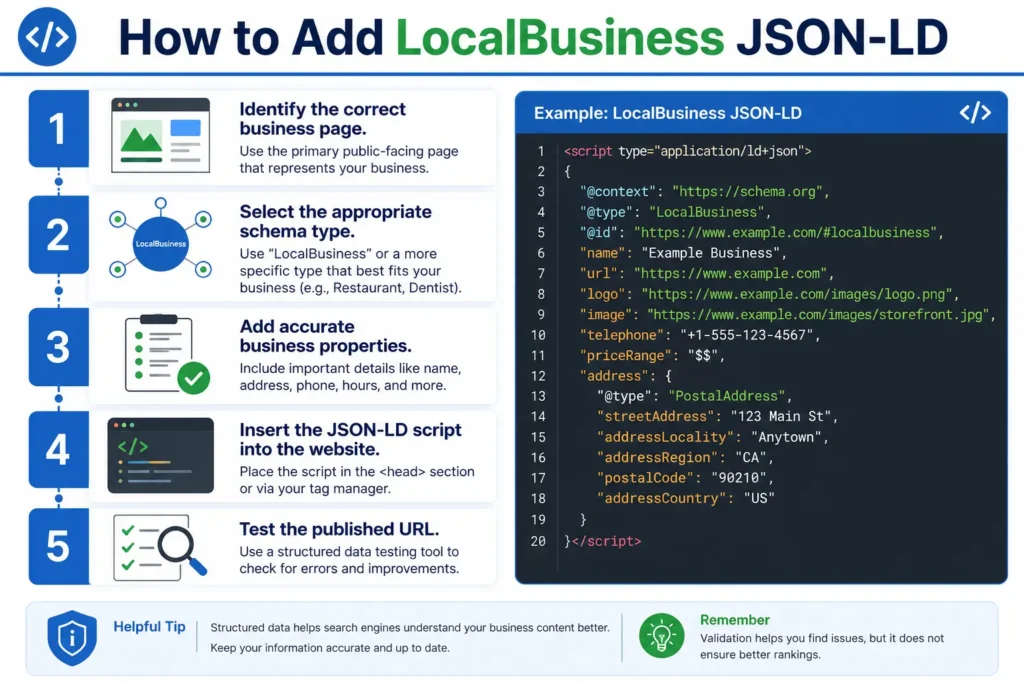
JSON-LD is Google’s recommended format for structured data. It stores the markup in a script block, separate from most of the visible page HTML, which often makes it easier to maintain.
A Practical LocalBusiness JSON-LD Code Example
The following example illustrates a fictional business. Replace every example value with verified information before using it. The address and phone number are placeholders, not real business details.
<script type=”application/ld+json”>
{
“@context”: “https://schema.org”,
“@type”: “Dentist”,
“name”: “Example Dental Clinic”,
“url”: “https://www.example.com/clinic/”,
“telephone”: “+1-202-555-0147”,
“address”: {
“@type”: “PostalAddress”,
“streetAddress”: “123 Example Street”,
“addressLocality”: “Example City”,
“addressRegion”: “CA”,
“postalCode”: “90000”,
“addressCountry”: “US”
},
“openingHoursSpecification”: [
{
“@type”: “OpeningHoursSpecification”,
“dayOfWeek”: [
“Monday”,
“Tuesday”,
“Wednesday”,
“Thursday”,
“Friday”
],
“opens”: “09:00”,
“closes”: “17:00”
}
]
}
</script>
This example uses Dentist because the fictional business is a dental clinic. The page URL, address, and schedule must match the real business information. The markup should be placed on the page that describes that clinic.
How to Adapt the Example to Your Business Type
Change the @type to the most specific applicable type, then adjust the properties to match the business. A restaurant might use Restaurant and relevant details such as its menu URL. A retail shop might use Store.
Do not add every property listed in a schema reference just because it exists. Select relevant properties and follow Google’s current requirements for the feature you want to support. A business website may also need Organization markup for broader company details, depending on its structure.
Common JSON-LD Syntax Errors to Avoid
JSON syntax is strict. A missing comma, mismatched quotation mark, extra comma, or incorrectly nested object can make the code invalid.
Use double quotes around property names and string values. Keep opening and closing braces balanced. Also check that values use the right format: a telephone number is text, while geographic coordinates are numbers. A syntax-valid example can still contain inaccurate business information, so technical validation is only one part of the review.
How to Add LocalBusiness Schema to Your Website
Add structured data by identifying the correct page, creating accurate JSON-LD, placing it in your website, and validating the published result. The exact implementation depends on your content management system and website setup.
Step 1: Identify the Correct Page and Business Type
Start with the page that represents the business or individual location. Review the visible content and confirm the business name, address, contact details, and opening hours.
Choose the schema type based on the actual business. For a website with multiple branches, create a clear relationship between each location page and the corresponding location information.
Step 2: Generate and Customize the JSON-LD
Write the JSON-LD using the properties relevant to the business. A generator can help produce the initial structure, but manually check every value before publishing.
Do not copy code from another business and leave its name, address, telephone number, or URL in place. Confirm the correct property names and formats against Google’s Local Business documentation.
Step 3: Add the Markup Through Your CMS or Website Code
On a content management system, a suitable schema plugin may let you configure the markup without editing theme files. Check whether your theme or existing plugins already output business schema before adding another implementation.
For a custom website, a developer can insert the JSON-LD script into the page’s HTML or template. Test the rendered page, especially if the site generates content through JavaScript or uses shared templates.
Step 4: Check for Duplicate or Conflicting Schema
Duplicate markup is not automatically an error, but multiple plugins can create conflicting business names, addresses, types, or identifiers. Inspect the page source and rendered output to see what is actually present.
If the same entity is described several times, review whether the markup is consistent and appropriately connected. Remove redundant or contradictory implementations instead of adding more code to cover every possible case.
Step 5: Publish and Verify the Updated Page
After publishing, test the live URL rather than relying only on a code editor preview. Confirm that the page loads for visitors and that search engines can access it.
If the page was previously indexed, use Google Search Console’s URL Inspection tool to check Google’s view of the page. Requesting a recrawl may be appropriate after substantial changes, but indexing and processing can take time.
How to Test and Validate LocalBusiness Schema Markup
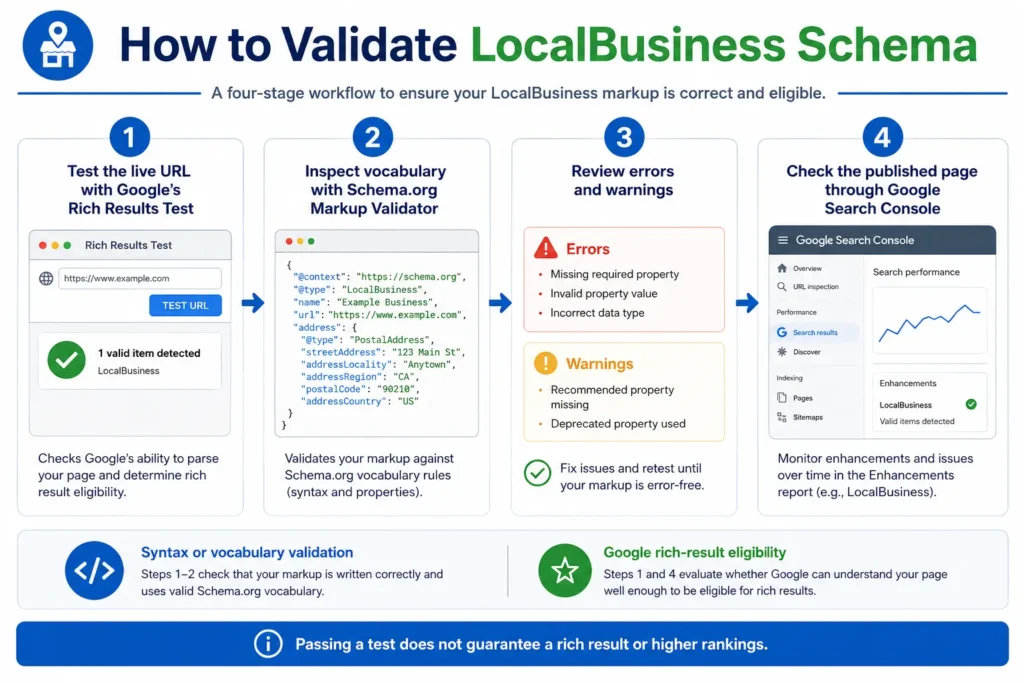
Use Google’s Rich Results Test to check eligibility for supported Google rich-result features, and use the Schema.org Markup Validator to inspect the broader schema vocabulary. These tools answer related but different questions.
Using Google’s Rich Results Test
Open the Rich Results Test and enter the live page URL, or test a code snippet. Review the detected structured data, errors, and warnings.
The tool focuses on Google-supported rich results. A result that shows no eligible feature does not necessarily mean all Schema.org markup is invalid; it may mean that the markup does not support a Google rich-result feature.
Using the Schema.org Markup Validator
The Schema Markup Validator checks structured data against Schema.org vocabulary. It can help identify syntax and vocabulary problems, including unexpected properties or incorrect structures.
Use it alongside the Rich Results Test rather than as a replacement. Schema.org validity and eligibility for a Google search feature are separate considerations.
Understanding Errors, Warnings, and Unsupported Properties
Errors may indicate a problem that prevents a particular feature from being eligible. Warnings can point to optional information that may improve completeness, though not every warning must be fixed for eligibility.
Read the message and the documentation for the specific feature. Avoid adding unsupported properties simply to silence warnings, and do not assume that every valid Schema.org property is used by Google for rich-result display.
Monitoring Indexed Pages in Google Search Console
Search Console helps you inspect how Google accesses and indexes your pages. After publishing schema, check the URL Inspection report and any relevant structured-data reports available for your property.
A successful test is not a guarantee that Google will display a rich result. Keep monitoring important pages after major template changes, plugin updates, or edits to business information.
Common LocalBusiness Schema Mistakes and How to Fix Them
The most common problems are inaccurate details, an unsuitable type, inconsistent markup, and unrealistic expectations about ranking impact. A practical review should check both the code and the visible page.
Using the Wrong Business Type or Inaccurate Address
Choose a type that matches the actual business, and confirm the address against the business’s real location. Do not use a more specific type merely because it sounds more relevant to a target keyword.
For multi-location businesses, check every location individually. A copied address or telephone number can misrepresent a branch even when the code itself is valid.
Adding Misleading, Hidden, or Unsupported Information
Only mark up information that is accurate and supported by the page. Do not invent opening hours, create fake ratings, or add services that the business does not provide.
Google’s structured data guidelines explain that misleading markup can make a page ineligible for rich results and may trigger manual action. Review both the technical documentation and the content shown to users.
Duplicating Markup Across Plugins and Templates
Two plugins may output similar schema with different values. Check the rendered page to identify the source of each block, then consolidate or correct the implementation where needed.
Some websites intentionally use multiple connected schema entities. The aim is not to remove all repeated properties, but to avoid conflicting descriptions of the same business.
Expecting Schema Markup to Guarantee Higher Rankings
Structured data is not a ranking guarantee. Google decides whether to show supported features based on its systems and eligibility rules, and valid markup alone does not guarantee a rich result.
Treat schema as a way to describe page content accurately. Pair it with useful content, a crawlable website, consistent business information, and a broader technical SEO audit when diagnosing wider site issues.
Local Business Schema Markup Guide: Best Practices and Limitations
A reliable implementation is accurate, relevant, maintainable, and tested against current documentation. It should describe a real business rather than attempt to manipulate search appearance.
A Practical Pre-Publication Checklist
Before publishing, confirm that:
- The schema type matches the real business.
- The business name and applicable address details are correct.
- URLs, phone numbers, hours, and images are accurate.
- The markup describes the page on which it appears.
- JSON-LD syntax is valid.
- The Rich Results Test and Schema.org validator have been reviewed.
- No plugin or template introduces conflicting details.
- The page is accessible to search engines.
When to Review and Update Your Structured Data
Review the markup whenever the business changes its name, location, telephone number, opening hours, or website structure. Also review it after replacing a schema plugin, changing page templates, or migrating a website.
Schedule periodic checks for important location pages. A markup block that passed validation last year may no longer match the business or the current requirements.
How Schema Fits Into a Broader Local SEO Strategy
Schema works best alongside clear location pages, helpful content, accessible website architecture, and accurate business details. It should support the information users already need, not replace it.
For a wider site improvement plan, review the website SEO service and the site’s Local SEO resources. Prioritize problems based on their effect on users, crawlability, and business accuracy.
Conclusion
Local business schema gives search engines a structured description of a business and its location. Select the right type, use accurate properties, add JSON-LD to the relevant page, and validate the live implementation. Keep the markup consistent with visible content and review it whenever business details or website templates change. Most importantly, treat schema as one part of sound technical and local SEO, not as a promise of better rankings.
Frequently Asked Questions
1. What Is LocalBusiness Schema Markup?
LocalBusiness schema markup is structured data that describes a local business, such as its name, address, telephone number, and opening hours. It helps search engines interpret business information in a standardized format.
2. Is LocalBusiness Schema the Same as Google Business Profile?
No. LocalBusiness schema is code on a website, while Google Business Profile is a listing managed through Google. They can contain consistent information, but schema does not create or verify a Business Profile.
3. Does LocalBusiness Schema Improve Google Maps Rankings?
There is no guarantee that LocalBusiness schema will improve Google Maps rankings. It describes business information for search engines, while local visibility depends on several factors, including relevance, distance, and prominence.
4. Which Schema Type Is Best for a Local Business?
Use the most specific Schema.org subtype that accurately describes the business. Examples include Restaurant, Dentist, and Store. Choose based on the real business rather than a target keyword.
5. Is JSON-LD Better Than Microdata for LocalBusiness Schema?
Google recommends JSON-LD for structured data. Microdata and RDFa are also supported formats for eligible structured data, but JSON-LD is often easier to maintain because it separates markup from visible HTML.
6. Where Should I Add LocalBusiness Schema on My Website?
Add the markup to the page that describes the business or specific location. For a multi-location company, use accurate, location-specific information on relevant branch pages.
7. Can a Service-Area Business Use LocalBusiness Schema?
It depends on the business and the intended Google feature. Google’s LocalBusiness rich-result documentation requires a physical address, so a business without an eligible physical location should review the current guidance and consider an appropriate alternative type.
8. Can I Use LocalBusiness Schema for Multiple Locations?
Yes. Each real business location should be represented accurately, with its own relevant details. Avoid copying the same address or telephone number across branches when the information differs.
9. How Do I Test My LocalBusiness Schema?
Use Google’s Rich Results Test to check supported rich-result eligibility and the Schema.org Markup Validator to inspect vocabulary and structure. Also review the published page through Google Search Console.
10. How Often Should I Update LocalBusiness Schema Markup?
Update it whenever business details change, including address, opening hours, telephone number, or location URLs. Review it after major website changes and periodically check that the markup still matches the visible page.