Google Business Profile Suspended: Causes and Fixes
Is your Google Business Profile suspended? Learn the common causes, understand soft versus hard suspensions, fix policy violations, submit a reinstatement appeal, and protect your local search visibility.


A suspended Google Business Profile removes your business from Google Search and Google Maps, cutting off calls, direction requests, and new customers without warning. Google Business Profile Suspended: Causes and Fixes is the exact situation this guide addresses: why Google suspends profiles, how to tell a soft suspension from a hard one, and the practical steps to get reinstated.
Suspensions usually come from inaccurate business information, policy violations like keyword stuffing, or suspicious activity flags. Most profiles can be fixed by correcting the underlying issue and submitting a documented appeal through Google’s official tool. Prevention comes down to accurate, consistent information and careful handling of edits and access.

What Does a Suspended Google Business Profile Mean
A suspended Google Business Profile has been restricted or removed by Google because it flagged a guideline violation or suspicious activity. When this happens, your listing stops appearing in local search results and on Google Maps, and in some cases you also lose the ability to manage the profile. Google does this to keep the information shown to searchers accurate and trustworthy, following its guidelines for representing your business.
How Suspension Affects Your Local Search Visibility
A suspended profile disappears from the local map pack, Maps navigation results, and the knowledge panel that normally shows your hours, reviews, and contact details. For a service-area business or a storefront that depends on local search, this can mean an immediate drop in calls, website clicks, and foot traffic, sometimes within hours of the suspension taking effect.
Soft Suspension vs Hard Suspension: Key Differences
Soft suspension keeps your listing visible to the public but removes your management access, while hard suspension removes the listing entirely from Search and Maps. Knowing which type applies to your profile changes how you approach the fix.
Soft Suspension Explained
In a soft suspension, customers can still find and contact your business, but you and any managers lose the ability to edit the profile, respond to reviews, or post updates. This type is usually tied to account-level restrictions rather than the listing content itself.
Hard Suspension Explained
A hard suspension pulls the entire listing, including photos, reviews, and posts, from Google. This is generally reserved for more serious or repeated policy violations, and reinstatement requires a full correction of the issue before an appeal has a realistic chance of success.
Google Business Profile Suspended: Causes and Fixes for Information Issues
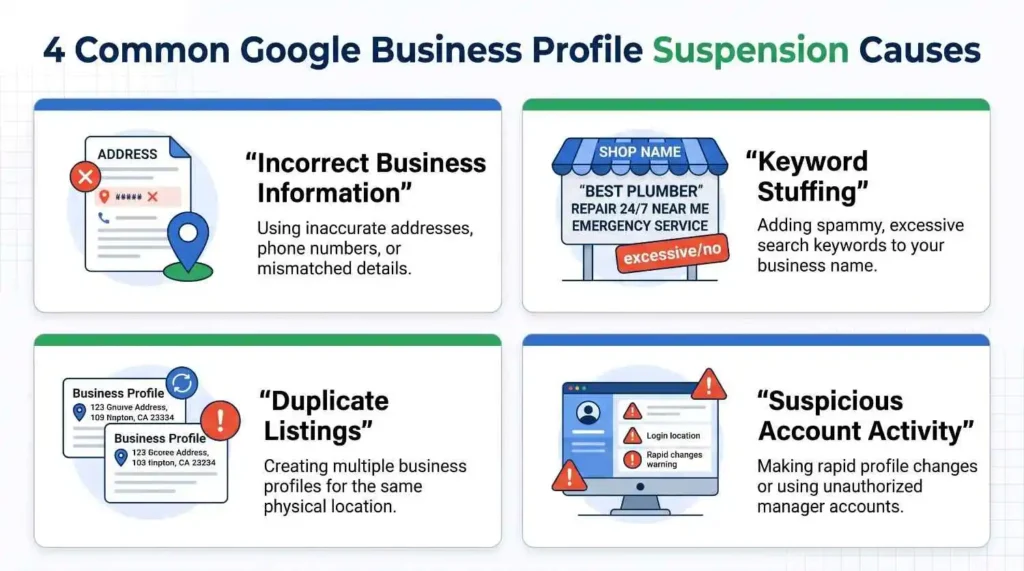
The most common trigger for a suspension is business information that Google cannot verify as accurate, consistent, or tied to a real, operating location. This covers everything from the business name to the address format.
False or Inconsistent Business Information
If your business name, address, or phone number on the profile does not match what appears on your website, signage, and other online listings, Google may flag the inconsistency as a quality or trust issue. The fix is to align every public listing of your business details with one accurate, consistent version.
PO Box, Virtual Office, or Coworking Space Addresses
Using a PO box, a virtual office, or a coworking space without regular staffed hours at that address is a frequent cause of suspension, since Google’s guidelines require a real, staffed location for most business categories. Coworking spaces can sometimes qualify, but only when there is visible signage and staff present during the listed hours.
Incorrect Setup for Service-Area Businesses
Service-area businesses that serve customers at their location rather than welcoming them to a storefront should hide their street address and define a service area instead. Listing a fake storefront address, or claiming to serve areas far outside where the business actually operates, commonly leads to suspension.
Common Policy Violations That Trigger Suspension
Beyond address and information issues, Google suspends profiles for specific content and listing practices that violate its guidelines. These violations are usually easier to identify once you know what to look for.
Keyword Stuffing in the Business Name
Adding descriptive keywords such as a service or location to your business name, when that is not your real, registered name, breaks Google’s naming guidelines and is one of the fastest ways to trigger a suspension or a name edit lock.
Duplicate Listings for the Same Business
Creating more than one profile for the same location, whether by accident or to try to gain extra visibility, splits your reviews and signals to Google that the listings need review. Google may suspend one or both until the duplicate is merged or removed.
Prohibited or Misleading Content
Content that misrepresents the business, impersonates another business, or includes offensive material in photos, posts, or the business description can lead to suspension even if the core business information is accurate.
Suspicious Activity and High-Risk Industry Triggers
Google also suspends profiles based on account behavior patterns, not just listing content, and some industries face closer scrutiny than others.
Fraudulent or Suspicious Account Activity
Rapid or frequent edits to core details like name, address, or category, unusual sign-in activity, or multiple accounts managing the same set of listings can all read as suspicious to Google’s automated systems, even when the business itself is legitimate.
High-Risk Industries With Greater Suspension Risk
Industries that have historically seen higher rates of spam listings, including locksmiths, plumbers, law firms, and other home service and professional categories, tend to face stricter review. Businesses in these categories benefit from extra care with address verification and consistent information across the web.
Google Business Profile Suspended: Causes and Fixes Through the Appeal Process
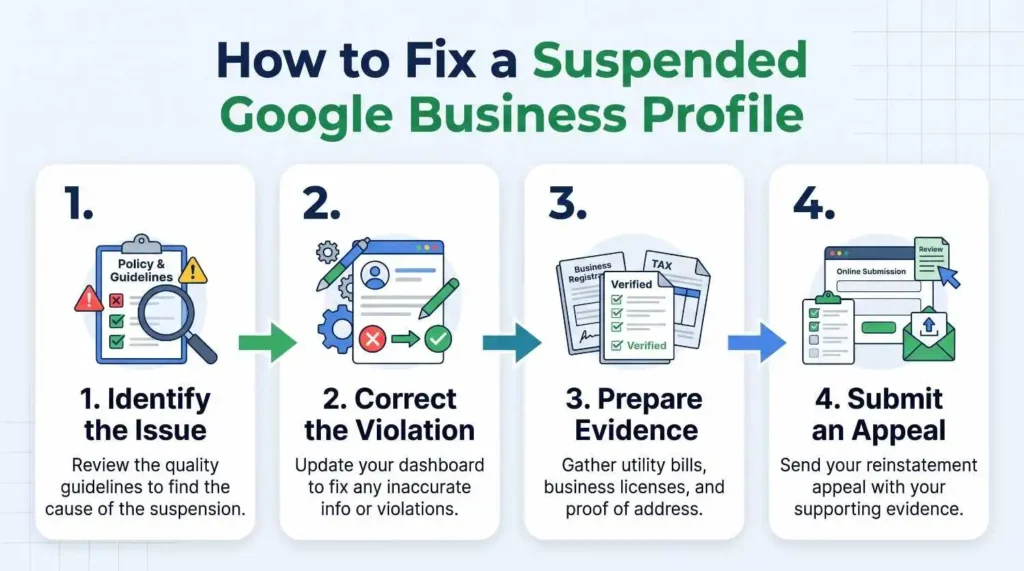
Fixing a suspension means identifying the exact cause, correcting it, and then submitting a clear, documented appeal rather than guessing at a solution.
Step 1: Identify the Suspension Type and Cause
Check your Business Profile Manager and the email associated with your account for the suspension notice, which may indicate whether it is a soft or hard suspension and give a general reason. Review your listing against Google’s guidelines for representing your business to narrow down the likely cause.
Step 2: Correct the Underlying Issue
Fix the specific problem before appealing: update inconsistent information, remove a non-qualifying address, merge a duplicate listing, or adjust a business name that includes extra keywords. Google’s own guide to fixing suspended profiles outlines the account-level steps if the restriction sits at the Google Account rather than the listing.
Step 3: Submit a Reinstatement Appeal
Once the issue is corrected, submit an appeal through the official Google Business Profile appeals tool. Attach supporting documents such as a business registration, license, or utility bill where requested, and describe clearly what was wrong and what you changed.
What to Expect After You Appeal
Review times vary, and Google does not publish a guaranteed timeline, so treat any specific number of days as an estimate rather than a promise. If an appeal is denied, you can request additional review rather than submitting a new appeal immediately, since repeated appeals for the same issue can slow the process down.
How to Prevent Future Google Business Profile Suspensions
Most repeat suspensions come from the same small set of avoidable mistakes, so a short regular review of your profile prevents most future issues.
Keep Business Information Accurate and Consistent
Match your business name, address, and phone number across your Google Business Profile, your website, and other directories. Review this at least once a quarter, since small inconsistencies tend to accumulate over time.
Avoid Risky Address and Listing Practices
Do not use a PO box or an unstaffed virtual office as your address, and do not create a second listing instead of fixing an existing one. For service-area businesses, work with local SEO services that understand the correct setup for hiding your address and defining a service area.
Monitor Access and Recent Profile Changes
Limit the number of managers with edit access, remove anyone who no longer needs it, and avoid making several major changes to your listing in a short period, since this pattern can resemble the suspicious activity Google’s systems are built to catch.
Conclusion
A suspended Google Business Profile is frustrating, but it is usually recoverable once you identify the specific cause and correct it before appealing. Businesses in categories with higher scrutiny, such as home services and contractor businesses or law firms, benefit from extra attention to address and information accuracy. Forkan Mahmud works on local SEO and Google Business Profile optimization with clients across several markets, drawing on about five years of hands-on experience with the platform.
Frequently Asked Questions
What does it mean when a Google Business Profile is suspended?
It means Google has restricted or removed your listing from Search and Maps after flagging a guideline violation or suspicious activity, and the profile will not appear to searchers until the issue is resolved.
How long does a Google Business Profile suspension usually last?
There is no fixed timeline, since review times depend on the type of suspension and the appeal queue. Treat any specific number of days you see elsewhere as an estimate rather than a guarantee.
What is the difference between soft and hard suspension?
A soft suspension keeps your listing visible but removes your management access, while a hard suspension removes the entire listing, including reviews and posts, from Search and Maps.
Can a PO box address cause a Google Business Profile suspension?
Yes. Google generally requires a real, staffed location for most business categories, so a PO box or an unstaffed virtual office commonly leads to suspension.
Why do service-area businesses get suspended more often?
Service-area businesses that list a fake storefront address or claim an unrealistic service area are more likely to be flagged, since Google expects these businesses to hide their address and define an accurate service area instead.
How do I know if my profile was suspended for policy violation or suspicious activity?
The suspension notice in your Business Profile Manager or the related email often gives a general reason. Comparing your listing against Google’s guidelines can help narrow down whether the cause is a content issue or an account-behavior flag.
What documents do I need to appeal a suspension?
Google may request documents such as a business registration, business license, tax certificate, or utility bill that confirms your business name and address, depending on the specific case.
How many times can I appeal a suspended Google Business Profile?
Google’s appeals tool allows an initial appeal, and a denied appeal can be followed by a request for additional review rather than a brand new appeal. Submitting repeated appeals for the same unresolved issue can slow the process.
Can a suspended profile lose its reviews and posts?
In a hard suspension, yes, the listing along with its reviews and posts is removed from Search and Maps. A soft suspension keeps this content visible to the public.
How can I prevent my Google Business Profile from being suspended again?
Keep your business name, address, and phone number consistent everywhere online, avoid risky address types, limit who has edit access, and avoid making several major profile changes in a short window.