Google Business Profile Optimization Checklist: A Practical Guide for Local Businesses
A practical, step-by-step Google Business Profile optimization checklist covering setup, categories, photos, reviews, posts, and ongoing maintenance for local businesses.

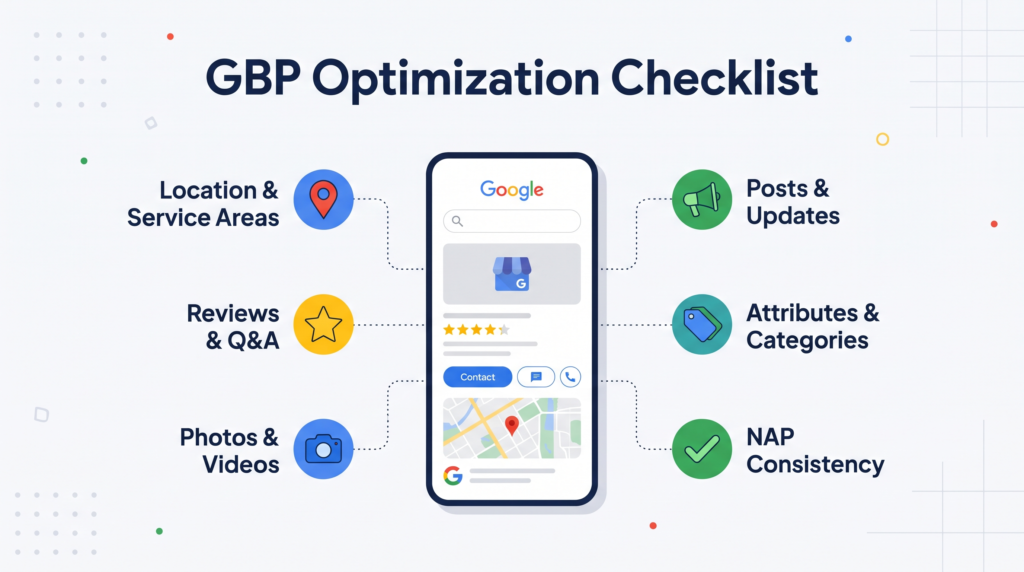
A Google Business Profile Optimization Checklist helps local businesses improve their visibility on Google Search and Google Maps. A complete profile makes it easier for potential customers to discover your business, understand your services, and contact you. However, creating a profile is only the first step. You must also maintain accurate information, select relevant categories, upload quality photos, and manage customer reviews. This guide explains each essential step, highlights common mistakes, and provides a practical maintenance schedule. If you need expert assistance, explore our professional GBP optimization service for structured optimization and ongoing support.
What Is Google Business Profile Optimization and Why It Matters
Google Business Profile optimization involves improving your free business listing so customers can find accurate information about your products, services, location, and operating hours. It also helps Google understand your business and determine when your profile may match a local search.
A well-maintained profile builds credibility before customers visit your website or contact your team. Therefore, optimization should be part of your broader local SEO strategy, rather than an isolated marketing activity.
How Google Ranks Local Results
Google identifies three primary factors that influence local search rankings: relevance, distance, and prominence. Understanding these factors helps you focus on improvements that genuinely support local visibility.
- Relevance: How closely your profile matches a customer’s search intent.
- Distance: How far your business is from the searcher or the location specified in the search.
- Prominence: How well known your business is, considering factors such as reviews, links, and online visibility.
You cannot control every ranking factor. However, accurate business information, appropriate categories, genuine customer reviews, and a trustworthy online presence can strengthen your local search performance.
Google Business Profile Optimization Checklist: Core Setup Steps
Start by establishing an accurate, complete, and verified business profile. These foundational steps help prevent avoidable errors and create a reliable starting point for future optimization.
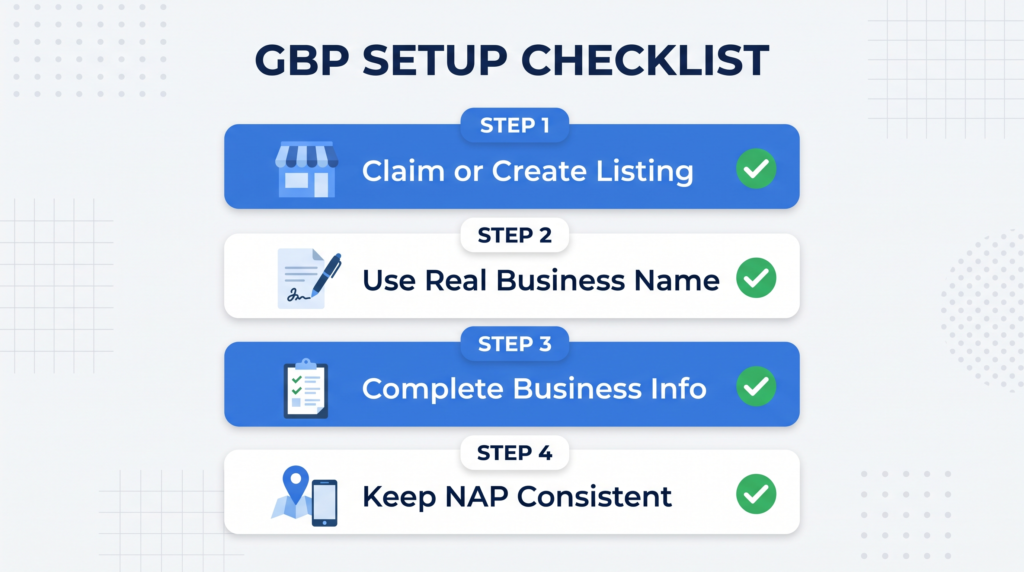
Claim or Create Your Listing
Search for your business name on Google Search and Google Maps before creating a new listing. An existing profile may already represent your business.
If a listing exists, follow Google’s verification process to claim it. Otherwise, create a new profile through the official Google Business Profile website.
Avoid creating duplicate profiles for the same business location. Duplicates can confuse customers, complicate profile management, and create unnecessary listing problems. Always confirm that you control the correct profile before making changes.
Use Your Real Business Name
Your business name should match the name customers recognize in the real world. Do not add unnecessary keywords, city names, promotional phrases, or service descriptions.
For example, use “Bright Dental Clinic” instead of “Bright Dental Clinic Best Dentist Muscat.”
Google requires businesses to follow its representation guidelines. Violations can lead to restrictions or suspension. Place relevant service keywords in appropriate fields rather than manipulating your business name.
Complete Core Business Information
Provide accurate information that helps customers understand how to reach and contact your business. Incomplete details can create uncertainty and reduce customer confidence.
Review these essential fields:
- Business address or eligible service area.
- Primary phone number and official website.
- Regular opening hours and special holiday hours.
- Business category and available contact options.
- Appointment or booking links, when applicable.
Follow Google’s official business information management guide when editing your profile. If you operate multiple locations, link each profile to the corresponding location page whenever possible.
Keep NAP Consistent Across Platforms
NAP means name, address, and phone number. Consistent information across your website, directories, and social profiles helps customers identify your business correctly.
Search your business name alongside its city to discover outdated listings. Correct inconsistencies at their original sources instead of updating only your Google profile.
For example, use the same business name, address formatting, and main contact number wherever practical. If your business relocates or changes its phone number, update important platforms promptly.
Category Optimization
Categories help Google understand what your business does and which searches may be relevant. Choosing appropriate categories is therefore an important part of profile optimization.
Choose the Right Primary Category
Your primary category should describe your main business activity as specifically as Google’s available options allow.
For example, a business specializing in nail treatments should generally select “Nail salon” rather than a broader category such as “Salon,” if both options are available and appropriate.
Review Google’s category selection guidelines before choosing your category. Consider your principal services, business model, and customer expectations.
Businesses seeking location-specific guidance can explore local SEO services in Muscat for help aligning their profiles with relevant local searches.
Add Relevant Secondary Categories
Secondary categories describe additional business activities that genuinely apply to your operation. For instance, a grocery store with a substantial bakery department might qualify for an appropriate bakery category.
Choose categories carefully rather than adding every remotely related option.
- Prioritize services that represent your actual business.
- Review available categories before making changes.
- Remove categories that no longer describe your operations.
- Avoid unrelated categories intended solely to attract extra traffic.
Relevant categories provide useful context without misrepresenting your business.
Writing an Effective Business Description
Your business description gives potential customers a concise introduction to your company. Use it to explain what you offer, who you serve, and what makes your business useful.
What to Include Within the Character Limit
Google allows up to 750 characters for the business description. Use this limited space to communicate meaningful information instead of repeating promotional claims.
Include your main services, business experience where relevant, customer needs, and service locations. Mention distinctive offerings that help customers understand why your business may suit them.
For example, a plumbing company might explain its residential repair services, emergency availability, and service coverage. Keep every statement accurate and avoid unsupported claims.
Natural Language Versus Keyword Stuffing
Write naturally for people who want to understand your business. Avoid repeating the same keyword unnaturally or listing multiple locations without context.
A description such as “We provide residential plumbing repairs, fixture installations, and maintenance for homeowners across Muscat” communicates useful information clearly.
In contrast, repeating “best plumber Muscat” throughout the description makes the text awkward and less helpful. Relevant terminology should support readability, not replace it.
Visual Optimization: Photos and Videos
Visual content helps customers understand your business before visiting or contacting you. Clear, authentic images can demonstrate your facilities, products, team, and service quality.
Types of Photos That Help Your Profile
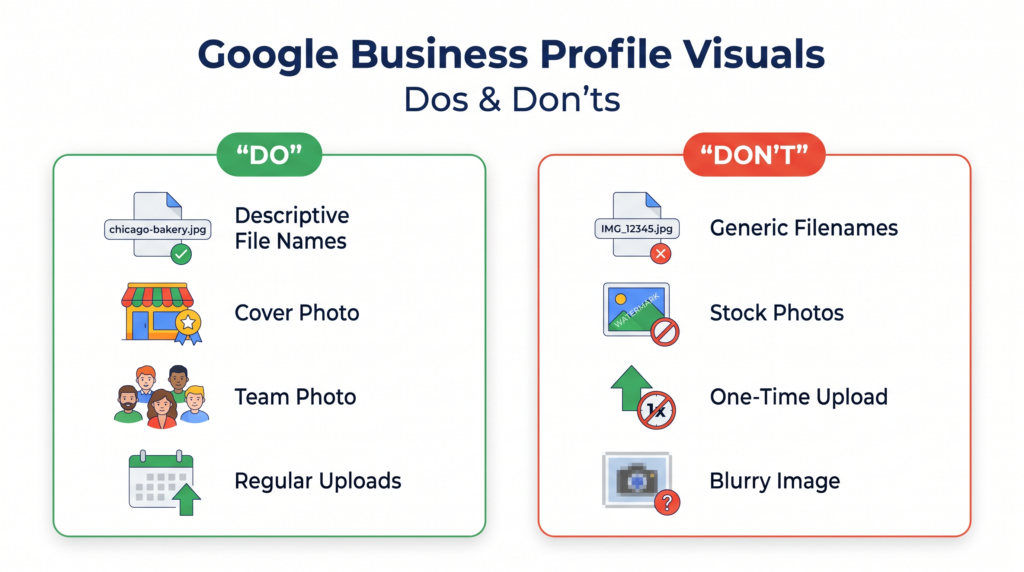
Choose images that accurately represent your business and provide useful information. Prioritize authentic photographs over generic stock images.
Consider uploading:
- Logo: Helps customers recognize your brand.
- Cover photo: Introduces your business visually.
- Exterior photos: Help visitors identify your premises.
- Interior photos: Show your environment and facilities.
- Team photos: Introduce the people behind your business.
- Product and service photos: Demonstrate what customers can expect.
For additional requirements, consult Google’s photo and video management guidelines.
Upload Frequency and Image Quality
Upload clear, well-lit images that accurately represent your current business. Avoid misleading edits, excessive filters, and photographs that no longer reflect your premises or offerings.
Add new photographs whenever you have meaningful updates, such as renovated interiors, new products, or completed projects.
A practical approach is to upload fresh images every two to four weeks. Descriptive filenames can also help organize your media library, although they should not be treated as a guaranteed ranking technique.
Attributes, Services, and Products
Attributes highlight genuine business features, while services and products explain what customers can purchase or access. These sections help people assess whether your business meets their needs.
Depending on your category, relevant attributes might include wheelchair accessibility, outdoor seating, or available payment methods.
Complete your service and product sections with accurate names and useful descriptions. Include prices when appropriate and keep the information updated.
For example, a salon could list haircuts, coloring, and styling services. A restaurant could showcase its menu items and available ordering options.
Never select attributes that do not apply. Accurate information creates realistic expectations and helps customers make informed decisions.
Google Posts: Staying Active
Google Posts allow eligible businesses to share updates, offers, events, and announcements directly through their profiles. These updates give customers timely information without requiring them to search elsewhere.
Publish useful content rather than posting simply to appear active. Suitable topics include seasonal offers, new services, upcoming events, and important business announcements.
A practical publishing routine includes:
- Share one useful update each week when you have relevant content.
- Use clear images and concise descriptions.
- Include an appropriate call to action when useful.
- Check dates, links, and offer details before publishing.
- Remove or update outdated information.
Regular posts support customer communication, but posting frequency alone does not guarantee higher rankings. Focus on usefulness, accuracy, and relevance.
Managing Reviews
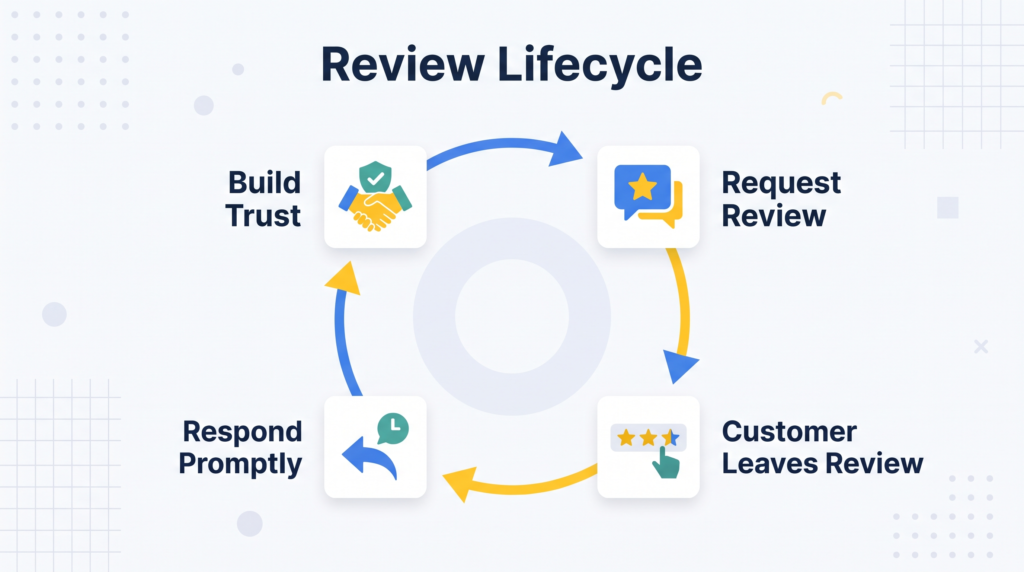
Customer reviews influence how people evaluate your business before making contact. Consistent review management also demonstrates that your business values customer feedback.
Asking for Reviews the Right Way
Request reviews after a completed purchase, appointment, or service. Make the process convenient by sharing your official review link through appropriate customer communication channels.
Ask customers to describe their genuine experiences. You can mention specific aspects of a completed project, but never pressure customers to leave positive feedback.
Avoid buying reviews, offering rewards in exchange for reviews, or selectively soliciting only positive reviews. These practices can violate Google’s policies.
Responding to Positive and Negative Reviews
Respond professionally to reviews whenever practical. A thoughtful response acknowledges customer feedback and shows prospective customers that your business takes service seriously.
For positive reviews, thank customers and mention a relevant detail when appropriate. Keep responses personal rather than copying identical messages repeatedly.
For negative reviews, remain calm, acknowledge the concern, and suggest a suitable resolution. Avoid sharing private customer information or arguing publicly.
If a review violates Google’s policies, report it through the appropriate process. Remember that disagreement alone does not necessarily make a review removable.
Q&A, Chat, and Booking Features
Available communication features help customers ask questions, contact your business, or arrange appointments. Their availability depends on Google’s current features, your business category, and supported integrations.
Monitor customer questions and provide accurate answers. You can also publish frequently needed information on your website and profile where suitable options exist.
If booking integrations are available, connect a reliable scheduling system and check that its links work correctly.
Messaging availability has changed over time, so verify which communication options Google currently supports for your profile. Never advertise a contact method that customers cannot actually use.
Tracking Performance with Profile Insights
Performance reporting helps you understand how customers discover and interact with your business. Google provides profile performance information through its available reporting tools.
Depending on the data available, review metrics such as searches, profile views, calls, website clicks, and direction requests.
Check these figures monthly and compare similar reporting periods. A sudden decline may reflect seasonal demand, changing competition, inaccurate information, or reduced customer interest.
Use the findings to guide practical improvements. For example, fewer website clicks may justify checking your website link, while declining calls could prompt a review of contact information.
Avoid judging performance using a single metric. Evaluate customer actions alongside enquiries, bookings, and actual business outcomes.
Monthly Maintenance: What to Review and When
A repeatable maintenance schedule prevents small errors from becoming ongoing problems. Assign responsibility for checking the profile so important updates do not get overlooked.
Follow this practical schedule:
- Weekly: Publish a useful post when appropriate and respond to new reviews.
- Every two to four weeks: Upload fresh photographs and check service information.
- Monthly: Review performance data, suggested edits, contact details, and customer questions.
- Before holidays: Confirm special opening hours and communicate temporary changes.
- Quarterly: Reassess categories, attributes, products, and services.
- After major changes: Update your address, telephone number, website, or operating details promptly.
For additional learning resources, explore the Local SEO blog to discover related optimization topics and practical guidance.
Common Google Business Profile Optimization Mistakes to Avoid
Even a complete profile can underperform when important information becomes inaccurate or optimization practices violate Google’s guidelines.
Avoid these common mistakes:
- Creating duplicate profiles: Check for existing listings before creating another profile for the same location.
- Keyword stuffing: Keep your business name accurate and use relevant terminology naturally.
- Selecting irrelevant categories: Choose categories that represent your actual business activities.
- Ignoring customer reviews: Respond professionally and address legitimate concerns.
- Uploading misleading photos: Use authentic images that accurately represent your business.
- Leaving information outdated: Update operating hours, contact details, services, and prices when necessary.
- Publishing irrelevant posts: Share information that genuinely helps customers.
- Ignoring performance data: Review trends and investigate meaningful changes.
Avoid promising guaranteed rankings. Google’s local results depend on several factors, including distance and prominence, that businesses cannot completely control.
Conclusion
An effective Google Business Profile optimization checklist helps local businesses maintain accurate information, improve customer communication, and strengthen their local search presence. Start with verification, business details, and relevant categories. Then improve your description, upload authentic photographs, manage reviews, and maintain useful updates.
Consistency matters more than completing everything once. Review performance regularly, correct inaccurate information, and adjust your approach as customer needs change.
If you need help managing these activities, contact Forkan Mahmud’s team to discuss your business requirements and suitable optimization options. A structured approach can make profile management easier while supporting your broader local marketing goals.
Frequently Asked Questions
1. How often should I update my Google Business Profile?
Review your profile monthly, update holiday hours before relevant dates, publish useful posts regularly, and add fresh photographs every two to four weeks.
2. Does Google Business Profile optimization affect website SEO?
It primarily supports local visibility and customer discovery. It does not automatically improve your website’s organic rankings, although profile interactions may generate additional website visits.
3. How many categories can I add to my Google Business Profile?
You can select one primary category and up to nine secondary categories. However, use only categories that accurately represent your business activities.
4. What happens if I use the wrong business name?
Adding keywords or locations that are not part of your real-world business name can violate Google’s guidelines and potentially result in profile restrictions or suspension.
5. How many photos should my profile contain?
There is no universal ideal number. Start with a logo, cover photo, and several authentic images of your team, premises, products, or services.
6. Should I respond to every customer review?
Yes, respond professionally whenever practical. Thank customers for positive feedback and address negative experiences constructively without revealing private information.
7. What is NAP consistency?
NAP means name, address, and phone number. Keeping these details consistent across your website and relevant directories helps customers identify your business accurately.
8. Can Google suspend my Business Profile?
Yes. Policy violations, misleading business information, and ineligible locations can lead to restrictions or suspension. Follow Google’s guidelines and maintain accurate details.
9. Do Google Posts improve local rankings?
Posts help communicate timely information and engage customers. However, publishing frequently does not guarantee higher rankings, so prioritize useful, relevant updates.
10. What is the difference between primary and secondary categories?
Your primary category describes your main business activity. Secondary categories represent additional activities that genuinely apply to your business and help clarify its offerings.