How to Rank Higher on Google Maps in Oman: 7 Proven Steps for Local Businesses
Learn how to rank higher on Google Maps in Oman with seven practical steps covering Google Business Profile optimization, genuine customer reviews, local SEO, website improvements, and performance tracking.

Google Maps can help customers find nearby businesses, compare services, check opening hours, and contact a provider. For businesses in Oman, appearing prominently in local results can make it easier for potential customers to discover relevant products and services. However, visibility depends on more than creating a profile or adding keywords.
If you want to understand how to rank higher on Google Maps in Oman, start by improving your business information, strengthening your local relevance, and building genuine customer trust. You also need a website that supports your services and accurate information across relevant online platforms.
Google explains that local results mainly depend on relevance, distance, and prominence. These factors help determine which businesses best match a searcher’s needs and location. No optimization method can guarantee a particular position, but consistent improvements can help Google understand your business and help customers make informed decisions.
This guide explains seven practical steps for businesses serving Muscat, Sohar, Salalah, Nizwa, and other locations in Oman.
How Google Maps Rankings Work in Oman
Before changing your profile, understand how Google evaluates local results. This helps you focus on improvements that support relevance, trust, and customer experience instead of relying on shortcuts.
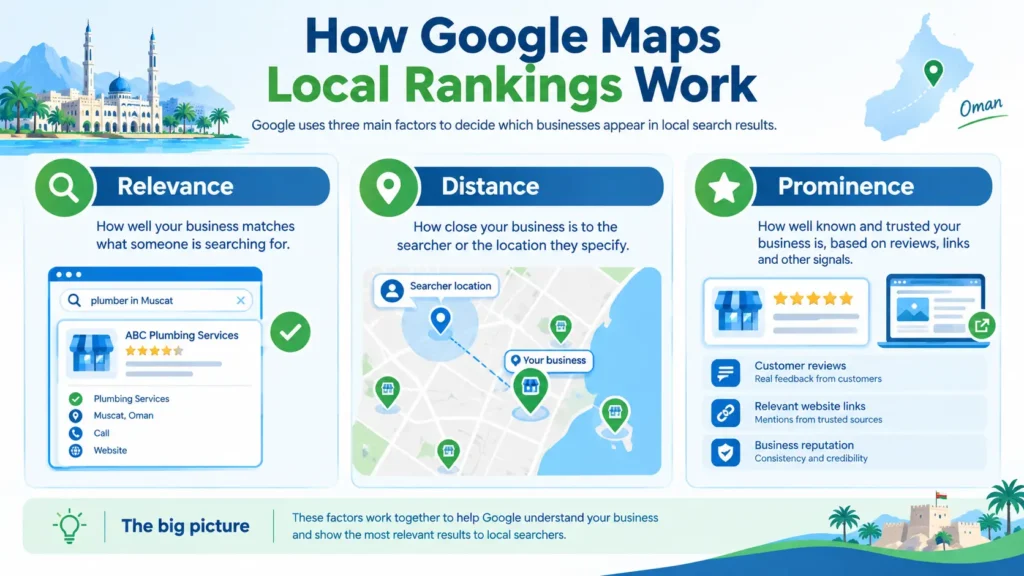
Google’s Three Main Local Ranking Factors
According to Google’s official guide to improving local rankings, three primary factors influence local results.
- Relevance: How closely your Business Profile matches what someone searches for.
- Distance: How far your business is from the person searching or the location they specify.
- Prominence: How well known your business is, based partly on information such as reviews and links from other websites.
For example, a person searching for a dentist in Muscat needs results relevant to dental services and their location. A complete profile can help Google understand the service, while genuine reviews and relevant website mentions can contribute to the business’s prominence.
How Location Changes Your Visibility
A business might appear prominently for a search near its premises but rank differently in another neighbourhood. This is normal because the searcher’s location influences local results.
A company based in Muscat should not assume that it will receive the same visibility in Sohar or Salalah. Distance can limit its reach even when its profile and website are well optimized.
Your goal should be to improve visibility where your business is genuinely relevant and eligible to serve customers. Do not create fake addresses or duplicate profiles to target additional cities.
Why Rankings Differ Between Searches
Search wording, business categories, competitor activity, and the searcher’s location can affect which results appear. A search for a specific service may produce different businesses from a broader category search.
Therefore, avoid judging performance from one manual search. Track meaningful customer actions and compare visibility across relevant searches and locations over time.
Step 1: Optimize Your Google Business Profile for Better Maps Visibility
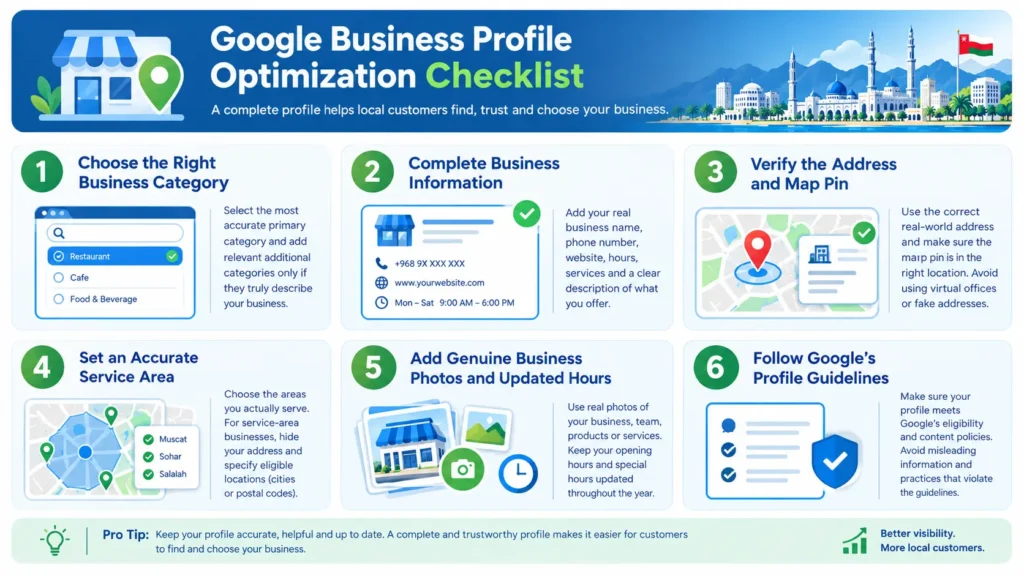
Your Google Business Profile gives potential customers essential information about your business. An accurate, complete profile helps them understand what you offer and whether you are a suitable choice.
Choose the Most Accurate Business Categories
Select the primary category that best describes your main business. Add additional categories only when they genuinely represent other core activities.
For example, a company primarily providing plumbing services should select the most appropriate plumbing category rather than adding unrelated categories to appear for more searches.
Google recommends choosing as few categories as necessary to describe the overall business. Its Business Profile guidelines also explain that categories should represent what a business is, not simply list everything it offers.
Avoid adding city names or service keywords to your business name unless they are genuinely part of the real-world name. Unnecessary additions may violate Google’s rules and put the profile at risk.
Complete Your Business Information
Review your profile and make sure the following details are accurate:
- Business name used in the real world.
- Primary and relevant additional categories.
- Business phone number and website.
- Opening hours and special holiday hours.
- Services or products, where supported.
- Business description and relevant photos.
Your description should explain what your business does, who it serves, and what customers can expect. Write for people first rather than repeating the same keyword several times.
If you need help with this process, see these Google Business Profile optimization services in Oman for related professional support.
Add Useful Photos and Keep Information Updated
Use genuine photos that help customers understand your business. Depending on your industry, these may include your premises, staff, products, equipment, or completed work.
Avoid uploading unrelated stock images that misrepresent your business. Update your profile when opening hours, phone numbers, services, or other important details change.
Before making major changes, review the information already displayed on Google. Consistency between your profile and your real-world business information helps prevent confusion.
Follow Google’s Business Profile Guidelines
Google Business Profiles are intended for eligible businesses that have in-person contact with customers during stated hours, subject to its eligibility rules and specific exceptions. Online-only businesses are generally not eligible simply because they serve customers through a website.
Read Google’s business eligibility and ownership guidelines before creating or changing a profile. Accurate information is more valuable than trying to exploit profile settings.
Step 2: Make Your Business Location and Service Area Accurate
Location is especially important when you want to reach customers across different parts of Oman. However, setting a larger service area does not automatically make a business rank throughout that area.
Check Your Address and Map Pin
If customers visit your premises, use the correct real-world address and make sure the map pin identifies the right location. Incorrect pins can send customers to the wrong place and create a poor first impression.
If your business moves, update its address and follow Google’s verification requirements where applicable. Do not use a virtual office, mailbox, or borrowed address that does not meet Google’s eligibility rules.
Set a Realistic Service Area
Businesses that travel to customers, such as plumbers or mobile repair providers, may qualify as service-area businesses. If customers do not visit your business address, Google instructs you to hide that address on your profile.
According to Google’s service-area guidance, service areas should reflect places where you actually provide services. You can specify eligible areas such as cities or postal codes rather than drawing a simple radius around your business.
For example, a company based in Muscat should select additional locations only if it genuinely serves them. Adding Sohar, Nizwa, and Salalah to a profile without actually serving those places can mislead customers.
Understand the Limits of Distance
A service area helps explain where you work, but it does not remove the distance factor from local rankings. Businesses may have stronger visibility near their eligible location than farther away.
Focus on building a strong profile for your real business location and service model. If your business has separate staffed locations that independently qualify, each location may need its own eligible profile. Do not create multiple profiles simply to target more map searches.
Step 3: Build Genuine Google Reviews and Customer Trust
Reviews help potential customers evaluate a business before contacting it. They can also contribute to prominence, one of Google’s stated local ranking factors. However, reviews should reflect genuine customer experiences, not a manufactured rating strategy.
Ask Real Customers for Honest Feedback
After completing a job or providing a service, invite the customer to share an honest review. You can make the process convenient by sharing your review link through an appropriate follow-up message.
Keep the request neutral. Customers should feel free to describe their experience honestly, whether their feedback is positive or negative.
Do not offer discounts, gifts, or other incentives in exchange for reviews. Google’s policy on prohibited and restricted content prohibits fake engagement, including reviews that are paid for or do not reflect genuine experiences.
Respond to Positive and Negative Reviews
Thank customers for positive feedback and mention something relevant to their experience when appropriate. Avoid copying the same generic response under every review.
When a customer leaves a negative review, respond calmly and professionally. Acknowledge the concern, explain any relevant next steps, and offer a suitable way to resolve the issue privately when necessary.
Do not disclose confidential customer information or argue publicly. A constructive response can show future customers that your business takes feedback seriously.
Build Trust Through Consistent Service
A steady flow of genuine reviews is more meaningful than a sudden burst of suspicious ratings. Encourage feedback as part of a normal customer service process rather than treating reviews as a one-time SEO campaign.
Also remember that reviews cannot compensate for inaccurate business details, poor service, or an ineligible profile. Focus on improving the actual customer experience and make it easy for customers to share honest feedback.
Step 4: Strengthen Your Website and Local SEO Signals in Oman
Your website can support Google Maps visibility by helping people and search engines understand your services, business location, and expertise. It also gives potential customers more information before they contact you.
Keep Business Information Consistent
Use accurate business details across your website, Business Profile, and relevant directories. Pay particular attention to your business name, address, phone number, and website URL.
Small differences are not always a ranking problem, but outdated phone numbers, old addresses, and duplicate records can confuse customers. Correct important discrepancies first, especially on platforms where customers are likely to find or contact you.
You can also review relevant website SEO services in Oman if your website needs broader technical or on-page improvements.
Create Useful Service and Location Pages
A location page should explain what you offer in a specific area and why that information is useful to local customers. Avoid publishing many nearly identical pages that only swap one city name for another.
For example, a page about providing local SEO in Muscat can describe the services available to businesses in Muscat, the problems those businesses may face, and how the service works. It should not claim a physical office in Muscat unless that claim is true.
If you genuinely serve Muscat, your local SEO services in Muscat page can provide a relevant example of location-specific content. A business serving Sohar can use an appropriately tailored Sohar local SEO page.
Every location page should provide real value. Include relevant services, useful explanations, accurate contact information, and a clear next step for visitors.
Improve Website Content and Mobile Usability
Local customers may visit your website from a phone while comparing businesses. Make sure the site loads reliably, displays clearly on small screens, and allows visitors to find essential information without difficulty.
Review these areas:
- Pages load without unnecessary delays.
- Contact details are easy to find.
- Services are described in clear language.
- Navigation works on mobile devices.
- Forms and contact links function properly.
- Each important page has a clear purpose.
A fast, accessible website helps customers use your site more easily. Do not assume that one technical change will directly improve your Maps position; measure website performance and customer behaviour separately.
Earn Relevant Local Links and Mentions
Links from relevant websites can help establish prominence. Look for legitimate opportunities such as local business associations, professional organizations, industry publications, community partnerships, or credible local directories.
Prioritize relevance and editorial quality over the number of links. Avoid buying large quantities of low-quality links or participating in schemes designed solely to manipulate search rankings.
Use Arabic and English Where Appropriate
Oman businesses may serve customers who prefer Arabic, English, or both. Choose languages according to your audience and the services you provide.
If bilingual content helps customers understand your services, provide accurate translations and a clear language experience. Do not add Arabic or English text merely to repeat keywords. Each version should answer real customer questions and explain the service naturally.
Step 5: Fix Common Google Maps Ranking Problems
If your business is missing from Google Maps or visibility has declined, investigate the cause before making extensive changes. Random edits can create more confusion and make it difficult to identify what actually helped.
Why Your Business May Not Appear
First, check whether your business is eligible for a Business Profile and whether the profile has completed any required verification. Google may not display a profile as expected if it is unverified, restricted, suspended, or otherwise ineligible.
Next, review the business name, category, address, service area, and contact details. Confirm that the information reflects the real business and follows Google’s policies.
If the profile is new or recently updated, allow time for changes to be reviewed and reflected. Do not assume that every delay means a penalty.
Resolve Duplicate Listings and Incorrect Information
Search for existing profiles before creating another one. Duplicate profiles can split customer activity and create uncertainty about which listing is correct.
If you find duplicates, review Google’s instructions and use the appropriate process to resolve them. Do not remove a legitimate, separate business location merely because it has the same brand name.
Also check important third-party listings for outdated phone numbers, old addresses, or incorrect website links. Prioritize corrections that could misdirect customers.
Diagnose a Drop in Rankings
If visibility declines, compare the current situation with earlier performance. Check whether business information changed, competitors improved their profiles, reviews changed, or your website developed technical problems.
Compare several relevant searches and locations rather than relying on one result. Look for a consistent pattern before deciding what to change.
Avoid repeatedly changing your business category or business name in an attempt to force a ranking improvement. Make changes only when the existing information is inaccurate or no longer represents the business.
Step 6: Measure Google Maps Performance and Track Progress
Optimization is more useful when you can identify what is improving and what still needs attention. Establish a baseline before making major changes so you can compare results over time.
Review Business Profile Performance
Use the performance information available in your Google Business Profile to review relevant customer interactions. Depending on the profile and available reporting, useful metrics may include searches, views, calls, website clicks, and direction requests.
Google explains these reporting options in its guide to Business Profile performance. Interpret the metrics according to what is available for your profile rather than assuming every business receives identical reports.
A rise in calls may be valuable even if a manual ranking check does not change. Similarly, more views do not necessarily mean more customers. Connect visibility metrics to the outcomes that matter to your business.
Compare Rankings Across Locations
Check visibility for relevant services and locations, such as searches made around Muscat or Sohar where your business actually operates. Use consistent search phrases and record the dates and locations being compared.
Remember that Google Maps results can change with the searcher’s location and query. A single search from your office cannot accurately represent every customer’s experience across Oman.
Create a Monthly Optimization Routine
At least once a month, review profile accuracy, customer feedback, website functionality, and available performance data. Prioritize important corrections over cosmetic changes.
Keep a simple record of what you changed and when. This makes it easier to compare performance and avoid repeatedly adjusting elements that are already accurate.
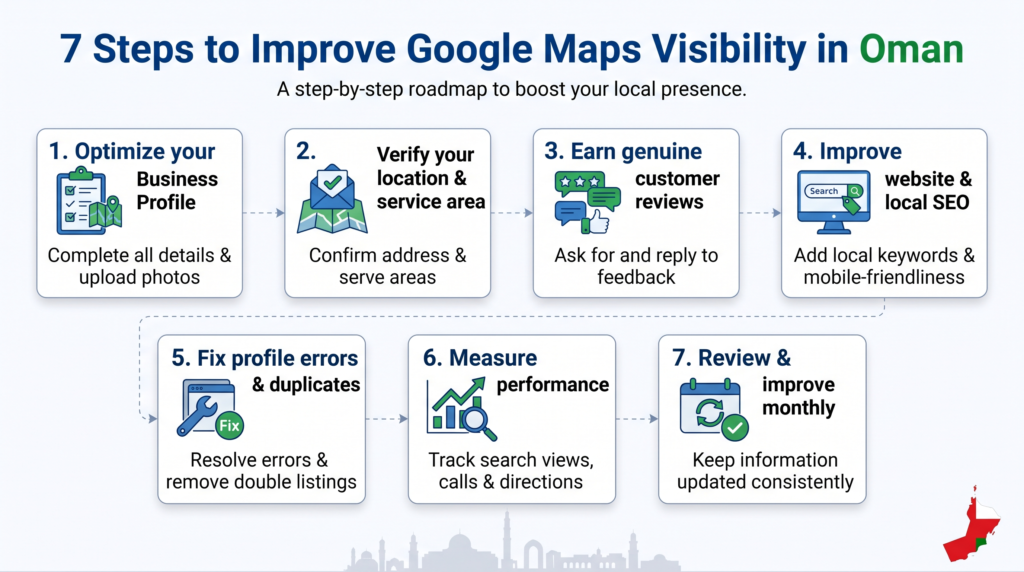
Step 7: Build a Sustainable Google Maps SEO Plan
Once the main elements are in place, turn optimization into a repeatable process. You do not need to change every part of your online presence at once.
Start by fixing inaccurate information and resolving eligibility or verification issues. Next, improve your profile categories and services, strengthen useful website pages, and establish a consistent process for requesting honest reviews.
Then measure customer actions and visibility over time. If results remain weak, investigate the underlying problem rather than adding more keywords or creating extra profiles.
For businesses in Oman, the most sustainable approach is to be accurate about where you operate, clear about what you provide, and reliable in how you serve customers. Strong local visibility is built through consistent improvements, not shortcuts.
Conclusion
Learning how to rank higher on Google Maps in Oman starts with understanding relevance, distance, and prominence. Build an accurate Google Business Profile, represent your location and service area honestly, earn genuine customer reviews, and strengthen your website with useful local content. Monitor available performance data and investigate problems before making major changes. These steps cannot guarantee a particular ranking, but they create a stronger foundation for local discovery and customer trust. Keep your information accurate, focus on real customer needs, and improve your process consistently.
Frequently Asked Questions
1. How long does it take to rank higher on Google Maps in Oman?
There is no fixed timeline. Results depend on your business location, competition, profile quality, and other local signals. Correct inaccurate information first, then monitor performance consistently rather than expecting immediate results.
2. What are the main Google Maps ranking factors?
Google identifies relevance, distance, and prominence as the main local ranking factors. Improve how accurately your profile describes your business, represent your location honestly, and build trust through genuine reviews and relevant online mentions.
3. Do I need a Google Business Profile to appear on Google Maps?
A Business Profile is important for eligible businesses that want to manage their information on Google. However, eligibility rules apply, and not every online business qualifies. Review Google’s guidelines before creating a profile.
4. Do Google reviews help local rankings?
Google states that reviews and positive ratings can help local ranking. Genuine reviews also help potential customers evaluate your business. Never purchase reviews or offer incentives in exchange for positive feedback.
5. Can keywords in a business name improve Google Maps rankings?
Your profile name should reflect your real-world business name. Adding extra keywords or city names solely to influence rankings can violate Google’s guidelines. Use the appropriate category and service fields to describe your business instead.
6. Does a website help a business rank higher on Google Maps?
A website can support local discovery by explaining your services, providing accurate business information, and earning relevant links. It does not guarantee better Maps rankings, so combine website improvements with an accurate Business Profile.
7. Can I rank in Muscat if my business is based elsewhere in Oman?
You may appear for relevant searches, but distance can affect visibility. Do not claim an office in Muscat if you do not have one. Represent your actual location and eligible service area accurately.
8. Should businesses in Oman use Arabic and English content?
Use Arabic, English, or both according to your customers’ needs. Helpful bilingual content can make services easier to understand for different audiences. Ensure translations are accurate and avoid repeating keywords unnaturally.
9. How can I check Google Maps rankings in different locations?
Compare relevant searches from different areas and record the date, query, and location. Remember that results vary by searcher location. Also monitor available Business Profile performance metrics instead of relying only on manual checks.
10. What should I do if my business is not appearing on Google Maps?
Check eligibility, verification status, profile restrictions, business details, and category accuracy. Review Google’s policies and resolve any identified problems. Avoid creating duplicate profiles or using inaccurate addresses to force visibility.