Local SEO Checklist for Small Businesses: A Practical Guide
A practical local SEO checklist covering Google Business Profile, keyword research, website optimization, reviews, technical SEO, and performance tracking.

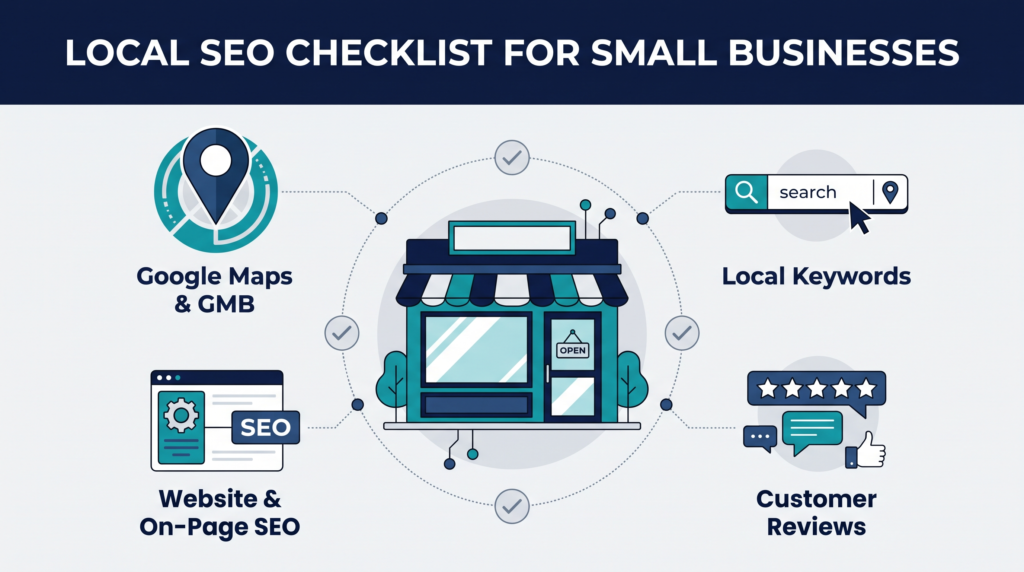
Small businesses need to reach customers who are searching for nearby products and services. Local SEO helps your business appear in relevant Google Search and Maps results. It also helps potential customers find your address, opening hours, services, website, and contact details.
However, local visibility takes more than creating a Google Business Profile. Your business information, website content, customer reviews, local citations, and technical SEO should work together. Each element helps customers understand your business and decide whether to contact you.
This Local SEO Checklist for Small Businesses gives you a practical way to review these areas. You can follow it whether you run a local shop, a home service company, a dental practice, or another business that serves a specific community.
Use the checklist to identify missing information, prioritize improvements, and track your progress over time. You do not need to complete every task in one day. Start with the items that affect customer access and business accuracy, then work through the remaining steps.
What Is Local SEO and How Does It Help Small Businesses?
Local SEO is the process of improving a business’s visibility in search results related to a location or service area. It helps search engines connect your business with relevant searches from potential customers.
For example, a person might search for “plumber near me,” “dentist in Muscat,” or “coffee shop in my area.” Google may show local businesses through Maps results, local listings, and regular organic results.
Google explains that local results mainly depend on relevance, distance, and prominence. Relevance measures how well a business matches the search. Distance considers how far the business is from the searcher. Prominence reflects how well-known the business appears to be. These factors are not a guarantee of a particular ranking. Google’s local ranking guidance explains them in more detail.
Local SEO can help small businesses:
- Reach people looking for nearby products or services.
- Provide accurate contact details and opening hours.
- Bring relevant visitors to service and location pages.
- Build trust through genuine customer reviews.
- Help potential customers understand what the business offers.
- Measure how people discover and interact with the business online.
This Local SEO Checklist for Small Businesses does not guarantee first-page rankings or a fixed number of leads. Results depend on the market, competition, business location, website quality, and other factors.
Local SEO Checklist for Small Businesses: Start With the Basics
Before changing your website or creating new content, clarify who you serve and how customers currently find you. This first review helps you avoid spending time on low-priority tasks.
Define Your Service Area and Target Customers
Write down the locations where your business genuinely serves customers. A physical shop may focus on its immediate neighborhood and nearby districts. A plumber or electrician may serve several towns within a practical travel radius.
Next, identify your main customer groups. Consider their needs, common questions, service preferences, and reasons for choosing your business.
Use these details to decide which local searches matter most. A business serving one city should not automatically target every city in its country. Focus on areas where you can actually deliver your services.
Check the following items:
- List your primary service area and nearby locations.
- Identify your main products or services.
- Note the questions customers ask before contacting you.
- Review the local competitors appearing for relevant searches.
- Identify the website pages that should attract local customers.
Avoid creating location pages for places you do not serve. Each page should provide useful, accurate information rather than repeat the same text with a different city name.
Audit Your Existing Online Presence
Search for your business name and review the results. Check whether your website, Business Profile, directories, and social profiles show the correct details.
Look for outdated addresses, old telephone numbers, duplicate listings, broken pages, and inconsistent business names. These issues can confuse customers and make it harder to manage your online presence.
You can also search for your main services with a location modifier. Note which competitors appear in Maps and organic results. Their visibility can help you identify topics and customer needs worth investigating.
Create a simple spreadsheet with four columns: issue, affected page or listing, priority, and status. This becomes your working checklist.
Optimize Your Google Business Profile
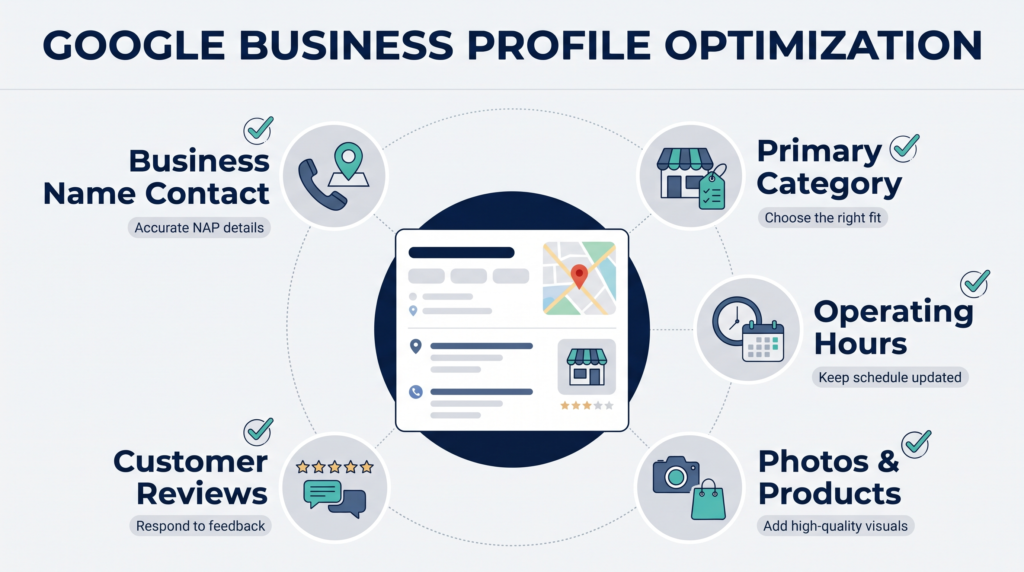
Your Google Business Profile helps eligible businesses manage how they appear across Google Search and Maps. Accurate, complete information gives potential customers a clearer picture of the business before they visit or make contact.
Start by opening your profile and checking each field. Google recommends keeping business information accurate, responding to reviews, and adding relevant photos. Read Google’s Business Profile recommendations.
Claim and Verify Your Business Profile
Search for your business on Google and Maps. If a profile already exists, check whether you can manage it. If you are eligible and no profile exists, follow Google’s process to create one.
Complete the available verification steps. Verification helps establish that you are authorized to represent the business. Do not create extra profiles for the same business at the same location simply to gain more visibility.
Before proceeding, check:
- The correct business profile exists.
- You have the appropriate owner or manager access.
- The profile is verified, where required.
- Duplicate or outdated profiles have been identified.
- Account access is limited to trusted people who need it.
Choose the Right Business Category
Select the primary category that best describes what your business mainly does. Add relevant secondary categories only when they accurately represent additional services.
For example, a dental clinic should choose a category that reflects its actual healthcare service. It should not add unrelated categories just because those terms have search demand.
Review categories periodically because your services may change. However, do not change categories repeatedly without a clear business reason.
Complete Your Business Information
Make the profile as accurate and useful as possible. Customers should be able to understand your services, location, hours, and contact options without searching through unrelated sources.
Review these details:
- Business name follows Google’s naming guidelines.
- Primary and secondary categories accurately describe the business.
- Address is correct for a customer-facing location.
- Service areas reflect where the business actually operates.
- Opening hours and holiday hours are current.
- Phone number and website URL are correct.
- Services and relevant business attributes are complete.
- Business description accurately explains what you offer.
Do not add keywords to the business name unless they are genuinely part of the real-world business name. Avoid using a virtual office or an address where customers cannot receive the advertised service in ways that violate Google’s rules.
Add Photos and Maintain Your Profile
Use clear, authentic photos that help customers recognize your business. Depending on the business type, these may include the storefront, interior, team, products, completed work, or service environment.
Keep the profile updated when opening hours, services, or other important details change. Review customer questions and respond to reviews in a professional manner.
A profile should reflect the actual business, not an idealized version of it. Do not use misleading images or publish information that customers cannot verify.
Conduct Local Keyword Research for Your Business
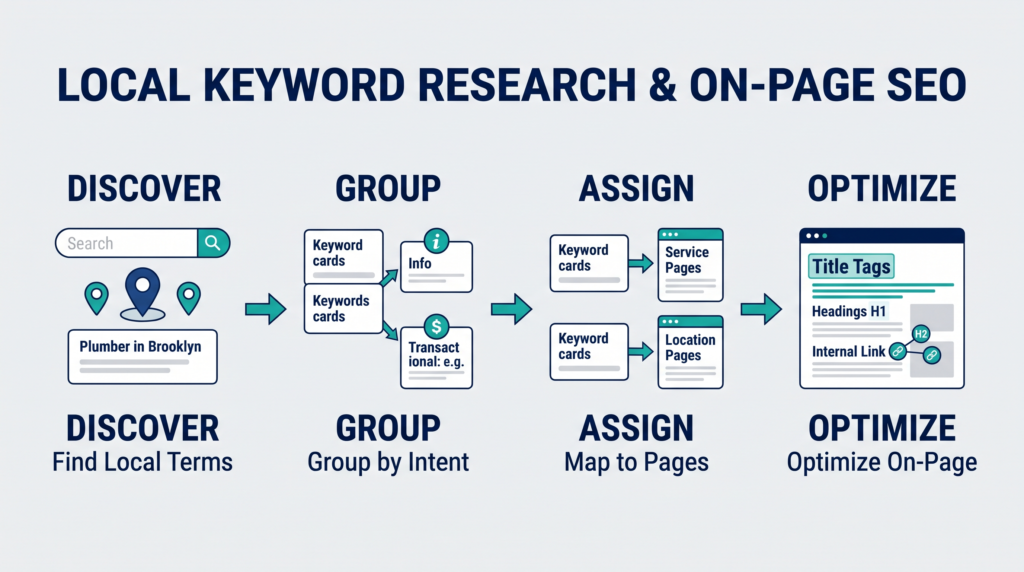
Local keyword research identifies the phrases people use when searching for products or services in a particular area. It helps you decide which pages to create and what information each page should answer.
Find Keywords With Local Search Intent
Start with your main services and combine them with relevant locations or customer needs. A cleaning company might investigate phrases such as “house cleaning in Muscat” or “move-out cleaning service near me.”
Do not assume that every phrase has the same intent. Someone searching for “how to clean an office” may want advice, while a person searching for “office cleaning company in Muscat” may be comparing providers.
Use several sources to build your keyword list:
- Google autocomplete suggestions.
- Related searches in search results.
- Google Search Console data, if available.
- Keyword research tools with local targeting options.
- Customer emails, calls, and frequently asked questions.
- Competitor service pages and location pages.
Record search intent alongside each keyword. Label it informational, commercial, or transactional where appropriate. This makes it easier to match terms to useful content.
Map Keywords to Relevant Website Pages
Assign one main search intent to each important page. A service page should explain the service, its benefits, process, and relevant next steps. A location page should describe the genuine service available in that area.
Avoid creating several pages that target nearly identical phrases but offer no distinct value. Such pages may compete for the same searches and create a poor experience for visitors.
Use a keyword map with the following fields:
- Primary keyword.
- Related terms and questions.
- Search intent.
- Target URL.
- Supporting content needed.
- Internal links to add.
- Performance metrics to monitor.
Choose keywords based on relevance and business value, not search volume alone. A smaller group of highly relevant searches may attract better prospects than a broad term with little connection to your services.
Optimize Your Website for Local Search
Your website should make it easy for visitors and search engines to understand your services and the areas you serve. Each important page should answer a clear customer need and provide a logical next step.
Improve Title Tags, Meta Descriptions, and Headings
Write a unique, descriptive title for each important page. Include the service or topic and a location when it helps explain the page. Avoid repeating the same title across multiple service pages.
For example, a local electrician might use “Residential Electrician in Muscat | Business Name” if the page genuinely targets that service and location.
Write meta descriptions that summarize the page accurately. Google may use page content instead of your provided description to generate a search snippet, so treat descriptions as helpful guidance rather than guaranteed text.
Use headings to organize information. The H1 should clearly describe the main topic, while H2 and H3 headings should help readers find answers. Add local terms naturally when they fit the page.
Google’s SEO Starter Guide provides additional guidance on titles, snippets, and making content useful for visitors.
Create Helpful Local Service Pages
A service page should explain what the business does, who it helps, and how customers can get started. Add relevant details that support the decision, rather than filling the page with repeated keywords.
Useful information may include:
- A clear explanation of the service.
- The types of customers or projects served.
- The actual locations covered.
- The process, expectations, or service limitations.
- Genuine photos or examples of work, where available.
- Relevant customer questions and answers.
- A clear contact method or next step.
Create a separate location page only when the business has a real reason to serve that location and can provide useful local information. Do not publish dozens of near-identical pages with only the place name changed.
If you need help reviewing site structure and page optimization, explore the website SEO services page as a related resource.
Improve Mobile Usability and Internal Linking
Many local searches happen on mobile devices. Visitors should be able to read your content, find contact details, and take action without zooming or struggling with navigation.
Check the website on several screen sizes. Make sure buttons are easy to tap, text is readable, and important information does not disappear on mobile. Google uses the mobile version of a site’s content for indexing, so mobile usability deserves attention. Google’s mobile-first indexing guidance explains the approach.
Internal links help visitors discover related information. Link from relevant blog articles to useful service pages, and connect related articles where the link adds value.
Use descriptive anchor text so readers know what they will find after clicking. For example, a technical troubleshooting article can link to a relevant guide about technical SEO and audits.
Avoid linking every mention of a keyword. Add links where they support the reader’s next step.
Keep Your Business Information Consistent Across Local Citations
Local citations are online mentions of your business details, often including its name, address, and phone number. They may appear in directories, professional associations, industry websites, and local business listings.
Consistency helps customers identify the correct business. It also reduces confusion when people compare details across several sources.
Start with a master record of your official business name, address, phone number, website, opening hours, and primary category. Use it to check the most important listings.
Follow these steps:
- Review major directories and relevant industry platforms.
- Correct outdated phone numbers and addresses.
- Update listings after a real business move or name change.
- Find duplicate listings that may confuse customers.
- Prioritize reputable, relevant directories over large numbers of weak listings.
- Keep a record of changes and login details.
Not every business needs to appear in every directory. Focus on platforms that customers in your industry or location actually use.
If your business serves several areas, distinguish between genuine business locations and service areas. Do not create fake offices to appear closer to customers.
Build Trust With Online Reviews and Reputation Management
Reviews help potential customers understand other people’s experiences with your business. They can also influence how prominently a business appears in local results, although no review count guarantees a particular ranking.
Ask customers for honest feedback after a genuine interaction. Make the process simple, and do not pressure people to leave only positive reviews.
A practical review process includes:
- Provide customers with a convenient way to leave feedback.
- Ask for reviews without offering rewards in exchange.
- Respond to positive reviews with genuine appreciation.
- Address negative feedback calmly and professionally.
- Take specific service complaints to the appropriate team.
- Look for repeated feedback that signals a business problem.
Avoid buying reviews, posting fake feedback, or asking people to review a business they have not used. Google prohibits fake engagement, including reviews posted in exchange for incentives. See its review and contribution policies.
When responding to a complaint, acknowledge the concern without sharing private customer information. If the issue requires investigation, explain how the customer can contact the business directly.
Use review patterns to improve your service. Repeated comments about late arrivals, unclear prices, or slow responses can reveal operational problems that marketing alone cannot solve.
Strengthen Local Authority With Relevant Links and Community Content
Relevant links from trusted websites can help people discover your business and give search engines additional context. However, link building should focus on real relationships and useful resources rather than artificial link schemes.
Consider opportunities such as:
- Local business associations and chambers of commerce.
- Genuine sponsorships or community partnerships.
- Supplier, manufacturer, or professional partner directories.
- Local events and community projects.
- Helpful guides that local organizations may reference.
- Expert contributions to relevant industry publications.
Choose opportunities that make sense for your business. Avoid buying links or joining schemes designed only to manipulate search rankings.
Community content can also support local visibility. A home service company might publish a seasonal maintenance guide relevant to the climate it serves. A clinic might explain appointment procedures or answer common questions about its services.
The content should offer real value and reflect the business’s experience. Do not invent local statistics, customer stories, or claims about community involvement.
For more context on organizing related content around a subject, you can explore the topical authority guide.
Fix Technical SEO Issues and Add LocalBusiness Structured Data
Technical SEO helps search engines access, interpret, and index your website. A well-written page cannot perform as expected if it is blocked from crawling, unavailable, or missing from the index.
Check Indexing, Crawlability, and Page Experience
Start with Google Search Console if you have access. Review indexing reports, inspect important URLs, and check whether the pages you want to rank can be indexed.
Use this checklist:
- Important pages return the correct HTTP status.
- Pages intended for search are not accidentally marked noindex.
- Robots.txt does not block important content.
- Canonical tags point to the intended versions of pages.
- XML sitemaps contain the appropriate canonical URLs.
- Internal links lead to working pages.
- Images have sensible file sizes and useful alternative text.
- Mobile pages are readable and usable.
- Broken links and redirect chains are reviewed.
Do not assume that submitting a sitemap guarantees indexing. Google treats sitemaps as a discovery aid, not a promise that every URL will be crawled or indexed. Review problems and allow time for search engines to process changes.
If you find recurring technical issues, use a structured review process rather than making random changes. The technical SEO and audit resources may help you explore related topics.
Implement and Validate LocalBusiness Schema
Structured data provides information about a page in a format that search engines can interpret. For a qualifying local business, LocalBusiness structured data may describe details such as the business name, address, and opening hours.
Use the most specific suitable subtype and include only information that is accurate and supported by the visible page. The correct properties depend on the business and the markup type.
A typical implementation process is:
- Identify the relevant business page.
- Select an appropriate schema type.
- Add the required and relevant recommended properties.
- Validate the markup with Google’s Rich Results Test.
- Check the page through URL Inspection in Search Console.
- Correct errors and review the implementation after site changes.
Read Google’s official Local Business structured data documentation before deployment.
Structured data does not guarantee rich results or higher rankings. Avoid adding fabricated ratings, reviews, addresses, or other details that the business cannot substantiate.
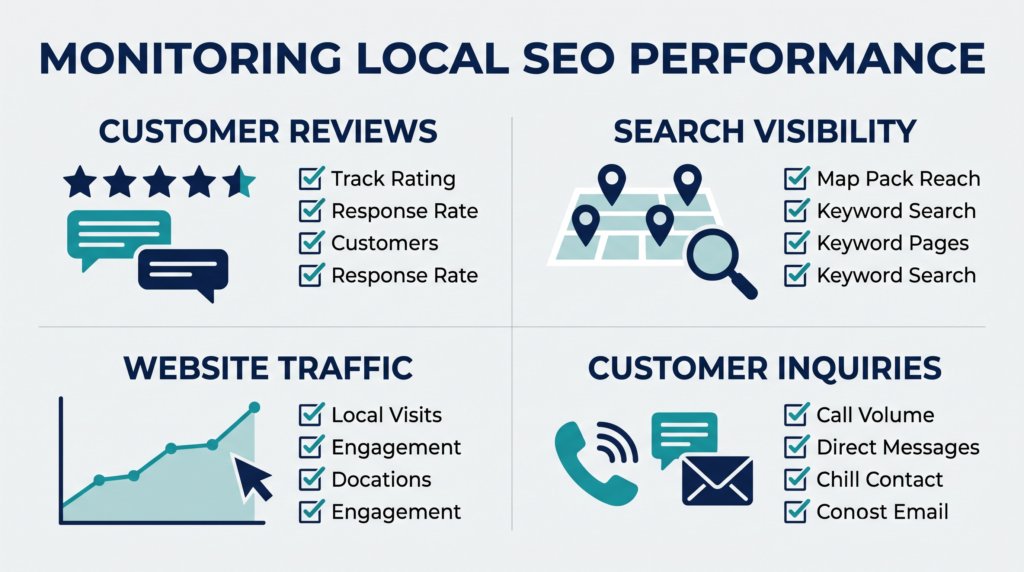
Track Local SEO Performance and Measure Progress
Tracking helps you understand whether your work is improving visibility and attracting relevant visitors. Choose metrics that connect search activity with business goals rather than relying on one ranking report.
Google Search Console can show search queries, impressions, clicks, and click-through rates for your website. Your Business Profile performance data may provide information about how customers find and interact with the profile. Analytics and customer records can add context about website visits and leads.
Review these areas:
- Search visibility: Are important pages receiving impressions for relevant queries?
- Organic traffic: Are qualified visitors reaching your local service pages?
- Business Profile interactions: Are customers using available contact or direction options?
- Conversions: Are visitors calling, submitting forms, booking, or requesting quotes?
- Review patterns: Are customers mentioning recurring strengths or service issues?
- Technical health: Are important pages accessible and indexable?
Record a baseline before making major changes. Compare similar periods where possible, and account for seasonal demand or changes in business operations.
Do not interpret every ranking fluctuation as proof that an action succeeded or failed. Search results vary by location, device, competition, and query. Review trends over time and connect them with the work you completed.
Use a simple monthly report with the metric, previous period, current period, change, and next action. This keeps the process manageable for a small business.
Create a Practical 30-Day Local SEO Action Plan
A short plan helps you make progress without trying to fix everything at once. Adjust the schedule to match your team’s time, website size, and business priorities.
Days 1–7: Review the basics
- Audit the Business Profile and correct inaccurate details.
- Check your contact information across key listings.
- Review the website’s most important service pages.
- Identify broken links, indexing issues, and duplicate listings.
Days 8–14: Improve local targeting
- Research relevant service and location keywords.
- Map the main search intent to existing pages.
- Improve page titles, headings, and descriptions.
- Add useful information where service pages lack detail.
Days 15–21: Build trust and strengthen the site
- Create a consistent process for requesting honest reviews.
- Respond to outstanding customer feedback.
- Add relevant internal links between articles and service pages.
- Identify genuine local partnerships or useful content opportunities.
Days 22–30: Validate and measure
- Check important URLs in Search Console.
- Validate structured data where applicable.
- Review Business Profile information and photos.
- Record baseline performance and set the next month’s priorities.
At the end of the month, list completed work, unresolved issues, and the next three priorities. Continue improving the areas that best serve your customers and business goals.
Common Local SEO Mistakes Small Businesses Should Avoid
Small businesses can waste time when they focus on shortcuts instead of accurate information and useful content. Avoid these common mistakes:
- Keyword stuffing: Repeating a city or service phrase unnaturally makes content harder to read.
- Fake locations: Listing an address where the business does not qualify to operate can violate platform guidelines.
- Duplicate profiles: Multiple profiles for one business can create confusion.
- Thin location pages: Pages with only a city name changed offer little distinct value.
- Fake reviews: Purchased or incentivized reviews can violate Google’s policies.
- Ignoring mobile visitors: Difficult navigation may prevent customers from contacting you.
- Neglecting technical problems: Important pages may remain inaccessible or unindexed.
- Tracking rankings alone: Visibility matters, but relevant calls, inquiries, and conversions matter too.
- Expecting instant results: Search engines need time to discover and process changes, and improvements are not guaranteed.
A sustainable approach prioritizes accurate business details, helpful pages, a usable website, genuine customer feedback, and consistent measurement.
Conclusion
Local SEO works best when your business information, website, reviews, and local content support the same customer experience. Start with the basics, correct inaccurate details, and improve the pages that matter most to your customers.
Use this checklist to organize your work, track completed tasks, and identify the next priority. Review progress regularly instead of chasing every ranking fluctuation. Consistent improvements can help your business become easier to discover and easier for potential customers to trust.
Frequently Asked Questions
1. What is a local SEO checklist for small businesses?
A local SEO checklist is a set of tasks for improving local search visibility. It covers your Google Business Profile, website, keywords, business listings, reviews, technical SEO, and performance tracking.
2. How can a small business improve local SEO?
Start by correcting your Business Profile, researching local search terms, improving service pages, keeping business details consistent, earning genuine reviews, and resolving technical website issues. Track progress over time.
3. Is Google Business Profile necessary for local SEO?
It is especially useful for eligible businesses that want to appear in Google Maps and local results. Website SEO still matters, and businesses should provide accurate information across relevant channels.
4. How long does local SEO take to show results?
Timing varies with competition, website condition, location, and the changes made. Some improvements may be processed within weeks, but meaningful performance trends can take longer to evaluate.
5. How much does local SEO cost for a small business?
Costs depend on whether you manage tasks yourself, hire a consultant, or use an agency. Pricing also varies with the number of locations, website needs, competition, and scope of work.
6. Can a service-area business rank without a storefront?
Eligible service-area businesses can have a Google Business Profile without displaying a customer-facing address. They must follow Google’s eligibility rules and represent their actual service area accurately.
7. How often should a business update its Google Business Profile?
Update the profile whenever important information changes, including hours, services, contact details, or business location. Review the profile regularly to catch outdated information.
8. How can small businesses find the right local keywords?
Combine core services with relevant locations and customer questions. Review search suggestions, Search Console data, keyword tools, competitors, and real customer inquiries to identify useful search terms.
9. Do online reviews help local SEO?
Reviews can support customer trust and contribute to local prominence. Businesses should request honest feedback, respond professionally, and avoid buying reviews or offering incentives for them.
10. Which tools can small businesses use to track local SEO performance?
Google Search Console helps monitor website search performance, while Google Business Profile performance reports provide profile interaction data. Analytics tools and call or lead records can help measure business outcomes.