How to Get More Google Reviews the Safe Way
Learn how to get more Google reviews safely with practical request methods, ready-to-use message templates, and Google policy guidance to build genuine customer trust.

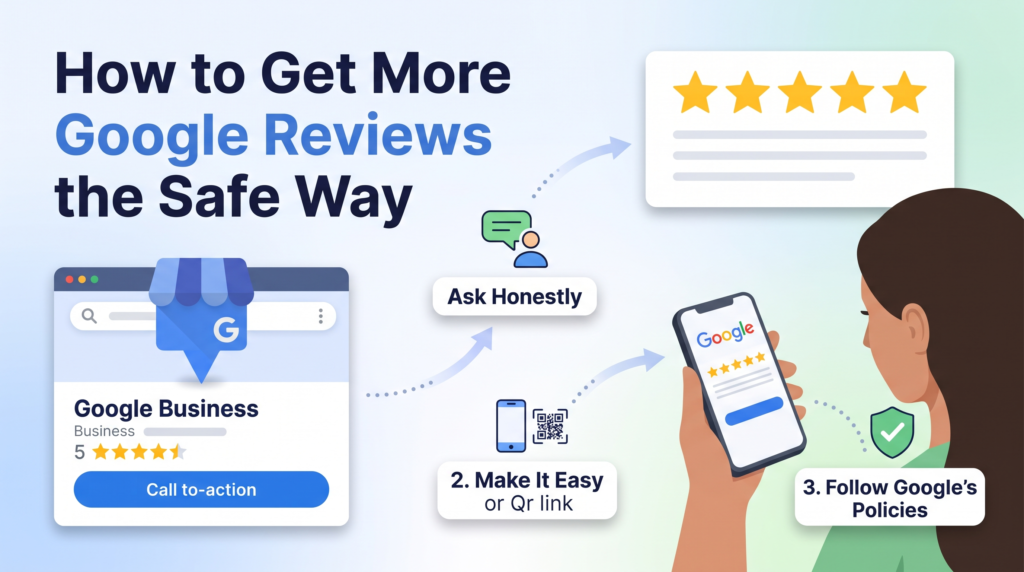
Getting more Google reviews can help a business build trust, answer customer concerns, and improve its online reputation. How to Get More Google Reviews is an important question for local businesses that want genuine customer feedback without risking their Google Business Profile. The safest approach is simple: deliver a good customer experience, ask eligible customers for honest feedback, and make the review process convenient.
You do not need to buy reviews, offer rewards, or pressure customers to leave five-star ratings. Instead, create a consistent process that invites customers to share their real experiences. A direct review link, a well-timed message, and thoughtful responses can make the process easier for both customers and staff.
This guide explains practical ways to request reviews, ready-to-use message templates, common mistakes to avoid, and ways to manage feedback responsibly. It also explains Google’s review policies so you can build a sustainable review strategy rather than chase short-term rating increases.
Why Google Reviews Matter for Your Business
Google reviews help potential customers understand what other people experienced before choosing a business. They appear alongside a Business Profile on Google Search and Maps, giving customers useful information when comparing local options. Reviews can also reveal recurring service problems that a business may need to address.
How Reviews Influence Customer Trust and Buying Decisions
Customers often look for evidence that a business delivers what it promises. Genuine reviews can describe service quality, communication, product condition, appointment experiences, and how the business handles problems.
A detailed review may answer a question that the business’s website does not cover. For example, a customer might explain whether a contractor arrived on time or whether a clinic’s booking process was straightforward. These specific experiences can help future customers make more informed decisions.
A high star rating alone does not tell the whole story. Readers may also consider the number of reviews, how recent they are, and whether the business responds professionally. Authentic feedback, including reasonable criticism, can provide a more balanced picture than a profile containing only brief praise.
The Relationship Between Reviews and Local SEO
Reviews are relevant to local SEO, but they are not a guaranteed shortcut to higher rankings. Google explains that local results are mainly influenced by relevance, distance, and prominence. Reviews can contribute to a business’s prominence and help potential customers evaluate it, but no single review tactic guarantees a specific position.
A business should therefore treat review management as one part of a broader local SEO strategy. Keep your Business Profile accurate, maintain consistent business information, describe your services clearly, and provide a helpful website experience. Encourage genuine feedback as part of this work, not as a replacement for it.
Why Review Quality and Authenticity Matter
Useful reviews reflect actual customer experiences. They may mention what went well, what could improve, and why the customer chose the business. Businesses should never write reviews for customers, ask people to copy a script, or encourage them to include particular keywords.
The objective is not to make every review sound the same. It is to make it easy for customers to share their own opinions honestly. A natural review profile is more useful to customers and aligns with Google’s requirement that reviews represent genuine experiences.
How to Get More Google Reviews Without Breaking Google’s Rules
The safest review strategy begins with Google’s policy: you may ask customers to leave a review based on their genuine experience, but you must not manipulate the rating or the content. Google allows businesses to share review links and QR codes, while prohibiting incentives and selective requests designed to collect only positive reviews.
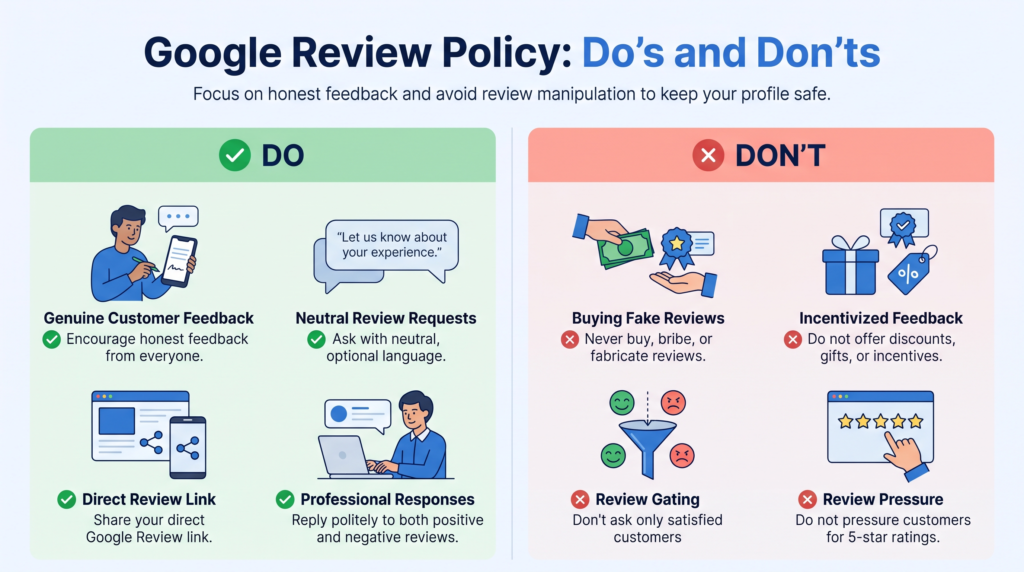
What Google’s Review Policy Allows
You can invite customers to share honest feedback after a real interaction with your business. You can send a review link by email or message, include it in a thank-you note, or display a QR code where customers can easily access it.
The request should be neutral. Ask for an honest review rather than a five-star review. Do not tell customers what to write, ask them to mention specific employees, or make a review a condition of receiving a service or benefit.
Google’s guidelines for requesting reviews explain that businesses can remind customers to leave reviews and reply to feedback. Follow the guidance directly when setting up your process.
Why Incentives, Fake Reviews, and Review Gating Are Risky
Offering a discount, gift, payment, or free service in exchange for a review is prohibited under Google’s policy. This also applies when a business offers a reward for changing a review or removing a negative one. Fake reviews, reviews from people without genuine experiences, and attempts to manipulate ratings can also lead to removal or other restrictions.
Review gating is another mistake to avoid. This means asking customers how satisfied they are and directing only happy customers to Google while sending unhappy customers elsewhere. Google prohibits selectively soliciting positive reviews or discouraging negative feedback.
You can still ask dissatisfied customers to contact your support team so you can address their concerns. Just make sure every eligible customer has the same opportunity to leave an honest public review.
If a Business Profile faces a policy issue, read this Google Business Profile suspension guide for related profile-compliance guidance. It is better to prevent policy problems than to rely on an appeal after a restriction occurs.
How to Ask All Eligible Customers Fairly
Use the same basic process for customers, regardless of whether you expect positive or negative feedback. You may tailor the timing to the service, but avoid using satisfaction scores or complaints to decide who receives the review link.
For example, a salon could send a neutral request after each completed appointment. A repair company could send one after the job is finished. A professional service provider could include the request in the standard follow-up email sent to all eligible clients.
Keep the invitation polite and optional. Customers should feel free to ignore it or provide honest criticism without pressure.
8 Practical Ways to Get More Google Reviews
A repeatable process is more reliable than asking for reviews only when you remember. Start with the methods that fit your customer journey, then review whether your requests are being delivered clearly and respectfully.
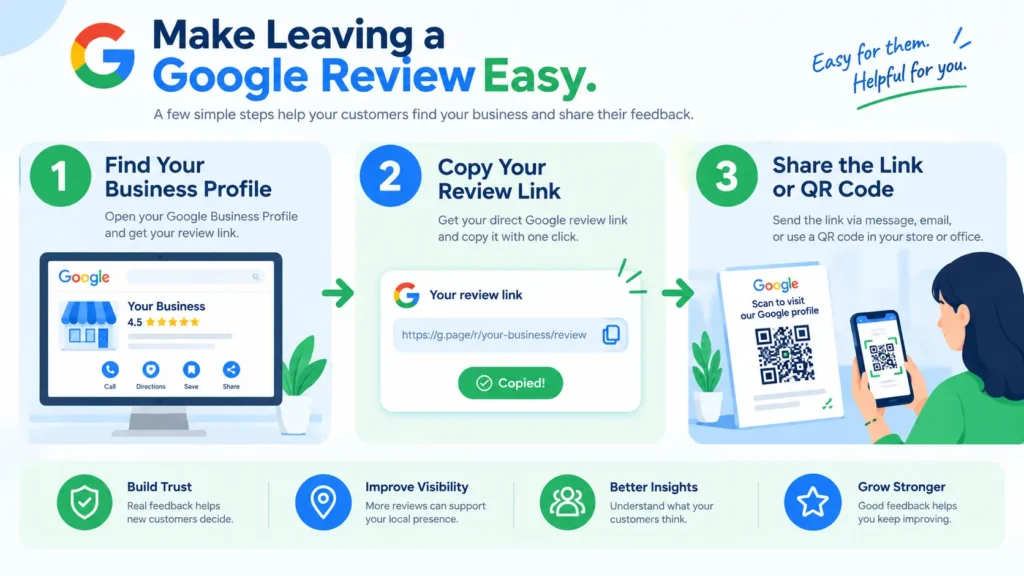
1. Create and Share Your Google Review Link
A direct review link removes unnecessary steps. Instead of asking customers to search for your business, find the correct profile, and locate the review section, send them a link that takes them closer to the review form.
To create one, sign in to the Google account that manages your Business Profile. Open the profile, select the option to read reviews, and choose the option to get more reviews or share a review link. Google may update interface labels over time, so follow the current instructions in its review link and QR code guide.
Copy the link and test it before sharing it with customers. Make sure it opens the correct business profile and works on a mobile device. Save it in a shared document or approved customer-service tool so staff can find the same link quickly.
2. Generate a Google Review QR Code
A QR code gives customers a quick way to open your review link using a phone camera. It can be useful for businesses that interact with customers in person, such as salons, restaurants, shops, repair services, and professional offices.
You can place the code on receipts, printed thank-you cards, or a small sign near the checkout area. Keep the accompanying message neutral, such as: “Share your honest feedback on Google.”
Avoid making customers scan the code while staff watch them write a review. The request should remain optional, and customers should have the freedom to decide whether to participate. Google’s current help page explains how to generate and share a review QR code; note that the QR-code creation feature may be limited to a computer browser.
3. Ask Customers at the Right Time
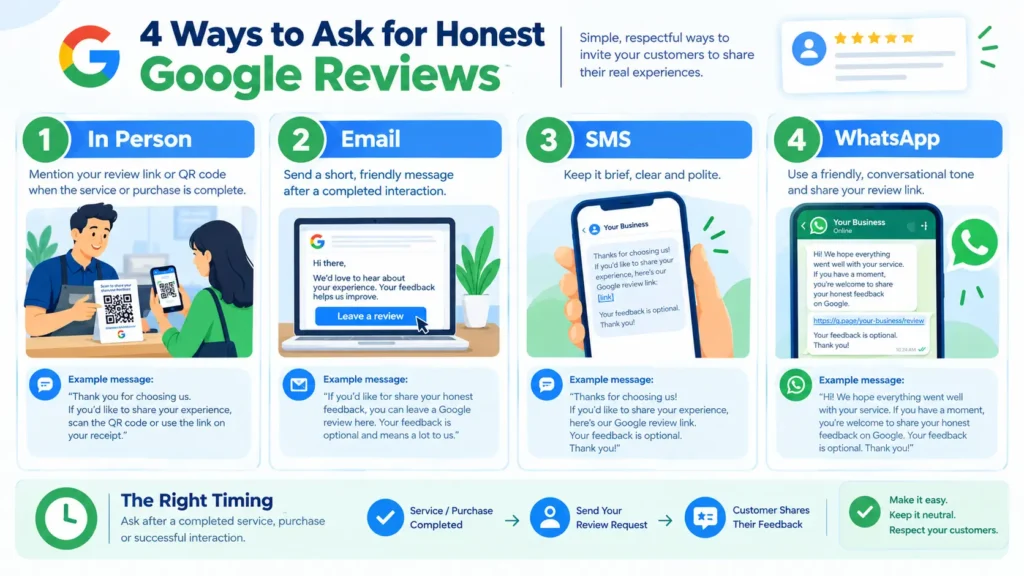
Timing affects whether customers notice and act on a request. Ask when the interaction is complete and the experience is still easy to remember. The right moment varies by business type.
For example, a restaurant may send a request after a completed visit. A home-service company might wait until the repair or installation is finished. A consultant could ask after delivering the agreed work or completing a milestone.
Do not interrupt customers during a stressful situation or pressure them to review while they are still on the premises. Make the request once at a suitable point, and allow the customer to decide.
4. Send Personalised Review Request Emails
Email is useful when your business already sends appointment confirmations, invoices, delivery updates, or project-completion messages. Add a short review invitation to a relevant follow-up rather than creating a long promotional email.
Example email:
Subject: Could you share your experience?
Hi [Customer Name],
Thank you for choosing [Business Name]. We appreciate your time and the opportunity to help.
If you would like to share feedback about your experience, you can leave an honest Google review here: [Google Review Link]
Your feedback helps us understand what is working well and where we can improve. Leaving a review is completely optional.
Thank you,
[Your Name or Business Team]
Personalisation should make the message feel relevant, not intrusive. Use the customer’s name where appropriate, confirm that the service has actually been completed, and avoid repeated follow-ups that could feel like pressure.
5. Use SMS and WhatsApp Requests Appropriately
Short messages can work well when your business already communicates with customers by text or WhatsApp. Keep the request brief, identify your business, and include the direct review link.
SMS example:
“Hi [Name], thank you for choosing [Business Name]. If you’d like to share your honest experience, you can leave a Google review here: [Link]. Your feedback is appreciated.”
WhatsApp example:
“Hello [Name], we hope everything went smoothly with your recent service. If you have a moment, you’re welcome to share honest feedback on Google: [Link]. Thank you for your support.”
Google allows businesses to send review requests through methods such as email and WhatsApp, provided the reviews reflect genuine experiences and no incentives are offered.
Respect customers’ communication preferences and applicable privacy or messaging rules. Do not add people to marketing lists without an appropriate basis, send repeated reminders after they decline, or use personal messaging channels in ways they would not reasonably expect.
6. Train Staff to Make Natural, Neutral Requests
Staff members often know when a customer has completed a service and may be able to mention the review option naturally. Give them a simple, consistent phrase rather than asking them to persuade customers.
For example: “Thank you for visiting us. If you’d like to share your experience, our Google review link is on your receipt.”
Do not set quotas for how many reviews an employee must obtain, ask staff to request specific wording, or reward them based on positive ratings. Google specifically identifies requests for a certain number of reviews or for content mentioning a particular staff member as problematic practices.
7. Add Review Requests to Your Customer Follow-Up Process
A review request is easier to manage when it is part of a normal workflow. Decide which completed interactions qualify, who sends the request, and where the link is stored.
A simple process might look like this:
- Complete the service or deliver the product.
- Send the normal thank-you or completion message.
- Include a neutral invitation to leave an honest review.
- Record that the request was sent, without tracking customers’ private review content unnecessarily.
- Respond to new feedback and look for recurring service issues.
Use a process that fits your business size. A spreadsheet may be sufficient for a small team, while a customer relationship management system may help a larger business manage follow-ups.
8. Make Leaving a Review Simple Across Customer Touchpoints
Customers may interact with your business through a website, email, invoices, printed materials, or messaging apps. Consider placing the review link where it naturally fits after a completed transaction.
You could include it in a thank-you email, a digital receipt, or a post-service message. An in-store QR code may work for a physical location. For service-area businesses, a follow-up message may be more practical.
Do not place review requests where they interfere with essential information or imply that a review is required. The aim is to reduce friction, not to overwhelm customers with repeated prompts.
Google Review Request Templates You Can Use
The following templates are designed to invite honest feedback without promising rewards or directing customers toward a particular rating. Adapt them to your brand voice and communication practices.
A Simple In-Person Review Request
“Thank you for choosing [Business Name]. If you’d like to share your experience, you can leave an honest review on Google using the link on your receipt. We appreciate your feedback.”
Keep your tone friendly and matter-of-fact. If the customer seems busy or uninterested, end the conversation without repeating the request.
Email Template for Requesting a Google Review
Subject: Thank you for choosing [Business Name]
Hi [Customer Name],
Thank you for working with us. We appreciate your trust and hope your experience was helpful.
If you would like to share your honest feedback, you can leave a Google review here: [Google Review Link].
Your comments help us understand the customer experience and identify areas where we can improve. The choice to leave a review is entirely yours.
Best regards,
[Name]
[Business Name]
SMS and WhatsApp Review Request Templates
SMS:
“Thanks for choosing [Business Name]. If you’d like to share honest feedback about your experience, here’s our Google review link: [Link]. Thank you.”
WhatsApp:
“Hi [Name], thank you for choosing [Business Name]. If you have a moment, you’re welcome to share your honest experience on Google: [Link]. We appreciate your time.”
A Polite Follow-Up Message That Does Not Pressure Customers
If your standard process includes a reminder, keep it limited and respectful.
“Hello [Name], we’re following up on your recent experience with [Business Name]. If you’d like to share honest feedback, you can use this Google review link: [Link]. No worries if you’re unable to. Thank you.”
Do not keep messaging customers who have declined or repeatedly ignored requests. A review invitation should be an option, not an obligation.
How to Manage Reviews After Customers Respond
Requesting reviews is only one part of reputation management. Reading the feedback, replying appropriately, and using recurring themes to improve service help make the process worthwhile.
How to Respond to Positive Google Reviews
Acknowledge the customer’s feedback and refer to a specific detail when appropriate. For example, if a customer appreciates your team’s communication, thank them for mentioning it rather than posting the same generic reply every time.
Keep responses professional, concise, and relevant. Avoid sharing private customer information or turning the reply into an advertisement. Google recommends that review replies be polite, helpful, and personalised where possible. See its guidance on managing customer reviews.
How to Handle Negative Reviews Professionally
Read the review carefully before responding. If the complaint is valid, acknowledge the concern and explain what you can do to help. If you need more information, invite the customer to contact the business privately to discuss the matter.
For example:
“Thank you for sharing your feedback. We’re sorry that your experience did not meet expectations. We’d appreciate the opportunity to understand what happened and address your concerns. Please contact us at [Business Contact].”
Do not argue, threaten the reviewer, publish personal details, or offer a reward in exchange for changing the review. If a review appears to violate Google’s content policies, you can report it for review. A negative opinion alone does not necessarily mean the review violates policy.
What to Do When a Review Goes Missing
First, check that you are viewing the correct Business Profile and that the reviewer posted to the right location. Some reviews may not appear immediately, and Google may remove reviews that violate its policies or are identified by spam-detection systems.
Review Google’s guidance, check for notifications or policy issues, and use the available support options if you believe a legitimate review was removed incorrectly. Do not ask the customer to post repeatedly or create alternative accounts to replace a missing review. Those actions can make the situation worse.
Google can also apply restrictions when it identifies policy violations, including temporary limits on new reviews or the removal of existing reviews.
Common Google Review Mistakes to Avoid
A sustainable review strategy depends on consistent, fair requests. Avoid these common mistakes:
Buying Reviews or Offering Rewards
Do not purchase reviews, use review farms, exchange discounts for ratings, or compensate customers for changing their feedback. Google prohibits incentivised reviews and may remove them or apply profile restrictions.
Asking Only Happy Customers to Leave Reviews
Do not filter customers by satisfaction and send the Google link only to those who seem pleased. Ask eligible customers fairly and let them decide what to say. You can invite unhappy customers to contact support, but do not discourage them from sharing honest public feedback.
Pressuring Customers or Setting Review Quotas
Avoid asking customers to leave a review while staff watch, demanding a five-star rating, or setting staff targets that encourage manipulation. Do not request specific phrases or require employees to collect a fixed number of reviews. Keep requests optional and unbiased.
How to Track and Improve Your Review Strategy
Measure whether your process is consistent and whether customer feedback reveals opportunities for improvement. Avoid focusing only on the star average.
Track Requests, New Reviews, and Customer Feedback
You can record the number of review requests sent, the number of new reviews received, and the recurring themes customers mention. Treat these numbers as operational indicators, not a reason to pressure customers.
Look for patterns such as delays, communication problems, unclear pricing, or praise for a particular part of the service. Share relevant findings with the team and use them to improve the customer experience.
Build a Simple Weekly Review Management Routine
Set aside a short period each week to check new reviews, respond to feedback, and identify issues that need action. Confirm that your review link still works and that staff understand the neutral request process.
For broader visibility, combine review management with your other Local SEO guides and resources. Review quality, accurate business information, useful website content, and a reliable customer experience work together more effectively than any single tactic.
Conclusion
Getting more genuine reviews is about creating a straightforward way for customers to share real experiences. Use a direct Google review link, send a polite request at an appropriate time, and make the process part of your normal customer follow-up. Train staff to ask neutrally and ensure every eligible customer can provide honest feedback.
Most importantly, follow Google’s policies. Do not buy reviews, offer incentives, gate reviews, or pressure customers to leave positive ratings. Respond professionally to praise and criticism, and use feedback to improve your service. A fair, consistent process can strengthen customer trust while protecting your business’s long-term online reputation.
Frequently Asked Questions
1. How can I get more Google reviews for my business?
Make it easy for customers to leave feedback by sharing your direct Google review link or QR code. Ask eligible customers politely after a completed interaction, use neutral messages, and never offer rewards or pressure them to leave positive ratings.
2. Is it legal to ask customers for Google reviews?
In general, businesses can request honest reviews, but applicable laws and platform policies still matter. Follow Google’s rules, avoid incentives or selective solicitation, and comply with relevant privacy and marketing requirements in your location.
3. Can I offer discounts for Google reviews?
No. Google prohibits offering discounts, gifts, payment, or free services in exchange for reviews. The prohibition also applies to incentives for changing a review or removing negative feedback.
4. How do I create a Google review link?
Open the Google account that manages your Business Profile, find the review-management area, and select the option to get more reviews or share a review link. Copy the link, test it, and send it to customers through appropriate channels.
5. Can I ask customers for reviews through WhatsApp?
Yes. You can send a polite WhatsApp message with your review link, provided the review reflects a genuine experience and the request does not offer an incentive or pressure the customer. Respect communication preferences and applicable privacy rules.
6. How often should I ask a customer for a review?
A practical approach is to send one request after a meaningful completed interaction. If your normal workflow includes a reminder, keep it limited and polite. Avoid repeated messages that make customers feel pressured.
7. Why are my Google reviews disappearing?
Google may remove reviews that violate its policies or are detected as spam. Some reviews may also be delayed or missing because of technical or profile-related issues. Check Google’s guidance and support options rather than asking customers to repost repeatedly.
8. Does responding to Google reviews help local SEO?
Responding shows customers that the business values feedback and can support trust. Google recommends replying to reviews, but responses do not guarantee better rankings. Local results depend on several factors, including relevance, distance, and prominence.
9. What should I do about a negative Google review?
Respond calmly, acknowledge the concern, and offer to resolve the issue privately when appropriate. Do not argue or reveal personal information. Report the review only if you believe it violates Google’s policies, not simply because it is negative.
10. Can I ask only satisfied customers to leave Google reviews?
No. Google prohibits selectively soliciting positive reviews or discouraging negative ones. Use a fair process that gives eligible customers the same opportunity to share honest feedback, regardless of whether their experience was positive or negative.