Website Redesign SEO Checklist: What to Do Before, During and After Launch
A three-stage website redesign SEO checklist: record your pages, build a 301 redirect map, protect staging, launch safely and monitor results.


A website redesign SEO checklist is a step-by-step list of the tasks that protect your search visibility while you change how a site looks, is built or is organised. It covers what to record before the build, how to map old addresses to new ones, how to keep the staging site out of search, what to do on launch day and what to check afterwards. This guide gives you the full checklist in three stages.
Record your current pages, rankings and traffic first. Build a redirect map that sends every old address to the closest new page. Protect the staging site, remove any block on launch day, and check crawling, redirects and Google Search Console in the first hours and weeks. Expect some movement, and judge results over time.
Why a Redesign Can Hurt SEO
A redesign can hurt SEO when it changes addresses, removes content, hides pages from crawlers or slows loading, because search engines have to relearn what the site contains. Most drops have simple causes that planning can prevent. Design alone rarely causes a loss, but design decisions often trigger the technical changes that do. Many teams treat redesign without losing rankings as a design problem, yet it is mostly a planning problem.
The type of project changes the risk:
- Redesign on the same platform and domain. The look and layout change, and most addresses can stay the same. This is the lowest-risk case.
- Redesign with a new platform. A move to a new content management system often changes address patterns, templates and plugins, so redirects and templates need more care. A website migration checklist and site migration SEO planning apply here.
- Redesign with a new domain. The address of every page changes. Google publishes a separate guide to moving a site with URL changes, and this guide only touches on it.
For a short look at how design choices affect search, read how design affects your rankings. This article goes further and gives the full step-by-step process.
Website Redesign SEO Checklist Overview
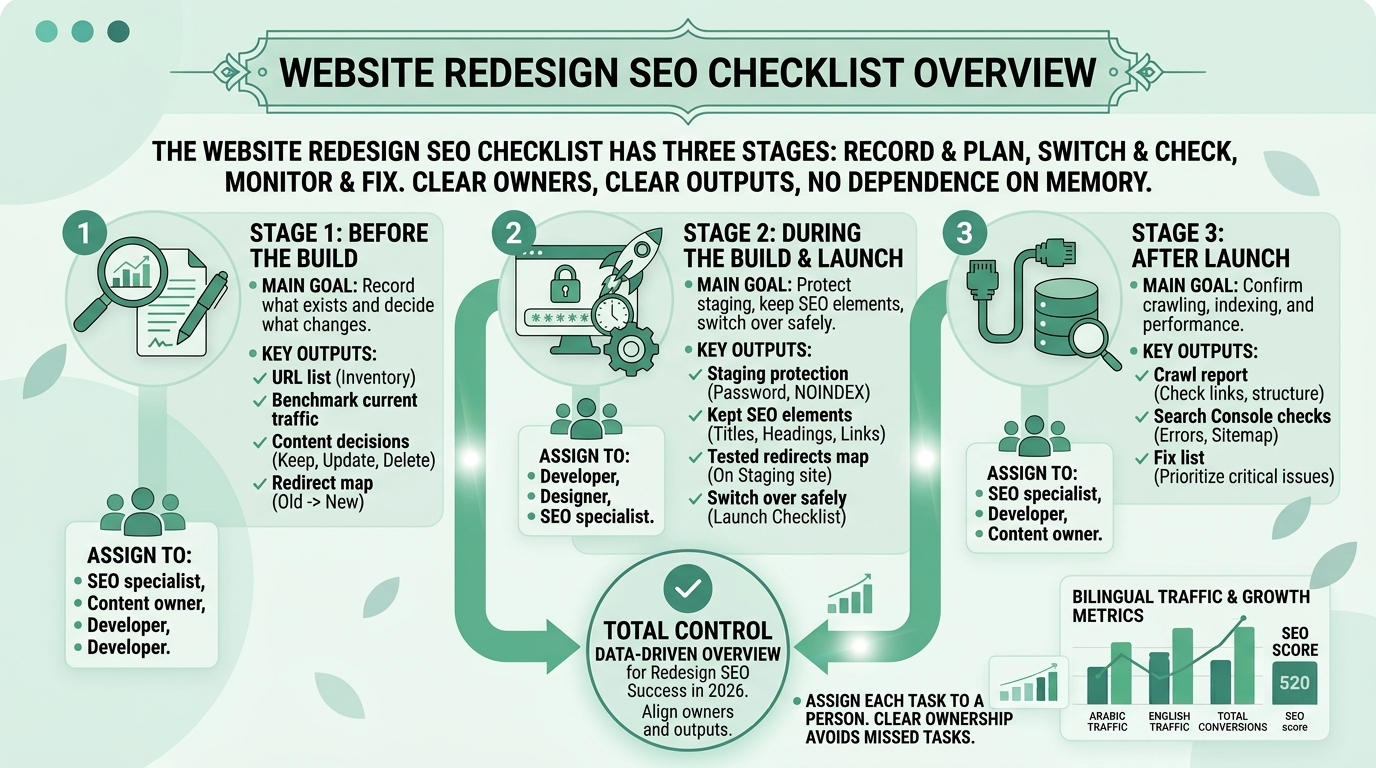
The website redesign SEO checklist has three stages: before the build, you record and plan; during launch, you switch over and check; after launch, you monitor and fix. Each stage has a clear owner and a clear output, so nothing depends on memory.
| Stage | Main goal | Key outputs |
| Before the build | Record what exists and decide what changes | URL list, benchmark, content decisions, redirect map |
| During the build and launch | Protect staging, keep SEO elements, switch over safely | Staging protection, tested redirects, launch checklist |
| After launch | Confirm crawling, indexing and performance | Crawl report, Search Console checks, fix list |
Assign each task to a person. The designer, developer, content owner and SEO specialist all touch the project, and unclear ownership is a common reason that tasks are missed.
Before the Build: Benchmark and Plan
Before the build, crawl the current site, list every URL, record your traffic and rankings, and decide which content to keep, merge or remove. This work takes time, but it is the foundation for every later step, and it is hard to recreate after the old site has gone.
Crawl and URL inventory
A crawl lists every page on the current site, with its address, title, headings and status, and it becomes your master list of URLs and the start of a redesign SEO audit. Run a crawl of the live site and export the results. Add the pages that appear in your sitemap, your analytics and Google Search Console, because a crawl alone can miss pages that no longer have internal links.
Benchmark traffic, rankings and conversions
A benchmark records how the site performs today, so you can tell afterwards whether the redesign helped, hurt or made no difference. Save organic traffic by page, the main keywords and their positions, conversions, and the pages with the most links pointing to them. Export the data and keep a copy outside the project.
Decide what to keep, merge or remove
For each URL, decide whether to keep it, merge it into a better page or remove it, and record the reason. Pages that earn traffic, links or conversions deserve special care. Thin or duplicate pages can be merged, but each merge needs a redirect to the most relevant remaining page.
How to Build a 301 Redirect Map
A 301 redirect map is a table that pairs every old URL with the new URL that should replace it, so the redirects can be set up and tested before launch. Google explains that permanent redirects show the new target in search results, and it recommends server-side redirects where possible.
“Use permanent redirects when you’re sure that the redirect won’t be reverted.”
Source: Google Search Central, Redirects and Google Search
Build the map from your URL inventory, not from memory. A simple map has four columns:
| Old URL | New URL | Type | Notes |
| /services-old/web-design/ | /services/web-design/ | 301 | Same topic, new path |
| /blog/old-post-title/ | /blog/new-post-title/ | 301 | Title and address updated |
| /about-us-2019/ | /about/ | 301 | Merged into one page |
| /summer-offer/ | No equivalent | Remove | Return a not-found response, not a redirect |
- Match by meaning. Send each old page to the closest new page on the same topic.
- Rank by importance. Mark pages with traffic, links or conversions as high priority and test them first.
- Include non-obvious URLs. Add images, PDFs, category pages and parameters that earn traffic.
- Review with two people. Ask the SEO lead and the developer to check the map together, because each sees different problems.
- Check address rules. Confirm how you will handle the preferred version of the address, such as with or without www and the secure version.
For wider guidance on clean addresses, see the guide to URL structure best practices.
Redirect Rules and Common Pitfalls
The most common redirect problems are chains, redirecting everything to the home page, using the wrong redirect type and forgetting parameters. Each one can be found with a crawl before launch, so test the whole map on the staging site.
- Redirect chains. One address should go straight to its final destination, not through several steps. Chains slow pages and make problems harder to find.
- Everything to the home page. Sending every old page to the home page is a poor match for visitors and search engines. Use the closest relevant page, or allow a proper not-found response when nothing fits.
- Wrong type. Use a permanent redirect for a permanent change and a temporary one only for a short-term move. The difference between 301 and 302 is explained in the guide to 301 vs 302 redirects.
- Script-based redirects. Google advises using JavaScript redirects only when server-side redirects are not possible.
- Lost parameters. If a page depends on a query string, check that the redirect keeps what the new page needs.
- Forgotten old redirects. Remove or update old rules that conflict with the new map.
Google also notes that after a domain move it may keep showing some old addresses for a while. This is normal, and it fades as users adopt the new address.

Keep On-Page SEO Elements During the Build
Keep the on-page elements that tell search engines what each page is about, including titles, descriptions, headings, text, internal links, structured data and image descriptions, unless you are deliberately improving them. A new design should not quietly delete the content that earned visibility.
- Titles and descriptions. Carry over existing page titles and meta descriptions, and improve them on purpose, not by accident.
- Headings and body text. Keep the main heading and the key content on each page. Shorter pages need a reason.
- Internal links. Rebuild menus, footers and in-text links. A guide to website structure for SEO shows what a clear structure looks like.
- Canonical tags. Make sure each page points to its preferred address.
- Structured data. Check that existing markup still outputs correctly in the new templates.
- Images and alt text. Keep descriptive file names and alt text, and compress images for speed.
- Mobile content. Make sure the mobile version carries the same text and links as the desktop version.
- Language versions. Keep language addresses and links between versions intact.
Protect the Staging Site
Protect the staging site with a password so that search engines and visitors cannot reach it, and use noindex as a second safeguard, not as the only one. A staging site that gets indexed can compete with your live pages, and a noindex rule left behind on the live site can remove it from search.
“…it is not a mechanism for keeping a web page out of Google.”
Source: Google Search Central, Introduction to robots.txt
That quote describes robots.txt. Google says the right ways to keep a page out of search are to block indexing with noindex or to password-protect the page.
- Use a password first. It keeps people and crawlers out together, and staging site noindex rules then act as a backup.
- Add noindex as a backup. It helps if the password is ever removed by mistake.
- Do not rely on robots.txt alone. It controls crawling, not indexing.
- Write the removal into the launch plan. Remove the password and the noindex rule on launch day, and check both.
- Check the live site afterwards. Confirm that no page carries a noindex rule you did not intend.
Pre-Launch Website Redesign SEO Checklist
Use this pre-launch checklist on the staging site, and tick each item only when you have seen it working. It brings together the earlier sections into one list.
- URL inventory complete. Every current URL is listed with its status.
- Benchmark saved. Traffic, rankings and conversions are exported.
- Content decisions recorded. Each page is kept, merged or removed, with a reason.
- Redirect map complete. Every old URL has a destination or a documented removal.
- Redirects tested. A crawl of the old URL list shows no chains and no errors.
- Staging protected. The site is password-protected, with noindex as a backup.
- Titles and descriptions in place. Each important page has a unique, deliberate title and description.
- Headings and content checked. Main headings and key text match or improve the old pages.
- Internal links working. Menus, footers and in-text links point to live new addresses.
- Canonical tags correct. Each page points to its preferred address.
- Mobile version complete. The phone layout matches the content of the desktop layout.
- Speed tested. Key pages pass a speed test on a phone.
- Structured data valid. Existing markup outputs correctly.
- Sitemap ready. The new sitemap lists the addresses you want found.
- Tracking tested. Analytics and conversion tracking work on the new templates.
- Language versions linked. Multilingual pages reference each other correctly.
- Launch plan written. Owners, times and rollback steps are agreed.
Launch Day Steps
On launch day, switch the redirects on, remove the staging protection, confirm the live site is indexable, submit the new sitemap and check that tracking works. Do the steps in order, and keep the team available for the first hours, because website relaunch SEO depends on catching mistakes quickly.
- Take a backup. Save the old site and its database before any change.
- Switch the site. Point the live address to the new site.
- Turn on the redirects. Test a sample of high-priority old URLs straight away.
- Remove staging blocks. Remove the password and any noindex rule, and check the live pages.
- Check robots.txt. Make sure it does not block pages you want crawled.
- Submit the sitemap. Add the new sitemap in Google Search Console. Google’s sitemaps guidance explains how sitemaps help discovery.
- Test tracking. Confirm that analytics and conversion events record on live pages.
- Crawl the live site. Look for errors, redirect chains and blocked pages.
How I Recommend You Review a Redesign Plan
A practical way to review a redesign plan is to read the redirect map, the staging settings and the launch plan before any design approval, and to test them in the same order every time. This is the method I recommend, and it draws on my work with website structure. It describes a process, not a set of results.
- Ask for the URL inventory. If the project has none, the redirects will be guesses.
- Read the redirect map. Check that high-value pages have specific destinations, not the home page.
- Open the staging site. Check that it asks for a password, and view the page source for noindex.
- Compare old and new pages. Look at titles, headings, text and links on five important pages.
- Test on a phone. Check that mobile pages hold the same content and load quickly.
- Read the launch plan. It should name who removes the staging protection and who checks the live site.
- Ask about monitoring. There should be a plan for the first days and weeks after launch.
If a designer or agency cannot answer these questions, ask for them to be written down before you approve the build. The guide on how to choose a web designer lists more questions to ask.

Post-Launch Website Redesign SEO Checklist
After launch, check crawling, redirects, indexing and performance straight away, then monitor Search Console and traffic over the following weeks. Early checks catch the mistakes that cause the biggest losses, and later monitoring shows how the site settles. These post-launch SEO checks are split into the first day and the first weeks.
First 24 hours
In the first 24 hours, confirm the site can be crawled, the redirects work and nothing is blocked. Do these checks on the live site, not on staging.
- Crawl the live site. Look for errors, chains and blocked pages.
- Test old URLs. Check a sample of high-priority old addresses, and confirm they reach the right page in one step.
- Check for stray noindex. View key pages and confirm that no noindex rule remains.
- Inspect key URLs. Use the URL Inspection tool in Google Search Console on important pages.
- Check the sitemap status. Confirm that Search Console reads the new sitemap.
- Test forms and tracking. Make sure enquiries and events record correctly.
First weeks
In the first weeks, watch indexing, crawl errors, rankings and traffic against your benchmark, and fix problems as they appear. Compare like with like, and allow for normal changes such as seasonal demand.
- Search Console reports. Review indexing, crawl errors and performance each week.
- Not-found pages. Fix any important page that returns an error, and add missing redirects.
- Rankings and traffic. Compare them with your benchmark, and look at trends, not single days.
- Speed and mobile. Re-test key pages on a phone.
- Old addresses in results. Expect some old addresses to appear for a while, as Google explains.
- A drop in traffic. Google has a guide to debugging drops in Search traffic that can help you work out the cause.
For deeper checks, see the technical SEO audit guides.
Multilingual and Multi-Region Sites
A multilingual redesign needs each language version to keep its own address, its own redirects and its links to the other versions. Google’s guidance on localized versions of a page says each version should reference itself and every other version, so keep these links intact in the new templates.
- Redirect each language separately. Map the old Arabic and English addresses to their own new pages, and avoid sending one language to the other.
- Keep language addresses stable. Changing language folders adds risk, so change them only for a clear reason.
- Check the language switcher. It should still send visitors to the equivalent page.
- Test each version. Run the same crawl and speed checks in every language.
The SEO friendly web design guide has a section on multilingual and right-to-left design.
What to Expect After Relaunch
After a relaunch, expect some movement in rankings and traffic, with no guarantee of an increase or of an unchanged result, and judge progress over weeks and months. A redesign changes many things at once, so search engines need time to process the new pages and signals.
Several factors affect what you see: how closely the new pages match the old ones, how clean the redirects are, how fast the new pages load, and what competitors and search systems are doing at the same time. A fall in traffic does not always mean the redesign failed, and a rise does not always mean it succeeded.
Compare against your benchmark, check for technical causes first, and avoid changing many things at once while you investigate. If a drop continues, work through the checks in Google’s debugging guide before you make large changes.
Common Redesign SEO Mistakes
The most common mistakes are changing addresses without redirects, leaving the staging block on the live site, removing content and forgetting to test after launch. Avoid these:
- No URL inventory. Without it, redirects are guesses.
- Redirecting everything to the home page. Visitors and search engines lose the topic match.
- Leaving noindex on the live site. The new pages are not indexed.
- Blocking crawlers by accident. A robots.txt rule from staging reaches the live site.
- Deleting content to fit the design. Pages lose the text that earned visibility.
- Changing too much at once. A new design, a new platform and a new domain together make problems hard to trace.
- Skipping tracking tests. You cannot measure the result.
- No monitoring plan. Problems go unnoticed for weeks.
Next Step for Your Redesign
If you want help with a redesign, you can start with the service that fits your stage, and I will explain exactly what is included. I offer web design and website SEO services, so I am not a neutral party, and you should compare me with other options using the checklists in this guide.
If you are choosing who will build the site, read how to choose a web designer in Oman. For a review of your redirect map, staging settings and launch plan, see my website SEO services. For a new or rebuilt site, see my web design service. If you are not sure what you need, contact me for a website review and share your current website address.
I an SEO specialist who manages much of my work from Oman. My work includes Local SEO, Google Business Profile optimisation, website structure, topical maps, content briefs and content optimisation, and i works with a team. I has around five years of experience working with clients in Europe. I also offers web design and website SEO services, so use the checklist in this guide to judge any plan fairly, including me.
Conclusion
A redesign protects your SEO when you record what exists, map every old address to a sensible new one, protect staging, switch over carefully and monitor afterwards. Use the three-stage checklist, assign each task to a person and test before you trust anything. Expect some movement after launch, and judge results against your benchmark over time, not on the first day.
Frequently Asked Questions
These answers cover the questions people ask most often before and after a redesign. Each answer starts with a direct response and then adds the detail you need to act on it, so you can read only the questions that matter to your own project.
What is a website redesign SEO checklist?
A website redesign SEO checklist is a step-by-step list of tasks that protect search visibility while a site is redesigned, covering preparation, launch and post-launch checks. It includes a URL inventory, a benchmark, a redirect map, staging protection, launch steps and monitoring.
How do I redesign a website without losing rankings?
Record your current URLs and performance, keep valuable content, redirect every old address to the closest new page, protect staging and check the live site after launch. No one can promise that rankings will not move, so monitor results against your benchmark.
What is a 301 redirect map?
A 301 redirect map is a table that pairs each old URL with the new URL that replaces it, so permanent redirects can be set up and tested before launch. Build it from your URL inventory and match pages by meaning, not only by position.
Should I noindex my staging site?
Password-protect the staging site first, and use noindex as a backup. Google says robots.txt is not a mechanism for keeping a page out of Google, and a noindex rule left on the live site can remove pages from search, so write its removal into the launch plan.
Do I need to redirect every old URL?
Redirect every old URL that has a close replacement, and let pages with no equivalent return a proper not-found response. Prioritise pages with traffic, links or conversions, test them first, and avoid sending unrelated pages to the home page, because a poor match helps neither visitors nor search engines.
How long does it take to recover after a redesign?
There is no fixed time, because recovery depends on how large the changes were, how clean the redirects are and what competitors are doing. Check for technical causes first, compare against your benchmark and judge trends over weeks and months.
What should I check after launching a redesigned website?
Check that the site can be crawled, old URLs redirect in one step, no noindex rule remains, the sitemap is read and tracking works. Then review Search Console, not-found pages, speed and rankings each week, and compare the results with the benchmark you saved before the build.
Is a redesign different from a site migration?
Yes, a redesign changes the look or structure, while a migration changes the platform, host or domain, and the two often happen together. The more that changes at once, the more important the redirect map and the testing become, and the harder it is to trace a problem to one cause.
Can I redesign without changing URLs?
Yes, and it is the lowest-risk approach when the existing addresses suit the site. Keep the same addresses, titles and content where you can, and change URLs only when there is a clear benefit, such as a cleaner structure, because every changed address needs a tested redirect.
Who should be responsible for SEO during a redesign?
Name one person to own SEO tasks, usually an SEO specialist or a project lead, and agree what the designer, developer and content owner each do. Clear ownership prevents the missed redirects and forgotten staging blocks that cause most problems.