What Is SEO Friendly Web Design? A Practical Guide
A practical guide to SEO friendly web design: plan structure, navigation and layout, build mobile first, and test your site with a checklist.

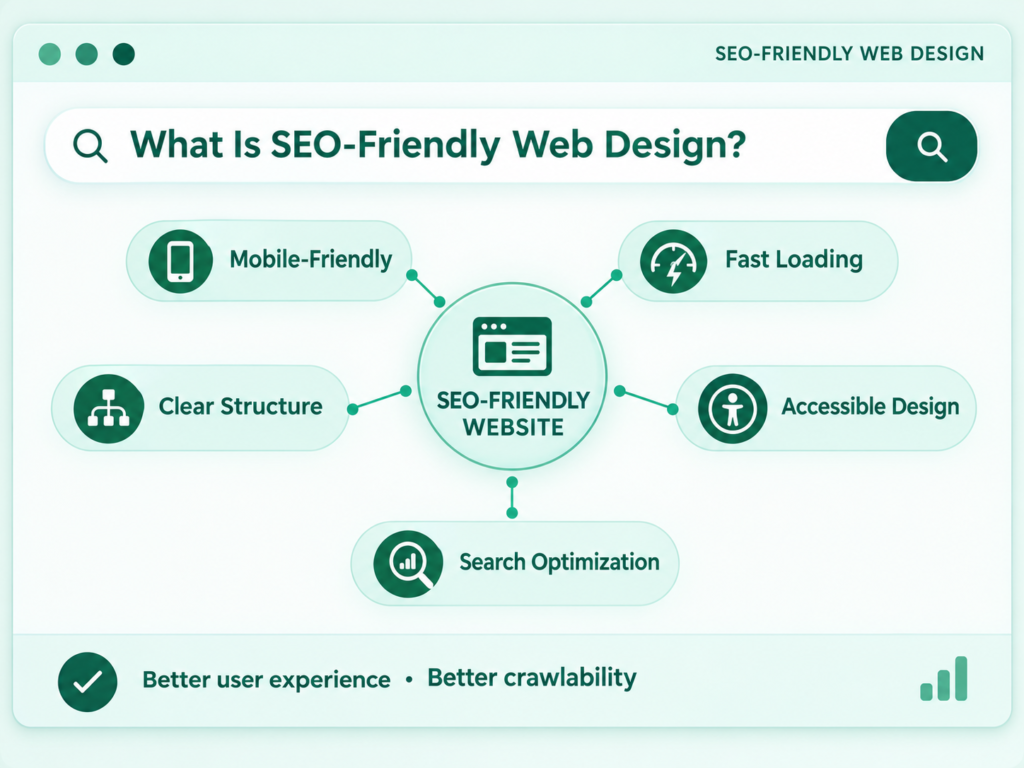
SEO friendly web design is the practice of building a website so that search engines can crawl, understand and index it, while visitors find it fast, clear and easy to use. It covers structure, navigation, layout, speed, code and content hierarchy, not only the visual style. This guide explains the elements that matter, how to choose a theme or builder, and how to check your own site.
An SEO ready website lets search engines reach every important page, loads quickly on a phone, uses a clear structure and heading order, and avoids design choices that hide content. Plan these points before you design a single page, and test them again after launch.
What Is SEO Friendly Web Design?
SEO friendly web design means designing a website so that its structure, code and layout help search engines find and understand pages, and help people use them. It treats search engine needs and visitor needs as one set of requirements instead of two competing ones.
SEO friendly web design vs ordinary web design
Ordinary web design focuses on appearance and brand; SEO friendly web design adds crawlability, structure, speed and content hierarchy to those goals. A site can look excellent and still hide its pages behind scripts, bury key services four clicks deep or load slowly on mobile. SEO friendly design prevents those problems at the planning stage, when they are cheap to fix.
What it does not mean
SEO friendly web design does not guarantee rankings, and it does not replace good content. Design removes barriers. It does not make a weak page useful. Google’s own guidance asks for helpful, reliable, people-first content, and no layout can substitute for that.
It also does not mean stuffing keywords into a template. A design that repeats phrases in menus, footers and sidebars reads badly and can break Google’s spam policies.
Why SEO Friendly Design Matters Before You Launch
Design decisions shape how a site is crawled, how fast it loads and how its pages connect, so they are far cheaper to get right before launch than after. Rebuilding a menu, changing a URL pattern or replacing a heavy template on a live site means redirects, lost links and weeks of rework.
The main reasons to plan early are:
- Search engines need access. Pages that cannot be crawled cannot be indexed, however good they are.
- Visitors decide quickly. A slow, cluttered or confusing page loses people before they read it.
- Structure is hard to change later. URL patterns, categories and templates are difficult to alter once links and rankings depend on them.
- Design and content must agree. Layouts need room for headings, text and proof, not only for large images.

Web Design Elements That Help SEO
The web design elements that help SEO are crawlable pages, mobile-first layout, fast loading, clean code, clear headings and well-described media. Each one removes a barrier between a page and the people searching for it.
Crawlable and indexable pages
A page is crawlable when search engines can reach it through links, and indexable when nothing tells them to leave it out. Check that important pages are not blocked, that your sitemap is submitted and that no stray noindex tag sits on a template. Google’s guidance on link best practices says its crawler can generally follow only links built as anchor elements with an href attribute, so menus that rely on script-only clicks can hide pages.
Mobile-first, responsive design
Mobile-first design means the phone version of a page is built first and carries the same content as the desktop version. Google predominantly uses the mobile version of a page for indexing, as its mobile-first indexing guidance explains. If your mobile layout hides text, images or links that the desktop version shows, search engines may see a thinner page.
Page speed and Core Web Vitals
Core Web Vitals are Google’s measures of loading, responsiveness and visual stability, and good scores support a better experience. Google’s Core Web Vitals page advises aiming for a Largest Contentful Paint within 2.5 seconds, an Interaction to Next Paint under 200 milliseconds and a Cumulative Layout Shift under 0.1. Heavy sliders, large unoptimised images and many third-party scripts are common causes of poor scores.
Clean code and semantic HTML
Semantic HTML uses elements for their intended purpose, such as one main heading, proper lists and landmark regions, so machines and assistive tools can read the page. Clean code also tends to load faster, because there is less to download and process.
Headings and content hierarchy
A good heading hierarchy uses one H1 for the page topic, H2 headings for main sections and H3 headings for sub-points. Choose headings for meaning, not for size. Style belongs in the design system, and structure belongs in the markup.
Images, media and structured data
Images should be compressed, sized for their space and described with accurate alt text. Descriptive file names and captions help readers and search engines. Structured data can describe content such as articles, products and organisations in a machine-readable way, but it should match what visitors actually see on the page.
SEO Friendly Website Structure
An SEO friendly website structure groups pages into clear sections, keeps important pages close to the homepage and gives every page one logical place. It is the skeleton that everything else attaches to.
Flat hierarchy and URL structure
A flat hierarchy means key pages are reachable in a few clicks, usually no more than three from the homepage. Use short, readable URLs that describe the page, such as /services/web-design/ rather than a string of numbers and parameters. Keep the pattern consistent so that visitors and crawlers can predict where pages live.
Internal links and sitemaps
Internal links connect pages and show which ones matter, and a sitemap lists the URLs you want search engines to find. Link from broad pages to specific ones and back again, using descriptive anchor text. Planning this structure around topics, not only around menus, makes it easier to grow. See how a topical map for a local business organises services, locations and supporting pages into one structure.
SEO Friendly Navigation
SEO friendly navigation is a menu that is short, clear and built from real links, so visitors and crawlers can reach the main sections quickly. It should reflect how people think about your services, not how your company is organised internally.
- Keep the main menu focused. List the key sections only. Do not put every page in the top menu.
- Use plain labels. Words such as Services, Pricing and Contact beat clever names that readers must decode.
- Use real links. Menus should use anchor elements with working destinations, not scripts that hide the address.
- Add breadcrumbs on deeper pages. They show the path back up and give another set of internal links.
- Make the footer useful. A footer can repeat key pages, but it should not become a long list of keyword links.
- Test on a phone. Check that the mobile menu opens easily and lists the same important pages.
SEO Friendly Layout
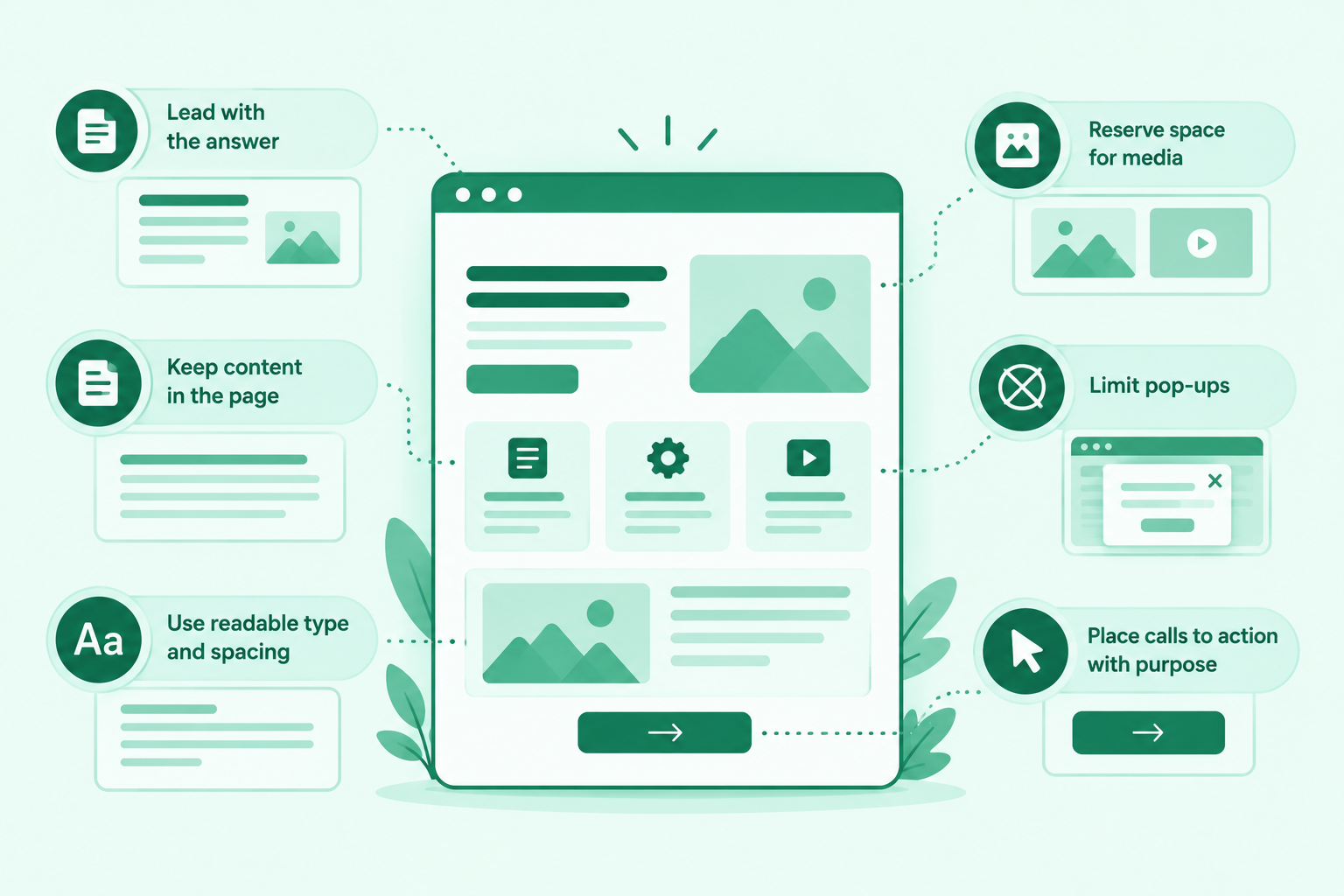
An SEO friendly layout puts the main content where visitors expect it, uses clear headings and leaves enough space for text to be read. It balances visual appeal with the need to explain a topic properly.
- Lead with the answer. Place the heading and a short, clear description near the top, before large images.
- Keep content in the page. Important text should be real text, not part of an image.
- Use readable type and spacing. Short paragraphs, adequate contrast and generous line spacing help every visitor.
- Reserve space for media. Set image and video dimensions so that the page does not jump while loading.
- Limit pop-ups. Banners and overlays that cover the content frustrate people and can hide the page.
- Place calls to action with purpose. One clear next step per section works better than many competing buttons.
SEO Friendly Themes for WordPress: How to Choose One
An SEO friendly WordPress theme loads quickly, outputs clean semantic HTML, supports responsive layouts and does not get in the way of the settings you need. No theme makes a site rank by itself, so treat the label as a starting point, not a promise.
Many guides list SEO friendly themes WordPress users can install, and most themes claim to be SEO friendly. Check the claim yourself before you commit.
Theme vs page builder vs site structure
A theme controls the look and base code, a page builder controls how pages are laid out, and site structure controls how pages are organised and linked. Each one can help or hurt SEO on its own. A fast theme with a poor structure still underperforms, and a clear structure on a slow, bloated theme still frustrates visitors.
Questions to ask before you buy or install a theme
- Is the code clean? Look at the page source or use a test page to see whether the headings, lists and landmarks are sensible.
- How fast is the demo? Test the theme’s demo on a phone and check how many scripts and styles it loads.
- Can you control headings? You should be able to set the heading level for each block without changing its look.
- Does it support your SEO tools? Check that it works with the plugin you use for titles, meta descriptions and sitemaps.
- Is it kept up to date? Look at update dates, support and reviews that mention speed or mobile problems.
- Does it handle languages? If you need right-to-left text or several languages, test them before you buy.
SEO Friendly Website Builder: What to Check
An SEO friendly website builder lets you control titles, meta descriptions, URLs, headings, redirects and sitemaps, and produces fast, mobile-ready pages. Platforms differ, and their features change, so check the current version before you choose.
- Editable page basics. You can set the title, description and URL for every page.
- Heading control. You can choose heading levels for meaning, not only for size.
- Redirects and canonical tags. You can redirect old pages and avoid duplicate URLs.
- Sitemap and robots control. The builder creates a sitemap and lets you decide what is indexed.
- Published pages load quickly on a mobile connection.
- Language and region support. You can build language versions with their own URLs if you need them.
- Export and growth. You can add content and pages without rebuilding the site.
SEO Friendly Web Design Checklist
Use this SEO friendly website checklist before launch and again at every audit. Each item states what to confirm.
- Pages crawlable. Key pages are not blocked, and menus use real links.
- Pages indexable. No stray noindex tag sits on a live template, and the sitemap is submitted.
- Mobile version complete. The phone layout carries the same content and links as the desktop layout.
- Speed tested. Core Web Vitals are checked on real pages, not only on the home page.
- One H1 per page. Headings follow a logical order from H1 to H3.
- Clean URLs. URLs are short, readable and consistent.
- Structure planned. Important pages are within a few clicks of the homepage.
- Navigation clear. The menu lists the main sections in plain words.
- Internal links in place. Related pages link to each other, and no page is orphaned.
- Images optimised. Files are compressed and sized, and alt text is accurate.
- Layout stable. Media has reserved space so that content does not jump.
- Titles and descriptions set. Each page has a unique title and description.
- Language versions linked. Multilingual pages reference each other correctly.
- Analytics and Search Console connected. You can see how pages perform.
SEO Friendly Website Examples: Patterns That Work
The best SEO friendly website examples share patterns, not templates: a clear hierarchy, honest navigation and pages that each serve one purpose. The three descriptions below are fictional illustrations, not real sites.
- A local clinic. The home page links to six treatment pages, each with its own URL, a short explanation, pricing guidance and a booking button. A locations page links to each branch page. The blog supports each treatment with questions patients ask.
- A software company. The main menu holds Product, Pricing, Resources and Contact. Each feature has its own page, linked from the product page. Guides link to the features they explain.
- A multilingual hotel site. Each language has its own URL path, translated content and a language switcher that uses normal links. Every language version points to the others.
The shared pattern is easy to copy: few menu items, one topic per page, and links that follow the way visitors think.
Design Choices That Can Hurt SEO
Some design choices can hide content, slow pages or confuse structure, even when the site looks impressive. Review these before you approve a design:
- Heavy sliders and auto-playing video. They slow loading and often push the main message out of view.
- Content only in images. Text inside images cannot be read as text by search engines or by many assistive tools.
- Menus built from scripts. If links are not real links, crawlers may not follow them.
- Layout shifts. Images and banners that load late push content around and harm the experience.
- Endless scrolling without separate URLs. Content that has no address of its own is hard to index.
- Duplicate templates. Many near-identical pages with only a name changed add little value.
- Hidden mobile content. Removing text from the phone version can reduce what search engines see.
SEO Friendly Design for Multilingual and Right-to-Left Websites
A multilingual site needs separate, linked pages for each language, and a right-to-left site needs layouts and fonts that suit its script. This matters for readers and businesses across Europe, the Middle East and Asia, where one site often serves several languages.
- Use separate URLs per language. Each language version should have its own address and fully translated main content.
- Link the versions with hreflang. Google’s guidance on localized versions of a page says each version should reference itself and every other version, and that Google does not use hreflang or the HTML lang attribute to detect a page’s language.
- Translate, do not copy. Google treats localized pages as duplicates only when the main content stays untranslated.
- Mirror the layout for right-to-left scripts. Menus, icons, spacing and reading order should follow the direction of the language.
- Choose fonts that cover your scripts. Check that Arabic, Hebrew or Asian characters display well and load quickly.
- Test each language separately. Check speed, links and headings in every version, not only in the main one.
How to Build SEO Friendly Web Design Step by Step
To build SEO friendly web design, define goals and topics, plan the structure, choose the theme or builder, design mobile first, build clean pages and test before launch. The six steps below turn the checklist into a working process.
Step 1: Define goals, audience and topics
Write what the site must achieve, who it serves and which topics each section covers. Everything else depends on this brief.
Step 2: Plan structure and URLs
Sketch the sections, the pages inside them and the URL for each page. A topical map service can turn this plan into a full list of pages, keywords and links if you want specialist help.
Step 3: Choose the theme or builder
Pick a theme or builder that meets your performance, structure and language needs. Test the demo on a phone before you decide.
Step 4: Design mobile first
Start with the phone layout, then expand it for larger screens. Keep the same content, links and headings in both.
Step 5: Build clean pages
Use real headings, real links and real text, and compress every image. Add titles, descriptions and alt text as you build, not afterwards.
Step 6: Test and launch
Test crawling, indexing, speed and mobile display before launch. Fix issues, set up redirects if you are replacing an old site, and submit the sitemap.
How to Test Your Design for SEO
Test your design with Google Search Console, a speed test, a crawl of your own site and a check on real phones. Each tool answers a different question.
- Search Console. Check indexing, Core Web Vitals and mobile problems.
- Speed tests. Run key page types through a performance tool and compare the results with Google’s targets.
- A site crawl. Crawl your own site to find broken links, missing titles, duplicate pages and orphaned pages.
- Real devices. Open the site on a phone and a tablet and check menus, forms and text.
For deeper checks, see the technical SEO audit guides.
Common SEO Friendly Design Mistakes
The most common mistakes are designing before planning, ignoring mobile, choosing a theme for looks alone and forgetting to test after launch. Avoid these:
- Skipping the structure plan. The menu grows page by page without a logic.
- Treating mobile as an afterthought. The phone version loses content or becomes slow.
- Choosing a theme for demos only. A beautiful demo can hide heavy code.
- Using headings for style. Heading levels jump around to change font sizes.
- Forgetting redirects. An old site is replaced and the old URLs are lost.
- Never auditing. Plugins, scripts and content change, so problems return.
Next Step for Your Website Project
If you want help applying this checklist, you can start with the right service for your stage. For a new or rebuilt site, my web design service page explains the approach. For an existing site that needs a structural and technical review, see the website SEO services. If you are unsure which fits, contact me for a website review and bring your current URLs.
Conclusion
SEO friendly web design makes a site easier to find, easier to understand and easier to use. Plan the structure first, build mobile first, keep the code and navigation clean, and test before and after launch. Treat the checklist as a living document, because themes, plugins and content keep changing.
Frequently Asked Questions
What is SEO friendly design?
SEO friendly design is a way of designing a website so that search engines can crawl and understand it and visitors can use it easily. It covers structure, navigation, layout, speed and code.
Does web design affect SEO?
Yes, design affects crawling, speed, structure and usability, all of which influence how pages perform in search. Design alone does not guarantee rankings.
What makes a website SEO friendly?
A website is SEO friendly when its pages are crawlable and indexable, load quickly on mobile, follow a clear structure and use proper headings, links and media.
Is a responsive layout necessary for SEO?
A responsive layout is the simplest way to give phones and desktops the same content, which matters because Google predominantly uses the mobile version. Separate mobile sites need extra care.
Are WordPress themes SEO friendly by default?
No, many themes claim to be SEO friendly, but quality varies. Check code, speed, heading control and mobile display before you choose.
Which website builder is best for SEO?
No single builder is best for every site. Choose one that gives control over titles, URLs, headings, redirects, sitemaps and speed, and check the current features before committing.
How should SEO friendly navigation look?
It should be short, use plain labels, link to the main sections with real links and work well on phones.
Does page speed affect rankings?
Google recommends good Core Web Vitals for success in Search and a better experience, but speed is one of many signals. Aim for the targets and judge results over time.
How often should you audit your site’s SEO design?
Audit it at launch and then every quarter, or sooner after a redesign, a theme change or a major plugin update.
Can a beautiful design still be SEO friendly?
Yes, a beautiful design can be SEO friendly if it keeps text as text, loads quickly, uses clear headings and links, and works well on mobile.