SEO Audit Guide: 10 Easy Steps to Fix Costly Site Mistakes
Learn how to do an SEO audit step by step. This guide covers crawling, indexing, on-page checks, content, speed, mobile use, links, and how to prioritize fixes.

An SEO audit is a structured website check that finds technical, content, and link problems holding back your search visibility.
This guide shows you how to run one yourself in 10 clear steps, from the first crawl to the final report. You will also learn what a website audit means in SEO, how an SEO website grader compares with a manual review, and when paid audit services make sense. I have worked in SEO for around five years with multiple European clients, and the method below follows how I prefer to work: find what blocks Google first, fix what matters most, and ignore score chasing.
Crawl the site, check indexing, review on-page elements and content, test speed and mobile use, inspect links and structured data, then rank every issue by impact and effort. Repeat after major changes. Treat tool scores as hints, not goals.

What Is an SEO Audit?
An SEO audit is a systematic review of how well a website can be crawled, indexed, understood, and used, ending in a prioritized list of fixes. The review covers technical health, on-page elements, content quality, links, and user experience. The result should be a plan of action, not just a score.
A plan matters because most websites carry many small problems at once. An accidental noindex tag, a slow page template, and duplicate title tags can all appear in the same crawl. An audit puts these problems in order, so you fix the ones that affect search visibility first.
What Is a Website Audit in SEO?
A website audit in SEO is a review of the whole site, not one keyword or one page. People who search “what is website audit in SEO” usually want to know the scope. The scope includes crawl access, site structure, page elements, content, speed, mobile use, and trust signals. A check of a single page is a page audit, and it covers only part of this work.
What Does an SEO Audit Cover?
An SEO audit covers five areas: technical SEO, on-page SEO, content, off-page signals, and user experience. The table below shows what you check in each area and which tools usually help.
| Audit area | What you check | Typical tool |
|---|---|---|
| Technical SEO | Crawl errors, redirects, robots.txt, noindex tags, XML sitemap | Site crawler, Google Search Console |
| On-page SEO | Title tags, meta descriptions, headings, image alt text, canonical tags | Site crawler, browser |
| Content | Match with search intent, duplicate or thin pages, topic gaps | Search Console, manual review |
| Off-page signals | Backlink quality, referring domains, brand mentions | Backlink tool |
| User experience | Core Web Vitals, mobile layout, intrusive pop-ups | PageSpeed Insights, Lighthouse |
Why Does an SEO Audit Matter?
An SEO audit matters because search engines can only rank pages they can reach, understand, and trust. Google states that its ranking systems are designed to prioritize this kind of content:
“helpful, reliable information that’s created to benefit people”
Source: Google Search Central, Creating helpful, reliable, people-first content
An audit checks whether your pages meet that standard and whether technical faults hide them from searchers. Google’s own SEO starter guide covers the basics that most audits test, so it is a useful reference while you work.
What Do You Need Before You Start?
Before you start, you need clear goals, access to Google Search Console and your analytics, and a site crawler. A short preparation step saves time later, because you will not need to hunt for logins in the middle of the review.
Gather these items first:
- Goals: more leads, more organic clicks, recovery from a traffic drop, or a safe redesign.
- Access: Google Search Console, your analytics account, and your content management system.
- Tools: a crawler such as Screaming Frog or Semrush Site Audit, PageSpeed Insights, and a spreadsheet for findings.
- Baseline numbers: recent organic clicks, impressions, and conversions.
Keep one spreadsheet for the whole project. Add a row for every issue with its URL group, the problem, the fix, and the status. This sheet becomes your audit report in the final step.
How to Do an SEO Audit Step by Step
An SEO audit follows ten steps, from setting goals and crawling the site to prioritizing fixes in a report. The order matters because later steps depend on earlier ones. A page that Google cannot index cannot rank, so indexing checks come before content polish.
Step 1: Set Goals and Record a Baseline
Start by writing down what the audit should improve, then record current numbers so you can measure change later. A goal might be more organic leads, a recovery after a traffic drop, or a clean site before a redesign.
Open the Performance report in Google Search Console and note clicks, impressions, click-through rate, and average position. Add organic conversions from your analytics tool. Save the date with the numbers. Without a baseline, you cannot prove that your fixes worked.
Step 2: Crawl the Website
Crawl the site with an SEO crawler to see it the way a search engine bot sees it. The crawler lists every reachable URL with its status code, title tag, headings, canonical tag, and indexing directives.
Look for broken pages (4xx errors), server errors (5xx), long redirect chains, duplicate titles, and missing H1 headings. Also confirm that only one version of the site loads. The http, https, www, and non-www versions should all redirect to a single preferred address.
I start with the crawl before I open any grader score, because the crawl shows page-level causes while a score only shows a symptom.
Step 3: Check Indexing and Crawlability
Check that every important page can be indexed and that every unimportant page is excluded on purpose. Two controls matter here. The robots.txt file controls crawling, and the noindex rule controls indexing.
Google’s documentation is direct about one common mistake:
“Specifying the noindex rule in the robots.txt file is not supported by Google.”
Source: Google Search Central, Block Search indexing with noindex
The same documentation explains that Google must crawl a page to see its noindex tag. If robots.txt blocks the page, Googlebot cannot see the tag. Use the Page indexing report in Search Console and the URL Inspection tool to test key pages. Also check your XML sitemap: it should list only indexable, canonical URLs that return a 200 status.
A forgotten noindex tag left over from a staging site is one of the fastest wins in any audit, because one small change can bring a whole page back into eligibility.
Step 4: Review Site Structure and Internal Links
Review whether important pages sit within a few clicks of the homepage and receive internal links with clear anchor text. A page with no internal links is an orphan page, and crawlers may find it late or not at all.
Check your navigation, category pages, and in-content links. Replace vague anchors such as “click here” with descriptive text. Group related pages so that each topic has a clear hub and supporting pages. If you want more examples of audit findings, my technical SEO and audit articles cover related checks in more detail.
Step 5: Audit On-Page SEO Elements
Audit each key page’s title tag, meta description, H1, subheadings, image alt text, and canonical tag. Every page should have a unique title that matches its topic and a meta description that summarizes the page honestly.
Use one H1 per page and keep the heading order logical. An H2 should be followed by an H3, not by an H4, because skipped heading levels confuse readers and screen readers. Write alt text that describes each image in plain words. Confirm that the canonical tag points to the preferred version of the page.
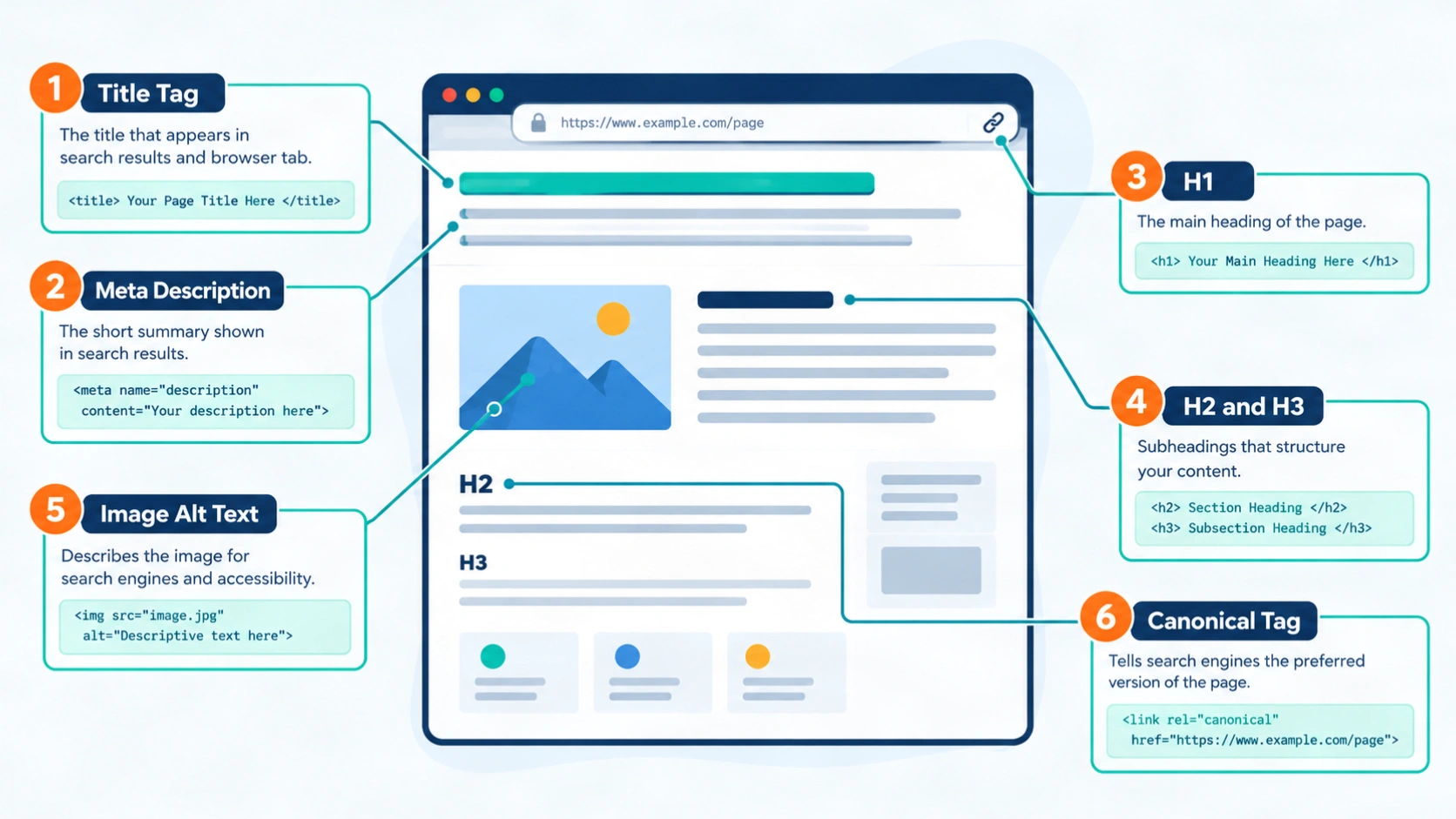
Check the title tag, meta description, headings, and image alt text on every key page.
Step 6: Evaluate Content Quality and Search Intent
Evaluate whether each page answers its target query better than the pages already ranking. Search the main query, then look at the page types in the results. If Google shows guides and your page is a sales page, the intent does not match.
Flag thin pages, outdated pages, duplicates, and pages that compete for the same query. For each one, choose an action: keep, improve, merge, or remove. Check topic coverage too. A topical map helps you spot missing subtopics, and strong semantic SEO practice helps you cover related entities naturally. When many pages need rewrites, professional SEO content writing can speed up the fixes.
Step 7: Test Page Speed and Core Web Vitals
Core Web Vitals are good when Largest Contentful Paint is 2.5 seconds or less, Interaction to Next Paint is 200 milliseconds or less, and Cumulative Layout Shift is 0.1 or less. According to web.dev’s threshold research, these limits apply at the 75th percentile of page views, which means three out of four visits should meet them.
Many sites miss these targets. The 2025 Web Almanac performance chapter reports that 48% of mobile sites and 56% of desktop sites had good Core Web Vitals, based on July 2025 data from the Chrome User Experience Report.
Test with PageSpeed Insights and the Core Web Vitals report in Search Console. Prefer field data over lab data when both exist, because field data reflects real visitors. Common fixes include compressing images, serving images at the size they display, deferring heavy scripts, and reserving space for images to prevent layout shifts.
Step 8: Check Mobile Usability and Mobile-First Indexing
Check that the mobile version of every key page contains the same content, links, and structured data as the desktop version. Google explains that it uses the mobile version of a site’s content, crawled with the smartphone agent, for indexing and ranking. You can read the details in Google’s mobile-first indexing best practices.
Open your main pages on a real phone. Look for text that is too small, buttons that are too close together, content that needs sideways scrolling, and sections that disappear on mobile. Responsive design is the simplest way to keep content identical across devices.
Step 9: Review Structured Data, Backlinks, and Local Signals
Review structured data for errors, backlinks for quality, and local signals if the business serves a physical area. Each of these three checks supports trust and understanding.
Validate structured data with Google’s Rich Results Test and confirm that the markup matches the visible page content. For backlinks, look at referring domains rather than raw link counts. Relevant sites that link naturally are a good sign, while repeated unnatural patterns need a closer look.
Local businesses should also check their Google Business Profile, business name and phone consistency, and location pages. My Local SEO and Google Business Profile optimization services cover that work.
Step 10: Prioritize Fixes and Write the Audit Report
Rank every issue by impact and effort, then write a short report that names the issue, the affected pages, the fix, an owner, and a deadline. Fix high-impact, low-effort items first. Removing an accidental noindex tag or repairing a broken redirect usually belongs at the top of the list.
A useful report is short and specific. It tells the reader what is wrong, why it matters, and what to do next. After the fixes go live, crawl the site again and compare the new numbers with your baseline. Google needs time to recrawl pages, so judge results over several weeks, not several days.
Website SEO Audit Checklist for Quick Reviews
A website SEO audit checklist is a short pass-or-fail list of checks you can repeat after every major site change. Use it as a quick review between full audits. The groups below follow the same order as the steps above.
Technical checks
- One preferred site version redirects correctly.
- Important pages return a 200 status code.
- No important page carries a noindex tag.
- The XML sitemap lists only indexable, canonical URLs.
On-page checks
- Every page has a unique title tag and meta description.
- Each page has one H1 and a logical heading order.
- Images have useful alt text.
- Canonical tags point to the preferred URLs.
Content checks
- Each page matches the intent of its target query.
- Thin, duplicate, and competing pages have a decision.
- Key pages link to related pages with descriptive anchors.
Experience and authority checks
- Core Web Vitals pass at the 75th percentile.
- Mobile pages hold the same content as desktop pages.
- Structured data validates without errors.
- Backlinks come mainly from relevant, natural sources.
What Are the Key SEO Website Metrics to Track?
The key SEO website metrics are organic clicks, impressions, click-through rate, average position, indexed pages, Core Web Vitals, referring domains, and conversions. You do not need to track every number. Choose the metrics that match your audit goals and review them on a fixed schedule.
| Metric | What it tells you | Where to find it |
|---|---|---|
| Organic clicks | Visits that came from Google results | Search Console |
| Impressions | How often your pages appeared in results | Search Console |
| Click-through rate | Share of impressions that became clicks | Search Console |
| Average position | Typical ranking across queries | Search Console |
| Indexed pages | How many of your URLs Google has stored | Search Console, Page indexing report |
| Core Web Vitals | Loading, responsiveness, and visual stability | PageSpeed Insights, Search Console |
| Referring domains | Number of separate sites linking to you | Backlink tool |
| Conversions | Leads or sales from organic visits | Analytics |
Treat average position with care. It is an average across many queries and devices, so it moves up and down even when your pages are healthy. Clicks and conversions tell you more about business results.
How Does an SEO Website Grader Compare With a Manual Audit?
An SEO website grader is a free online tool that scans a site and returns a score, while a manual audit is a human review that explains causes and sets priorities. Both have a place. The grader gives a fast first look, and the manual review gives the plan.
What Does a Website Grader SEO Report Show?
A website grader SEO report shows a score and a list of suggestions across a few fixed categories. HubSpot’s Website Grader, for example, grades a site on performance, mobile readiness, SEO, and security. Such reports are useful for spotting obvious gaps, like missing meta descriptions or slow loading.
When Should You Rely on a Manual Audit Instead?
Rely on a manual audit when you need to know why a problem exists and which fix comes first. HubSpot describes its grader as a tool that scans the home page, so deeper sections of a site may go unchecked. Scores also come from each tool’s own rules, not from Google. A site can score well and still have an indexing problem, or score poorly on a minor item that does not affect visitors.
My advice is simple: run a grader for a quick snapshot, then use the ten steps above for the real diagnosis.
When Should You Hire Professional Audit Services?
Hire website SEO audit services when your site is large, your traffic dropped suddenly, a migration is planned, or your team lacks the time or technical skill. An outside specialist can also give a fresh view of problems that internal teams stop noticing.
A good service should deliver crawl data, indexing findings, a prioritized roadmap, and a call to explain the results. Be careful with reports that contain only automated scores and no explanation, because those leave the hard work undone.
Prices vary widely. WebFX reports that 43% of surveyed businesses paid between $101 and $750 for an audit, and larger or more complex sites cost more. Ask each provider what the audit covers before you compare prices.
I provide SEO services myself, so I am not a neutral party here. If you want help turning audit findings into fixes, you can explore my website SEO services or send a message through the contact page.
Which Mistakes Make an Audit Less Useful?
The most common mistakes are chasing tool scores, skipping indexing checks, fixing low-impact issues first, and never retesting. Each one wastes time and hides the real problems.
- Chasing a perfect score. A tool score is an estimate, not a Google metric, so use it as a guide only.
- Skipping indexing checks. Content work is wasted when the page cannot appear in search results.
- Fixing easy items first. Rank issues by impact, not by how simple they feel.
- Ignoring search intent. A well-optimized page still fails when it answers the wrong question.
- Never retesting. Without a second crawl and a baseline comparison, you cannot confirm that a fix worked.
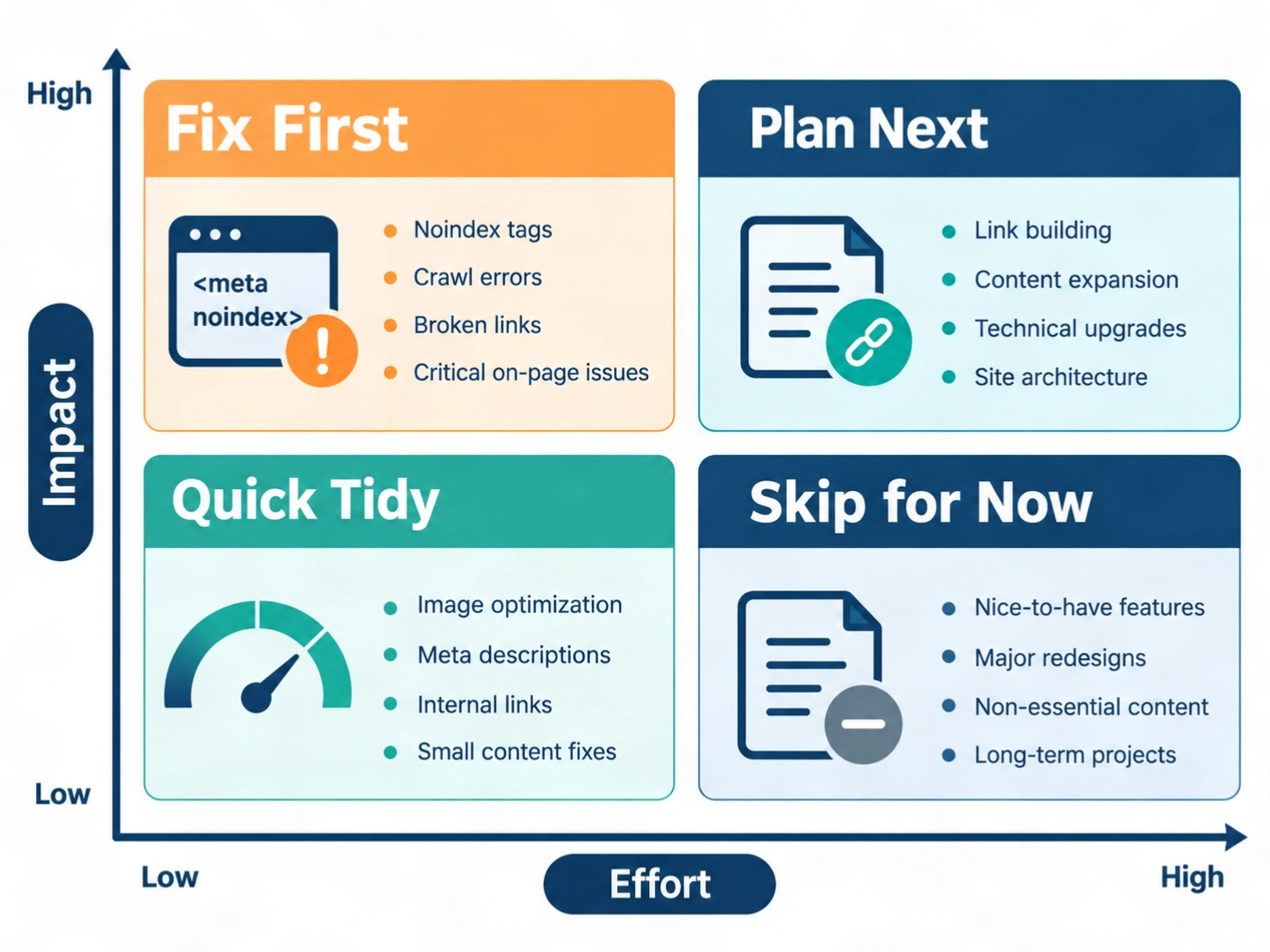
Fix high-impact, low-effort issues first, then plan the bigger projects.
Conclusion
A useful audit finds what blocks search visibility, ranks the fixes, and checks the results afterward. Follow the ten steps in order, keep your findings in one sheet, and repeat the process after major changes such as a redesign or migration. If you would like an expert review of your findings, contact me and share your site details.
Frequently Asked Questions
How long does an SEO audit take?
An SEO audit takes from a few hours for a small site to several weeks for a very large one. The main factors are the number of pages, the quality of your access to data, and the depth of the review. A small business site with clean data can be reviewed quickly, while a large store with thousands of URLs needs far more time.
How often should I do an SEO audit?
Run a full SEO audit once or twice a year and after any major site change. In between, check Search Console monthly for new indexing errors, speed problems, and sudden traffic drops. A redesign, a platform move, or a large content update should always trigger a fresh review.
How much does an SEO audit cost?
There is no standard price for an SEO audit, because cost depends on site size, depth, and who performs the work. WebFX reports that 43% of surveyed businesses paid between $101 and $750. A free tool costs nothing, while enterprise reviews for large sites can cost far more. Compare the scope before you compare the price.
Can I do an SEO audit myself for free?
Yes, you can run a basic SEO audit yourself using free tools. Google Search Console, PageSpeed Insights, and the free version of a crawler cover indexing, speed, and on-page checks for small sites. The harder part is interpreting results and ranking fixes, so follow the ten steps above and keep notes in a spreadsheet.
Which tools do I need for an SEO audit?
You need a site crawler, Google Search Console, a speed testing tool, and a spreadsheet. A crawler such as Screaming Frog or Semrush Site Audit finds page-level issues. Search Console shows how Google sees your site. PageSpeed Insights tests Core Web Vitals. A backlink tool is useful if you also review off-page signals.
What is the difference between a technical SEO audit and a full SEO audit?
A technical SEO audit checks crawling, indexing, speed, and site structure, while a full SEO audit adds content, on-page elements, backlinks, and local signals. Choose a technical review when traffic fell after a site change. Choose a full review when you want a complete plan for growth over several months.
Is an SEO website grader accurate?
An SEO website grader is accurate for the simple checks it runs, but its overall score is an estimate based on the tool’s own rules. It can spot missing tags and slow pages. It cannot judge your search intent match, your topic coverage, or deep indexing problems. Use the score as a starting point, not as proof of site health.
What should an SEO audit report include?
An SEO audit report should include the issues found, the pages affected, why each issue matters, the recommended fix, and a priority level. It should also list owners and deadlines, and it should start with your baseline numbers. A report that ends in a clear action plan is far more useful than a long list of warnings.
What is a good score on a website grader?
There is no universal good score, because each grader uses its own scale and rules. A high score usually means fewer obvious problems, but it does not guarantee rankings. Compare scores from the same tool over time, and focus on fixing high-impact issues rather than reaching a perfect number.
Does an SEO audit guarantee higher rankings?
No, an SEO audit does not guarantee higher rankings, traffic, or sales. An audit finds problems and sets priorities. Rankings also depend on competition, content quality, links, and how search engines respond over time. A well-run audit removes barriers and gives your pages a fair chance to perform.