Website URL Structure Best Practices: A Practical Guide
This infographic explains URL Structure Best Practices for SEO, including descriptive URL slugs, logical website hierarchy, canonical URLs, hyphen-separated words, fewer URL parameters, and proper 301 redirects.


Website URL structure best practices come down to one idea: give every page one clear, readable, stable address that describes its content. Good URLs help visitors understand where they are, and they help search engines crawl your pages without wasting time on duplicates. This guide explains what Google recommends, how to apply it to blogs, service pages, and online stores, and when you should leave existing URLs alone.
Use short, descriptive, lowercase URLs with hyphens, keep parameters to a minimum, and build folders that mirror your real site hierarchy. Change a live URL only when the current one causes a real problem, and use a 301 redirect when you do. These steps are a small but dependable part of good website SEO, not a ranking shortcut.
Where Google has published guidance, this article says so. Advice on length or stop words is labeled a common recommendation, because Google’s documentation sets no number for those points.
What Is a URL Structure and Why Does It Matter for SEO?
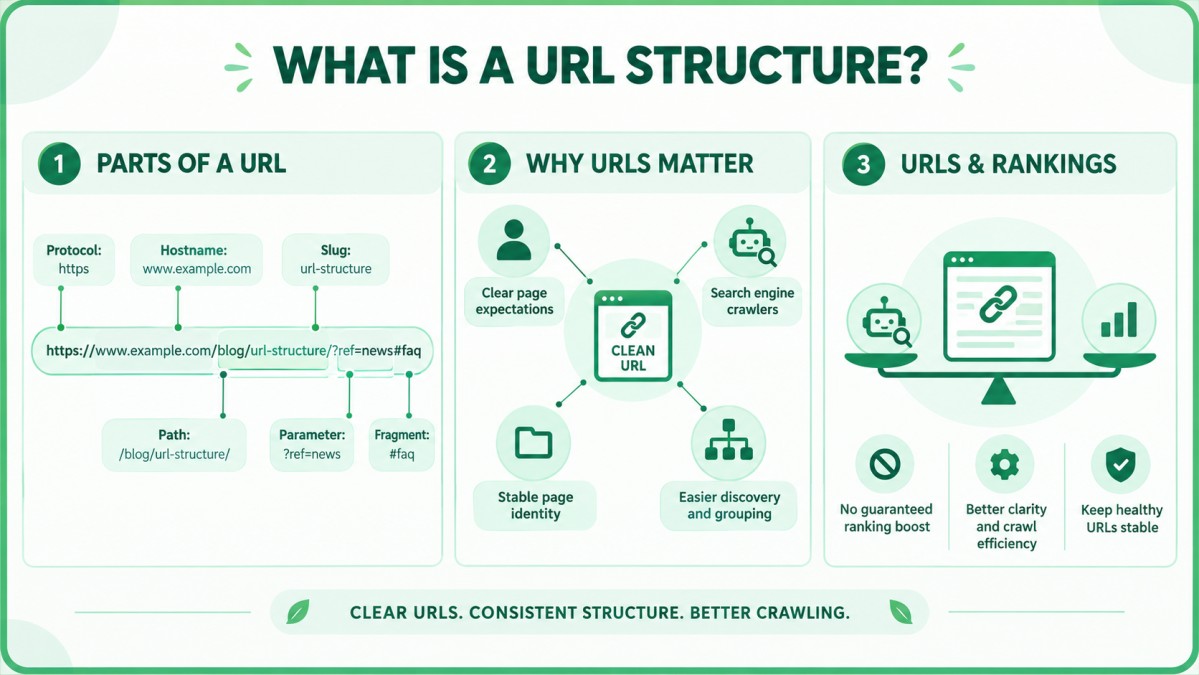
A URL structure is the pattern a website uses to write its page addresses, including the domain, folders, slugs, and parameters. It matters because that pattern affects how people read your links and how search engines discover, group, and compare your pages. The three sections below cover the parts of a URL, how users and crawlers use them, and what Google does and does not claim about rankings.
What are the parts of a URL?
A URL has a protocol, a hostname, a path, and sometimes parameters and a fragment. Take this example: https://www.example.com/blog/url-structure/?ref=news#faq. Here, https is the protocol, www.example.com is the hostname, /blog/url-structure/ is the path, url-structure is the slug, ?ref=news is a parameter, and #faq is a fragment. Most of your control sits in the path and the parameters.
How do URLs help users and search engines?
URLs help users by showing what a page is about before the click, and they help search engines by giving each page a stable identifier. People see URLs in search results, browser bars, emails, and shared links. A readable address builds trust and sets expectations.
When the same content loads at two addresses, Google has to choose which one to show. A consistent structure removes that guesswork and keeps your signals on one address.
Do URLs affect rankings? What Google says and does not say
Google’s documentation does not present any URL pattern as a ranking boost; it presents URL structure as a way to keep a site easy to crawl and understand.
That means URL work is mainly about clarity and crawl efficiency. Do not expect a traffic jump from rewriting healthy URLs. Expect fewer duplicate pages and cleaner reports.
Which Website URL Structure Best Practices Does Google Recommend?
Google recommends simple URLs with readable words, hyphens between words, consistent letter case, standard parameter encoding, and no fragments for changing content. The six practices below come from Google Search Central’s URL structure guidance. They are the safest starting point because they come from the search engine itself, not from a third-party opinion.
Use descriptive words instead of ID numbers
Use readable words in your URLs instead of long ID numbers. Google’s guidance recommends “readable words rather than long ID numbers” when possible. A URL such as /blog/301-redirect-guide/ tells people and crawlers what the page covers. A URL such as /post/839201 tells them nothing.
Many content management systems default to ID-based addresses, such as /?p=4821. Switch to descriptive permalinks before you build your content library.
Separate words with hyphens, not underscores
Use hyphens to separate words in a URL. Google’s guidance says hyphens help users and search engines identify the concepts in a URL, and it lists words joined together as not recommended. So url-structure is better than urlstructure.
Underscores are not the pattern Google recommends, so hyphens are the safe standard. Mixing both styles on one site also creates an inconsistent pattern.
Use as few parameters as you can
Avoid parameters when a clean path can serve the same page. Google’s guidance says to use an equal sign to separate a key from its value and an ampersand to add more parameters, as in ?color=blue&size=9. It also warns that irrelevant parameters, such as referral tags, can create a large number of URLs that all show the same content.
Keep tracking parameters out of your internal links so they never become separate crawlable addresses.
Keep letter case consistent
Use lowercase for every URL. Google advises that when a server treats upper and lower case text the same, you should convert everything to one case so Google can tell that the URLs point to the same page.
On many servers, /About and /about are two different addresses. Set lowercase as a rule, and redirect mixed-case links to the lowercase version.
Use your audience’s language and percent encoding
If your audience searches in another language, use words in that language in the URL, encoded correctly. Google supports URLs defined by the RFC 3986 standard. Reserved characters must be percent encoded, and characters outside the basic ASCII range should be UTF-8 encoded.
For a US English site, the practical rule is simpler: use plain English words, and avoid spaces and symbols.
Do not use fragments to change page content
Do not use the part of a URL after the # sign to load different content, because Google generally does not support fragment URLs for that purpose. Google’s guidance says that if JavaScript changes the content, you should use the History API so each view gets a real URL.
How Do You Build a Clear Folder Hierarchy for Your URLs?
Build folders that match how your site is actually organized, so each folder stands for a real category or topic. A folder in a URL is a promise about where a page sits. If the promise matches your navigation, the structure feels natural to visitors and easy to maintain. The next four sections cover topic alignment, depth, the blog subfolder question, and the site version you choose.
Mirror your site architecture and topic clusters
Make each URL folder match a real parent page in your navigation or topic cluster. A topical map groups pages by subject and shows which pages support which. When your URL folders follow the same grouping, the address of a page tells readers and crawlers where it sits.
For a wider look at how layout and structure work together, see this guide on web design and architecture. Do not invent folders only to look organized, because every folder you add is one more thing to maintain.
How many folder levels are too many?
Most sites work well with one to three folder levels, though Google does not publish a maximum depth. This is a common recommendation, not a Google rule. A shallow path is easier to read, share, and update.
Compare /blog/url-structure/ with /blog/2026/october/seo/technical/url-structure/advanced/. The second address is hard to read and hard to change, and it hides the page behind labels that may not match the content next year. If a folder does not help the visitor understand the page, remove it.
Subfolder or subdomain: which is better for a blog?
A subfolder such as example.com/blog/ is usually the simpler choice, because it keeps the blog inside one site and one structure. A subdomain such as blog.example.com can make sense when the blog runs on a separate platform or is managed by a separate team.
I did not find a Google statement that either option ranks better, so decide based on how you will manage the site. Moving later requires redirects for every post.
Which site version should you choose: HTTPS, www, and trailing slash?
Choose one version of your site, such as https://www.example.com or https://example.com, and redirect every other version to it. The choice between www and non-www matters less than sticking to it.
Use HTTPS because visitors expect a secure connection. For trailing slashes, pick one style and apply it everywhere. On many servers /page and /page/ are different addresses, so redirect one to the other and use that version in your links, canonical tags, and sitemap.
How Do You Write a Clean URL Slug?
A clean slug is a short, lowercase, hyphenated phrase that names the page’s topic in plain words. The slug is the part of the URL you edit most often, so a consistent habit pays off across hundreds of pages. The next four sections answer the questions writers ask most.
How long should a URL be?
Keep the slug short enough to read at a glance, which in practice means about three to five words. Google’s documentation does not set a length limit, so this is a common recommendation based on readability.
A slug like url-structure-best-practices is easy to scan and share. A slug like the-complete-and-ultimate-guide-to-writing-the-best-urls-for-seo-in-2026 is hard to read and hard to trust.
Should you put your target keyword in the URL?
Yes, include the main topic words when they describe the page naturally, but do not expect the URL to carry ranking weight. A slug that matches the page topic helps visitors confirm they clicked the right result. This is a common recommendation, not a documented Google ranking factor.
Avoid stacking variations, as in /seo-url-seo-tips-best-seo-urls/. One clear phrase that matches the page is enough.
Should you remove stop words?
Remove stop words such as “a”, “the”, and “of” only when the URL stays clear without them. Google does not require you to strip them. The goal is readability, not a shorter string at any cost.
Read the slug aloud. If a stranger would understand it, the stop word decision is fine either way, as long as you apply the same habit across the site.
Should you include dates or years?
Avoid dates and years in the slug unless the content is truly tied to that date. A guide with /2024/ in the address looks stale in 2026, and updating the date means changing the URL and adding a redirect.
Evergreen content works better with a timeless slug and a visible “last updated” note on the page. Dated URLs can make sense for news or event pages.
Which Website URL Structure Best Practices Fit Blogs, Service Pages, and Online Stores?
The same core rules apply to every site type, but the folder patterns differ: blogs favor short topic slugs, service pages favor service names, and stores favor category paths. The table below compares common patterns. Treat them as starting points, then adjust to your real site structure.
| Site type | Common pattern | Example |
| Blog post | /blog/topic-slug/ | /blog/url-structure-guide/ |
| Service page | /services/service-name/ | /services/technical-seo-audit/ |
| Store category | /category/subcategory/ | /mens/running-shoes/ |
| Store product | /products/product-name/ | /products/trail-runner-x/ |
Blog post URL patterns
Use /blog/ followed by a short topic slug, such as /blog/url-structure-guide/. Add a category folder only if you plan to keep that category for years. Categories get renamed and merged, and every change forces a redirect for each post inside them.
Set slug rules before drafting so writers and developers follow one pattern. This is a normal part of professional SEO content writing.
Service page URL patterns
Use /services/ followed by the service name, such as /services/technical-seo-audit/. Give each service one address and keep the slug focused on the service, not on a list of modifiers.
Create separate location pages only when each has real local information. Near-identical pages with only a city name swapped in create duplication.
Ecommerce category and product URLs
Use category paths for category pages and short, stable URLs for products. Stores face a real choice here. A hierarchical product URL, such as /mens/running-shoes/trail-runner-x/, shows the structure. A flat URL, such as /products/trail-runner-x/, keeps one address even when a product sits in two categories.
Whichever you pick, one product should have one canonical URL. For any e-commerce business, this choice touches thousands of pages, so settle it before launch.
Good vs. bad URL examples
A good URL is short, readable, lowercase, hyphenated, and free of IDs and session data. The table shows common bad patterns next to better versions.
| Bad URL | Better URL | Why the better one works |
| example.com/?p=4821 | example.com/blog/url-structure-guide/ | Uses readable words instead of an ID |
| example.com/Blog/URL_Structure | example.com/blog/url-structure/ | Lowercase with hyphens |
| example.com/blog/2024/10/26/the-best-url-tips-for-seo-2024 | example.com/blog/url-tips/ | Shorter and not tied to a date |
| example.com/shoes?sessionid=8f3a&sort=price | example.com/shoes/ | Keeps session data out of the URL |
| example.com/blog/urlstructure | example.com/blog/url-structure/ | Separates words with a hyphen |
How should you handle pagination and filters?
Give each paginated page its own crawlable URL, and keep filter combinations from creating endless addresses. For pagination, use normal links so crawlers can reach page two, three, and beyond, for example /blog/page/2/.
Filters are harder. A store with color, size, brand, and price filters can generate thousands of combinations. A common approach is to let only the filter pages that match real search demand be indexed, point the rest to the main category with a canonical tag, and use robots.txt rules for parameter patterns that should not be crawled at all.
What URL Mistakes Hurt Crawling, and How Do You Fix Them?
The most damaging URL mistakes create many addresses for the same content, which wastes crawl effort and splits signals between duplicates. Google’s guidance lists the usual causes: filters that stack on top of each other, dynamically generated pages, session IDs, sorting parameters, irrelevant referral parameters, calendar pages that never end, and broken relative links. Finding these issues is usually part of a technical SEO and audit review.
Duplicate URLs for the same content
Duplicate URLs appear when one page loads at more than one address, such as with and without www, with and without a trailing slash, or in different letter cases.
The fix has four parts. Choose one preferred version. Redirect the others with a 301. Point a canonical tag at the preferred version. Link to that version everywhere inside your site. Then crawl again to confirm that the duplicates are gone.
Session IDs, tracking codes, and endless filter URLs
Session IDs, tracking parameters, and stacked filters can generate a nearly unlimited number of URLs from a small set of pages. Each variation looks like a new page to a crawler, even though the content barely changes.
Store session data in cookies instead of URLs. Add tracking parameters only to external campaign links, never to internal links. For filters, use canonical tags and robots.txt rules as described earlier. Check your server logs or a crawl report afterward to see whether the number of discovered URLs has dropped.
Broken relative links and infinite spaces
A relative link can create ever-growing URLs when its path is written incorrectly, and a calendar widget can produce an endless run of date pages. Google lists both as common URL problems.
Use root-relative links that start with a slash, or full URLs. For calendars, limit how far ahead the navigation can go, or block the date-based URLs from crawling.
Auto-generated slugs and inconsistent patterns
Auto-generated slugs often copy a long title, keep stop words and punctuation, or change when the title changes. The result is a site where every section follows a slightly different pattern.
Edit the slug by hand before you publish each page. In WordPress, choose the post name option under Settings, then Permalinks. Changing that setting on a live site changes existing addresses, so test redirects first.
Should You Change Your Existing URL Structure?
Change an existing URL only when the current one causes a real problem, because every change carries redirect and tracking risk. An established URL holds links from other sites, bookmarks, and history in search results. A redirect is meant to carry a page to its new address, but it is still one more step that can go wrong.
When changing URLs is not worth the risk
Do not change URLs only to add a keyword, shorten a slightly long slug, or match a new style guide. The benefit of such edits is small and hard to measure, and the risk is real.
If your current URLs are readable, consistent, and free of duplicates, leave them alone and apply the new rules to new pages.
When a change is justified
Change a URL when it is broken, duplicated, misleading, or part of a planned redesign or migration. These situations usually justify the work:
- The site uses ID-based or parameter-based URLs across most pages.
- The same content loads at several addresses and you cannot control them any other way.
- You are moving from HTTP to HTTPS, merging domains, or rebranding.
- A section is being reorganized and the old folders no longer match the content.
- A redesign already forces a new CMS and new templates.
In each case, plan the redirects before you change anything.
How do 301 redirects protect your pages?
A 301 redirect tells browsers and search engines that a page has moved permanently to a new address. According to Google’s redirect documentation, a permanent redirect makes the new target the one shown in search results, and server-side redirects are the method Google is most likely to interpret correctly.
A redirect does not promise unchanged rankings, but it keeps visitors and crawlers from landing on error pages. Use a 302 only for a truly temporary move. Avoid redirect chains, where one address leads to a second and then a third, and do not send every old URL to the home page, because that gives visitors a page they did not ask for.
Redirect map checklist for a URL migration
A redirect map is a spreadsheet that pairs every old URL with its new URL. Use this order when you move addresses:
- Crawl the site and combine the list with URLs from Google Search Console, analytics, and your backlink data.
- Match each old URL to the closest equivalent new page.
- Set up server-side 301 redirects from old to new.
- Update internal links, canonical tags, and the XML sitemap to the new URLs.
- Test for chains, loops, and error pages before launch.
- Submit the updated sitemap and watch Search Console for errors.
- Keep the redirects in place long term.
Website URL Structure Best Practices Checklist Before You Publish
Run this checklist on every new page before you publish it, because URLs are hardest to change after a page earns links and traffic. A few minutes of review at this stage saves hours of redirect work later.
A pre-publish URL checklist
Check that each new URL is lowercase, hyphenated, descriptive, short, parameter-free, and placed in the right folder. Use these 10 checks:
- The URL uses lowercase letters only.
- Hyphens separate the words.
- The slug describes the page in plain words.
- The slug is short enough to read at a glance.
- The URL has no ID numbers, session IDs, or tracking codes.
- The page sits in a folder that matches a real section of the site.
- The slug has no year or date unless the content depends on it.
- The preferred version (HTTPS, www or non-www, trailing slash style) is used.
- Internal links, the canonical tag, and the sitemap use the same URL.
- No other URL on the site shows the same content.
How do you audit existing URLs with a crawler and Google Search Console?
Crawl your site with a tool such as Screaming Frog, then compare the results with the page indexing reports in Google Search Console. Export the crawl and filter for uppercase letters, underscores, parameters, very long URLs, duplicate content, redirects, and error responses.
In Search Console, look at reports such as “Duplicate without user-selected canonical” and “Page with redirect” to see how Google has handled your addresses. If a redesign is behind the URL changes, involve your web design service provider early so the developers build the redirects together with the new templates.
Conclusion
Good URLs are simple: readable words, hyphens, lowercase letters, few parameters, and folders that match a real site structure. Google’s documentation supports these habits, and it frames them as a way to keep your site easy to crawl and understand, not as a ranking trick.
Apply the rules to every new page, protect the URLs that already perform, and change old addresses only when there is a clear reason and a tested redirect map. Start with the pre-publish checklist, then audit your current URLs with a crawler to find the few issues that matter most.
FAQs
1. What is the best URL structure for SEO?
The best URL structure is short, descriptive, lowercase, and hyphenated, with folders that match your real site sections. Avoid ID numbers, session data, and extra parameters. Use one consistent pattern across the whole site.
2. How long should a URL be for SEO?
Keep the slug to about three to five readable words. Google does not publish a length limit, so this is a common recommendation. Shorter URLs are easier to read, share, and update.
3. Do keywords in URLs help rankings?
Keywords in a URL may help people recognize the topic, but Google’s documentation does not describe them as a ranking boost. Include the main topic words naturally and skip repetition.
4. Are hyphens or underscores better in URLs?
Hyphens are better. Google’s guidance recommends hyphens to separate words, so they are the safe standard. Underscores are not the pattern Google recommends.
5. Should URLs use only lowercase letters?
Yes, lowercase is the safest choice. Some servers treat upper and lower case as different addresses, and Google advises converting to one case so it can tell the URLs are the same page.
6. Is a subfolder or a subdomain better for a blog?
A subfolder is usually simpler to manage. Google has not published a rule that either option ranks better. Choose a subdomain only when the blog runs on a separate platform or team.
7. Should I include the year in a URL?
No, not for evergreen content. A year in the address makes the page look outdated and forces a URL change and redirect when you update it. Use a “last updated” note on the page instead.
8. Is it safe to change URLs on a live website?
It can be safe if you have a reason, a tested redirect map, and updated internal links. Without those steps, you risk broken links and lost visitors. Do not change healthy URLs just for style.
9. How many folders should a URL have?
Most pages need only one to three folders. Google does not set a maximum. Use as many levels as your site structure truly needs, and no more.
10. Do trailing slashes matter for SEO?
They matter only for consistency. On many servers, a URL with and without the slash can be treated as two addresses. Pick one style, redirect the other, and use the chosen version in links, canonicals, and sitemaps.