How to Write Location Pages Without Duplicate Content: A Practical SEO Guide for Multiple Locations
Learn how to write unique location pages without duplicate content. Discover local research methods, reusable templates, content differentiation, and practical SEO strategies for managing multiple locations.

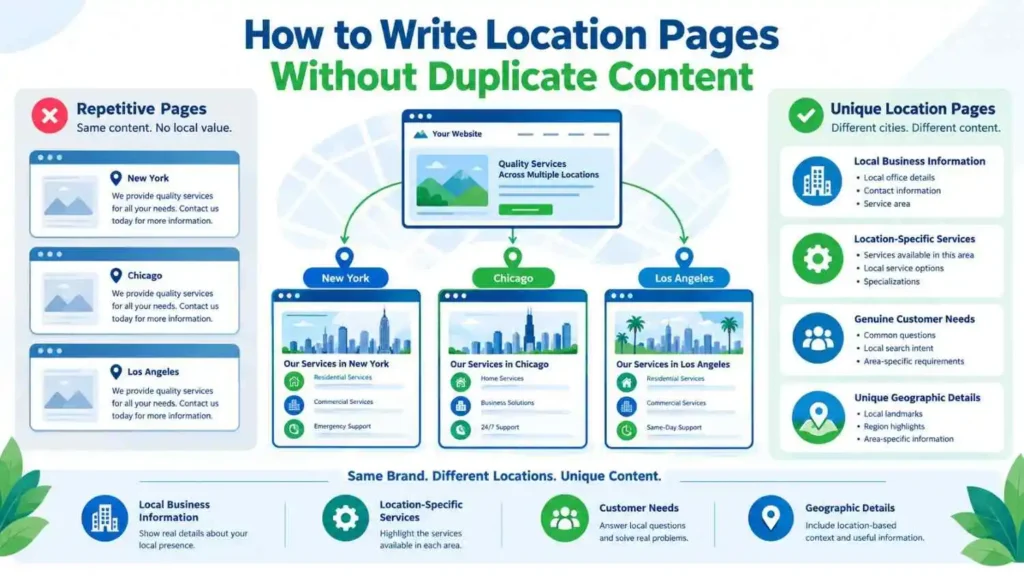
Location pages help businesses connect with customers in different cities, regions, and service areas. However, publishing several pages with nearly identical content can make those pages less useful. How to Write Location Pages Without Duplicate Content is an important question for businesses managing multiple locations or targeting different geographic markets.
The solution is not to rewrite every sentence just to make pages look different. Instead, each page should provide useful information about its specific location. A reusable template can support consistency, while local research, genuine business details, and relevant customer information make every page valuable.
This guide explains how to plan, write, optimize, and audit location pages without creating repetitive or low-value content. It also covers internal linking, structured data, content templates, and practical examples.
What Are Location Pages and Why Do Businesses Need Them?
A location page is a website page created to explain a business’s presence, services, or operations in a particular geographic area. It helps visitors understand what the business offers in that location and how they can access its services.
For example, a company operating in Muscat, Sohar, and Salalah may create a separate page for each city. Each page can explain the services available, relevant business information, and how customers in that area can get in touch.
Location pages can support local SEO by connecting a business’s services with geographic search intent. However, creating a page for every city does not automatically improve search visibility.
What Is a Location Page in Local SEO?
In local SEO, location pages provide information that connects a business with a particular place. They may target searches such as “local SEO expert in Muscat” or “web design services in Sohar.”
A useful location page should answer questions that matter to people in that area. These may include:
- Which services are available in this location?
- Does the business operate in this area?
- How can customers contact the business?
- What makes the service relevant to local customers?
- Are there location-specific projects or examples?
The page should provide meaningful information instead of simply inserting a city name into a generic service description.
When Should a Business Create a Separate Location Page?
Create a separate page when a business has a genuine presence, service operation, or meaningful offering in a particular area.
A physical branch may justify its own page because it has a unique address, opening hours, staff, and customer information. A service-area business may also need location pages when it genuinely serves different areas and can provide useful details about each one.
However, a separate page is not always necessary for every nearby town. If the business has nothing meaningful to say about a location, creating another page may add little value.
Why Duplicate Content Becomes a Problem on Location Pages
Duplicate content becomes a concern when multiple pages provide substantially similar information without giving visitors a clear reason to visit each one.
Consider a business with ten city pages. If every page uses the same introduction, service descriptions, benefits, and FAQs, changing only the city name does not create meaningful differentiation.
Search engines may struggle to understand which page best satisfies a particular query. Visitors may also find it difficult to identify what is actually different about the business’s offering in each location.
How Similar Location Pages Are Created
Many businesses create repetitive location pages because they use templates without adding location-specific information.
Common examples include:
- Replacing one city name with another throughout the same article.
- Publishing identical service descriptions across every location.
- Using the same introduction and conclusion on all pages.
- Repeating generic claims about local expertise.
- Copying the same FAQs without considering local customer needs.
- Publishing pages for locations where the business has no meaningful service information.
Templates are not inherently problematic. The issue is publishing pages that offer almost nothing unique or useful.
Duplicate Content vs. Doorway Pages: Understand the Difference
Duplicate content and doorway pages are related SEO concerns, but they are not identical.
Duplicate content refers to substantially similar content appearing across multiple URLs. It can happen for several reasons, including product variations, URL parameters, and location page templates.
Doorway abuse is a more specific concern under Google’s spam policies. It involves creating pages for similar search queries or locations that funnel visitors toward the same destination without providing meaningful value.
For example, creating dozens of nearly identical city pages that all send visitors to one generic contact page may create doorway page concerns.
Google’s spam policies explain doorway abuse and scaled content abuse. Businesses should review these policies before publishing large groups of location pages.
How Thin and Repetitive Pages Affect Website Quality
A thin page does not provide enough useful information to satisfy its intended audience. It may contain a few generic paragraphs, a service list, and a contact button.
Repetitive pages can also create a poor user experience. Visitors may land on several pages and find the same information with different city names.
This does not mean Google automatically penalizes every website containing similar text. Instead, businesses should focus on whether each page serves a distinct purpose and provides real value.
How to Write Location Pages Without Duplicate Content: Start With Local Research
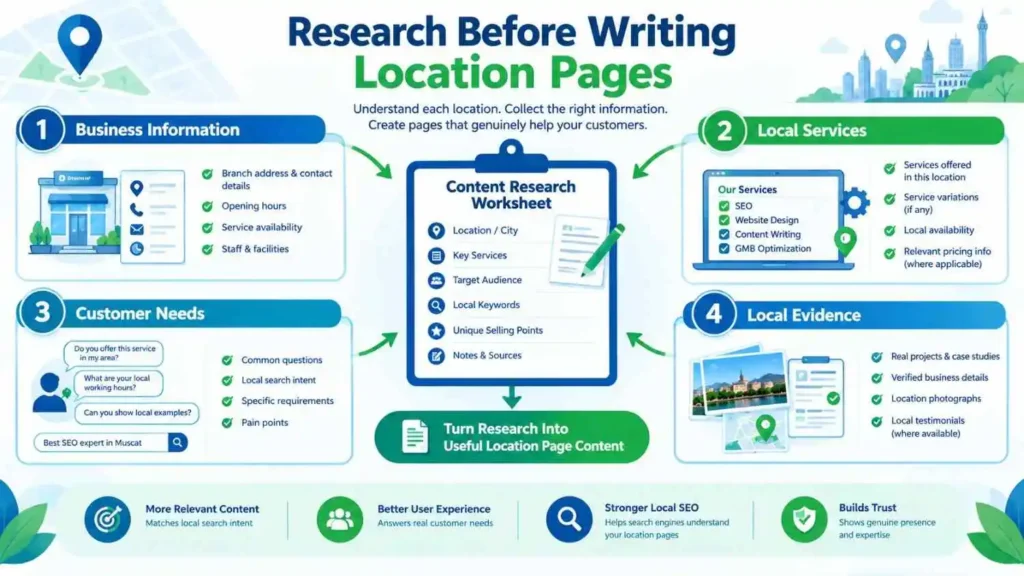
Local research should happen before writing. It helps identify what makes each location different and what information visitors need.
Rather than beginning with a copied template, collect information about the business, its services, and the customers in each area.
Research Each Location Before Writing
Start by understanding the location and its relationship with the business.
Research questions may include:
- What services does the business provide in this area?
- Does it have a physical branch or serve customers remotely?
- Which customer groups are relevant to this location?
- Are there local projects, clients, or service examples?
- What questions do customers commonly ask?
- Are there meaningful differences in service availability?
Use reliable sources to gather information. These may include business records, staff interviews, customer questions, project details, and genuine operational information.
Local research should not become an exercise in collecting random landmarks or neighborhood names. Include geographic information only when it helps visitors understand the service.
Collect Genuine Business Information for Every Location
Business information is often the strongest starting point for unique content.
For a physical location, collect:
- Verified business address.
- Opening hours.
- Contact details.
- Available services.
- Local staff or branch information.
- Relevant photographs.
- Accessibility or parking details, where applicable.
For a service-area business, collect different information. This may include service availability, coverage boundaries, travel arrangements, and the types of work offered in that area.
Do not invent local offices, customer testimonials, projects, or addresses to make pages appear different. Every factual claim should reflect the actual business.
Build a Location-Specific Content Research Sheet
A research sheet makes the writing process easier when managing several pages.
Create a separate record for every target location. Include the information that will help writers develop unique sections.
| Research field | Example information |
| Location name | Muscat |
| Business presence | Service-area coverage |
| Available services | Local SEO, website SEO |
| Customer needs | Local search visibility |
| Local evidence | Verified projects or experience |
| Contact method | Website contact form |
| Geographic information | Relevant service coverage |
| Unique FAQs | Questions from local customers |
This sheet also helps identify missing information. If two locations have exactly the same research details, investigate whether separate pages are necessary.
Build a Reusable Location Page Template Without Copying Content
A template gives writers a consistent structure. It also helps maintain brand voice, page quality, and essential business information.
However, the template should provide a framework rather than a complete article that gets duplicated across locations.
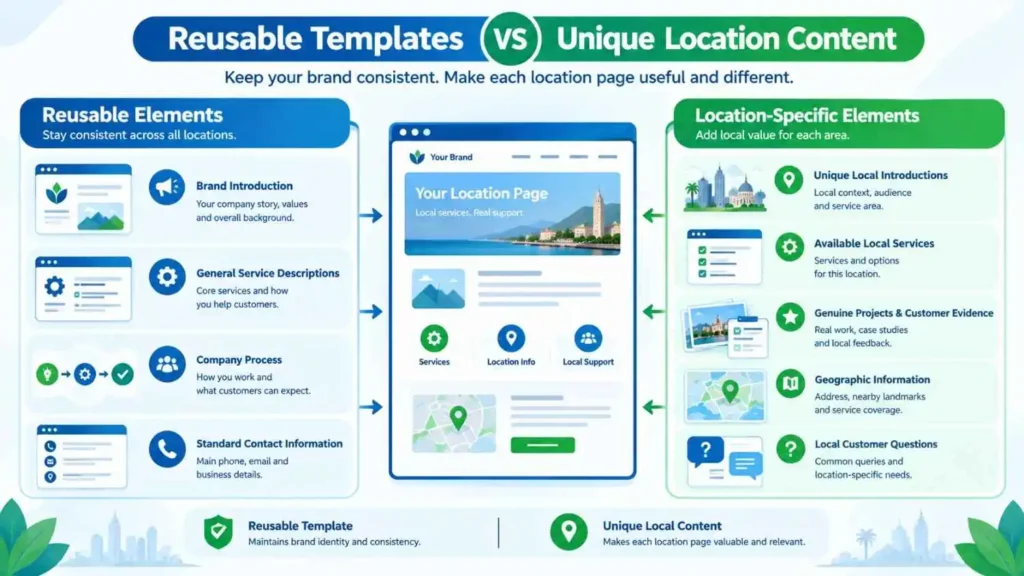
Which Location Page Elements Can Remain Consistent?
Some elements can remain similar because they represent the business rather than a particular location.
These may include:
- Brand introduction.
- General company background.
- Core service explanations.
- Standard contact information.
- General service process.
- Brand policies and guarantees, when accurate.
For example, a company may use the same explanation of its website design process across multiple location pages. There is no need to rewrite an accurate explanation simply to make it different.
However, the surrounding content should explain how that service applies to each location.
Which Sections Must Be Location-Specific?
Certain sections should reflect the actual location and customer requirements.
These may include:
- Introduction to the local service offering.
- Location-specific service availability.
- Local projects or customer examples.
- Relevant geographic coverage.
- Local contact and branch information.
- Customer questions related to that area.
Not every page needs every possible section. Choose sections according to available evidence and visitor needs.
Create a Content Differentiation Matrix
A content differentiation matrix helps writers separate reusable information from location-specific information.
| Page element | Reusable or unique? | Writing approach |
| Company introduction | Reusable | Keep accurate brand information |
| Main service explanation | Mostly reusable | Explain relevant local application |
| Location introduction | Unique | Research each area |
| Service availability | Unique | Confirm actual coverage |
| Local projects | Unique | Use verified examples |
| Contact information | Depends | Use branch-specific details where applicable |
| FAQs | Mixed | Keep general questions where useful; add relevant local questions |
| Conclusion | Mostly unique | Summarize the local offering |
This matrix helps prevent unnecessary rewriting while ensuring that every page has a clear purpose.
How to Write Location Pages Without Duplicate Content Using Unique Sections
The strongest location pages contain information that helps visitors understand the business in their specific area.
Writers should prioritize useful differences over superficial wording changes.
Write a Different Introduction for Every Location
The introduction should immediately explain the relationship between the business and the target location.
Avoid using the same paragraph and replacing only the city name.
For example, a generic introduction might say:
“Looking for professional SEO services in Muscat? Our team provides reliable SEO solutions to help businesses grow online.”
The same paragraph could be published for Sohar by changing one word. It does not explain what is different about the service in either location.
A more useful introduction would identify the actual service arrangement, relevant customer needs, and available support.
For example:
“Businesses in Muscat can access our local SEO services for improving their online visibility and managing their local search presence. We help companies review their website structure, Google Business Profile information, and location-focused content based on their business requirements.”
This example is more informative because it explains the service rather than relying only on a location keyword.
Add Local Services, Projects and Customer Evidence
Local evidence can make a location page more useful and credible.
Depending on the business, this may include:
- Completed projects in the area.
- Verified customer feedback.
- Local case studies.
- Relevant photographs.
- Branch-specific service details.
- Staff experience connected with the location.
For example, a contractor may explain a completed renovation project in a particular city. A marketing agency may discuss a verified campaign for a local business, provided it has permission to share the details.
Never create fictional case studies or customer reviews to make pages appear unique.
If the business has no local projects or testimonials, do not manufacture them. Use other genuine information that helps customers understand the service.
Include Local Directions and Useful Geographic Information
Physical branches should provide accurate directions and practical visitor information.
Useful details may include:
- Full address.
- Nearby recognizable landmarks.
- Parking information.
- Public transport options.
- Building or floor details.
- Opening hours.
For service-area businesses, explain the areas covered and any relevant service arrangements.
Avoid adding unrelated landmark names simply to increase geographic keyword coverage. Geographic information should help visitors make practical decisions.
Answer Questions That Matter to Local Customers
Customer questions can create useful differences between location pages.
For example, customers in one area may ask about appointment availability, while another group may need information about travel arrangements or service coverage.
Collect questions from actual customer conversations, sales enquiries, support requests, and staff feedback.
A shared FAQ can remain on multiple pages when the answer is genuinely relevant everywhere. However, do not repeat ten identical questions on every location page just to fill space.
Before and After: Turn Duplicate Location Content Into Unique Copy
A before-and-after example makes the difference between superficial rewriting and useful content clearer.
Consider a fictional business offering website design services in two cities.
Example of Repetitive Location Page Content
Muscat page:
“Are you looking for the best website design services in Muscat? We provide professional website design solutions for businesses in Muscat. Contact us today for reliable website design services.”
Sohar page:
“Are you looking for the best website design services in Sohar? We provide professional website design solutions for businesses in Sohar. Contact us today for reliable website design services.”
Both pages use almost identical information. Only the city name changes.
Example of Improved Location-Specific Content
Muscat page:
“Businesses in Muscat can work with us to plan and develop websites that support their services, products, and customer enquiries. Our website design process considers each company’s goals, required features, and content structure before development begins.”
Sohar page:
“Companies in Sohar can request website design support for building or improving their online presence. We review the business requirements, website functionality, and content needs before recommending a suitable design approach.”
These examples still describe the same core service. However, the wording and emphasis are different.
More importantly, the final versions should be supported by genuine information about the business and its local operations.
What Makes the Improved Version More Useful?
The improved examples avoid repeating the same opening sentence and service description.
However, different wording alone is not enough. A truly useful page should also include verified local information, relevant service details, and answers to customer questions.
Writers should ask one important question before publishing:
Would a visitor learn something useful from this page that they would not learn from another location page?
If the answer is no, the page needs more research or a different purpose.
Optimize Location Pages for Local SEO Without Keyword Stuffing
Unique content is important, but location pages also need clear SEO signals. These help search engines understand the topic, purpose, and geographic relevance of each URL.
Optimization should support the page rather than make the writing unnatural.
Use Location Keywords Naturally
Start with one primary search topic for each page.
For example:
- Local SEO services in Muscat.
- Website design services in Sohar.
- GBP optimization in Salalah.
Use the location and service terms where they make sense, such as:
- Page title.
- Main heading.
- Introduction.
- Relevant subheadings.
- Image ALT text, when descriptive.
- Internal link anchor text, where appropriate.
Avoid inserting the city name into every paragraph. Repetition does not make a page more useful.
Write Unique SEO Titles and Meta Descriptions
Each location page should have a title and meta description that accurately describe its content.
For example:
Muscat SEO title: Local SEO Services in Muscat | Business Visibility Support
Sohar SEO title: Local SEO Services in Sohar | Website and Maps Guidance
The descriptions should also reflect the actual page. Avoid creating dozens of titles that differ only by one city name while the underlying content remains identical.
Use Descriptive URLs and Image ALT Text
Use simple URLs that clearly identify the page’s purpose.
For example:
/service-areas/muscat/
/service-areas/sohar/
If a page includes a genuine location photograph, write descriptive ALT text that explains the image.
For example:
“Business office entrance in Muscat.”
Do not use ALT text as a place to repeat several location keywords.
Add Appropriate LocalBusiness Structured Data
Structured data can help search engines understand business information. Depending on the business, relevant details may include its name, address, telephone number, opening hours, and location.
Use the appropriate Google LocalBusiness structured data documentation when implementing markup.
Do not add a fictional address or create separate business entities for locations that do not exist. The structured data should accurately represent the real business.
Also remember that valid structured data does not guarantee higher rankings or rich results.
Create a Strong Internal Linking Structure for Multiple Location Pages
Internal links help visitors navigate between related pages. They also help search engines discover the website’s content and understand relationships between pages.
A clear structure becomes especially important when a website has several service-area pages.
Connect Location Pages With Relevant Service Pages
Link location pages to relevant service pages when the connection helps visitors.
For example, a Muscat location page discussing local SEO can link to the main Local SEO service page.
A page discussing technical website improvements may link to a relevant website SEO service.
Use descriptive anchor text that explains the destination. Avoid repeating exact-match keywords in every internal link.
Build a Locations Hub Page
A locations hub page provides a central place where visitors can find the areas served by a business.
It can organize location pages by:
- Country.
- Region.
- City.
- Service area.
For example, a website may use its Service Areas page as a central directory. Visitors can then navigate to individual location pages such as Muscat.
Keep the hierarchy simple. Every location page should be reachable through relevant navigation or contextual internal links.
How to Audit Existing Location Pages for Duplicate Content
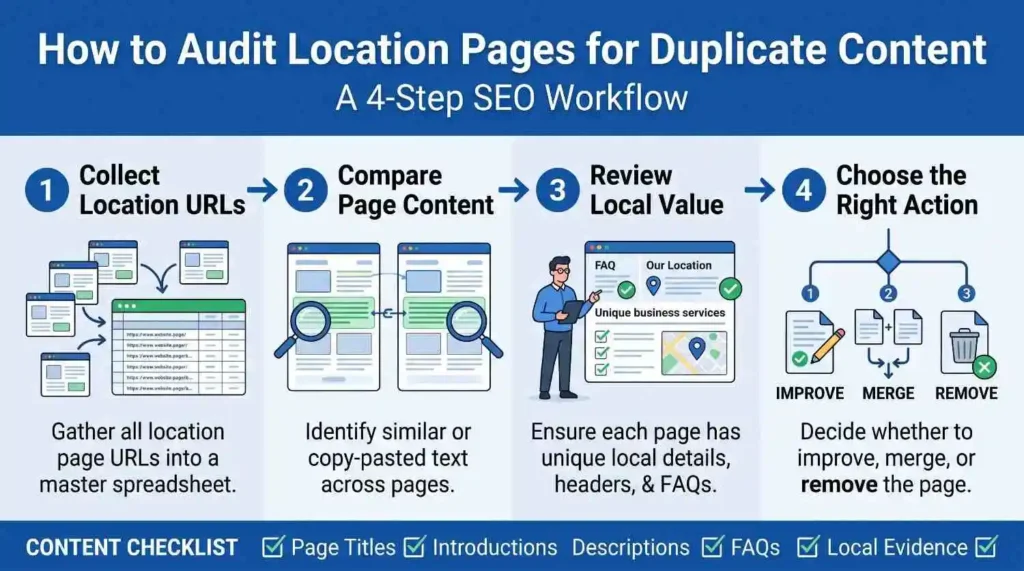
A content audit helps identify pages that need improvement, consolidation, or removal.
Do not assume that every similar paragraph is a problem. Review each page according to its purpose and usefulness.
Compare Similar Pages Across Different Locations
Start by collecting all location URLs into a spreadsheet.
Compare important page elements:
- H1 headings.
- Introductions.
- Service descriptions.
- Main content sections.
- FAQs.
- Title tags.
- Meta descriptions.
- Contact information.
- Local evidence.
Look for sections that repeat without adding location-specific value.
A page comparison should also consider whether the business genuinely serves that area and whether the page answers a distinct search need.
Use SEO Tools to Find Repetitive Content
SEO crawlers and content analysis tools can help identify similar pages.
Useful checks include:
- Similar title tags.
- Duplicate or near-duplicate descriptions.
- Repeated headings.
- Similar body content.
- Missing or weak location information.
- Orphaned location pages.
- Incorrect canonical tags.
A tool can identify similarity, but it cannot always determine whether two pages serve different customer needs. Human review remains important.
Decide Whether to Improve, Merge or Remove Weak Pages
After reviewing the pages, choose an appropriate action.
Improve: Keep a page when the business genuinely serves the location and can add useful information.
Merge: Combine pages when they target overlapping areas and provide substantially the same information. Redirect outdated URLs to the most relevant surviving page when appropriate.
Remove: Consider removing pages that have no useful purpose, no genuine service relevance, and no meaningful audience value. Review backlinks, traffic, and other dependencies before removal.
If multiple URLs contain similar content for technical reasons, review Google’s canonicalization guidance. Canonical tags can help communicate preferred URLs, but they are not a replacement for creating useful content.
How to Manage Location Page Content at Scale
Managing location pages becomes more complicated as a business expands. A documented workflow helps maintain quality without making every page unnecessarily different.
Create a Standardized Location Page Content Brief
Give writers a consistent brief for every location.
The brief should include:
- Target location.
- Primary search intent.
- Relevant services.
- Verified business information.
- Local customer needs.
- Available projects or evidence.
- Required internal links.
- Relevant external sources.
- Unique questions to address.
This makes it easier to identify missing information before writing begins.
Establish a Consistent Editorial Review Process
Every location page should pass through a review process before publication.
Check the following:
- Does the business genuinely serve this location?
- Does the page explain the available services accurately?
- Does it contain useful location-specific information?
- Are local claims supported by evidence?
- Are the title and meta description accurate?
- Are internal and external links relevant?
- Does the page provide value beyond changing the city name?
A review checklist can reduce repetitive content and prevent inaccurate local claims.
Use AI for Assistance Without Publishing Mass-Produced Pages
AI can support research organization, content briefs, editing, and initial drafts. However, it should not replace genuine local information.
For example, AI can help organize verified information into a consistent page structure. It can also identify repeated paragraphs across several drafts.
However, generating hundreds of city pages by changing location names is not a sustainable content strategy.
Google’s guidance on creating helpful, reliable, people-first content emphasizes content created to benefit people. Businesses should review AI-assisted content for accuracy, originality, and practical value before publication.
Conclusion
Creating multiple location pages requires more than changing city names and repeating service descriptions. Each page should explain the business’s genuine relationship with its target location and provide useful information for local visitors.
Start with location-specific research. Then use a reusable template, add verified local details, and optimize each page naturally. Finally, audit existing pages and improve, merge, or remove those that offer little value.
The best approach is not to make every sentence different. It is to make every location page useful for the people who visit it.
FAQs
1. How Do You Write Unique Content for Location Pages?
Start by researching each location and collecting verified business information. Include relevant services, local customer needs, genuine projects, and practical details. Use a consistent template for general information, but write location-specific introductions and sections. Avoid changing only city names because that does not provide meaningful differentiation.
2. Does Google Penalize Duplicate Location Pages?
Google does not automatically penalize every website containing similar content. However, pages created mainly to manipulate search results or funnel visitors without providing distinct value may violate its spam policies. Businesses should focus on helpful information and avoid doorway page practices.
3. How Much Unique Content Should a Location Page Have?
There is no fixed word count that guarantees a successful location page. The content should cover the information visitors need to understand the business and its services in that area. A shorter page with accurate, useful details can be better than a long page filled with generic paragraphs.
4. Can Multiple Location Pages Use the Same Template?
Yes. Businesses can use the same template to maintain consistency across location pages. General company information and service explanations may remain similar. However, each page should include relevant location-specific details, accurate service information, and useful content for its intended audience.
5. What Should Every Location Page Include?
A location page should include a clear introduction, relevant services, accurate business information, and useful contact details. Depending on the business, it may also include directions, service coverage, local projects, photographs, and customer FAQs. Only include information that is accurate and relevant.
6. How Do You Avoid Creating Doorway Pages?
Create location pages only when they serve a genuine purpose. Each page should provide useful information about the business’s presence or services in that area. Avoid publishing large groups of nearly identical pages that send visitors to the same generic destination without offering meaningful local value.
7. Should Every City Have Its Own Landing Page?
No. A separate page is appropriate when the business has a genuine service relationship with that city and can provide useful information. If several nearby cities have identical service details and no meaningful differences, one broader service-area page may be more appropriate.
8. How Do You Optimize Location Pages for Local SEO?
Use relevant location keywords naturally in titles, headings, introductions, and descriptive URLs. Include accurate business information, useful local content, and relevant internal links. Add appropriate structured data when applicable. Avoid keyword stuffing and unsupported local claims.
9. Can Location Pages Have the Same FAQs?
Yes, when the questions and answers are genuinely relevant to every location. General questions about pricing, services, or business processes may be shared. However, location-specific questions should address actual differences in service availability, coverage, or customer needs.
10. How Often Should You Update Location Pages?
Review location pages whenever business information changes, such as services, contact details, addresses, or operating hours. You can also conduct periodic content audits to identify outdated information and weak pages. Update content when there is something useful and accurate to add rather than changing text without a clear reason.