Topic Clusters and Pillar Pages: A Practical SEO Guide
Topic Clusters and Pillar Pages help organize website content around a central subject and its related subtopics. Instead of publishing disconnected articles, you create a clear structure that…

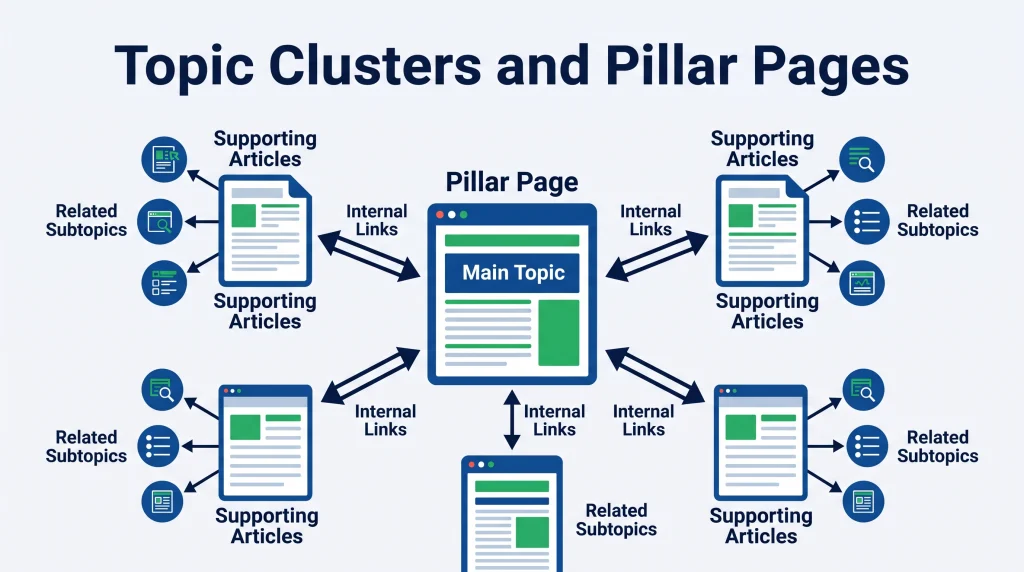
Topic Clusters and Pillar Pages help organize website content around a central subject and its related subtopics. Instead of publishing disconnected articles, you create a clear structure that connects related pages through relevant internal links. This approach makes content easier for visitors to navigate and gives search engines useful context about how your pages relate to one another.
However, creating a successful cluster requires more than choosing a broad keyword and writing several articles. You need to understand search intent, group keywords carefully, assign topics to the right URLs, and build useful connections between pages.
This guide explains how to plan, create, connect, and measure a content cluster. It also covers common mistakes and a practical workflow you can adapt to an existing or new website.
What Are Topic Clusters and Pillar Pages?
A topic cluster is a group of related web pages that cover different aspects of a broader subject. A pillar page acts as the central resource, while supporting pages answer more specific questions about that subject.
Together, these pages create an organized content structure. Readers can start with a broad overview and follow links to find more detailed information.
What Is a Pillar Page?
A pillar page is a central page that introduces a broad topic and links to more detailed pages covering its main subtopics.
For example, a website about SEO might publish a pillar page about technical SEO. It could introduce crawling, indexing, site speed, XML sitemaps, canonical URLs, and structured data.
The pillar page should explain how these areas fit into the broader subject. It does not need to answer every technical question in full. Instead, it provides enough context for readers to understand the subject and directs them to supporting resources when they need more detail.
A useful pillar page should:
- Cover the main subject from a broad perspective.
- Organize important subtopics into clear sections.
- Link to relevant supporting pages.
- Help readers find information without unnecessary navigation.
- Stay focused on the needs and questions of its intended audience.
What Is a Topic Cluster?
A topic cluster is the collection of supporting pages built around the central subject. Each supporting page focuses on a narrower topic and addresses a distinct user need.
For a technical SEO cluster, supporting articles might cover:
- How to create and submit an XML sitemap.
- How to identify crawl errors.
- How canonical tags work.
- How to improve website loading performance.
- How to find and fix indexing issues.
Each article should provide enough depth to be useful on its own. It should also link to the pillar page when that broader resource helps readers understand the subject.
How Topic Clusters and Pillar Pages Work Together
The pillar page and supporting articles serve different purposes, but they should work as one connected content system. The pillar page introduces the subject, while the supporting pages answer specific questions in greater detail.
Understanding the Hub-and-Spoke Content Model
A common way to understand this structure is the hub-and-spoke model.
The pillar page acts as the hub. Supporting articles act as spokes that connect to the central resource. Related supporting pages may also link to one another when their subjects overlap naturally.
Consider a website that publishes content about keyword research.
Its pillar page might be titled “Keyword Research Guide.” Supporting pages could cover search intent, keyword difficulty, long-tail keywords, competitor keyword analysis, and keyword mapping.
A reader who wants a complete introduction can use the central guide. Someone researching search intent can visit the specific supporting article. Both pages serve different needs while remaining connected.
How Internal Links Connect the Structure
Internal links help readers move between related pages. They also provide search engines with crawlable paths to discover other pages and understand their context.
Google recommends using crawlable links and descriptive anchor text. The anchor should give readers a reasonable idea of what they will find after clicking. See Google’s guidance on crawlable links and anchor text.
Google for Developers
For example, a supporting article about search intent could link to the main keyword research guide using the anchor text “complete keyword research process.” The link should appear where the broader resource adds value, not simply because the pages belong to the same cluster.
Pillar Pages vs. Topic Cluster Pages: Key Differences
Pillar pages and supporting cluster pages are connected, but they have different content roles. Understanding those differences helps prevent overlap and keeps each URL focused.
| Feature | Pillar Page | Supporting Cluster Page |
| Main purpose | Introduces a broad subject | Explains a specific subtopic |
| Topic coverage | Wide and introductory | Narrow and detailed |
| Target query | Broad topic or head term | Specific query or related intent |
| Content structure | Multiple major sections | Focused sections around one need |
| Internal links | Links to relevant supporting pages | Links to the pillar and related pages |
| Reader need | Understand the overall subject | Solve a particular problem or question |
A pillar page should not become a collection of short summaries with no practical value. Likewise, a supporting page should not repeat the entire pillar page.
Each URL needs a clear reason to exist. If two pages answer essentially the same question, review whether they should be combined or differentiated by intent.
Why Topic Clusters and Pillar Pages Matter for SEO
A well-planned content structure can make a website easier to explore and maintain. It can also help search engines discover related content through internal links and understand the subject of individual pages.
However, this structure does not guarantee higher rankings. Google explains that SEO practices help search engines crawl, index, and understand content, but there are no automatic methods for securing a first-place result. Read the Google SEO Starter Guide for its broader recommendations.
Google for Developers
Improve Website Content Organization
A cluster gives related articles a defined place within your website. Instead of publishing content whenever a keyword idea appears, you can plan how each page supports a larger subject.
This makes your editorial calendar easier to manage. It also helps you identify missing topics, overlapping articles, and pages that need stronger internal links.
For more context on connected subjects and their coverage, see the guide to building topical authority.
Support Topical Coverage and Search Relevance
A collection of useful pages can cover different questions within a subject. This gives readers more ways to find relevant information and helps each page provide a focused answer.
The goal is not to publish as many articles as possible. It is to cover the important subtopics that matter to your audience. A small, well-researched cluster can be more useful than dozens of thin pages.
Improve Content Discovery Through Internal Links
A visitor may land on a supporting article from search results without seeing the pillar page first. Relevant internal links give that visitor a path to explore the broader subject.
The same links can help crawlers discover other pages. Their value depends on clear HTML links, useful destinations, and descriptive anchor text, rather than the number of links alone.
How to Create a Topic Cluster Strategy
Start by choosing a subject that fits your website and audience. Then identify the questions people ask about it and decide which topics deserve separate pages.
Choose a Relevant Core Topic
Choose a broad subject that connects with your website’s purpose, services, products, or audience.
A suitable core topic should have enough meaningful subtopics to support several useful pages. It should also be relevant to the people you want to reach.
For example, a website focused on small business marketing might build a cluster around local SEO. A general entertainment website may have little reason to create the same cluster unless it serves a relevant audience.
Before choosing a topic, consider:
- Does it match the website’s main subject?
- Does the intended audience need information about it?
- Can it support several distinct subtopics?
- Can your website provide useful, accurate coverage?
- Does it overlap with an existing content section?
You can use a topical map planning service as a reference when organizing broad subjects and related content opportunities.
Identify Important Subtopics
List the questions, tasks, problems, and concepts connected to your core topic. Use keyword research, search suggestions, competitor analysis, customer questions, and existing website content to build the list.
Do not treat every keyword variation as a separate article idea. Several phrases may express the same need. Group them together when one page can answer them clearly.
For example, “what is local SEO,” “local SEO meaning,” and “how local SEO works” may share a similar informational intent. They may belong on one page rather than three separate URLs.
How to Research and Map Keywords for Topic Clusters
Keyword research helps you understand how people search for information. Keyword mapping turns that research into a plan for individual pages.
Find Primary and Supporting Keywords
Begin with one primary keyword for the central page. Then collect supporting keywords related to the subtopics.
You can use keyword research tools, search engine suggestions, competitor pages, forums, and customer conversations. Look beyond search volume. A keyword’s relevance and the question behind it matter just as much.
Create a working spreadsheet with columns such as:
- Topic or subtopic.
- Primary keyword.
- Supporting keywords.
- Search intent.
- Proposed page title.
- Existing or new URL.
- Priority and content status.
This makes it easier to compare topics and identify gaps before writing.
Group Keywords by Search Intent
Search intent describes what a person wants to achieve through a search. Common categories include informational, commercial, transactional, and navigational intent.
Review the search results for your target phrases. If several phrases return similar page types and answers, they may belong on the same URL. If the results satisfy different needs, separate pages may be more appropriate.
For example, “what is keyword research” suggests an informational need. “Best keyword research tools” may indicate comparison or commercial investigation. Combining both into one page could make the content less focused.
Assign Keywords to Individual URLs
Give each planned page one clear primary topic and a defined purpose. Supporting keywords can be included naturally when they fit the page.
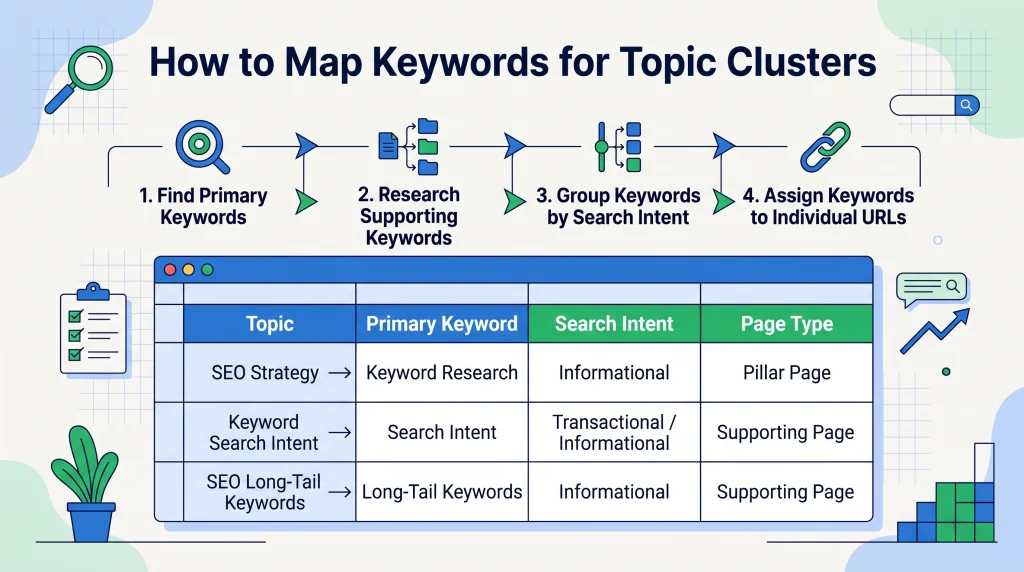
A simple mapping example might look like this:
| Page Type | Page Topic | Primary Keyword |
| Pillar | Keyword Research Guide | keyword research |
| Supporting | Understanding Search Intent | search intent |
| Supporting | Finding Long-Tail Keywords | long-tail keywords |
| Supporting | Keyword Mapping Process | keyword mapping |
| Supporting | Competitor Keyword Research | competitor keyword analysis |
Before creating a new URL, check whether an existing page already targets the same intent. This step can prevent unnecessary duplication and keyword cannibalization.
How to Create an Effective Pillar Page
A strong pillar page gives readers a clear introduction to the subject and helps them reach more detailed resources. Its structure should reflect the way the audience understands and explores the topic.
Build a Logical Content Structure
Organize the page into major sections that represent the subject’s main areas. Use descriptive headings and arrange them in a sequence that makes sense to readers.
For example, a keyword research pillar page could explain the process, tools, search intent, keyword selection, mapping, and measurement. Each section should answer a useful question and connect with the next step.
Use a clear heading hierarchy. A single H1 should describe the page, while H2 and H3 headings should organize its sections and subsections.
Cover the Main Topic Without Overloading the Page
A pillar page should provide a useful overview, not an exhaustive explanation of every related concept.
Explain the central ideas, include practical examples, and link to supporting pages for deeper guidance. Avoid adding unrelated sections simply to increase word count.
Review the page from a reader’s perspective. Can someone understand the subject, identify the next step, and find more detailed information without struggling through repeated explanations?
How to Create Supporting Cluster Content
Supporting content should answer specific questions that the pillar page introduces. Each article needs a distinct purpose and enough detail to satisfy its intended audience.
Develop Focused Articles for Each Subtopic
Create one page for each subtopic that deserves separate coverage. Give every article a clear title, target query, search intent, and outline.
For example, a supporting page about long-tail keywords could explain what they are, how to find them, how to evaluate them, and how to use them in a content plan.
Avoid creating separate pages for minor keyword variations when the same article can answer them naturally. More URLs do not automatically create better coverage.
Maintain Consistency Across Cluster Content
Use consistent terminology, accurate information, and a logical internal linking approach across the cluster. Each article should match the expectations set by its title and search intent.
You should also review older content before commissioning new articles. Existing pages may already cover some of the planned subtopics. Updating and connecting those pages can be more useful than publishing duplicates.
Google’s people-first content guidance encourages original, useful information that serves readers rather than content made mainly to manipulate rankings.
Google for Developers
How to Build an Effective Internal Linking Structure
Internal linking connects the central page with its supporting resources. A clear structure helps visitors navigate the website and gives search engines crawlable routes between related pages.
Link Cluster Pages to the Pillar Page
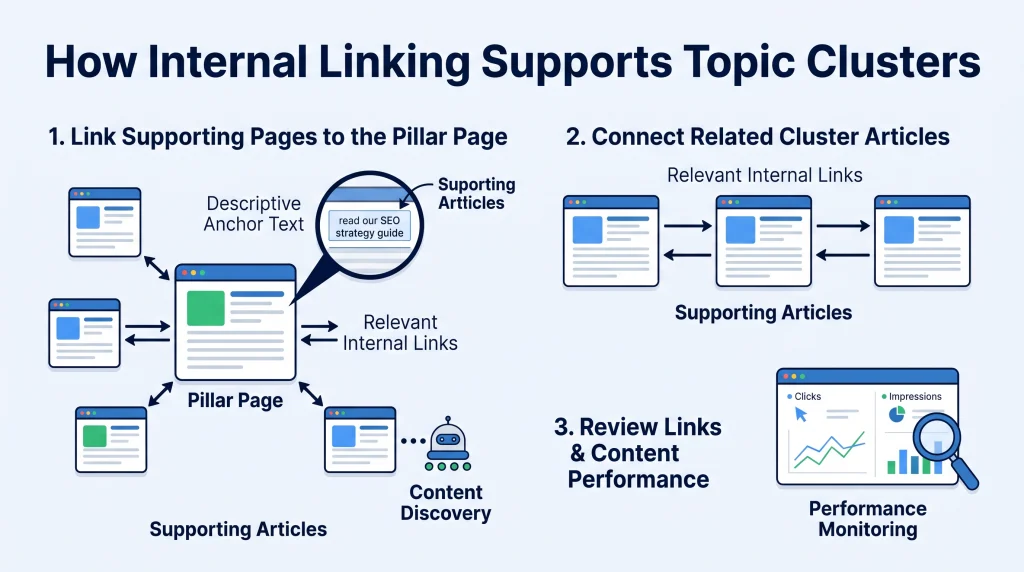
Add a relevant link from each supporting article to the pillar page. Place it in a paragraph where the broader guide offers useful context.
The link should use descriptive anchor text. Avoid repeating an exact-match keyword in every link if it makes the writing unnatural.
The pillar page should also link to its supporting articles from the relevant sections. This creates a useful two-way connection between the overview and detailed resources.
Connect Related Cluster Articles
Supporting pages can link to one another when the connection helps readers. For example, an article about search intent may link to keyword mapping because intent affects how keywords are assigned to URLs.
Do not link every article to every other article. Too many unrelated links can make navigation confusing and weaken the usefulness of the structure.
Review Links and Website Navigation
Check that links work, point to the intended pages, and use meaningful anchor text. Review links after URL changes, content updates, or site redesigns.
You can also connect relevant blog categories and navigation elements to help visitors explore related content. For more detail on the relationship between meaning and site structure, read about semantic SEO principles.
How to Audit and Measure Topic Cluster Performance
A content cluster needs regular review. An audit helps you find missing pages, outdated information, weak internal links, and overlapping content.
Review Existing Website Content
Start by collecting URLs related to the core subject. Record each page’s title, target topic, search intent, content quality, and internal links.
Then look for:
- Two or more pages targeting the same search intent.
- Important subtopics with no useful page.
- Supporting articles that do not link to the pillar.
- Outdated or inaccurate information.
- Pages with little value that may need merging or removal.
- Broken links and unclear anchor text.
Decide whether each page should stay as it is, be updated, be combined with another page, or be removed. Make decisions based on usefulness and evidence, not URL count.
Monitor Relevant SEO Metrics
Use Google Search Console to review clicks, impressions, click-through rate, average position, queries, and page-level performance. Its Performance report documentation explains how to use these metrics and dimensions.
Search Console Help
Compare the pillar page and supporting pages over consistent date ranges. Look for changes in relevant queries, organic clicks, and impressions. Analytics tools can add engagement and conversion context, depending on your measurement setup.
Do not judge the entire cluster by one ranking or one page’s traffic. A supporting page may attract a smaller audience but still answer an important question or help visitors move toward a relevant next step.
Common Topic Cluster and Pillar Page Mistakes
Some content structures look organized in a spreadsheet but provide little value to readers. Watch for these common problems:
- Choosing an irrelevant core topic: A broad subject should fit the website and its audience.
- Creating pages for every keyword variation: Similar search intents often belong on one well-developed page.
- Ignoring search intent: A page may target the right phrase but fail to answer the actual question.
- Writing shallow supporting articles: Each page should offer meaningful information, not repeat a short summary.
- Overloading the pillar page: Keep the overview useful and link to deeper explanations.
- Using forced internal links: Link only when the destination adds context or helps the reader.
- Ignoring existing content: Audit current URLs before publishing another page on the same subject.
- Expecting guaranteed rankings: A clear content structure supports organization and discovery, but it cannot promise a search position.
A useful cluster is built around the audience’s needs. The number of pages matters less than their quality, distinct purpose, and connections.
Conclusion
Topic clusters and pillar pages provide a practical way to organize related website content. Start with a relevant core subject, research its subtopics, group keywords by search intent, and assign each page a distinct purpose. Then connect the pages with useful internal links and review their performance over time.
Do not build a cluster just to increase the number of URLs on your website. Build it to help readers find accurate answers and move naturally between related resources. A focused structure, supported by useful content and regular maintenance, gives your website a stronger foundation for long-term content development.
Frequently Asked Questions
1. What Are Topic Clusters in SEO?
Topic clusters are groups of related web pages organized around one broad subject. They usually include a central pillar page and supporting articles that explain specific subtopics in greater detail.
2. What Is a Pillar Page in SEO?
A pillar page is a central resource that introduces a broad subject and links to supporting pages. It gives readers an overview and helps them find more detailed information about related topics.
3. What Is the Difference Between a Pillar Page and a Topic Cluster?
A pillar page is one central page, while a topic cluster is the complete group of related pages. The cluster includes the pillar page, supporting articles, and relevant internal links connecting them.
4. How Many Articles Should a Topic Cluster Have?
There is no fixed number of articles for every cluster. The right size depends on the subject, audience needs, and number of distinct subtopics that deserve separate coverage.
5. Do Topic Clusters Improve SEO Rankings?
Topic clusters can improve content organization and help search engines discover related pages through internal links. However, using this structure does not guarantee higher rankings or a particular search position.
6. How Do You Choose a Topic for a Pillar Page?
Choose a broad subject that matches your website’s purpose and audience. It should have enough relevant subtopics to support useful articles and address genuine questions people search for.
7. How Should Cluster Pages Link to Pillar Pages?
Supporting pages should link to the pillar page when it provides useful broader context. The pillar page should also link to relevant supporting articles using concise, descriptive anchor text.
8. Can Existing Blog Posts Be Used in Topic Clusters?
Yes. Review existing posts to identify relevant pages, overlapping topics, and content gaps. Update and connect useful articles before creating new URLs for subjects your website already covers.
9. How Do Topic Clusters Help Build Topical Authority?
A well-planned cluster can demonstrate consistent coverage of related subjects through useful, connected pages. It can strengthen the depth and organization of your content, but it does not guarantee authority or rankings.
10. How Do You Measure the Success of a Topic Cluster?
Review clicks, impressions, CTR, average position, relevant search queries, and page-level performance in Google Search Console. You can also examine engagement and conversions using suitable analytics tools.