What Is a Topical Map? Structure, SEO Benefits, Examples, and How to Create One
Learn what a topical map is, how it supports SEO content planning, and how to create one using topic research, search intent, content relationships, and internal linking.

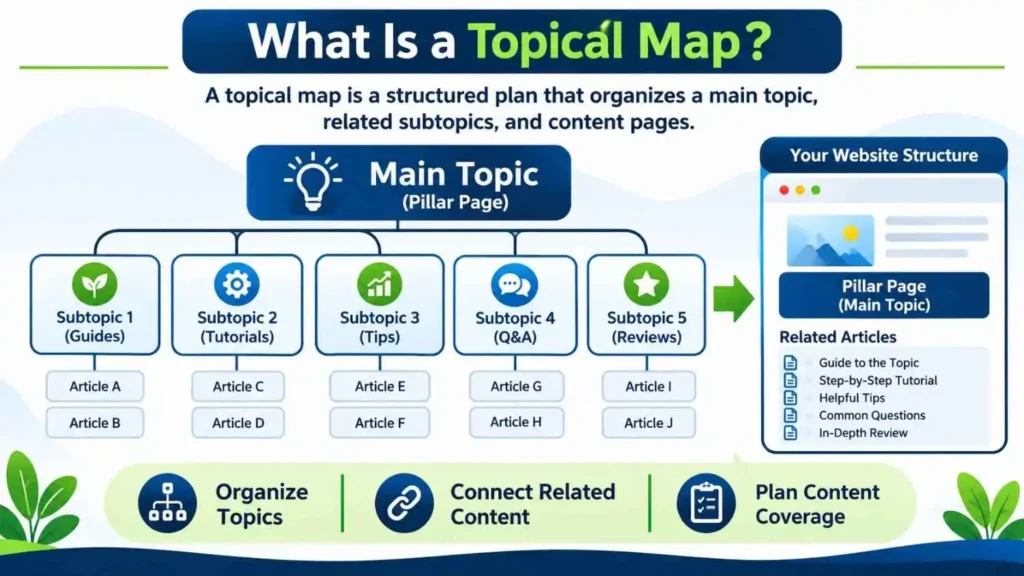
A website can publish many articles and still leave important questions unanswered. The issue may be how topics connect and serve an audience. What Is a Topical Map? It is a plan that organizes a subject into related topics, subtopics, and pages. It shows content teams what to cover and how each page fits the wider subject. This guide explains its structure, SEO value, practical use, and limits.
What Is a Topical Map? Definition and Purpose
A topical map represents the subjects a website plans to cover in a defined area. It starts with a central topic and divides it into connected subtopics, questions, entities, and content opportunities. Each page has a role within that wider subject.
A gardening website might cover soil, plant selection, watering, pruning, pests, and seasonal care. Each subject can branch into narrower questions. The map shows these relationships before pages are created or updated.
It helps a website plan coverage around audience needs and business relevance. It can reveal missing subjects and overlapping page ideas.
A subject map is a planning model, not a special file format or a Google ranking feature. Teams may build one in a spreadsheet, mind map, project management tool, or specialist SEO platform. The format matters less than the quality of the research and decisions behind it.
Why Topical Maps Matter for SEO
A well-researched map can improve the quality and consistency of an SEO content plan. It gives writers and strategists a shared view of the subject, the audience questions, and the pages needed to answer them.
It can also make editorial planning more consistent. Writers can see which questions belong together, what a page should explain, and where a reader may need a related resource. This shared view is especially useful when several people research, write, edit, and maintain content across a large website.
It also helps connect related information. Readers can move from a broad explanation to a detailed guide when the links and page structure make sense. Search engines can also discover pages through links and use link context to understand relationships. Google explains that links help it find pages and understand relevance, while descriptive anchor text gives people and search systems useful context. Google’s link best practices provide further guidance.
Google for Developers
Subject coverage may contribute to a site’s perceived expertise, but topical authority is not a public Google score that a website can calculate. A map does not guarantee rankings, indexing, traffic, or conversions. Its value is practical: it helps teams plan content that serves a subject and its audience more completely.
What Is a Topical Map? Core Components
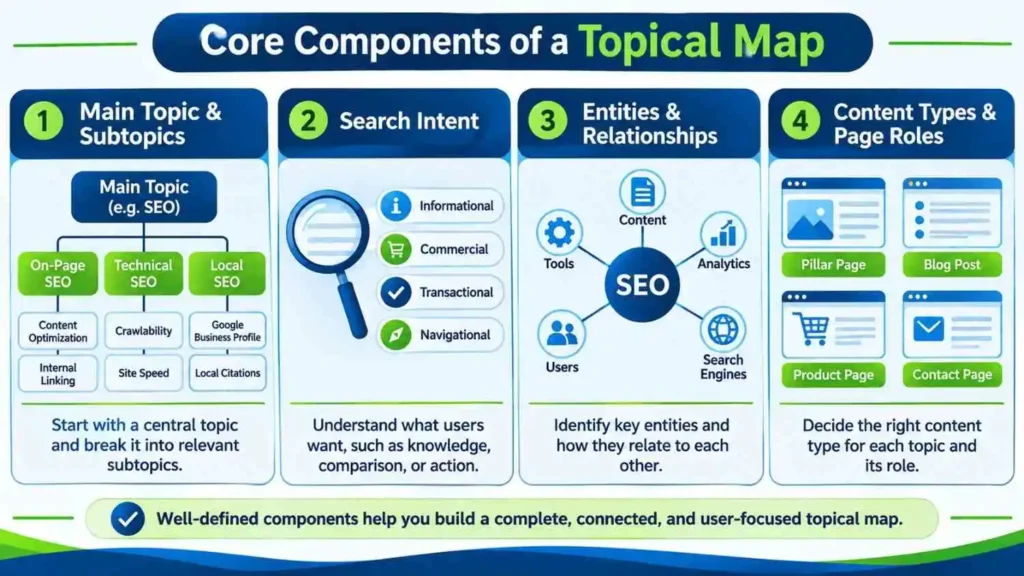
A useful map combines several layers. The central subject gives the plan direction, while the supporting layers define what to research, write, connect, and maintain.
Main Topic and Subtopics
The main topic is the broad subject that connects the planned content. It should match the website’s purpose and the audience it wants to serve. Subtopics divide that subject into meaningful areas.
A strong map records why each topic matters. It may support a key service, answer a customer concern, or explain a concept needed before purchase. Recording this reason helps teams set priorities and avoid disconnected ideas across the website.
These concept relationships also support semantic SEO by giving related ideas clear context.
Search Intent
Search intent describes what a person wants to achieve with a search. A map should identify whether a topic calls for an explanation, comparison, product page, local service page, or another format.
Informational searches seek knowledge. Commercial investigation searches compare possible solutions. Transactional searches show an intention to act or buy. Navigational searches aim to reach a known website or page.
Entities, Attributes, and Relationships
Entities are identifiable people, places, organizations, products, concepts, or things discussed within a subject. Attributes describe their characteristics. Relationships explain how they connect.
For a coffee topic, entities might include coffee beans, grinders, brewing methods, and coffee makers. Attributes could include roast level, grind size, brewing temperature, and capacity. Relationships explain which grind sizes suit particular brewing methods.
Content Types and Page Roles
A pillar page introduces a broad subject. Supporting articles answer narrower questions, while category, product, and service pages serve browsing or conversion needs. One topic may fit an existing page instead of requiring a new URL.
How a Topical Map Works in SEO
A subject map turns research into a connected content plan. It begins with a subject, groups related questions, assigns page roles, and shows how pages can support one another.
The map does not make pages rank by itself. Google must still discover, crawl, index, and evaluate each page. Its SEO Starter Guide explains that SEO helps search engines understand content and helps people find websites, but no set of suggestions guarantees a first-place result. Google’s SEO Starter Guide explains these fundamentals.
Google for Developers
Topical Map vs. Topic Clusters vs. Keyword Lists
These three methods can support content planning, but they do not describe exactly the same thing. A topical map is the broadest planning view. Topic clusters organize a group of related pages. A keyword list records search terms for research or targeting.
Topical Map vs. Topic Cluster
A topical map describes the wider subject and its connected areas. It can include dozens of themes, search intents, entities, page types, and relationships.
A cluster can be one part of a topical map. The map helps decide which clusters are needed and how they relate to the wider website.
Topical Map vs. Keyword List
A keyword list records phrases, search volume estimates, and related research data. It does not automatically show how subjects connect or which page should answer each need. A topical map adds those strategic relationships.
Which Approach Should You Use?
Use a keyword list when collecting and comparing search terms. Use topic clusters when planning a focused group of connected pages. Use a topical map when deciding the full scope and structure of a website’s content.
What Is a Topical Map? A Practical Example
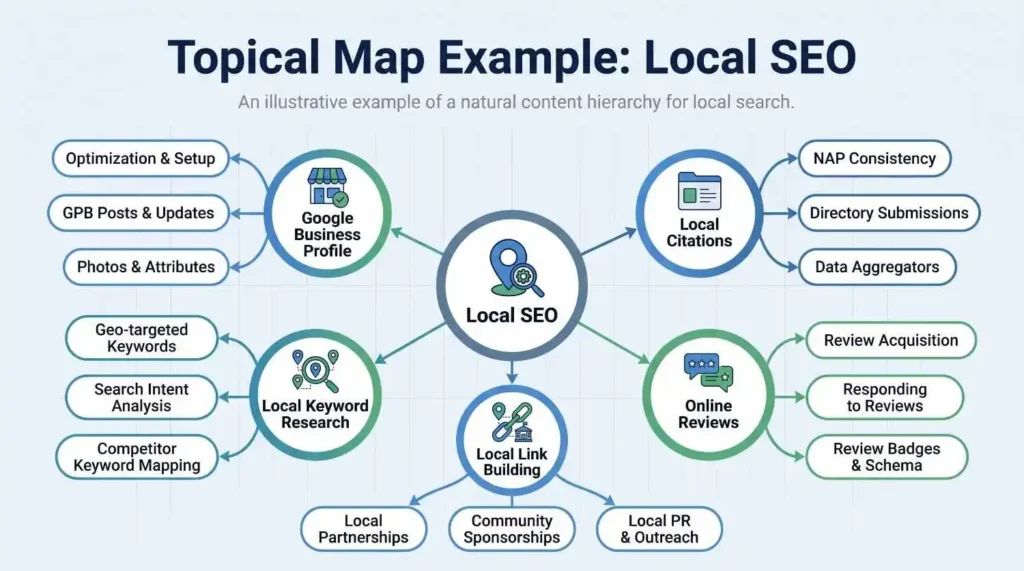
Consider a website that publishes educational content about local SEO. Its main topic is Local SEO. The map can divide that subject into several connected areas.
One area can cover Google Business Profile, with subtopics such as profile categories, business information, photos, reviews, and profile suspensions. Another area can cover local citations, including NAP consistency, directory selection, duplicate listings, and citation audits.
A third area can cover local keyword research. Its supporting topics might include service-based keywords, location modifiers, search intent, and local landing pages. Other areas could include review management, local link building, and local SEO reporting.
The team can then assign each topic a page role. A broad guide may introduce local citations, while a separate article explains how to audit inconsistent business details. A service page can describe the actual service offered, rather than trying to serve as an educational article.
This example shows why a map is more than a list of article titles. It describes subject coverage, relationships, intent, and the purpose of each page. It also helps the team identify missing areas before publishing more content.
How to Create a Topical Map Step by Step
Creating a useful map requires research and clear decisions. Adapt these steps to the site’s subject, resources, and goals.
Step 1: Choose Your Main Topic
Choose a subject connected to your expertise, services, or audience. Define what belongs within its scope. See the topical map service for professional support.
This boundary helps prevent the map from expanding into unrelated topics.
Step 2: Understand Your Target Audience
Identify the people the content should help. Consider their knowledge level, problems, questions, and decisions. A map for beginners will need different explanations from a resource written for experienced SEO professionals.
Review customer questions, sales conversations, support requests, community discussions, and search suggestions. Note repeated problems and the language people use.
Separate audience groups when their needs differ significantly. Do not create separate pages for every small variation. Create them when the difference changes the question, intent, or information a reader needs.
Step 3: Research Topics and Keywords
Collect broad topics, related searches, questions, and specific phrases. Use search engine suggestions, related searches, competitor content, keyword tools, forums, and first-party customer feedback.
Record each idea’s phrase, intent, audience need, related entity, page type, and source. Separate evidence from assumptions.
Step 4: Group Topics by Search Intent
Place topics together when they serve the same underlying need. Separate them when the searcher expects a different answer or page format.
Before separating two topics, compare the questions behind them. If the same page can answer both clearly, combine them. If readers need different evidence, steps, or decisions, separate pages may be more useful. This decision should come from intent and content quality, not keyword wording alone.
Step 5: Organize Topics into a Logical Hierarchy
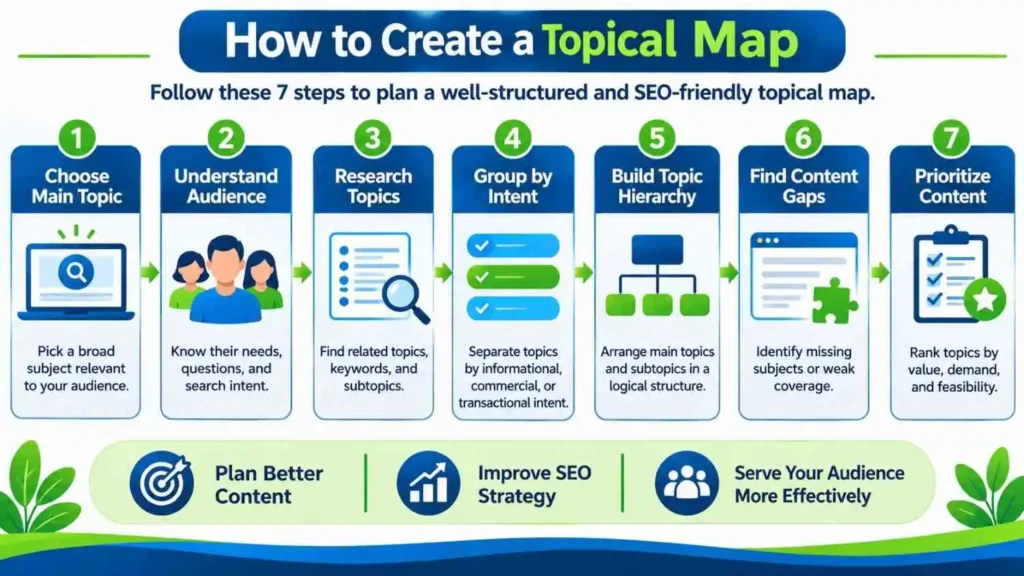
Arrange the main topic, supporting areas, and narrower subtopics in a clear hierarchy.
A simple structure might look like this:
– Main topic: Local SEO
- Google Business Profile
- Categories and business information
- Reviews and responses
- Profile troubleshooting
- Local citations
- NAP consistency
- Citation audits
- Local keyword research
- Service keywords
- Location modifiers
The hierarchy is a planning aid, not a rule that every branch needs its own URL. Decide page boundaries after checking intent, overlap, and usefulness.
Step 6: Identify Content Gaps
Compare the map with the website’s existing pages. Mark topics that are covered well, covered partly, outdated, duplicated, or missing.
A gap does not always mean the website needs another article. An existing page may need a stronger explanation, clearer examples, updated evidence, or better links. Two overlapping pages may need consolidation rather than expansion.
Check whether each important audience question has a suitable destination. Look for missing beginner explanations, practical instructions, comparisons, and limitations. Prioritize gaps that matter to readers and the website’s purpose.
Step 7: Prioritize the Content
Use a clear content strategy and briefs process to rank ideas by audience value, business relevance, demand evidence, competition, effort, and existing coverage.
Improve an important existing page when that serves readers better. Some topics may need expert review or original research first.
How to Connect a Topical Map with Internal Linking
Internal links connect related pages and help readers reach useful information. A map can show where these connections make sense, but the links should follow the content rather than a fixed quota.
Google recommends crawlable links and descriptive anchor text. Its link best practices explain how links help Google find pages and understand their context. For more on site structure, the Web Design & Architecture category offers related reading.
Google for Developers
A topical map can also help identify orphan pages: useful pages that have few or no relevant internal links. Add links where they improve navigation and context. Do not force every page to link to every other page.
How to Measure and Maintain a Topical Map
A map should evolve with the website, audience, and search landscape. Review it on a schedule and after major changes to products, services, or audience needs.
Track whether important topics have useful pages, whether those pages are indexed, and whether they attract relevant impressions, clicks, and engagement. Search Console can help identify queries and pages that receive search visibility. Analytics can show what visitors do after arriving, although engagement metrics need careful interpretation.
Use a simple status for each planned page, such as existing, needs update, planned, or not required. Add an owner and review date when several people manage the site. These fields turn the map into a working editorial document and make it easier to track decisions over time.
Common Content Mapping Mistakes to Avoid
A common mistake is treating a keyword export as a complete map. Keywords are useful evidence, but they do not explain audience needs, page roles, or relationships by themselves.
Another mistake is creating too many pages. Small keyword variations do not always deserve separate URLs. If several phrases express the same intent, one strong page may serve them better.
Some teams also ignore existing content and plan everything from scratch. This can create duplication and waste resources. Audit current pages before assigning new topics.
Other problems include grouping topics only by similar wording, overlooking search intent, forcing internal links, and expanding into subjects outside the site’s expertise. A map can guide decisions, but it cannot replace editorial judgement.
Finally, do not treat the map as a ranking guarantee. Google’s guidance on helpful, reliable, people-first content focuses on content that benefits people. Its Search Essentials describe technical requirements, spam policies, and key best practices. Following them does not guarantee crawling, indexing, or visibility.
Google for Developers+1
Conclusion
A topical map gives a website a structured view of the subjects it should cover and the relationships between its pages. Build it around audience needs, search intent, meaningful subtopics, and business relevance. Review existing content before creating more pages, connect resources with useful internal links, and update the plan as evidence changes. Treat the map as a practical content framework, not a ranking shortcut.
Frequently Asked Questions
1. What is a topical map in SEO?
A topical map is a structured plan of related subjects, subtopics, questions, and pages within a website’s main area of focus. It helps content teams organize coverage, assign page roles, and connect useful resources.
2. What is the main purpose of a topical map?
Its main purpose is to plan meaningful content coverage. It shows what a website should discuss, how topics relate, which pages already exist, and where useful content gaps remain.
3. How does a topical map help build topical authority?
It helps a website cover a subject in a connected and useful way. This can support clearer expertise signals for readers, but topical authority is not a public Google score or a guaranteed ranking factor.
4. Is a topical map the same as a keyword map?
No. A keyword map usually assigns target keywords to pages. A topical map is broader because it also considers audience questions, search intent, entities, content types, and relationships between subjects.
5. What is the difference between a topical map and a topic cluster?
A topical map represents the wider subject and its content opportunities. A topic cluster is a smaller group of related pages organized around a central page. Clusters can form parts of a larger map.
6. How many topics should a topical map contain?
There is no fixed number. The right size depends on the website’s subject, audience, business model, and resources. Include topics that serve a real need instead of filling the map to reach an arbitrary total.
7. Can I create a topical map without paid SEO tools?
Yes. You can use search suggestions, search results, customer questions, spreadsheets, and free research resources. Paid tools may speed up data collection, but they do not replace analysis and editorial decisions.
8. How do I find content gaps in a topical map?
Compare the planned topics with existing pages. Mark each subject as covered, partly covered, outdated, duplicated, or missing. Then prioritize gaps according to audience value, business relevance, and the quality of current coverage.
9. Does Google use topical maps as a direct ranking factor?
Google does not identify topical maps as a direct ranking factor in its public documentation. A map is an SEO planning method. Its practical value comes from helping teams create useful content and a clear site structure.
10. How often should I update my topical map?
Review it during content audits and when services, audience needs, or search patterns change. Update topics and page relationships when evidence supports a change.