How to Create a Topical Map: A Practical SEO Guide with Examples
A topical map helps organize related website content into a clear structure. To understand how to create a topical map, start by choosing a main topic, researching relevant…

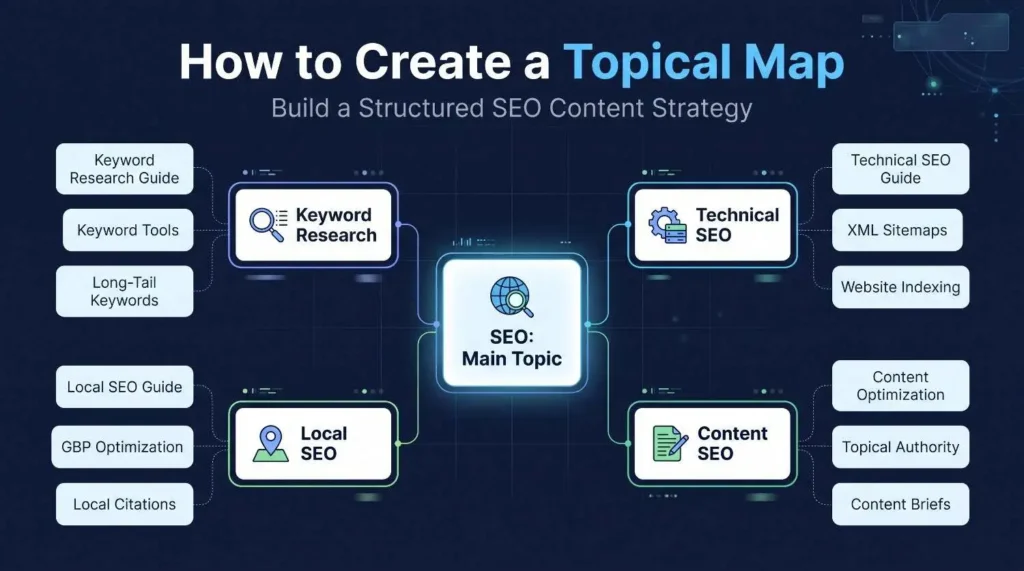
A topical map helps organize related website content into a clear structure. To understand how to create a topical map, start by choosing a main topic, researching relevant keywords, and grouping related subtopics based on search intent. Next, organize them into pillar pages and supporting content, then plan internal links to connect relevant pages. This process helps build comprehensive topic coverage and a better experience for visitors.
A well-organized website needs more than a collection of articles targeting different keywords. Its content should cover related subjects in a logical structure, answer the questions people search for, and help visitors move naturally between relevant pages. This guide explains how to create a topical map through keyword research, search intent analysis, content planning, and internal linking, with a practical example, spreadsheet structure, and tips for using AI tools effectively.
What Is a Topical Map in SEO?
A topical map is a structured plan that organizes a website’s main subject into related topics and subtopics. It shows what content a website should publish, how individual pages relate to each other, and where each page belongs within the overall website structure.
Think of it as a content roadmap. Instead of writing random articles whenever a keyword idea appears, you organize the subject into meaningful groups. Each group covers a particular part of the main topic.
For example, a website about digital marketing might have SEO as one of its main topics. Under SEO, it could include keyword research, technical SEO, local SEO, content optimization, and link building. Each of these subjects can contain more specific subtopics.
A topical map is not simply a keyword list. It connects keywords with search intent, page ideas, content relationships, and website URLs.
If you want professional support with planning this structure, explore this topical map service for SEO-focused content organization.
Topical Map vs. Topic Cluster vs. Keyword Cluster
These three terms are related, but they describe different parts of content planning.
| Concept | Meaning | Example |
| Topical map | The overall structure of a website’s subject coverage | A complete SEO content roadmap |
| Topic cluster | A group of related pages connected around a central subject | Keyword research with supporting articles |
| Keyword cluster | A group of search terms with similar meaning or intent | “Keyword research guide” and “how to do keyword research” |
A keyword cluster helps you decide which search terms may belong on one page. A topic cluster organizes related pages around a broader subject. A topical map connects these groups into a complete content structure.
Understanding these differences makes it easier to plan content without creating unnecessary pages. You can also explore semantic SEO to understand how related concepts and entities contribute to meaningful content relationships.
Why Is a Topical Map Important for SEO?
A topical map helps you plan relevant content, organize website pages, and identify missing information. It gives your content strategy a clear direction rather than leaving every article as an isolated publication.
Here are some practical benefits.
1. Better topic coverage: You can identify the main questions and supporting subjects your audience expects your website to cover.
2. More organized content: Related pages can follow a logical hierarchy, making it easier for visitors to discover additional information.
3. Stronger internal linking: A planned structure helps you connect relevant articles and service pages using meaningful anchor text.
4. Fewer content gaps: You can compare your existing pages with the planned structure and identify subjects that need attention.
5. Better content decisions: A map helps you decide whether a keyword deserves a separate article, belongs in an existing page, or should be excluded.
However, creating a topical map does not guarantee higher Google rankings. It is a planning method, not a direct ranking factor or shortcut. Google’s SEO Starter Guide explains the broader principles of helping search engines understand website content and helping people find useful information.
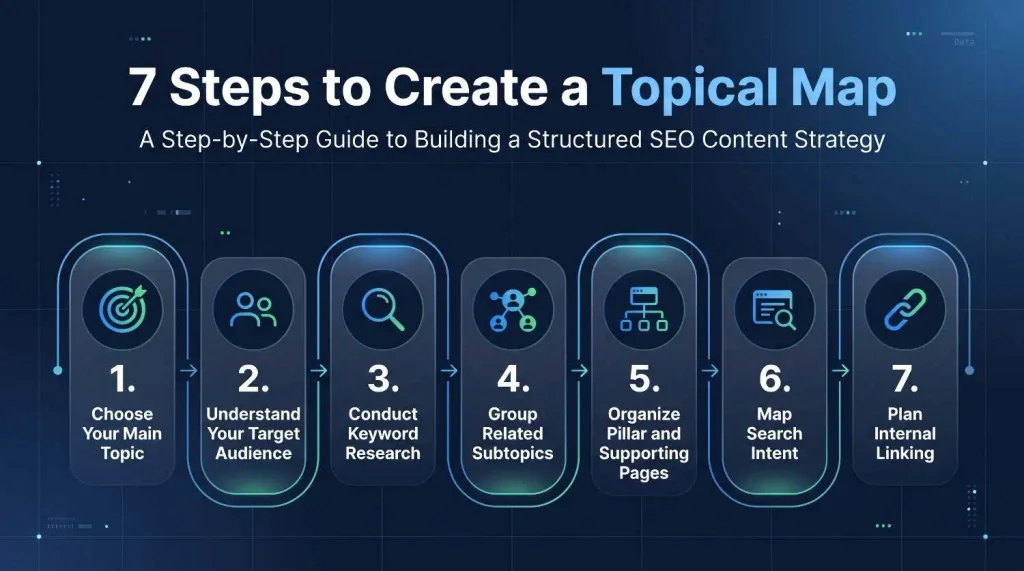
How to Create a Topical Map Step by Step
The process starts with one clearly defined subject and gradually develops into a structured content plan. Follow these seven steps to build a practical map for a new or existing website.
Step 1: Choose Your Main Topic
Start by identifying the central subject your website wants to cover. Your main topic should match your business, audience, products, or services.
For example, if you operate an SEO agency, your main subject could be SEO services and education. However, simply choosing “marketing” may be too broad if your actual services focus on search engine optimization.
Ask yourself three questions:
- What is the primary subject of my website?
- What products or services does my business offer?
- What topics are relevant to my target audience?
Your answers will help define the boundaries of your content strategy.
Avoid selecting a main topic only because it has a large search volume. A subject must also be relevant to your website and audience.
Step 2: Understand Your Target Audience
Before collecting keywords, understand the people you want to reach. Different audiences may search for different information, even when they are interested in the same subject.
For example, someone searching for SEO information may want to:
- Understand what SEO means.
- Learn how to perform keyword research.
- Compare SEO tools.
- Find an SEO service provider.
- Fix a website indexing problem.
These searches represent different needs and stages of the decision-making process.
You can identify audience questions through customer conversations, sales calls, support requests, Google autocomplete, related searches, and the People Also Ask section.
Organize these questions into informational, commercial, and transactional groups. This gives your map a stronger connection to real user needs.
Step 3: Conduct Keyword Research
Keyword research helps you discover the search terms people use when looking for information about your main topic.
Start with a seed keyword that represents your subject. Then expand it into related keywords, questions, and more specific search queries.
For an SEO website, possible keyword ideas include:
- What is SEO?
- How does SEO work?
- How to do keyword research
- Technical SEO checklist
- Local SEO strategy
- SEO content optimization
- Website audit process
You can collect these ideas using tools such as Google Keyword Planner, Ahrefs, Semrush, and Google Search Console. Google Search Console is particularly useful for finding queries that already generate impressions for an existing website.
During research, review the following information:
- Search intent
- Search volume
- Keyword difficulty, where available
- Relevant questions
- Related search terms
- Existing ranking pages
- Business relevance
Do not treat search volume as the only deciding factor. A keyword with lower demand may be more valuable if it attracts people who need your service.
For a deeper content planning process, you can also explore SEO content strategy resources.
Step 4: Identify and Group Related Subtopics
After collecting keyword ideas, group terms that share the same subject and search intent.
For example, these keywords may belong to one content group:
- How to find keywords
- Keyword research process
- Keyword research for beginners
- Steps to conduct keyword research
If these searches have similar intent and the same page can answer them properly, they may be suitable for one comprehensive article.
However, consider a different page for a keyword such as “best keyword research tools.” A comparison of tools has a different purpose from a step-by-step tutorial.
You can use keyword clustering tools to speed up the process. However, review the results manually because automated grouping may combine terms that need separate pages.
A useful question is: Can one page satisfy the searcher’s needs behind these keywords?
If the answer is yes, consider combining them. If the search intent, content format, or information requirement is different, separate pages may be more appropriate.
Step 5: Organize Topics into Pillar and Supporting Pages
Now arrange your keyword groups into a logical hierarchy.
A pillar page covers a broad subject. Supporting pages provide more detailed information about individual subtopics and connect back to the relevant pillar.
For example:
| Level | Topic | Suggested page |
| Main topic | SEO | SEO Guide |
| Supporting topic | Keyword Research | Keyword Research Guide |
| Subtopic | Keyword Research Tools | Best Keyword Research Tools |
| Subtopic | Long-Tail Keywords | How to Find Long-Tail Keywords |
| Supporting topic | Technical SEO | Technical SEO Guide |
| Subtopic | XML Sitemap | What Is an XML Sitemap? |
| Subtopic | Website Indexing | How Google Indexes Websites |
This structure gives each page a clear role.
Do not create a separate page for every keyword variation. Closely related search terms can often be covered naturally within one article.
Your website architecture should also make sense to visitors. For more guidance on organizing pages and navigation, see website structure and architecture.
Step 6: Map Search Intent to Each Page
Search intent explains what a person wants to accomplish when entering a query into a search engine.
Four common intent categories are:
| Search intent | User’s goal | Example |
| Informational | Learn something | What is technical SEO? |
| Navigational | Find a specific website or page | Ahrefs login |
| Commercial | Compare options before buying | Best SEO audit tools |
| Transactional | Take an action or make a purchase | Hire an SEO agency |
Assign an intent to each keyword group before deciding the final page format.
For example, someone searching for “what is local SEO” probably expects an explanation. Someone searching for “local SEO services” may want to compare providers.
If you target both with one page without considering their different needs, the content may fail to satisfy either audience properly.
Search intent analysis also helps reduce keyword cannibalization. This happens when multiple pages on the same website compete for similar queries. Review existing URLs before creating new pages, and consider improving or combining overlapping content when appropriate.
Step 7: Plan Internal Linking
Internal linking connects related pages on the same website. It helps visitors discover useful resources and gives search engines links through which they can find other pages.
Start by connecting supporting articles to their relevant pillar page. Then add contextual links between supporting articles when the relationship is useful.
For example:
- A keyword research guide can link to a keyword research tools article.
- A technical SEO guide can link to an XML sitemap explanation.
- A local SEO guide can link to a Google Business Profile optimization guide.
Use descriptive anchor text that tells readers what they will find after clicking.
Google’s official link best practices documentation explains how crawlable links and meaningful anchor text help users and search engines understand website relationships.
You can also review your existing content with a technical SEO audit to identify missing internal links and poorly connected pages.
Topical Map Example: A Practical Website Structure
Let’s create a simple example for a website that provides SEO services and publishes educational content.
Assume its main topic is SEO. The website wants to attract business owners who need SEO services and beginners who want to learn about search optimization.
| Main Topic | Supporting Topic | Subtopics |
| SEO | Keyword Research | Keyword Research Guide, Keyword Tools, Long-Tail Keywords |
| SEO | Technical SEO | Technical SEO Guide, XML Sitemaps, Website Indexing |
| SEO | Local SEO | Local SEO Guide, GBP Optimization, Local Citations |
| SEO | Content SEO | Content Optimization, Topical Authority, Content Briefs |
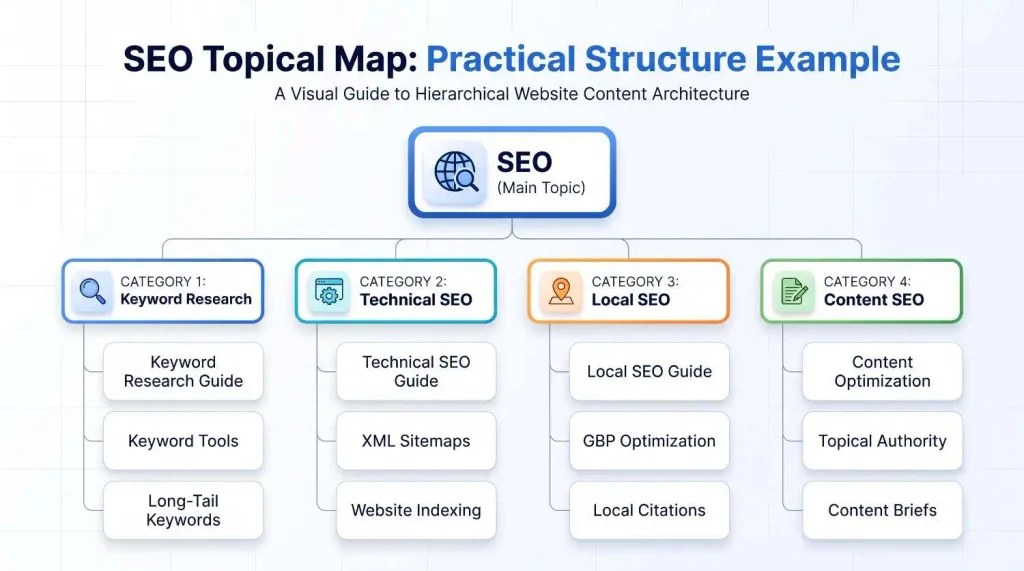
Illustrative hierarchy for an SEO-focused website. Each supporting topic can have its own relevant pages.
This example is a starting point, not a fixed structure. A real website may need additional topics based on its services, audience, existing content, and competitors.
Before publishing, map every proposed topic to an existing or planned URL. This prevents multiple pages from targeting the same purpose without a clear reason.
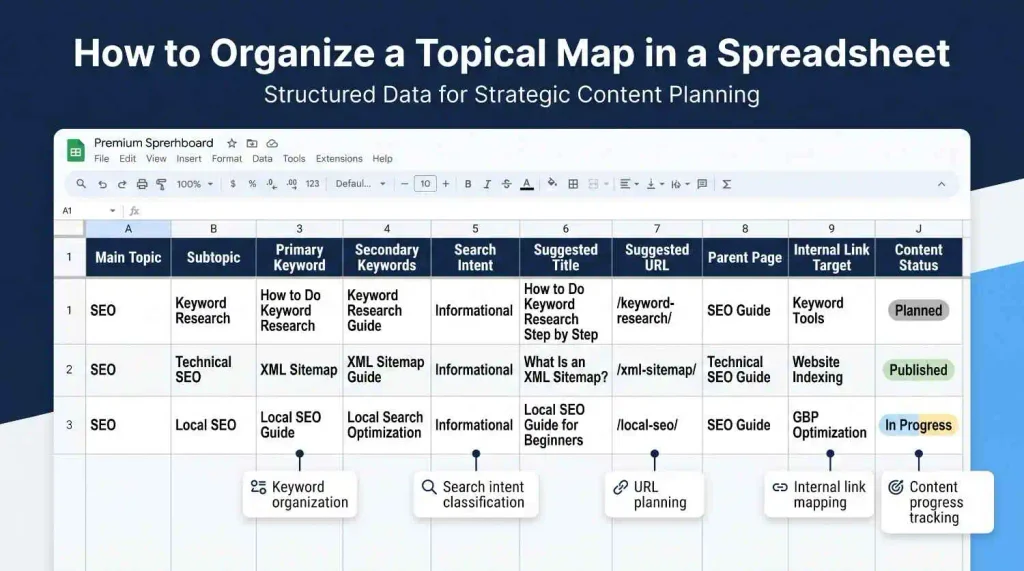
How to Build a Topical Map in Excel or Google Sheets
A spreadsheet makes your content plan easier to organize, review, and update. You do not need expensive software to create your first map.
Start with these columns:
| Column | What to include |
| Main Topic | The website’s central subject |
| Subtopic | A supporting content category |
| Primary Keyword | Main target search term |
| Secondary Keywords | Related search terms |
| Search Intent | Informational, commercial, etc. |
| Suggested Title | Proposed page title |
| Suggested URL | Planned page slug |
| Parent Page | Related pillar or category |
| Internal Link Target | Relevant pages to connect |
| Content Status | Planned, writing, published, or updated |
For example, a row could contain:
- Main Topic: SEO
- Subtopic: Keyword Research
- Primary Keyword: How to Do Keyword Research
- Secondary Keywords: Keyword research process, keyword research guide
- Search Intent: Informational
- Suggested Title: How to Do Keyword Research Step by Step
- Suggested URL: /how-to-do-keyword-research/
- Parent Page: SEO Guide
- Content Status: Planned
You can also add columns for priority, estimated content difficulty, existing URL, and last updated date.
Keep the spreadsheet practical. A map should help your team make content decisions, not become a complicated document that nobody updates.
Can AI Tools Help You Create a Topical Map?
Yes. AI tools can help you brainstorm topic ideas, organize keyword lists, identify possible subtopics, and prepare initial content structures.
For example, you can give an AI tool your main topic and ask it to suggest supporting topics, common questions, and possible content categories.
You can also provide a keyword list and request an initial grouping based on meaning and search intent.
However, AI-generated suggestions need human review. An AI tool may suggest unrelated topics, repeat similar ideas, or recommend pages that do not match your business.
A practical workflow is:
- Use AI to generate initial topic ideas.
- Collect real keyword data using SEO tools.
- Review search results to understand intent.
- Group related keywords and remove duplicates.
- Check business relevance and audience needs.
- Map the approved topics to URLs.
- Review the final structure manually.
AI should support research and organization rather than replace SEO judgment.
Common Topical Mapping Mistakes to Avoid
A topical map becomes less useful when it is built around keyword volume instead of relevant content opportunities.
Watch out for these common mistakes:
1. Choosing an overly broad main topic: A website with a narrow business focus may struggle to create useful content around a subject that is too general.
2. Grouping unrelated keywords: Similar words do not always mean similar search intent. Review the actual search results before combining terms.
3. Creating too many pages: Every keyword does not need a separate URL. Combining closely related topics can produce a more useful resource.
4. Ignoring search intent: A page should match what the searcher expects to find, not simply repeat the target keyword.
5. Forgetting internal links: Related pages should connect naturally. Otherwise, useful content may remain difficult for visitors to discover.
6. Copying competitor structures: Competitor research can reveal content gaps, but your map should reflect your own audience, services, and expertise.
7. Treating the map as a ranking guarantee: A topical map supports planning. It cannot replace useful content, sound technical SEO, or a good website experience.
How to Check and Improve Your Topical Map
A topical map should change as your website grows. Review it regularly to identify missing topics, outdated pages, and overlapping content.
Start by comparing your published URLs with your planned structure. Check which topics have no content, which pages need improvement, and whether important supporting articles connect to their pillar pages.
Next, review performance using Google Search Console. Look at the queries generating impressions, pages receiving clicks, and topics where your website may be gaining or losing visibility.
You can also compare your coverage with relevant competitors to discover subjects your audience may expect but your website has not addressed.
Finally, review the quality of your content. Google recommends creating helpful, reliable, people-first content rather than publishing pages mainly to attract search traffic. Its helpful content guidelines provide useful questions for reviewing originality, accuracy, expertise, and audience value.
Google for Developers+1
Update your spreadsheet when you publish, merge, redirect, or improve a page. This keeps your content plan connected to the actual website.
Conclusion
Creating a topical map starts with understanding your website’s main subject and audience. From there, you can research keywords, group related topics, identify search intent, organize pillar and supporting pages, and plan internal links.
The goal is not to publish the largest number of articles. It is to build a useful collection of connected pages that answers your audience’s questions and supports your website’s purpose.
Start with one main topic, organize a few relevant subtopics, and expand the structure as your research and website grow. A clear plan makes content decisions easier and gives your SEO strategy a stronger foundation.
Frequently Asked Questions
1. What is a topical map in SEO?
A topical map is a structured plan that organizes a website’s main subject into related topics and subtopics. It helps guide keyword research, content creation, website architecture, and internal linking.
2. How do you create a topical map?
Start by choosing your main topic and understanding your audience. Conduct keyword research, group related terms, identify search intent, organize pillar and supporting pages, and plan internal links between relevant URLs.
3. Is a topical map the same as a topic cluster?
No. A topic cluster is a group of related pages organized around a central subject. A topical map is broader because it organizes multiple topic groups into an overall website content structure.
4. How many topics should a topical map have?
There is no fixed number. The size depends on your niche, website purpose, audience needs, and available resources. A focused website may need fewer topics than a large publication.
5. What tools can I use to create a topical map?
You can use Google Sheets or Excel for organization, Google Search Console for existing search data, and tools such as Ahrefs, Semrush, and Google Keyword Planner for keyword research. AI tools can also help generate initial ideas.
6. Can I create a topical map without paid SEO tools?
Yes. You can use Google autocomplete, related searches, People Also Ask, Google Search Console, and a free spreadsheet. Paid tools can make keyword analysis faster, but they are not required to start.
7. How does a topical map help with SEO?
It helps organize related content, identify missing subjects, plan internal links, and align pages with search intent. These practices can support a more useful and understandable website, but they do not guarantee rankings.
8. Should every subtopic have its own page?
No. Create a separate page when the subject has a distinct purpose and enough useful information to stand alone. Closely related subtopics can often be covered together.
9. How often should I update a topical map?
Review it regularly, such as every few months, and whenever you add new services, publish major content, or discover important changes in audience needs and search behaviour. The schedule should depend on your website’s activity.
10. Does a topical map guarantee higher Google rankings?
No. A topical map is a content planning framework, not a ranking guarantee. Search visibility also depends on content quality, relevance, technical accessibility, competition, and many other factors.