JavaScript SEO Basics: A Complete Guide With 7 Easy Steps for Beginners
Learn how Google crawls, renders and indexes JavaScript pages, which issues hurt search visibility, and how to test your site with a simple 7-step checklist for beginners.

JavaScript SEO is the technical work of making pages that rely on JavaScript crawlable, renderable and indexable for search engines. Google can run JavaScript, but problems start when key content, links or tags appear only after a script runs. This guide explains how Google processes JavaScript and gives 7 steps to test and fix your pages.
What Is JavaScript SEO and Why Does It Matter?
JavaScript SEO is the part of technical SEO that helps search engines crawl, render and index websites built with JavaScript. It matters because a page that looks perfect in a browser can look empty to a crawler. The work focuses on what search engines receive, not on how the page feels to a visitor.
Technical SEO is the practice of improving how search engines access and understand a website. JavaScript is a programming language that runs in the browser and changes what a page shows. Ahrefs treats this topic as a branch of technical SEO, and Google documents it in Search Central. Both sources agree on the core goal: search engines must be able to see your content.
Why Do Websites Use JavaScript?
Websites use JavaScript to add interactive features such as menus, filters, forms and live updates. Google describes JavaScript as an important part of the web platform that turns websites into powerful applications.
Developers also use it to build whole pages from data. Frameworks such as React, Vue and Angular create the page inside the browser after an API call returns data. This helps users, but it adds a step that crawlers must handle. That extra step is the reason JavaScript SEO exists.
Does JavaScript Affect SEO?
Yes, JavaScript affects SEO when it controls content, links, titles or indexing rules on a page. Most scripts on a normal site change nothing that search engines need, such as a slider or a chat widget. Ahrefs notes that a standard WordPress site without heavy customization will likely face none of these issues.
Trouble starts when JavaScript builds an entire page, adds or removes elements, or rewrites what the server sent. Then the raw HTML and the rendered HTML can differ, and Google may index a different version than you expect. Good JavaScript SEO work closes that gap.
Is JavaScript Bad for SEO?
No, JavaScript is not bad for SEO, but careless delivery can hide content, links and tags from search engines. Patrick Stox, a technical SEO specialist at Ahrefs, states the position plainly:
“JavaScript is not bad for SEO, and it’s not evil.”
Patrick Stox, Ahrefs, in JavaScript SEO Issues & Best Practices
The risk comes from how the page is delivered. Content that needs a script to appear, links that are not real links, and blocked files all create gaps. The fix in JavaScript SEO is testing, not avoiding scripts.
Which General SEO Basics Still Apply to JavaScript Sites?
All standard SEO basics still apply: useful content, unique titles, crawlable links, clean URLs and fast pages. JavaScript SEO adds delivery risks on top of these basics, but it does not create a separate rulebook for how search works.
Before you test rendering, check that each page has a clear H1, a unique title and a purpose a reader can understand. Google’s SEO Starter Guide covers the fundamentals. Forkan Mahmud also explains how entities and context shape content in his guide on what semantic SEO means.
How Does Google Render JavaScript?
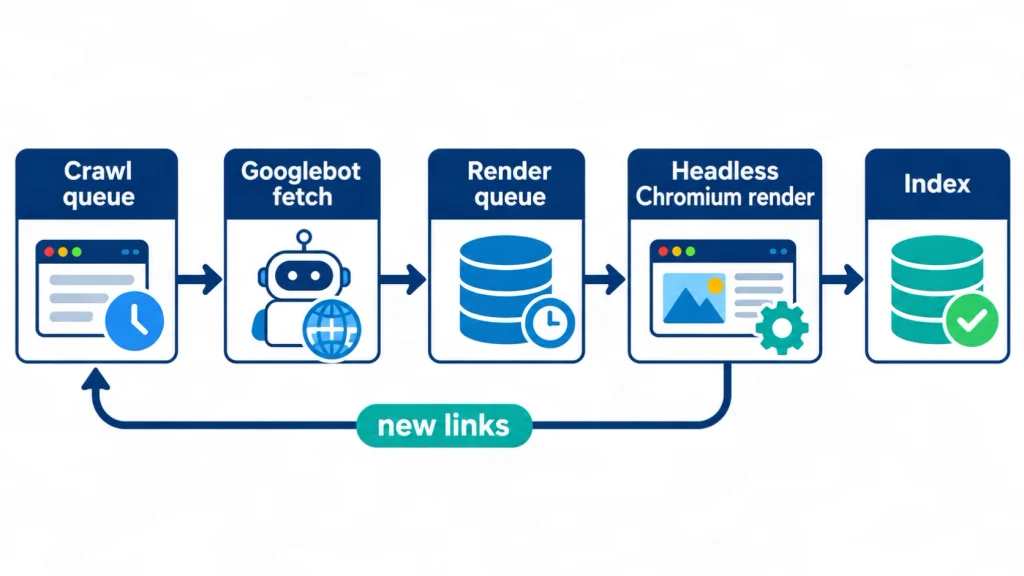
Google renders JavaScript by crawling a URL, queuing the page, running it in a headless Chromium browser and indexing the rendered HTML. This process lets Google see content that scripts create. A headless browser is a browser that runs without a visible window.
Google’s JavaScript SEO basics documentation, last updated on March 4, 2026, describes the process step by step. Every JavaScript SEO check starts from this process, and the next sections cover each part.
What Are the Three Phases of Crawling, Rendering and Indexing?
Google processes JavaScript pages in three phases: crawling, rendering and indexing, and each phase can affect what ends up in search. Googlebot, Google’s crawler, requests the URL and checks robots.txt first. It then reads the HTML for links and adds the page to a render queue.
In the rendering phase, a headless Chromium browser runs the scripts. Google parses the rendered HTML for links again and uses that HTML for indexing. Pages with a 200 status code go to the render queue unless a robots meta tag or header says not to index them.
How Long Does the Render Queue Take?
Most pages wait only seconds to hours in the render queue, but delays vary by site. Google says a page may stay in the queue for a few seconds or longer. A 2024 study by MERJ and Vercel measured the gap on about 37,000 matched Googlebot requests, mostly from nextjs.org.
The median delay was 10 seconds. The 75th percentile was 26 seconds, the 90th was about 3 hours and the 99th was about 18 hours. The data covers April 2024 and a high-profile site, so a new small site may see different timing. These numbers help you judge how urgent a JavaScript SEO fix really is. Vercel and MERJ published the full results on July 31, 2024.
What Is the Web Rendering Service and Which Browser Does It Use?
The Web Rendering Service (WRS) is the Google system that renders pages with an evergreen version of Chromium, the open-source browser behind Chrome. Evergreen means the browser version updates over time. It supports many modern features, but not every browser API.
Google advises feature detection and polyfills, which are small code additions that supply a missing browser feature. WRS may also ignore caching headers and reuse old files. Content fingerprinting solves this by putting a content hash in the file name, such as main.2bb85551.js, so each update creates a new file name.
What Does Googlebot Not Do During Rendering?
Googlebot does not scroll, click or type, and it does not keep cookies between page loads, so it sees a page in a clean first state. Google’s lazy-loading documentation says Google Search does not interact with your page. MERJ and Vercel add that each render starts in a fresh browser session.
Martin Splitt of Google made the same point about infinite scroll:
“What does Googlebot not do? It doesn’t scroll.”
Martin Splitt, Google, as reported by Search Engine Journal
Anything that appears only after a scroll, click or tab change can stay unseen.
Client-Side Rendering vs Server-Side Rendering for SEO
Rendering is the step that turns code and data into the HTML that a browser or crawler reads. Where this step runs, in the browser or on the server, decides what search engines receive first. This choice is the biggest decision in JavaScript SEO. Google’s guide to rendering on the web on web.dev explains the main patterns.
What Is Client-Side Rendering (CSR)?
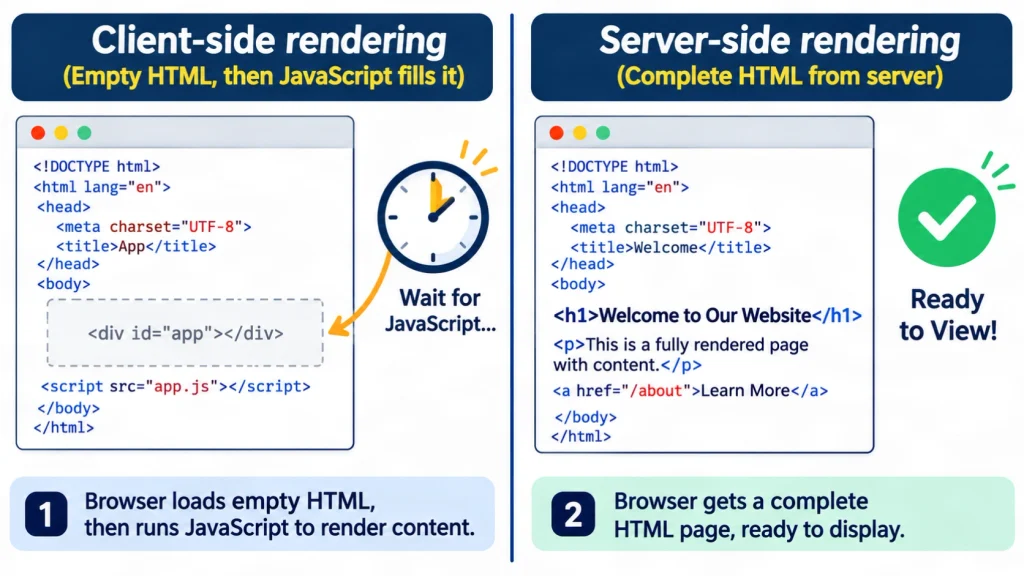
Client-side rendering (CSR) builds the page in the visitor’s browser with JavaScript after a nearly empty HTML file loads. The first HTML often holds only a container and script tags. This pattern is called the app shell model.
Google then has to run the scripts to see the real content. Google says it sees content that CSR adds, but it also warns of limits. Other search engines may ignore JavaScript entirely.
Is Client-Side Rendering Bad for SEO?
Client-side rendering is not automatically bad for SEO, but it carries more risk than server-rendered HTML for public pages. Vercel’s comparison rates CSR as poor for crawl efficiency and rendering time. It adds that a CSR page might not be indexed when rendering fails.
The same research says rendering rarely fails and that failures often trace back to files blocked in robots.txt. The data comes from a vendor study on a few sites. Treat it as a strong signal, not a law.
How Does Server-Side Rendering (SSR) Help SEO?
Server-side rendering (SSR) builds the full HTML on the server, so crawlers receive the content in the first response. Google calls server-side or pre-rendering a great idea because it makes sites faster for users and crawlers, and because not every bot can run JavaScript.
SSR removes the dependence on the render queue for your key content. It does not guarantee higher rankings. Rankings still depend on relevance, quality and many other signals.
What Are Static Rendering and Hydration?
Static rendering creates HTML files ahead of time, and hydration adds interactivity to server-made HTML in the browser. Google lists server-side rendering, static rendering and hydration as its recommended solutions in place of dynamic rendering.
Static rendering suits pages that change rarely, such as guides and service pages. SSR suits pages that change often. Many frameworks mix these methods route by route, as nextjs.org does with static, server-side and client-side rendering.
What Happened to Dynamic Rendering?
Dynamic rendering was a workaround that sent bots a pre-rendered page, and Google now says it is not a long-term solution. The server detects crawlers and gives them static HTML, while users get the client-side version.
Google’s dynamic rendering documentation, updated on December 10, 2025, says this approach adds complexity and resource needs. It is not cloaking when both versions show similar content. Serving completely different content to bots can count as cloaking.
Which Rendering Method Fits Your Site?
Choose static rendering for stable pages, server-side rendering for public pages that change often, and client-side rendering only for pages that search engines do not need. This table compares the five methods.
| Method | First response contains | Best fit | Main risk |
|---|---|---|---|
| Client-side rendering | Empty shell and scripts | Logged-in tools | Content depends on rendering |
| Server-side rendering | Full HTML per request | Public pages that change often | Server cost and complexity |
| Static rendering | Prebuilt HTML files | Guides and service pages | Rebuilds for each update |
| Hydration | Server HTML plus later scripts | Interactive public pages | Heavy scripts slow pages |
| Dynamic rendering | Bot-only static copy | Short-term workaround | A second system to maintain |
The decision rule for JavaScript SEO is simple. A public page that should rank needs its main content in the first HTML response.
Which Problems Do JavaScript-Built Pages Cause Most Often?
The most common JavaScript SEO issues are late content, unusable links, soft 404 errors, conflicting tags and blocked files. Each issue has a simple test and a clear fix that a developer can apply. The sections below take them one at a time, starting with content that loads late.
Why Does Content Sometimes Appear Only After Scripts Run?
Content appears late when the server sends an empty shell and a script adds the text afterward. Google can often read the result, but crawlers that skip JavaScript receive nothing useful.
The fix is to place the H1, the main text and the title in the initial HTML for every public page. A common mistake in JavaScript SEO is testing only in a browser, where scripts have already run.
Why Can Googlebot Miss Some Links?
Googlebot finds links reliably only when they are anchor elements with an href attribute that holds a real URL. Click handlers, buttons that act like links and URL fragments such as #/products can fail. Google explains the rules on its crawlable links page.
Single-page apps should use the History API for routing. The History API on MDN shows how it changes the URL without a full reload. Google accepts links injected by JavaScript when they follow the same rules.
What Is a Soft 404 in a Single-Page App?
A soft 404 is an error page that returns a 200 status code, so search engines may treat it as a real page. Single-page apps cause this often because routing happens in the browser and the server cannot send a 404.
Google suggests two fixes. Redirect with JavaScript to a URL that returns a real 404, or add a noindex robots meta tag to the error view with JavaScript. Google explains soft 404 errors in its crawl error guide.
Do Conflicting Titles, Canonicals and Robots Tags Cause Problems?
Yes, conflicting tags send mixed signals about which URL to index and how to show it in results. Google allows JavaScript to set the title, meta description and canonical URL. A canonical set with JavaScript should match the one in the original HTML, and the page should carry only one canonical tag.
A noindex tag in the raw HTML is a special case. Google may skip rendering such a page, so a script that removes the tag may never run. MERJ and Vercel saw this in their tests, and Ahrefs reports the same behavior.
Can Blocked Scripts and Files Break Rendering?
Yes, Google does not render JavaScript from blocked files or on blocked pages. A robots.txt rule that blocks a script, a style file or an API endpoint can leave the rendered page incomplete.
Google’s robots.txt introduction explains how rules work. Review the file for any rule that blocks resources your content needs.
Does Lazy Loading Hurt SEO?
Lazy loading does not hurt SEO when content loads as soon as it enters the viewport, without a scroll or a click. Google’s lazy-loading guide lists three safe methods: built-in browser lazy loading for images and iframes, the IntersectionObserver API and libraries that load data when content becomes visible.
Infinite scroll needs extra care. Give each chunk of content its own URL and update the address with the History API. Never lazy load content that users see the moment the page opens. React developers can also add error boundaries so one failed component does not stop the whole render, as MERJ and Vercel recommend.
Can JavaScript Generate Structured Data?
Yes, Google accepts JSON-LD structured data that JavaScript generates and injects into the page, as long as Google can render it. JSON-LD is a script-based format that describes page facts to search engines. Google tells site owners to test the result. Its guide on generating structured data with JavaScript shows how.
Server-rendered markup stays visible to more systems. Many AI crawlers do not run scripts, so this is a reasonable precaution rather than a rule from Google.
How Do You Handle SEO for a Single-Page App (SPA)?
A single-page app (SPA) loads one HTML document and updates the view with JavaScript, so SPA SEO depends on giving each view its own URL, status code and metadata. Good JavaScript SEO for an SPA starts with real links and the History API for routing.
Serve the initial HTML from the server or pre-render it for public pages. Keep an updated XML sitemap, because MERJ and Vercel found it reduces discovery differences between rendering methods. Handle missing pages with a real 404 or a noindex tag.
Which JavaScript Frameworks and Libraries Help With SEO?
No framework guarantees good SEO, because Google’s guidance focuses on how pages are rendered and delivered, not on brand names. Frameworks that support server-side or static rendering make the work easier. Libraries then help each page carry its own tags. A framework alone does not deliver JavaScript SEO results.
Which JavaScript Framework Is Best for SEO?
The best JavaScript framework for SEO is one that delivers complete HTML for public pages and that your team can maintain. Next.js for React, Nuxt for Vue and SvelteKit for Svelte all support server-side or static rendering. Google does not rank frameworks.
A common mistake in JavaScript SEO is choosing a framework for its popularity and then shipping every page as client-side rendering. The MERJ and Vercel study used nextjs.org, so it shows one framework on one site. It is not a comparison across frameworks.
Which Libraries Help With Titles and Meta Tags?
A JavaScript SEO library, such as a head-management module, lets each page set its own title, meta description and canonical tag. Ahrefs points to modules such as React Helmet, with versions for Vue, Angular and Svelte.
A library alone does not solve the problem. Check that the tags appear in the raw HTML or at least in the rendered HTML. Ahrefs also warns that users may see the title flash when a script overwrites it.
Can JavaScript Run on the Server?
Yes, JavaScript can run on the server through a runtime such as Node.js, and this is how server-side rendering works for JavaScript frameworks. The same component code builds HTML on the server, then runs in the browser to add interactivity.
This is why a team can keep a JavaScript framework and still send full HTML to crawlers. The server does the first rendering work before the browser receives the page.
What Does Ahrefs Recommend for JavaScript Websites?
Ahrefs recommends comparing raw and rendered HTML, letting crawlers fetch JavaScript files, writing unique titles and descriptions, and avoiding duplicate canonical tags. Its JavaScript SEO guide, updated on May 9, 2025, also tells SEOs to work with developers rather than learn to code.
Ahrefs sells SEO tools, so compare its advice with Google’s documentation. The two sources agree on the main checks. Ahrefs also offers a browser toolbar that shows both the raw and the rendered version of a page.
Do AI Crawlers Read JavaScript Content?
Many AI crawlers do not run JavaScript, so content that exists only after rendering may be invisible to them. This matters for visibility in AI answers, although no technique can guarantee a citation or mention. Sound JavaScript SEO still starts with HTML that every crawler can read.
Which AI Crawlers Run JavaScript?
In MERJ and Vercel’s December 2024 data, none of the major AI crawlers tested rendered JavaScript, while Gemini and AppleBot did. The tested crawlers came from OpenAI, Anthropic, Meta, ByteDance and Perplexity. Gemini uses Googlebot’s infrastructure, and AppleBot uses a browser-based crawler.
On Vercel’s network in one month, GPTBot made 569 million fetches and Claude’s crawler made 370 million. Googlebot made 4.5 billion across Gemini and Search. Vercel’s AI crawler report is almost two years old, so crawler behavior may have changed. Re-check before you rely on it.
What Does Google Say About JavaScript in AI Features?
Google says its generative AI features build on the same foundations as Search, and sites that use JavaScript should follow JavaScript SEO best practices. Google’s guide to generative AI features, published in May 2026, says Google can process JavaScript content as long as it is not blocked.
The guide adds that SEO on JavaScript frameworks is generally more complex than on other sites. It also asks site owners to keep content crawlable. These points match the checklist in the next section.
A 7-Step JavaScript SEO Checklist for Beginners
Follow this JavaScript SEO checklist of 7 steps in order: compare raw and rendered HTML, move key elements to the server, use real links, return correct status codes, unblock resources, lazy load safely, then test after every release. Each check takes minutes. Fixes may need a developer.
Step 1: Compare Raw HTML and Rendered HTML
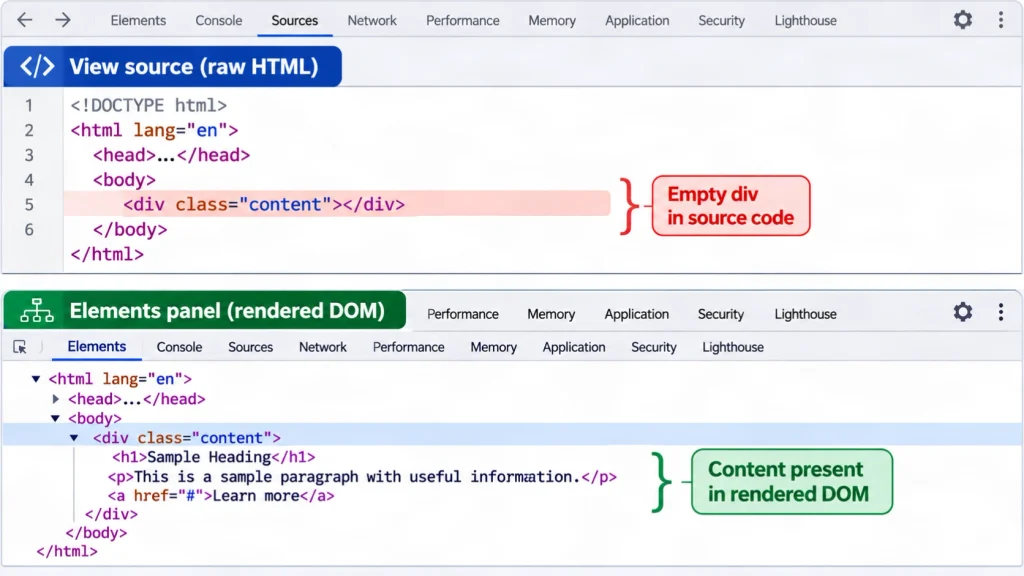
Open the page source and the rendered DOM, then compare headings, text, links and tags side by side. The page source shows the raw HTML that the server sent to the browser. The Elements panel in Chrome DevTools shows the rendered DOM, which is the page structure after scripts run.
Anything that appears only in the rendered version depends on JavaScript. Ahrefs calls a Google testing tool the best check for rendered output, and Google points to the same tools.
Step 2: Put Critical SEO Elements in the Initial HTML
Place the title, meta description, canonical tag, H1, main text and primary links in the server response, not in a later script. Vercel recommends server-side rendering or static generation for these elements.
Google allows JavaScript to set a canonical tag, but calls HTML the best method. Never place a noindex tag in the raw HTML of a page you want indexed, because removing it later with JavaScript may not work.
Step 3: Use Real Links and the History API
Use anchor elements with href attributes for navigation, and use the History API for single-page routing. Avoid URL fragments, buttons that act as links and links that work only through click events.
Test by viewing the rendered HTML and searching for each important link. A link that is missing there is a link Googlebot may not follow.
Step 4: Return Meaningful Status Codes
Return 404 for missing pages, a redirect for moved pages and 200 only for pages that exist and should be indexed. Google uses status codes to learn what happened during a crawl. Non-200 pages may skip rendering.
Single-page apps that cannot send a 404 should redirect to a server URL that does, or add a noindex tag to the error view.
Step 5: Do Not Block Needed Resources
Let Googlebot fetch the JavaScript, CSS and API files that build your content, because blocked files stop rendering. Review robots.txt for blocking rules and test a sample page after each change.
Use content fingerprinting for scripts and styles. It prevents the Web Rendering Service from using a stale copy of a changed file.
Step 6: Lazy Load Without Hiding Content
Load content when it enters the viewport, require no scroll or click and give infinite scroll pages their own URLs. Use native lazy loading or the IntersectionObserver API, which reacts when an element becomes visible.
Skip lazy loading for text and images that appear at the top of the page. Delaying them slows the page for users and adds no SEO value.
Step 7: Test and Monitor After Every Release
Test one URL per page template with the URL Inspection tool in Search Console and the Rich Results Test, then repeat after each release that changes templates. Google’s guide to fixing search-related JavaScript problems lists the tools. The URL Inspection tool shows the rendered HTML Google stored, and the Rich Results Test shows what Googlebot sees at test time.
A short JavaScript SEO log makes this routine easy. Record the URL, the status code, whether the H1 appears in raw and rendered HTML, and the index status. The SEO tools and resources page lists more tools for this routine. Crawlers such as Sitebulb can also compare response and rendered code across a whole site.
What Did a Small Raw HTML Test Show?
A controlled test built for this guide showed that a client-side rendered demo page had no text, links or H1 in its raw HTML, while a server-rendered page had all three. This JavaScript SEO test is a demonstration of the mechanism, not a client audit.
Both pages were tiny HTML files served locally. The client-side page used a script, 300 milliseconds after load, to add one H1, one paragraph and one link. The server-rendered page held the same kind of content directly in its HTML. A plain HTTP request captured the raw HTML. Headless Chromium through Playwright 1.63.0 captured the rendered HTML after an 800 millisecond wait.
| Page | Raw words | Rendered words | Raw links | Rendered links | Raw H1 | Rendered H1 |
|---|---|---|---|---|---|---|
| Client-side rendered | 0 | 11 | 0 | 1 | 0 | 1 |
| Server-rendered | 10 | 10 | 1 | 1 | 1 | 1 |
What Are the Limits of This Test?
The test proves only that content added by a script is absent from raw HTML, and it says nothing about rankings or about how Googlebot behaves on a real site. It used two toy pages, one browser and one setup.
Googlebot uses its own rendering service and its own timing. Treat the table as a teaching example, and run your own checks on real templates before you change anything.
What Are the Risks and Limits of Fixing JavaScript Problems?
Rendering changes can break a live site, so test them on a staging site first and involve a qualified developer for code changes. Treat every JavaScript SEO change as a code change. This guide is educational and is not an engineering audit of your website.
What Could Go Wrong When You Change Rendering?
Rendering changes can break features, slow pages, create duplicate URLs or remove content from the page without any warning. Moving to server-side rendering can raise server load and hosting cost. A wrong canonical tag can push good pages out of the index.
No fix guarantees traffic or rankings. Google weighs many signals, and the effect of any single change depends on the site.
When Should You Ask a Qualified Developer or Specialist?
Ask a developer when a fix needs code changes, and ask a technical SEO specialist when crawl data or traffic drops are unclear. An SEO can find the problem and write a clear brief. A developer should build and test the fix.
Escalate sooner for large sites, because heavy scripts can affect crawl efficiency at scale. MERJ and Vercel note this for sites above roughly 10,000 unique, frequently changing pages.
Who Wrote This Guide and How Was It Checked?
This guide was written by Forkan Mahmud, an SEO professional with about five years of experience, and its technical claims come from Google documentation and named studies. He works from Oman with a team on Local SEO, Google Business Profile optimization, topical maps, content briefs and content optimization for several European clients. You can read more on his About Forkan Mahmud page or view his local SEO case studies.
His work is SEO strategy, not software engineering, so developers should review any JavaScript SEO implementation advice. Each technical claim was checked against Google Search Central pages or a named study with a date. Forkan Mahmud also offers SEO services, which is a commercial interest in this topic. The guide will be reviewed again within 3 to 6 months.
Conclusion
JavaScript SEO comes down to one rule: key content, links and tags must reach search engines reliably. Google can render JavaScript, but server-delivered HTML is faster to process and works for crawlers that do not run scripts. Good JavaScript SEO is mostly checking and fixing delivery. Start with Step 1 on a single template, then work through the other steps.
For more guides on how content and site structure work together, read the topical authority articles. To discuss a technical SEO question, you can contact Forkan Mahmud.
Frequently Asked Questions About Rendering and Search
Do SEOs Need to Learn JavaScript?
SEOs do not need to learn to program in JavaScript, but they should understand how rendering changes what search engines receive. Ahrefs says it does not recommend that SEOs learn to code, because most JavaScript SEO work involves reading HTML. A basic grasp of raw HTML, rendered HTML and status codes covers most checks.
Does Google Click Buttons, Tabs or Accordions?
Google generally does not click buttons, tabs or accordions during rendering. Google’s documentation says Search does not interact with your page, and MERJ and Vercel report that Googlebot generally does not click items such as tabbed content. Put important text in the HTML that loads with the page.
What Is the DOM, and Why Does It Matter for SEO?
The DOM, or Document Object Model, is the live structure of a page after the browser has run its scripts and built every element. Google indexes the rendered HTML built from this structure. When a heading, link or text block is missing from the DOM, Google cannot index it. Checking the DOM is how you see what scripts really produce.
What Is the App Shell Model?
The app shell model is a pattern where the first HTML holds only the page frame, and JavaScript loads the real content afterward. Google notes that the initial HTML in this model does not contain the page content. Google must run the scripts before it can see what the page says.
Does Google Index Content Inside Web Components?
Yes, Google supports web components and flattens the shadow DOM and light DOM content when it renders a page. Google can only see content that appears in the rendered HTML. Test with the URL Inspection tool or the Rich Results Test, and use a slot element when content must appear in both layers.
Do Bing and Other Search Engines Render JavaScript?
Not every search engine renders JavaScript the way Google does, so results can differ between engines. Google’s documentation warns that other search engines may ignore JavaScript and miss content that scripts create. Check each engine’s webmaster tools, and keep important content in the initial HTML so every crawler can read it.
Does Server-Side Rendering Guarantee Higher Rankings?
No, server-side rendering makes content easier to access, but it does not guarantee higher rankings in any search engine. Rankings depend on relevance, content quality, links and many other signals. SSR removes a technical barrier. It does not replace useful content or a clear site structure.
Where Does JavaScript Fit Inside Technical SEO?
JavaScript SEO is one branch of technical SEO, alongside crawling, indexing, site speed, structured data and site architecture. Ahrefs defines it as the part that makes JavaScript-heavy websites easy to crawl and index. The same rules about status codes, canonical tags and internal links apply across all branches.
Can JavaScript Be Used on Its Own, Without HTML?
In a browser, JavaScript needs an HTML document to act on, while Node.js can run JavaScript on a server without a browser. For SEO, this means a public page still needs HTML that crawlers can read. Scripts add behavior on top of that HTML.
How Often Should You Re-Test JavaScript Pages?
Re-test after every release that changes templates, scripts, routing or robots.txt, and review a sample of key pages every few months. This is a practical routine, not a Google rule. Google updates its rendering and documentation over time, so periodic checks catch changes you did not make.