301 vs 302 Redirects: Easy Step-by-Step Guide With 9 Fixes for Broken Links
301 vs 302 redirects differ by intent: 301 means permanent, 302 means temporary. Learn how Google treats each, how to find broken links and 404 errors, and how to fix redirect chains safely.

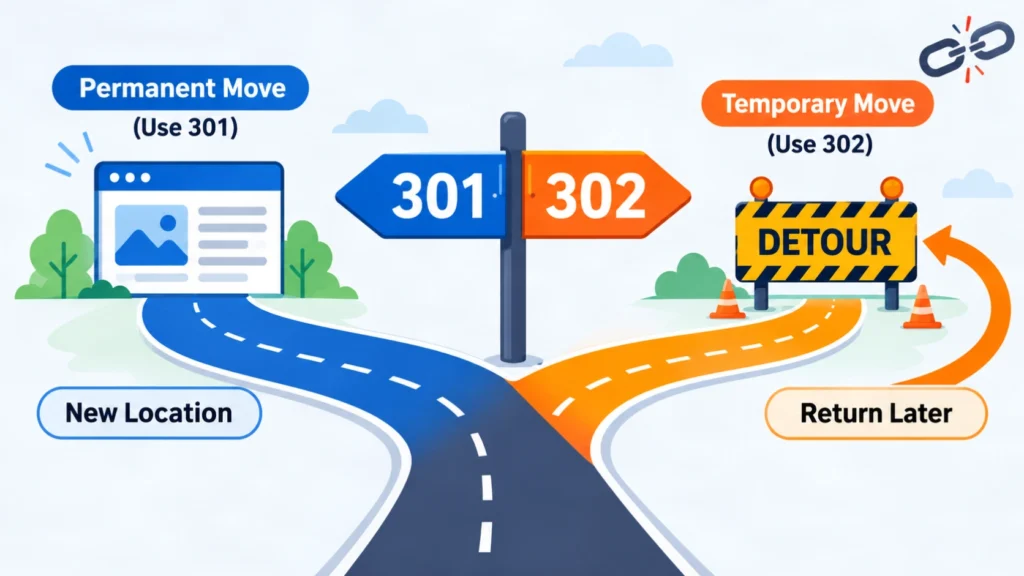
301 vs 302 redirects differ in one main way: a 301 tells browsers and search engines that a page moved permanently, while a 302 says the move is temporary. Google treats a 301 as a strong signal that the new URL should be canonical and a 302 as a weak one. This guide explains both, then shows how to find and fix broken links safely.
What Is the Difference Between 301 vs 302 Redirects?
A 301 redirect marks a permanent move, and a 302 redirect marks a temporary one. Both send visitors from an old URL to a new URL, but search engines treat them differently when they pick which URL to show in results. The sections below define each status code and compare them side by side.
What does a 301 redirect mean?
A 301 redirect is an HTTP response with status code 301 (Moved Permanently). It tells the browser and Googlebot, Google’s web crawler, that the old URL now has a new permanent address. Google says its indexing pipeline uses a 301 as a strong signal that the target should be canonical.
Google handles the 308 code the same way. Typical 301 uses include domain migrations, HTTP to HTTPS switches, merged pages and renamed URL slugs. Google’s own redirects documentation recommends a permanent server-side redirect whenever you need to change a URL in search results.
What does a 302 redirect mean?
A 302 redirect is an HTTP response with status code 302 (Found). It sends visitors to another URL for now, while the original URL stays the main address. Google treats it as a weak signal that the target should be canonical, so the source URL usually stays in search results.
Among 301 vs 302 redirects, the 302 is the temporary option, so use it when you plan to bring the original URL back. A maintenance page, a short sale or a limited test are common examples.
What are 303, 307 and 308 redirects?
A 303 redirect (See Other) sends a client to a new page, often after a form submission. A 307 is a temporary redirect and a 308 is a permanent redirect, and both keep the original request method. Google handles 307 like a 302 and 308 like a 301. Most content sites only need 301 vs 302 redirects, and the other codes are special cases.
The HTTP standard, RFC 9110, explains the method detail. For historical reasons, a browser may change a POST request to GET after a 301 or 302. A 307 or 308 does not allow that change, which matters for forms, logins and API calls.
How do 301 vs 302 vs 307 vs 308 compare in one table?
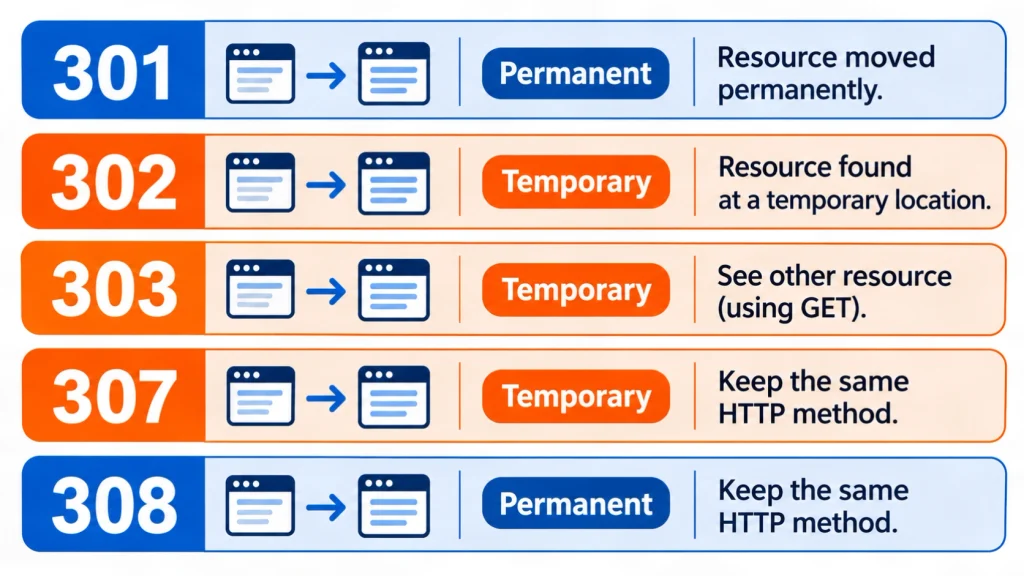
Use the table below as a quick lookup. The codes 301 and 308 are permanent, the codes 302 and 307 are temporary, and only 307 and 308 guarantee that a POST request stays a POST request. The 303 code is included for completeness.
| Status code | Name | Duration | Google canonical signal | Request method |
|---|---|---|---|---|
| 301 | Moved Permanently | Permanent | Strong | May change POST to GET |
| 302 | Found | Temporary | Weak | May change POST to GET |
| 303 | See Other | Temporary | Weak | Client uses GET |
| 307 | Temporary Redirect | Temporary | Weak | Keeps method |
| 308 | Permanent Redirect | Permanent | Strong | Keeps method |
For most page moves on a content site, 301 vs 302 redirects come down to one question: will the old URL return? The 307 and 308 codes matter when the request method must survive the redirect.
How Do 301 and 302 Redirects Affect SEO?
A 301 redirect asks Google to show the new URL, and a 302 redirect asks Google to keep showing the old one. In the 301 vs 302 redirects debate, neither code is a ranking boost. They tell Google which URL to treat as canonical, meaning the preferred address when several URLs show the same content.
Does a 301 redirect help SEO?
A 301 redirect helps SEO by moving Google toward the new URL after a permanent change, so visitors and crawlers do not land on a dead page. It does not add rankings by itself. The new page still has to match the search intent of the old one.
Google’s redirect guidance says permanent redirects show the new target in search results. A good 301 therefore needs a relevant destination, a single hop and an updated internal link.
Does a 302 redirect hurt SEO?
A 302 redirect does not hurt SEO when the move is truly temporary. Problems start when a 302 is used for a permanent change, because Google may keep the old URL in results while visitors land on the new one. The 301 vs 302 redirects mistake to avoid is using a 302 for a move that is already final. Match the code to your real plan.
Google’s guidance says temporary redirects show the source page in search results. That is the correct outcome for a short test and the wrong outcome for a finished migration.
What happens when a 302 stays in place for months?
Google does not publish a time limit after which a 302 turns into a 301, so no exact number applies. A long-running 302 sends mixed signals, because the code says temporary while the site behavior says permanent. Switch to a 301 once the move is final.
The long-term handling of 301 vs 302 redirects is an area of real uncertainty, since Google’s systems weigh several signals, not only the status code. The safe rule is to choose the code that states your true intent, then review it every few months.
What Are Broken Links and Why Do They Hurt SEO?
A broken link is a link that leads to a page that cannot load, usually because the page was deleted, moved or mistyped. Broken links hurt visitors first, then waste crawl effort and break the paths that connect your pages. Redirects fix some cases, but 301 vs 302 redirects cannot repair a link that has no good replacement.
What do broken links mean in SEO?
In SEO, a broken link is any internal or external link that returns an error status such as 404 instead of a working page. Internal broken links sit on your own pages. External broken links point to other websites. Both create dead ends for readers and crawlers.
Broken links usually appear after a redesign, a slug change, a deleted post or a site that was never audited. They also appear when other websites link to a URL you later removed.
Are broken links bad for SEO?
Broken links are bad for user experience, and they can weaken how well crawlers move through a site. Google does not publish a penalty for a few dead links. Many broken internal links, however, point to neglected structure and lost paths between related pages.
Fixing them supports a clear site structure, which also helps topical authority, the depth and consistency of your coverage on one subject. No fix can promise a ranking change.
What is a 404 error in SEO?
A 404 error means the server cannot find the requested URL. Google does not index URLs that return a 4xx status code, and indexed URLs that start returning one are removed from the index. A 404 is correct for a page that is truly gone.
Google’s HTTP status code documentation treats all 4xx errors the same way for indexing, except 429. So a few 404 pages are normal, and the goal is to remove them from internal links.
What is a soft 404?
A soft 404 is a page that tells the user the content does not exist but returns a 200 (success) status code. It can also be a nearly empty page. Google may report it as a soft 404 error in the Page indexing report.
The fix depends on the situation. Return a real 404 or 410 when the page is gone, a 301 when the content moved, and repair the page when it should exist but loads blank because resources fail to load.
Should you use a 301 redirect or a 404 page?
Use a 301 redirect when a close replacement page exists, and use a 404 page when it does not. The 301 vs 404 choice depends on relevance. Redirecting a deleted page to an unrelated page misleads visitors and can look like a soft 404 to Google.
A simple decision rule helps: if the new page would satisfy the same search intent, redirect. Otherwise return a 404, or a 410 when you want to state that the removal is intentional.
What is the difference between 301 and 401?
A 301 is a redirect that moves a URL permanently, while a 401 (Unauthorized) means the page needs valid login credentials. The 301 vs 401 mix-up is common because the numbers look alike. They belong to different classes: 3xx is redirection and 4xx is client error.
A URL that returns 401 is not broken in the same way as a 404. Crawlers cannot sign in, so protected URLs stay out of the index. Do not use a 301 to hide a login problem.
How Do You Find Broken Links on a Website?
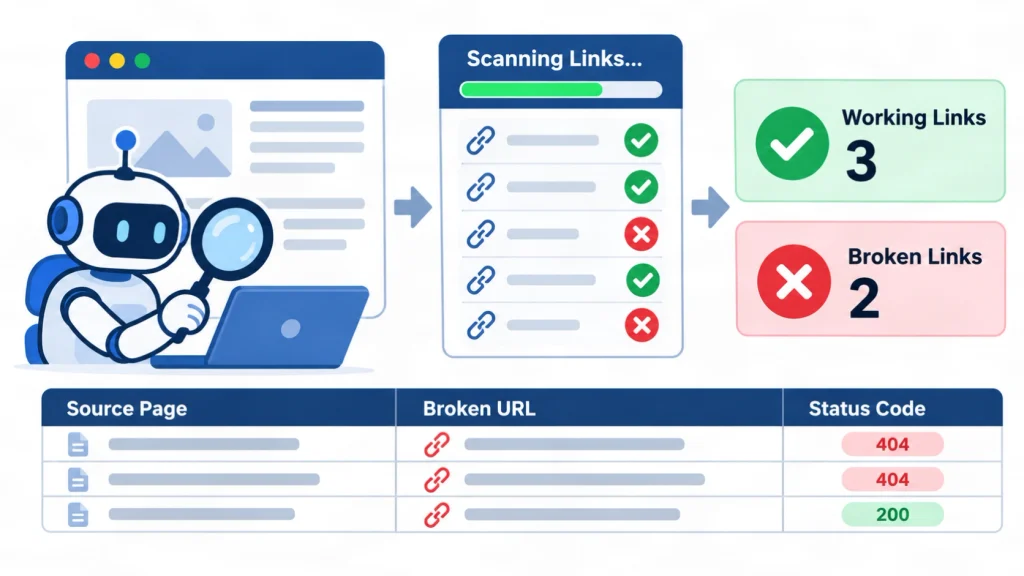
You find broken links by crawling your site, reading the status codes and exporting the list of broken URLs with the pages that link to them. Search Console adds the URLs Google itself could not load. Combining both sources gives the fullest picture.
How do you use a broken link checker?
A broken link checker is a tool that crawls a page or a site, requests each link and reports the HTTP status code. Free browser extensions suit single pages, while desktop crawlers suit whole sites. Each report lists the source page, the broken URL and the code.
Free tools often cap the number of pages or links, so check the limit before you trust a clean report. A list of crawlers and audit tools is available in my SEO tools and resources page.
How do you build a broken links report with Screaming Frog?
Screaming Frog SEO Spider is a desktop crawler that lists every URL with its status code. Crawl the site, open the Response Codes tab, filter for Client Error (4xx), then export the inlinks to see which pages link to each broken URL. Menu names can change between versions.
Sort the export by inlink count, so the URLs that hurt the most visitors are fixed first. Keep the file as your baseline for the next audit.
What about broken links reports in SharePoint and Sitecore?
SharePoint and Sitecore are content management systems that store links inside page fields. A crawler report is the usual starting point on a public site. Intranet pages need a crawler that can sign in, and each vendor may offer built-in link reports, so check current vendor documentation.
This guide did not test those platforms, so treat the point as a direction, not a verified procedure.
How do you find broken links in Google Search Console?
Google Search Console shows pages Google could not index in the Page indexing report. Look for the reasons Not found (404), Soft 404 and Page with redirect. The report lists URLs Google already knows, which can include URLs found through links from other websites.
The Page with redirect reason lists URLs where 301 vs 302 redirects send Google elsewhere. Open each reason, inspect a sample URL and note the pages that link to it. Then decide whether to fix, redirect or leave the 404 in place.
How do you review broken links in Excel?
Excel helps you sort and count crawl exports. Save the crawler export as a CSV file, open it in Excel, filter the status code column for values of 400 and above, then use a pivot table to count broken URLs by destination. Add a column for the planned fix.
A simple column set works well: source page, broken URL, status code, planned action, owner and date fixed. This also becomes your change log.
How do you test broken links in Selenium or Playwright?
Selenium and Playwright are browser automation tools that can test every link on a page. The usual method has four steps: collect all anchor href values, request each URL, record the status code, then fail the test for any value of 400 or higher. The code differs by language, but the logic stays the same.
- Open the page and collect every anchor href.
- Send an HTTP request to each unique URL.
- Record the final status code.
- Fail the test for any status of 400 or higher.
Many coding classes use practice websites with deliberately broken links. Run your first tests there, and keep request speed low on any live site.
How Do You Fix Broken Links With Redirects?
You fix broken links by correcting the link, redirecting the dead URL to a close replacement, or removing the link when nothing fits. A redirect is only one of several tools. The right choice depends on whether the page moved, was deleted or never existed.
What are the 9 easy ways to fix broken links?
There are nine practical fixes, and each one matches a specific cause. Start with the simplest fix that restores a correct path for readers. Use a redirect only when a relevant replacement exists, and pick between 301 vs 302 redirects by the permanence of the move.
- Fix the typo when the link contains a mistyped URL.
- Update the link to the final URL when the page moved.
- Add a 301 redirect from the old URL to the closest replacement page.
- Restore the page when it was deleted by mistake.
- Return a 404 when the content is gone and no replacement exists.
- Return a 410 when you want to mark the removal as intentional.
- Replace a dead external link with a working, relevant source.
- Remove the link when no good replacement exists.
- Re-crawl the site to confirm every fixed URL returns the planned status code.
How do you redirect a broken link?
To redirect a broken link, choose the closest live match, add a 301 rule from the old URL to that page, then test the old URL. The redirect can be set in server files, a CMS plugin or a hosting panel. Keep the path to one hop. For broken links, the answer to the 301 vs 302 redirects question is almost always a 301.
Document each rule in a simple redirect map so later changes do not create chains. The example below uses placeholder paths on example.com.
| Old URL | Status | New URL | Reason |
|---|---|---|---|
| /old-guide/ | 301 | /new-guide/ | Page renamed |
| /sale-2026/ | 302 | /current-offers/ | Short campaign |
| /retired-page/ | 404 | None | No replacement |
How do you redirect broken links in WordPress?
To redirect broken links in WordPress, add a 301 rule in a redirect manager plugin, in an SEO plugin that includes redirects, or in the server file. Enter the old path as the source and the closest live match as the target. Then test the old URL in a private window.
- Export the broken URL list from your crawler or Search Console.
- Match each URL to a relevant live match.
- Add the rule with the 301 type.
- Test the old URL and confirm one hop.
- Update internal links to the final URL.
Choose the 301 type for permanent fixes and the 302 type for short tests, as with all 301 vs 302 redirects. Plugin menus differ by version, so follow the current plugin documentation. Take a backup first.
How do you write 301 and 302 rules in Apache and Nginx?
Apache and Nginx are web servers that read rules for 301 vs 302 redirects from configuration files. The examples below follow the patterns shown in Google’s redirect documentation. Replace the paths with your own, test on a staging site and keep a backup of the file before editing.
# Apache (mod_alias)
Redirect permanent "/old" "https://example.com/new"
Redirect temp "/two-old" "https://example.com/two-new"

# Nginx
return 301 $scheme://example.com/about/service;
Syntax errors in server files can take a whole site offline. Ask a developer to review the change when you are not confident with server configuration.
Should you send every broken link to the homepage?
No. Sending every broken URL to the homepage is a weak fix because the homepage rarely matches the topic of the old content. Google may treat such redirects as soft 404 errors. Redirect each URL to the closest relevant match, or return a 404 when no match exists.
Visitors who expect a specific article get confused when they land on a generic screen. A clear 404 page with search and helpful links is often better than a mismatched redirect.
What Are Redirect Chains and Redirect Loops?
A redirect chain is a path of two or more redirects before the final page, and a redirect loop is a path that never ends. Both slow visitors and waste crawl effort. The fix for both is to simplify the path so each old URL points straight to its final target.
What is a redirect chain?
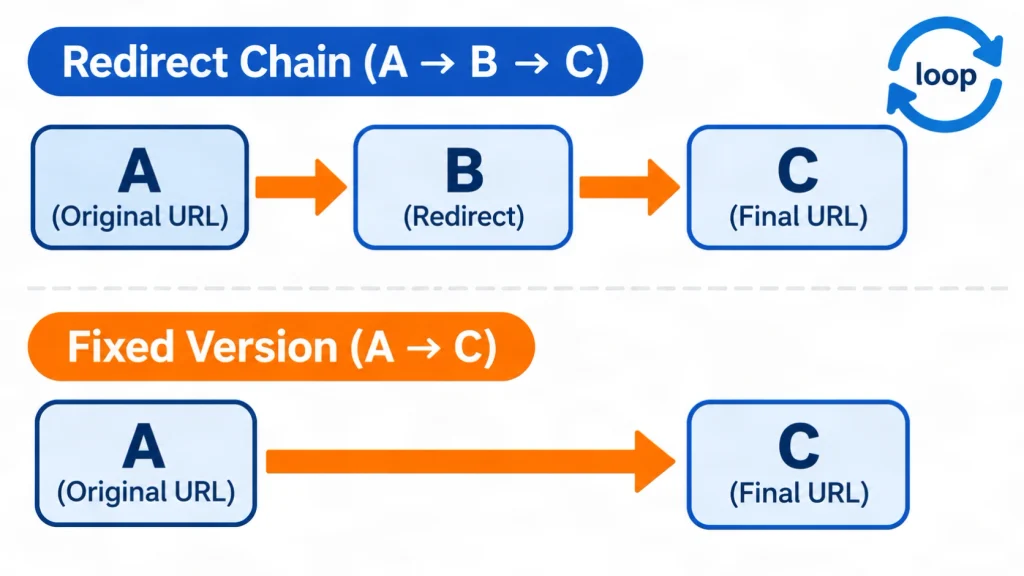
A redirect chain is a series of two or more redirects between the first URL and the final page, such as A to B to C. Chains form when old redirects are never updated after a later move. Each extra hop adds a request and delays the visitor.
Chains that mix 301 vs 302 redirects send mixed signals, so use one code type per path. Chains often appear after repeated migrations, such as an HTTP to HTTPS change followed by a www change and a slug change. A crawler report shows them as multi-hop paths.
How many redirects does Googlebot follow?
Googlebot follows up to 10 redirect hops, and Search Console reports a redirect error when content does not arrive within that limit. The limit depends on the crawler, so other Google crawlers can differ. For robots.txt, Googlebot follows at least five hops.
“Googlebot follows up to 10 redirect hops.” (Google Search Central)
Ten is a ceiling, not a target. Aim for one hop on every important URL, and read the full list of codes in Google’s HTTP status code documentation.
How do you fix redirect chains?
To fix a redirect chain, point the first URL straight to the final URL, then update internal links so they skip the redirect. Crawl the site, export the multi-hop paths, rewrite the first rule in each chain and run the crawl again to confirm a single hop.
- Crawl the site and export redirect paths.
- List the first URL and the final URL for each chain.
- Change the first rule to point to the final URL.
- Update internal links to the final URL.
- Re-crawl and confirm one hop.
What is a redirect loop?
A redirect loop happens when URLs send visitors in a circle, such as A to B and B back to A. Browsers stop with a too many redirects error, such as ERR_TOO_MANY_REDIRECTS in Chrome, and crawlers cannot reach content. Break the loop by correcting or deleting one rule.
Loops often come from conflicting rules, such as a plugin and a server file that both force a redirect. Disable one source, clear the cache and test again. Loops can occur with any mix of 301 vs 302 redirects.
So the pattern for this whole section is simple: one rule per old URL, one hop, and no circles.
When Should You Pick 301 vs 302 Redirects in Real Projects?
Pick a 301 when the old URL will not return, and pick a 302 when it will. The rule for 301 vs 302 redirects is about your plan, not about the page type. Four common projects show how the rule works in practice, from site moves to URL shorteners.
Which redirect fits a domain move or HTTPS switch?
Use a 301 redirect for a domain move, an HTTP to HTTPS switch, a merged page or a permanent URL rename. Each case is permanent, so the old URL should hand its role to the new one. Map each old URL to its closest match, not to the homepage.
For a full domain move, Google’s Search Console also offers a Change of Address tool, and a 301 map from every old URL to its new match remains the core step.
Which redirect fits a sale, test or maintenance page?
Use a 302 redirect for a short-term change that you plan to reverse, such as a maintenance page, a seasonal landing page or a limited test. The original URL stays the main address in search results. Of the 301 vs 302 redirects, the 302 is the one for short events, so remove it when the event ends.
Use a 307 when the request method must stay the same, for example on a form endpoint. Review every temporary redirect on a calendar so it does not become permanent by accident.
Which redirect fits a URL shortener?
Many URL shorteners use a 301 for permanent short links and a 302 when the destination may change. The 301 vs 302 redirects choice for short links is a product decision, because Google’s guidance covers page moves, not shortener design. Pick the code that matches how long the short link should point to its target.
For a short link that will point to one page for years, a permanent code states that intent clearly. For a link that you plan to repoint, a temporary code keeps the short URL as the main address.
Is a 301 or 302 response an error?
No. A 301 or 302 is a redirection response in the 3xx class, not an error. Errors sit in the 4xx class (client errors) and 5xx class (server errors). A redirect only becomes a problem when it loops, forms a chain or points to an error page.
Domain registrars often label these options permanent and temporary forwarding, so a 301 vs 302 forwarding choice follows the same logic. Confirm which code your registrar sends with a header check, because labels differ by provider.
What Risks Should You Know Before Changing Redirects?
Redirect changes on a live site can break pages, send traffic to wrong URLs and create loops. Back up the site, test on a staging copy when possible, change URLs in small batches and monitor Search Console after each batch. No one can promise a ranking result from a redirect change.
What can go wrong with live redirects?
The main risks of 301 vs 302 redirects are redirect loops, long chains, mismatched destinations and rules that overwrite each other. A wrong rule can also redirect the whole site by mistake. Each risk has a simple control: test before launch, log every rule and review the crawl after launch.
- Loops stop pages from loading.
- Chains slow visitors and waste crawl effort.
- Mismatched targets confuse readers and can look like soft 404 errors.
- Overlapping plugin and server rules produce unpredictable results.
How do you test a redirect safely?
Test a redirect by requesting the old URL and reading the status code and the Location header. The command curl -I followed by the URL prints the response headers without downloading the page. Your browser’s developer tools show the same data in the Network tab.
When you compare 301 vs 302 redirects on your own site, check three things: the first status code is the planned 301 or 302, the Location header shows the intended target, and the final page returns 200. Repeat the test on mobile and in a private window.
When should you ask a qualified professional for help?
Ask a qualified technical SEO or developer when the site has thousands of URLs, a domain move, a custom server setup or pages that drive revenue. A guide cannot replace an audit of your own server logs, analytics and CMS. Mistakes on large sites are costly to reverse.
For a hands-on review, see these affordable website SEO services in Oman. Recurring crawls can also be scheduled with an SEO automation service.
Who Wrote This Guide and How Was It Checked?
Forkan Mahmud wrote this guide. He is an SEO professional based in Oman with about five years of experience in local SEO, Google Business Profile optimization, topical maps and content briefs, and he has worked with European clients. You can read more on the About Forkan Mahmud page.
This guide to 301 vs 302 redirects relies on technical claims from Google Search Central documentation and the HTTP standard. Forkan Mahmud also offers SEO services, so the service links in this article are commercial. Last updated: November 6, 2026. Review again in three to six months, because documentation and tools change. Published work is listed in the local SEO case studies.
What are the limits of this guide?
This guide explains documented behavior and common practice. It does not report a controlled ranking test of 301 vs 302 redirects, and it does not cover every server, CMS or tool. Google’s internal handling of long-running temporary redirects is not fully documented, so that point stays uncertain.
Menu names in crawlers, plugins and Search Console change over time. Confirm each step against current official documentation before you edit a live site.
Conclusion: Which Redirect Fits Your Page?
For 301 vs 302 redirects, the rule is simple: use a 301 when a URL moves for good and a 302 when the move is temporary. Fix broken links by correcting, redirecting or removing them. Keep every redirect to one hop, test after each change, then re-crawl and watch Search Console.
Review 301 vs 302 redirects together with broken links in one routine. A short routine keeps the site clean: crawl monthly, export 4xx and 3xx URLs, fix the highest-impact links first and update internal links to final URLs. More guides on technical and local SEO are on the blog.
For a next step, run one crawl on your own site and list every broken link and redirect chain. To discuss the results, contact Forkan Mahmud.
Redirect and Broken Link FAQs
The ten answers below cover follow-up questions about redirects and broken links. Each answer stands alone, so you can read only the question you need. They add detail that the main sections do not repeat, such as timing, speed and tool limits.
What is a broken link redirect?
A broken link redirect is a redirect set up for a URL that no longer works, so visitors reach a working page instead. It is usually a 301 to the closest matching page. It only helps when the target is truly relevant, otherwise a 404 is cleaner.
How long does Google take to process a 301 redirect?
Google publishes no fixed time. Googlebot must recrawl the old URL, follow the redirect and update its index, which depends on how often the page is crawled. Large or rarely crawled pages can take longer. Watch the Page indexing report in Search Console for progress.
Should I update links that point to a redirected URL?
Yes. Update each internal link to point straight to the final URL. The redirect still works, but it adds a request on every click and it can grow into a chain later. Use a crawler to list internal links that point to 3xx URLs.
Do redirects slow down a website?
Both 301 vs 302 redirects add the same extra request cost, since each redirect adds at least one extra request before the final page loads, so a single hop adds a small delay and a chain adds more. The exact delay depends on server speed and network conditions. Keep redirects to one hop and link straight to final URLs.
What is the difference between a 404 and a 410?
A 404 means the server cannot find the page, and a 410 means the page is gone on purpose. Google treats 4xx errors the same way for indexing, except 429. Use a 410 when you want to state the removal clearly. A 404 is also acceptable.
Is a free broken link checker enough?
A free broken link checker is enough for a small site or a single page. Larger sites need a crawler without tight page limits, plus Search Console data. Check the free tool’s limits, such as page caps and JavaScript rendering, before you trust a clean report.
Can a meta refresh or JavaScript redirect replace a server-side redirect?
Server-side redirects are the best choice because Google interprets them most reliably. Google reads an instant meta refresh as permanent and a delayed one as temporary. Use JavaScript redirects only when server-side and meta refresh options are impossible, because rendering can fail.
Should I use a 301 redirect when I delete a product page?
Redirect the product to a close replacement, such as a similar product or its category page, only when the match is genuine. When no relevant page exists, return a 404 or 410. Redirecting every deleted product to the homepage can look like a soft 404.
How often should I run a broken links report?
A practical schedule is one full crawl each month for active sites, plus a crawl after every migration, redesign or large content change. Small static sites can use a quarterly check. Review the Page indexing report in Search Console alongside each crawl.
What should I do about broken external links on my pages?
Replace the dead link with a current, relevant source when one exists. Otherwise remove the link and keep the sentence if it still makes sense. You cannot redirect another site’s URLs, so the only fix is to change the links on pages you control.