XML Sitemap and Robots.txt Guide: What They Do and How to Set Them Up
An XML sitemap lists the pages you want search engines to find, and robots.txt sets crawl rules for bots. This guide explains how each file works, how they differ, and how to set up, add, and check both.

This XML Sitemap and Robots.txt Guide explains how two small files help search engines crawl your site. An XML sitemap is a file that lists the pages you want search engines to find, and robots.txt is a text file that sets crawl rules for bots.
An XML sitemap and robots.txt work as a pair. The sitemap lists URLs you want discovered, and robots.txt tells crawlers which paths they may request. Use both, connect them with one Sitemap line, and never rely on robots.txt to hide private content.
You do not need to be a developer to follow this guide. Each section answers one question first, then adds an example, a source, or a limit. You will learn what each file does, how they differ, how to read and check them, and which mistakes waste crawl time.
XML Sitemap and Robots.txt Guide: What Each File Does
An XML sitemap invites crawlers to specific URLs, while robots.txt tells crawlers which paths to skip. Both files sit on your server, and both talk to bots. They solve opposite problems, so most websites need both.
What Is an XML Sitemap?
An XML sitemap is a file that lists the URLs on your website that you want search engines to find. Search engines treat it as a hint, not a command. The format comes from the sitemaps.org protocol, and Google supports the sitemap formats defined by that protocol.
Each entry names a page address. It can also carry a last-modified date. That is why people search for “sitemap xml explained” or “xml sitemap what is it”: the idea is simple, but the details matter.
What Does Sitemap.xml Do for SEO and Digital Marketing?
Sitemap.xml helps search engines discover new and updated pages, but it does not guarantee crawling, indexing, or rankings. The file adds the most value when pages are new, deeply buried, or poorly linked.
For XML sitemap SEO work, three cases stand out:
- New websites have few external links, so crawlers have fewer paths to follow.
- Large websites have thousands of URLs, and some sit many clicks from the homepage.
- Frequently updated websites gain from accurate last-modified dates.
Google’s sitemap overview describes a small site as one with roughly 500 pages or fewer, and says such a site may not need a sitemap if internal links already reach every page. In digital marketing, the Search Console Sitemaps report also gives teams a clear count of submitted URLs, which makes reporting easier.
What Is Robots.txt and How Does Robots.txt Work?
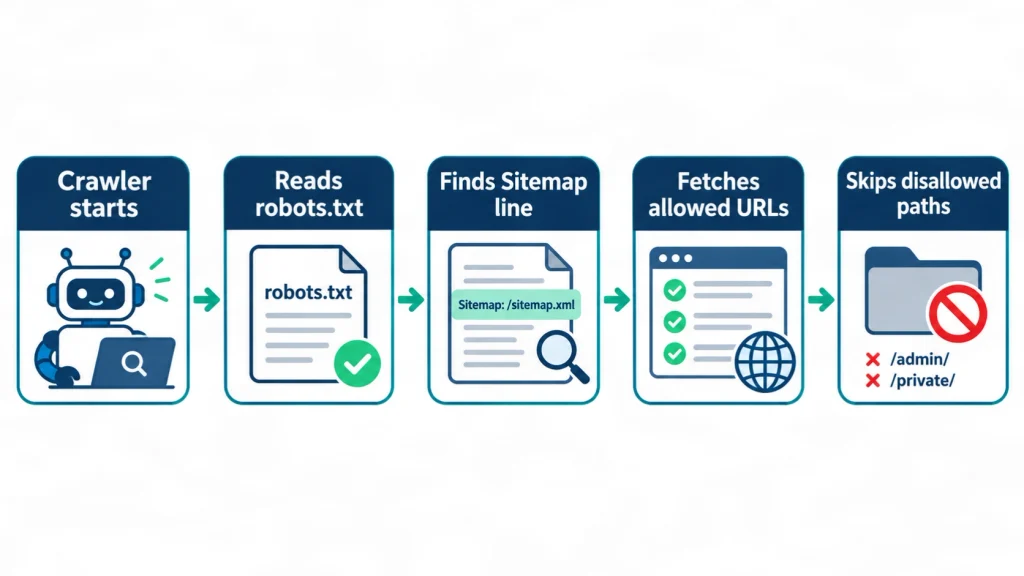
Robots.txt is a plain text file at the root of your site that tells crawlers which URLs they may request. Before crawling, a well-behaved bot fetches https://example.com/robots.txt, finds the group that matches its name, and follows the Allow and Disallow rules in that group.
The rules were formalized as the Robots Exclusion Protocol in RFC 9309, published in September 2022. Google’s own documentation uses careful wording about the limits of the file:
Google Search Central describes robots.txt as “not a mechanism for keeping a web page out of Google.” (Introduction to robots.txt, Google for Developers, accessed November 1, 2026)
The practical meaning is simple. Robots.txt manages crawling. It does not manage indexing, and it cannot force a bot to obey.
What Is the Difference Between a XML Sitemap and Robots.txt?
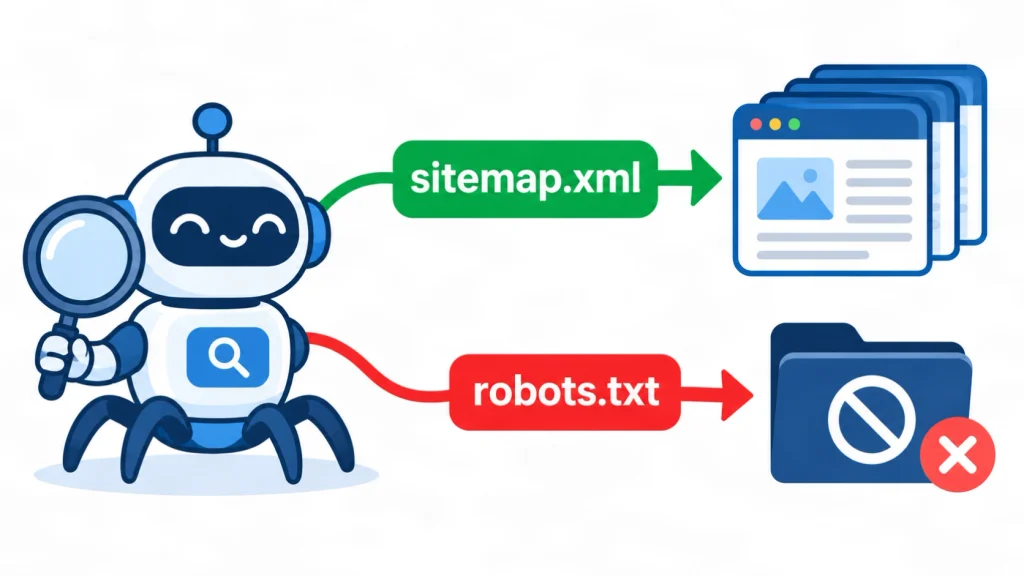
A sitemap invites crawlers to specific URLs, while robots.txt asks crawlers to stay out of specific paths. Search professionals often describe the sitemap as a URL inclusion tool and robots.txt as a URL exclusion tool. The table below answers the common searches “sitemap vs robots”, “robots txt vs xml”, and “sitemap xml vs robots txt”.
| Feature | XML sitemap | Robots.txt |
|---|---|---|
| Main job | Lists URLs you want discovered | Sets crawl rules for bots |
| Typical location | /sitemap.xml or /sitemap_index.xml |
/robots.txt at the root only |
| Format | XML | Plain text |
| Controls crawling | No, it only suggests URLs | Yes, for bots that obey it |
| Controls indexing | No | No |
| Required | No | No |
| Enforced | No, it is a hint | No, it is voluntary |
| Size limits | 50,000 URLs or 50 MB uncompressed per file | Parsers must handle at least 500 KiB |
The XML sitemap and robots.txt also interact. A sitemap that lists URLs blocked by robots.txt sends mixed signals, and a robots.txt file that blocks the sitemap itself defeats the purpose. Section by section, this guide shows how to keep them aligned.
Is Robots.txt Necessary?
No, robots.txt is not required, and a site without one is crawlable by default, but most sites benefit from having one. Under RFC 9309, if a robots.txt file returns a client error such as 404, crawlers may access any resource on the site.
A robots.txt file becomes useful when you want to steer bots away from low-value paths such as internal search results, cart pages, or admin areas. It is also the standard place to point crawlers to your sitemap. Online stores, which often create many filter and cart URLs, gain the most. If you run one, see how SEO for e-commerce businesses handles crawl waste.
What Is the Difference Between Sitemap XML and HTML Sitemap?
An XML sitemap is written for search engine crawlers, while an HTML sitemap is a normal web page written for human visitors. The searches “sitemap xml vs html”, “sitemap vs xml sitemap”, and “xml sitemap vs sitemap” all point to this one distinction.
An HTML sitemap sits inside your navigation, often in the footer, and uses clickable links with readable labels. An XML sitemap uses tags, has no design, and is never shown to visitors. Many sites use both. Neither replaces the other, and clear site structure helps both. Our notes on website architecture explain how page groups should be organized before you generate either file.
How Do You Read an XML Sitemap?
Open the sitemap URL in a browser and read each <url> block: <loc> is the page address and <lastmod> is the date of the last significant change. This is the whole answer to “how to read sitemap xml”. An XML sitemap reader can be a browser, a text editor, a crawler, or the Search Console Sitemaps report.
If the first file you open contains <sitemap> blocks instead of <url> blocks, you are looking at a sitemap index. Each <loc> inside it points to a child sitemap. Open those one at a time.
What Does an XML Sitemap Example Look Like?
A minimal XML sitemap has one <urlset> wrapper and one <url> entry per page, each with a <loc> tag. Here is a simple XML sitemap example using a placeholder domain:
xml
<?xml version="1.0" encoding="UTF-8"?>
<urlset xmlns="http://www.sitemaps.org/schemas/sitemap/0.9">
  <url>
    <loc>https://example.com/</loc>
    <lastmod>2026-11-01</lastmod>
  </url>
  <url>
    <loc>https://example.com/blog/xml-sitemap-guide/</loc>
    <lastmod>2026-10-28</lastmod>
  </url>
</urlset>
Every URL must be absolute, including the protocol and host. Special characters such as the ampersand must be escaped as &.
What Does the XML Sitemap Schema Include?
The XML sitemap schema defines a <urlset> root element in the sitemaps.org 0.9 namespace, with <loc> required and three optional child tags. People searching “xml sitemap schema” usually want to know which tags matter. Google’s documentation says it ignores <priority> and <changefreq>, and uses <lastmod> only when it is consistently and verifiably accurate.
| Tag | Required | What it means | Google use |
|---|---|---|---|
<loc> |
Yes | Full page URL | Used |
<lastmod> |
No | Last significant change date | Used if consistently accurate |
<changefreq> |
No | Expected change frequency | Ignored |
<priority> |
No | Relative importance, 0.0 to 1.0 | Ignored |
The sitemaps protocol also sets hard limits. One file may hold at most 50,000 URLs or 50 MB (52,428,800 bytes) uncompressed, whichever comes first. A sitemap index may list up to 50,000 sitemaps. Source: sitemaps.org protocol and Google Search Central, Build and submit a sitemap, accessed November 1, 2026.
What Is an XML Sitemap URL and Where Do You Find It?
An XML sitemap URL is the web address where your sitemap file lives, most often /sitemap.xml or /sitemap_index.xml at the root of the website. The file name is not fixed, so check three places: your robots.txt file, your CMS settings, and Search Console.
If robots.txt contains a Sitemap line, that line gives the exact address. If not, try the common paths in your browser. A working sitemap in a website should return a readable XML page, not a 404 error.
How Does Robots.txt Work, and What Do Robots.txt Rules Look Like?
Robots.txt works as a set of groups: each group starts with a User-agent line and lists the Allow and Disallow rules for that bot. Here is a short example that many sites could adapt:
text
User-agent: *
Disallow: /cart/
Disallow: /search
Allow: /search/help

Sitemap: https://example.com/sitemap.xml
The asterisk means “all crawlers that have no more specific group”. The Disallow lines block carts and internal search. The Allow line makes one exception. The last line points to the sitemap.
What Are the Main Robots.txt Rules?
The main robots.txt rules are User-agent, Disallow, Allow, and Sitemap, plus two wildcard characters. This list works as a quick robots.txt tutorial:
- User-agent: names the bot the group applies to. A bot obeys the group that best matches its product token.
- Disallow: blocks a path prefix.
Disallow: /blocks the entire site. - Allow: permits a path inside a blocked area.
- Sitemap: gives the full URL of a sitemap.
- Wildcards:
*matches any sequence of characters and$marks the end of a URL.
When rules overlap, the most specific match wins under RFC 9309. Paths are case-sensitive, so /Cart/ and /cart/ are different. Google does not support the crawl-delay rule that some other crawlers read.
What Are Common Robots.txt Examples?
Common robots.txt examples allow everything, block low-value folders, or block one named bot. Use these as patterns, not as copy-and-paste fixes:
text
# Allow everything (an empty Disallow blocks nothing)
User-agent: *
Disallow:

# Typical WordPress pattern
User-agent: *
Disallow: /wp-admin/
Allow: /wp-admin/admin-ajax.php

# Block one named bot from the whole site
User-agent: ExampleBot
Disallow: /
The difference between Disallow: with nothing after it and Disallow: / is one character, but the effect is opposite. Always re-read the file after editing.
What Are Robots.txt Guidelines and Best Practices?
The best robots.txt guidelines are to keep the file short, place it at the root, avoid blocking files that pages need to render, and test every change. These robots txt guidelines apply to most sites:
- Serve the file as UTF-8 plain text at
https://yourdomain.com/robots.txt. It applies only to that host and protocol. - Do not block CSS or JavaScript files that Google needs to understand the page.
- Keep the file small. RFC 9309 requires crawlers to parse at least 500 KiB.
- Do not list secret URLs. The file is public, so a listed path becomes easy to find.
- Re-test after every CMS, plugin, or theme change.
The RFC also covers failure cases. If robots.txt cannot be reached because of a server error in the 500 range, a crawler must assume that everything is disallowed. A broken server can therefore pause crawling even when your rules are fine.
How Do You Add a Sitemap to Robots.txt?
Add a line that starts with Sitemap: followed by the full, absolute URL of your sitemap, such as Sitemap: https://example.com/sitemap.xml. This answers “how to add sitemap to robots txt”, “how to specify sitemap in robots txt”, and “how to add sitemap xml to robots txt file”.
Follow these steps:
- Open your robots.txt file in the editor, plugin, or hosting panel you use.
- Add
Sitemap: https://example.com/sitemap.xmlon its own line. Use your real address. - Place it anywhere in the file. The directive is independent of the User-agent lines.
- Add one line per sitemap if you have several, or point to one sitemap index file.
- Save the file, open it in a browser, and confirm the line appears.
Use a full URL with https:// and the host name. A relative path such as /sitemap.xml is not a valid value, which settles the question behind “robots txt sitemap relative”. RFC 9309 notes that crawlers may read other records such as Sitemap, but the record must not interfere with the core rules.
If your sitemap is not listed in robots.txt, nothing is broken. The line is optional. It still helps crawlers find the file, and Google lists robots.txt as one way to submit sitemaps across sites, next to Search Console.
XML Sitemap and Robots.txt Guide: Setup Steps for Any Website
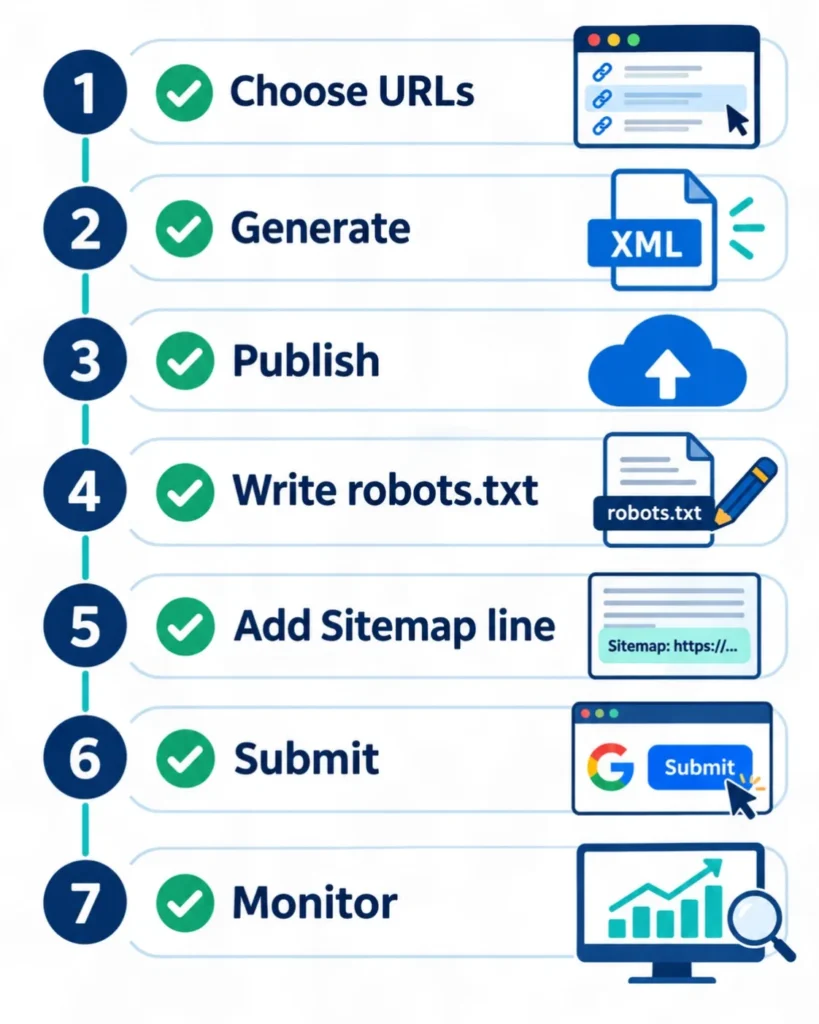
You can set up an XML sitemap and robots.txt in seven steps: pick the URLs, generate the sitemap, publish it, write robots.txt, link the two, submit the sitemap, and monitor.
- Choose the URLs that deserve to be found. Include canonical, indexable pages that return a 200 status. A clear content strategy and brief process makes this choice easier because every page has a purpose.
- Generate the sitemap. Use your CMS, a plugin, a framework feature, or a script. Avoid adding pages by hand on large sites.
- Publish it at the root. Open the URL in a browser and confirm that it returns valid XML.
- Write a minimal robots.txt file. Start with a few clear rules. Add more only when you have a reason.
- Add the Sitemap line. Use the full URL, as shown in the previous section.
- Submit the sitemap. Use the Sitemaps report in Google Search Console, which shows when Googlebot read the file and any processing errors. Bing Webmaster Tools has a similar option.
- Monitor and update. Re-check both files after migrations, redesigns, plugin changes, and large content updates.
How Do You Create These Files in WordPress, Next.js, React, and AEM?
Most platforms generate both files for you, so you usually configure your XML sitemap and robots.txt rather than write them by hand. Platform behavior changes between versions, so confirm details in your platform’s own documentation.
- WordPress: core WordPress has offered a built-in sitemap at
/wp-sitemap.xmlsince version 5.5. Yoast SEO and Rank Math create their own index, usually at/sitemap_index.xml. Use one source only, so you do not publish two competing sitemaps. WordPress also serves a virtual robots.txt unless a physical file exists. The “xml sitemap in wordpress” setup is mostly a plugin setting. - Next.js: the App Router supports a
sitemapfile and arobotsfile inside theappfolder, which return your URLs and rules from code. This covers “sitemap xml in nextjs”. - React: a plain client-rendered React app can place static
sitemap.xmlandrobots.txtfiles in the public folder, or generate them at build time. For “sitemap xml in react js”, remember that crawlers need server-readable HTML for the pages themselves too. - Adobe Experience Manager (AEM): AEM includes sitemap support, but setup depends on your version and project. Follow Adobe’s documentation for “sitemap xml in aem” and test the output.
How Do You Check an XML Sitemap?
Check an XML sitemap by opening its URL, confirming that it returns a 200 status and valid XML, then reviewing it in the Google Search Console Sitemaps report. This answers “how to check xml sitemap” in four moves:
- Load the URL and confirm that it is readable XML.
- Validate it against the sitemaps.org schema or a trusted validator.
- Crawl the listed URLs with a crawler to see status codes, redirects, and noindex tags. This is what people mean by an “xml sitemap crawler”.
- Compare submitted URLs with indexed URLs in Search Console.
A useful review method is the three-list check. List A is every URL in the sitemap. List B is every URL blocked by robots.txt. List C is every URL that redirects, errors, carries noindex, or points to a different canonical. A healthy site shows no overlap between List A and the other two lists. This method comes from the logic of the protocols, not from a measured test.
How Do You Use an XML Sitemap Generator for Google?
Use an XML sitemap generator to list your canonical URLs, download the file, upload it to your root, and submit it in Search Console. A generator is fine for small static sites. For growing sites, an automatic CMS feature is better because it updates the file when content changes.
Before you upload a generated file, remove redirected, blocked, duplicate, and parameter URLs. Also remove <priority> and <changefreq> values if the tool adds them by default, since Google ignores both. Generators only create the file. They do not decide which pages deserve to be indexed.
XML Sitemap and Robots.txt Guide: Common Mistakes to Avoid
The most common mistakes are blocking important pages, listing the wrong URLs in the sitemap, and treating robots.txt as a privacy tool. Each mistake in an XML sitemap and robots.txt setup is easy to make and easy to find with the checks above.
Why Does Blocking a Page in Robots.txt Not Remove It From Google?
Blocking a page in robots.txt stops crawling, but the URL can still be indexed if other sites link to it. Google says a blocked page can still appear in results, usually without a description. To keep a page out of search, use a noindex rule or password protection.
Here is a point many guides skip. Noindex only works when the crawler can read the page. If robots.txt blocks the page, Google never sees the noindex rule. So choose one tool for each goal: robots.txt for crawl control, noindex for index control.
The RFC makes the privacy point as well:
RFC 9309 states that these rules are “not a form of access authorization.” (RFC 9309, Robots Exclusion Protocol, IETF, September 2022)
If a page is private, protect it with a login, not with a Disallow line.
Should Noindex, Blocked, or Redirected URLs Stay in Your Sitemap?
No, a sitemap should list only canonical, indexable URLs that return a 200 status. Listing redirected, blocked, noindex, or error URLs gives crawlers contradictory instructions and wastes your crawl budget on pages you do not want indexed.
Clean the file whenever you remove or merge pages. If you run a local business site with many location pages, review the list after each change. Our local SEO service includes this kind of structure check for location pages.
What Other Mistakes Should You Watch For?
Other frequent mistakes include a stray Disallow: /, a sitemap blocked by robots.txt, fake lastmod dates, and mixed hostnames. Check this list during every audit:
- Leaving a staging rule on the live site. A
Disallow: /copied from a test server can block the whole site. - Blocking CSS and JavaScript. Google may fail to understand the page layout.
- Using fake lastmod dates. Google uses the date only when it proves reliable, so updating it on every build can reduce trust.
- Mixing hostnames. A sitemap should list URLs from its own host, with the same protocol.
- Exceeding limits. Split files above 50,000 URLs or 50 MB and use an index.
- Forgetting to resubmit after a migration. Update the sitemap URL in Search Console and robots.txt.
- Submitting but never reviewing. Search Console errors need a response.
For deeper reviews, browse the site’s technical SEO audit articles.
What Do Reddit Threads and SEO Tools Say About XML Sitemaps?
Reddit threads show the questions people ask most, but they contain opinions, so verify any advice against official documentation. This guide does not use Reddit as evidence. When you read a thread about an xml sitemap on Reddit, compare each claim with Google Search Central or the RFC before acting.
SEO tools help you check an XML sitemap and robots.txt setup. Google Search Console reports sitemap processing. Desktop crawlers can read a sitemap and compare it with a site crawl. Platforms such as Semrush include site audits that can flag sitemap and robots.txt issues. Treat tool warnings as diagnostics, not as Google verdicts, and confirm each feature in the tool’s documentation. When people search “what is sitemap xml semrush”, the useful answer is that an audit tool reads your file, while the file itself still follows the sitemaps.org protocol.
What Are the Risks and Limits of This Guide, and When Should You Ask a Professional?
The main risk is that one wrong robots.txt line can block crawling across your entire site, so test changes and ask a qualified technical SEO or developer to review them on important sites. This topic is not a health or money topic, but a mistake in an XML sitemap and robots.txt setup can still hurt a business that depends on search traffic.
Keep these limits in mind:
- No ranking promises. A sitemap and a clean robots.txt file support discovery. They do not guarantee crawling, indexing, rankings, traffic, or AI citations.
- Platform differences. WordPress, Next.js, React, and AEM change over time. Check current documentation before editing a live site.
- Search engine differences. Google follows its own documentation. Other crawlers may read rules differently, and some ignore robots.txt.
- No legal advice. Robots.txt is a technical convention, not a contract. For questions about scraping, data use, or AI training permissions, speak with a qualified legal professional.
- Back up first. Save a copy of your current robots.txt file before any change, and know how to restore it.
If you manage a large or business-critical site, a developer can test changes on a staging environment before they go live. My own website SEO service follows that same cautious approach to technical changes.
How Was This Guide Reviewed, and Who Wrote It?
This guide was written by Forkan Mahmud, an SEO professional, and reviewed against Google documentation, the sitemaps.org protocol, and RFC 9309 on November 1, 2026. I work with SERP Panda and manage much of my work from Oman, with a team. My work covers Local SEO, Google Business Profile optimization, website structure, topical maps, content briefs, and content optimization. I have about five years of experience with clients across Europe. You can read more on the about page.
I have not included client case studies, traffic numbers, or ranking results here, because none are verified for this article. The examples use example.com, and the three-list check is a working method, not a test result.
Sources used:
- Google for Developers, Introduction to robots.txt.
- Google Search Central, Build and submit a sitemap.
- Google Search Console Help, Build and submit a sitemap.
- IETF, RFC 9309: Robots Exclusion Protocol, September 2022.
- sitemaps.org, Sitemaps XML format.
I plan to review this guide again in May 2027, or sooner if Google changes its documentation.
Conclusion
An XML sitemap and robots.txt do different jobs. The sitemap lists the pages you want found, and robots.txt sets crawl limits. Keep both files clean and connected, and review them each time your site changes.
Three takeaways:
- List only canonical, indexable URLs in your sitemap.
- Use robots.txt for crawl control, and noindex or a login for index control and privacy.
- Add one Sitemap line to robots.txt, submit the sitemap in Search Console, and re-check after every major site change.
If you want a second pair of eyes on your crawl setup, contact Forkan Mahmud to discuss a technical review.
Frequently Asked Questions
What is sitemap XML and robots.txt in simple terms?
A sitemap XML file is a list of pages you want search engines to find, and robots.txt is a set of crawl rules for bots. The sitemap says “here are my important pages”. Robots.txt says “please do not request these paths”. Together they help crawlers spend time on useful pages instead of low-value ones.
Does an XML sitemap guarantee that my pages will be indexed?
No, an XML sitemap does not guarantee indexing. It helps search engines discover URLs, but each engine decides what to crawl and index based on quality, duplication, and other signals. If a listed page is thin, duplicated, or blocked, it may still stay out of the index.
Can I have more than one XML sitemap?
Yes, you can submit several sitemaps or one sitemap index file that lists them. Large sites often split files by content type, such as posts, products, and categories. Each file must stay within 50,000 URLs and 50 MB uncompressed, and an index can list up to 50,000 sitemaps.
How often should I update my XML sitemap?
Update the sitemap whenever you publish, remove, or significantly change a page. Most CMS plugins do this automatically. Keep lastmod dates honest and change them only after meaningful edits. A fixed weekly or monthly schedule is less important than accurate, automatic updates tied to real content changes.
Should I add my sitemap to robots.txt if I already submitted it in Search Console?
Yes, adding it is harmless and helps other crawlers find the file. Search Console gives you reporting for Google. A Sitemap line in robots.txt is public, works without an account, and helps any crawler that reads it. Use the full URL, and keep both references pointed to the same file.
What is a sitemap index file?
A sitemap index is an XML file that lists other sitemap files instead of page URLs. It uses <sitemapindex> and <sitemap> tags. You submit the index once, and search engines read each child file. It is the standard way to handle sites above the 50,000-URL limit or to organize sitemaps by type.
Can robots.txt block my sitemap?
Yes, a Disallow rule can accidentally block the sitemap path, so crawlers may be unable to read it. Check that rules such as Disallow: / or a broad folder block do not cover your sitemap URL. Open the sitemap in a browser and test it in Search Console after every robots.txt edit.
Do I need an XML sitemap for a small website?
Not always, but it rarely hurts. Google’s overview says a small, well-linked site may not need one. If your pages are all reachable through normal internal links, search engines can find them anyway. A sitemap still adds Search Console reporting and a clear record of the pages you consider important.
What is the difference between Disallow and noindex?
Disallow stops a bot from crawling a URL, while noindex tells a search engine not to keep a crawled page in its index. They do different jobs. If you Disallow a page, the crawler cannot read its noindex tag. Use noindex when you want a page removed from results.
Where do I put the robots.txt file?
Put robots.txt in the root directory of the host it controls, such as https://example.com/robots.txt. A file in a subfolder is not valid. Each host, protocol, and port needs its own file, so a subdomain such as blog.example.com needs a separate robots.txt file at its own root.