Website Architecture for SEO: Silo vs Hub-and-Spoke
Learn how to structure your site to boost rankings. Compare Silo versus Hub-and-Spoke models to choose the best website architecture for SEO and establish topical authority.

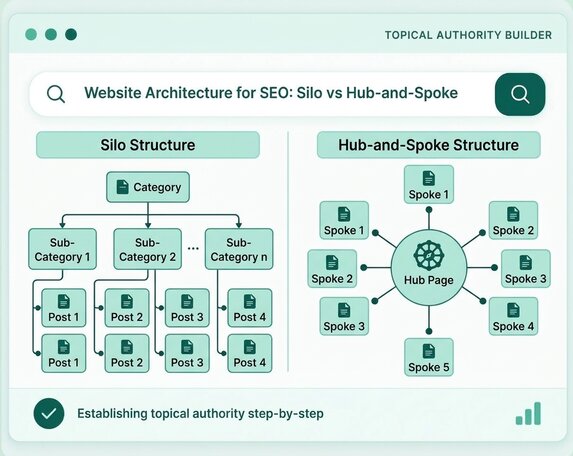
Website architecture for SEO is the way a site’s pages are organised, grouped and linked so that search engines can find them and visitors can move between them. Two models dominate the discussion: the silo, which keeps each topic in its own section, and hub-and-spoke, which builds each topic around one hub page with supporting spoke pages. This guide explains both, compares them and shows how to choose and build the right structure.
Use a silo when your sections are genuinely separate, and hub-and-spoke when topics overlap and readers move between them. Most sites end up with a mix. Keep important pages within a few clicks of the homepage as a rule of thumb, link every supporting page to its hub, and link across sections whenever it helps the reader.
What Is Website Architecture for SEO?
Website architecture for SEO is the plan that decides how pages are grouped, how deep they sit and how they link to each other, so that crawlers and people can reach and understand every important page. It is the skeleton of a site: the hierarchy, the navigation, the URL pattern and the internal links. Website architecture in SEO is not a ranking trick. It is a way of removing barriers, so that good content can be found and used.
Website architecture vs information architecture vs site structure
Information architecture is the logic of how content is organised, website architecture is how that logic is built into the site, and site structure is the resulting hierarchy. Writers use the three terms loosely, and most guides treat them as close relatives. This article uses website architecture to mean the whole picture: grouping, depth, links, URLs and navigation. When people search for website architecture SEO advice or a good SEO website structure, they usually want this complete view.
Why architecture matters for crawling and users
Architecture matters because it decides which pages search engines discover easily and which pages visitors can find without effort. Google says that if your pages are properly linked, it can usually discover most of your site, as its sitemaps documentation explains. A clear structure also tells readers where they are and what to do next, which supports the helpful, people-first content that Google asks for.
Flat vs Deep Architecture and Click Depth
A flat architecture keeps important pages only a few clicks from the homepage, while a deep architecture buries them behind many levels of categories. Click depth is the number of clicks needed to reach a page from the homepage.
- Flat structure. Few levels, such as Homepage, Category, Page. Key pages are easy to find and easy to crawl.
- Deep structure. Many nested levels, such as Homepage, Section, Subsection, Group, Page. Pages at the bottom can become hard to reach.
- The three-click rule. Many guides suggest keeping important pages within about three clicks. This is a rule of thumb, because I found no Google guidance that sets a click limit.
- Flat does not mean everything on the homepage. A large site still needs categories. The aim is a shallow, logical hierarchy, not a single long menu.
Pages with no links pointing to them, known as orphan pages, sit outside any architecture and are the first problem to look for.
What Is a Silo Structure in SEO?
A silo structure groups pages about one topic into a self-contained section, with the pages linking mainly to each other and to the section’s main page. Think of it as a set of separate departments within one website.
Physical silos and virtual silos
A physical silo uses the URL and folder structure to separate topics, while a virtual silo uses internal links to group pages without changing URLs. These are industry terms rather than Google terms.
- Physical silo. All pages in a section share a folder, such as /coffee-grinders/ or /brew-guides/. The structure is visible in the URL.
- Virtual silo. Pages in different folders link to each other so that they behave like one group. The grouping lives in the links.
Strengths and limits of strict silos
A strict silo is simple to understand and easy to keep tidy, but it can stop you linking to a relevant page just because it sits in another section. Some publishers argue that this restriction is its main weakness. Ahrefs has argued that strict silo structure prohibits relevant contextual links outside the silo and that a more flexible approach works better.
- Clear topic boundaries, easy navigation for visitors, simple to explain to a team.
- Related topics in different silos cannot support each other, and a strict rule can feel artificial to readers.
- Moving a page between silos means changing its URL, which needs a redirect.
What Is the Hub-and-Spoke Model?
The hub-and-spoke model builds each topic around one broad hub page that links to narrower spoke pages, and each spoke links back to the hub. The hub gives the overview. The spokes answer specific questions in depth.
Hub, spoke and lateral links
A hub links to every spoke, every spoke links back to the hub, and related spokes may link to each other. These are the three link types:
- Hub to spoke. The hub introduces each sub-topic and links to its page.
- Spoke to hub. Each spoke points back to the broad overview with descriptive anchor text.
- Spoke to spoke. Related spokes link to each other where it helps the reader. These are lateral links.
How it relates to topic clusters
Hub-and-spoke is closely related to the topic cluster, and many guides use the two terms as if they meant the same thing. The practical difference is emphasis: hub-and-spoke usually stresses the internal links and URL relationships, while topic cluster describes the group of content more broadly. For more on clusters and pillars, see the guide to common topical authority mistakes.
What Makes a Strong Hub Page?
A strong hub page explains a broad topic well enough to stand alone, and then guides readers to the narrower pages that go deeper. A hub that is only a list of links adds little value and gives search engines little to understand.
- A clear overview. Define the topic, say who it is for and answer the main question in the opening lines.
- Short sections for each spoke. Introduce each sub-topic in a few sentences, then link to its page with descriptive anchor text.
- Original value. Add your own process, examples or comparisons, so the hub is more than a table of contents.
- A visible path forward. Include a clear next step, such as a service page, a contact link or a related hub.
- Regular updates. Add new spokes to the hub as you publish them, and remove links to pages that no longer exist.
- Reasonable length. Cover the topic fully without repeating what each spoke says in detail.
Silo vs Hub-and-Spoke: Key Differences
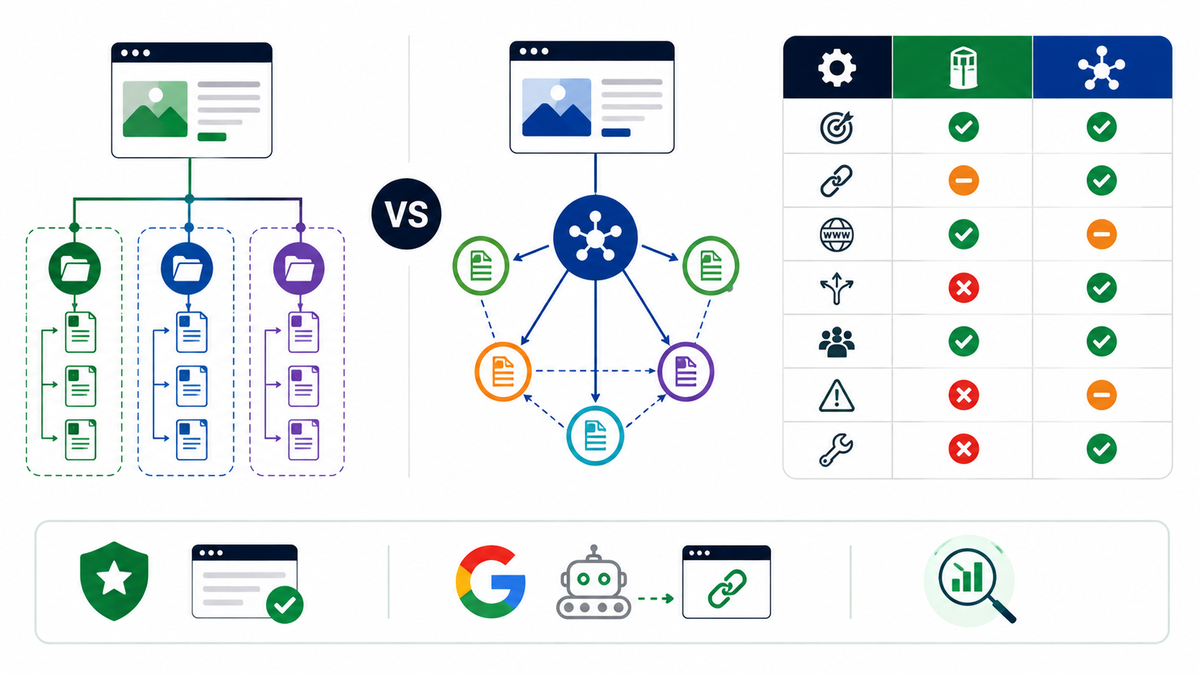
The main difference is how strictly topics are separated: a silo isolates them, and hub-and-spoke connects them around a central page. The table summarises the other contrasts.
| Feature | Silo | Hub-and-spoke |
| Core idea | Separate sections for each topic | One hub page with linked spoke pages |
| Links | Mainly within the section | Hub and spokes, plus lateral and outside links |
| URLs | Often mirror the section folders | Can mirror the hub, but not required |
| Flexibility | Lower, because of strict boundaries | Higher, because links can cross topics |
| Best for | Distinct departments or product lines | Overlapping topics and content libraries |
| Main risk | Missed contextual links | Weak hubs or unlinked spokes |
| Maintenance | Moving pages changes URLs | Adding spokes is simple |
Neither model is a Google requirement. Google’s guidance asks for crawlable links and a simple, descriptive URL structure, and it does not name either model as a ranking method.
Which Model Fits Your Website?
Choose a silo when your site has clearly separate sections, and choose hub-and-spoke when topics overlap and readers move between them. Ask three questions: do the sections serve different audiences, do pages need to link across topics, and how often will new content appear? Good website structure for SEO follows the way your readers think, not the way your company is organised.
The examples below are fictional illustrations of how the choice looks on different site types.
- Online shop. Product categories usually form a hierarchy. A topical map for an e-commerce store often combines category hubs with buying guides as spokes.
- Local service business. Service pages act as hubs, with location pages and question articles as spokes. See the topical map for a local business.
- Software company. Product, feature, use case and integration pages can form hubs, supported by guides. The topical map for SaaS websites shows this in detail.
- Publisher or blog. Hub-and-spoke suits a large library of related articles, because readers jump between topics.
- Large company with separate divisions. Strict silos may suit divisions that serve different customers and rarely need cross-links.
A mixed model is common: silo-style sections at the top level, with hub-and-spoke clusters inside each section.
Linking Rules for Each Model
Linking rules keep the structure working: every page needs a parent, every hub needs its spokes and links should follow what helps the reader. Google’s link best practices say that its crawler can generally follow only links built as anchor elements with an href attribute, so use real links.
- Link up and down. Spokes link to the hub, and the hub links to every spoke.
- Link sideways with purpose. Connect related spokes only when a reader would want the next answer.
- Link outside the section when it helps. A relevant link to another hub or section is fine. In a strict silo, keep these links rare and prefer links to other hubs rather than deep spokes.
- Use descriptive anchor text. Say what the target page covers, not click here.
- Avoid orphan pages. Each page should receive at least one contextual link.
- Keep navigation consistent. Menus, breadcrumbs and footers should reflect the same structure.
URL Structure and Navigation for Website Architecture for SEO
A good URL and navigation plan makes the architecture visible: short descriptive URLs, a clear menu, breadcrumbs and an up-to-date sitemap. These elements turn your plan into something crawlers and visitors can follow.
- Simple URLs. Google’s URL structure guidance recommends a simple structure with descriptive words and hyphens to separate them.
- Do they have to mirror the architecture? A URL can reflect a hub, such as /coffee-grinders/burr-grinders/, but links and navigation define the real structure.
- Show the main hubs or sections, not every page. Use plain labels and real links.
- They show the path back up the hierarchy and add internal links on deeper pages.
- An XML sitemap lists the URLs you want found. Google notes that smaller sites of about 500 pages or fewer may not need one, but it can help larger or more complex sites.
- Stable URLs. Changing URLs later needs redirects, so choose a pattern you can keep. Website structure for SEO depends as much on stable URLs as on a clean menu.
For the wider design side of this topic, see the SEO friendly web design guide.
How to Build Your Architecture Step by Step
To build your architecture, list your topics, group them, choose a model, plan URLs and menus, plan links, then publish and test. The six steps below work for a new site or a restructure.
Step 1: List your goals and topics
Write what the site must achieve and list every topic, service or product it needs to cover. Include questions readers ask, because they often become spokes.
Step 2: Group topics into hubs
Group related topics under one broad hub each. A hub should be a topic you can explain broadly and support with several narrower pages.
Step 3: Choose the model
Choose silo, hub-and-spoke or a mix using the questions in the model-choice section. Write the rule down so that everyone follows it.
Step 4: Plan URLs and navigation
Plan one URL pattern and a menu that shows the main hubs. Keep important pages within a few clicks.
Step 5: Plan the internal links
Decide which pages link to which, and list the anchor text for each link. Mark any cross-section links you want.
Step 6: Publish, test and review
Publish the hubs first, add spokes and link them on the day they go live, then test. Check crawling, click depth and orphan pages after launch, and review the plan every quarter.
Multilingual Sites: Architecture for Several Languages
A multilingual site needs a separate, linked structure for each language, with its own hub pages and clear URLs. This matters for sites that serve readers across Europe, the Middle East and Asia.
- Choose a URL pattern. Google’s URL guidance mentions using a structure that makes it easy to geotarget, such as a language or country folder like /de/.
- Mirror the hubs in each language. Each language version should have its own hubs, spokes and internal links, written for that audience.
- Link versions with hreflang. Google’s guidance on localized versions of a page says each version should reference itself and every other version, and that Google does not use hreflang or the HTML lang attribute to detect a page’s language.
- Translate, do not copy. Keep the main content of each version truly translated.
- Test each language. Check navigation, links and click depth in every version.
How to Audit an Existing Architecture
Audit your architecture by crawling the site, checking click depth, finding orphan and duplicate pages and reviewing internal links. A regular audit shows where the real structure differs from the plan.
- Crawl the site. Use a crawler to list every page, its depth and its links.
- Check click depth. Find important pages that sit more than a few clicks away.
- Find orphan pages. List indexed or published pages with no internal links.
- Look for cannibalisation. Find pages that target the same question and merge or differentiate them.
- Review hubs. Check that each hub links to every spoke and that spokes link back.
- Use Search Console. Review indexing, sitemaps and the pages that get impressions.
For deeper checks, see the technical SEO audit guides.
A Fictional Example: Restructuring a Small Site
A restructure works best when you start from a list of existing pages, group them and then change links and URLs in one planned step. The scenario below is an illustration for a fictional shop selling home coffee equipment. It is not a client result.
- The shop has 60 pages: a home page, a long shop page, some product pages and a blog with random posts. Grinder articles and grinder products are not linked, and several posts compete for the same question.
- The owner groups the pages into four hubs: grinders, brewers, beans and brewing guides.
- Product areas follow a simple hierarchy, and each hub links to buying guides and how-to posts as spokes.
- Each hub links to its spokes, each spoke links back, and a few links connect grinders to brewing guides where a reader would want them.
- Old URLs that change receive permanent redirects to the closest new page. The sitemap is updated and resubmitted.
- After launch. The owner crawls the site, checks click depth and orphan pages, and reviews indexing in Google Search Console for several weeks.
The lesson is that the shop did not need more pages. It needed clearer groups, consistent links and careful redirects.
Common Architecture Mistakes
The most common mistakes come from growing a site without a plan. Avoid these:
- Burying important pages. Key pages sit many clicks deep or appear only in a search box.
- Strict silos that block useful links. Readers cannot reach related pages in another section.
- Weak hubs. The hub is thin, so it adds nothing to the spokes it links.
- Unlinked spokes. New pages are published with no link from the hub.
- Mixing models by accident. Each section follows different rules, so the structure becomes confusing.
- Changing URLs without redirects. Restructures lose links and traffic.
- Menus built from scripts. Crawlers may not follow links that are not real anchors.
- Never reviewing. New pages and plugins slowly change the structure.
Website Architecture for SEO Checklist
Use this checklist before launch and at each quarterly review. Each item states what to confirm.
- Goals written. You know what each section must achieve.
- Topics grouped. Every topic belongs to one hub or section.
- Model chosen. Silo, hub-and-spoke or a mix is written down.
- Important pages shallow. Key pages are within a few clicks of the homepage.
- Hubs link to spokes. Each hub links to all its supporting pages.
- Spokes link back. Each spoke points to its hub with descriptive anchor text.
- No orphan pages. Every page has at least one contextual link.
- URLs simple and consistent. They use descriptive words and hyphens.
- Navigation clear. The menu shows the main sections with real links.
- Breadcrumbs added. Deeper pages show their path.
- Sitemap submitted. The URLs you want found are listed.
- Language versions linked. Multilingual pages reference each other correctly.
- Review scheduled. A quarterly audit is in the calendar.
Next Step for Your Website
If you want help planning or fixing your architecture, a topical map shows which hubs and spokes your site needs. I build topical maps, content briefs and website structure plans as part of my SEO work. See my topical map service for the planning side, or my website SEO services for a structural and technical review. If you are unsure which fits, contact me for a website review and share your current URLs.
Conclusion
Silo and hub-and-spoke are two ways to organise the same goal: a site that crawlers can follow and readers can use. Choose the model that matches how your topics relate, keep important pages shallow, link with purpose and review the structure regularly. A simple, consistent plan usually beats a complicated one.
Frequently Asked Questions
What is website architecture for SEO?
Website architecture for SEO is the way a site’s pages are grouped, linked and navigated so that search engines can find them and visitors can use them. It covers hierarchy, URLs, menus and internal links.
What is the difference between silo and hub-and-spoke?
A silo isolates each topic in its own section, while hub-and-spoke connects a hub page to supporting spokes and allows links across topics.
Is silo structure still useful?
Yes, for sites with clearly separate sections, but strict rules can block useful links. Many sites use a flexible mix instead.
How many spokes should a hub have?
There is no fixed number. Add a spoke only when it answers a distinct question, and review the hub regularly.
Should spoke pages link only to the hub?
No, spokes should link to the hub and may also link to related spokes or other hubs when it helps the reader.
Does URL structure need to match the architecture?
No, URLs can reflect the structure, but links and navigation define it. Keep URLs simple, descriptive and stable.
How many clicks deep should important pages be?
Many guides suggest about three clicks, but this is a rule of thumb, not a Google rule. Keep key pages as easy to reach as your site allows.
Can ecommerce sites use hub-and-spoke?
Yes, category pages can act as hubs, with buying guides, comparisons and product pages as spokes.
Is hub-and-spoke the same as a topic cluster?
They are closely related and often used interchangeably. Hub-and-spoke tends to stress internal links and URL relationships.
How often should you review site architecture?
Review it every quarter, or sooner after a redesign, a large content addition or a migration.