Topical Map for E-commerce Business
Discover how to build a topical map for ecommerce to establish topical authority, optimize product categories, and drive targeted organic traffic to your online store.

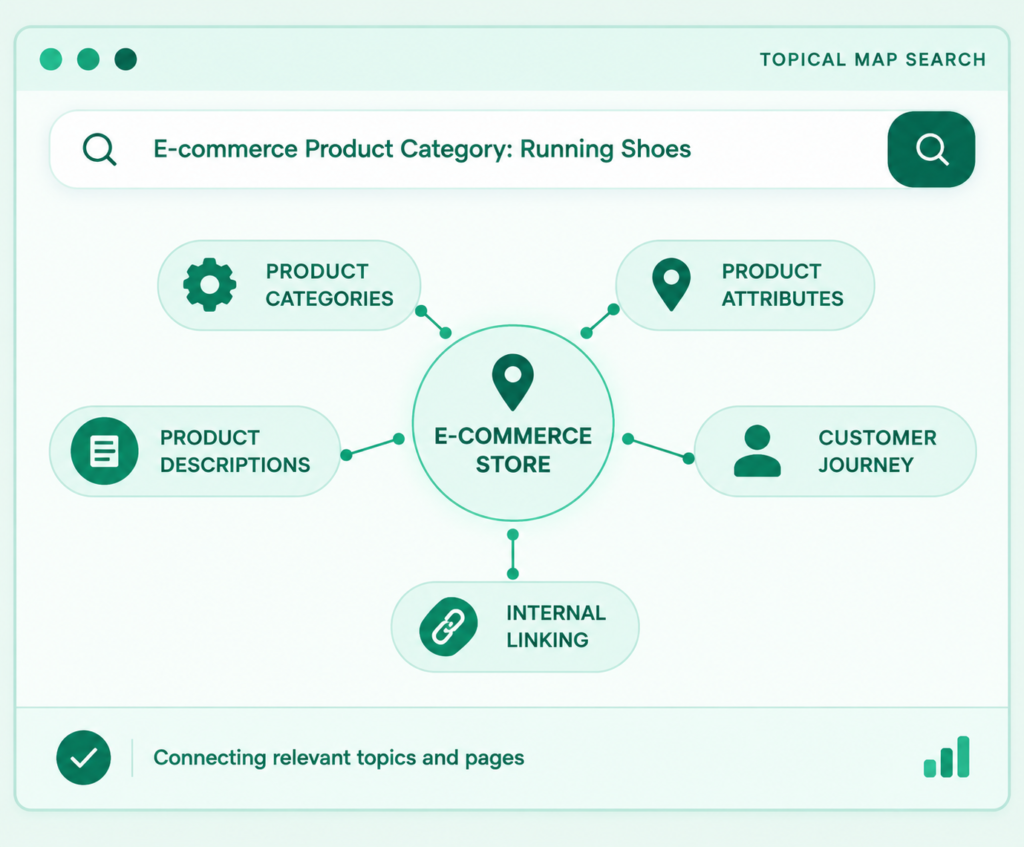
Build an effective topical map for ecommerce by focusing on core products, grouping keywords by intent, and mapping clusters to clear URLs. Connect categories, products, and guides with internal links while resolving technical issues like filtered pages and duplicate content. Finally, measure SEO performance at both page and topic cluster levels.
What Is a Topical Map for Ecommerce?
A topical map for ecommerce connects keyword research with site architecture to plan categories, products, and supporting content. It organizes topics systematically (e.g., linking running shoes with sizing and comparison guides) so every page serves a clear purpose.
Topical Authority vs. Topical Coverage
Topical coverage means addressing the subjects that matter to a particular audience. Topical authority is an SEO concept used to describe a site’s perceived expertise and relevance across a subject area.
A topical map can help a store build useful coverage, but creating more pages does not automatically produce authority or higher rankings. Search visibility also depends on content quality, competition, technical accessibility, product relevance, and other factors.
How Content Clusters Connect Informational and Commercial Searches
Customers often research before purchasing. Someone looking for a coffee machine may first ask how espresso machines work, then compare espresso machines with drip coffee makers, and finally browse a category or specific product.
A useful content cluster can support these stages:
- An educational guide answers an early question.
- A comparison page helps the shopper evaluate alternatives.
- A category page displays relevant products.
- A product page provides item-specific information and purchasing options.
These pages should link to one another when the link is relevant to the reader. The goal is to make the next useful step easy, not to add links mechanically.
How a Topical Map Helps Find Content Gaps
A content gap is a useful topic or customer need that the current website does not address adequately. It might be a missing buying guide, a category with little explanatory information, or a product page that fails to answer common questions.
A gap is not automatically a reason to publish a new URL. The store may already have a suitable page that needs better content, clearer targeting, or improved internal links.
How It Helps Reduce Keyword Cannibalization
Keyword cannibalization can occur when multiple pages target the same or very similar search intent and compete to satisfy the same query.
A functional topical map organizes your actual catalog into structured topic clusters, search intent, page types, URLs, internal linking paths, and business priorities:
-
Core Topics & Product Categories: Map out your primary product lines and create subcategories only when catalog depth and customer browsing needs justify them.
-
Category & Subcategory Hierarchy: Group products logically (e.g., Running Shoes $\rightarrow$ Trail-Running Shoes) to simplify site navigation and group intent.
-
Product Pages & Variant Strategy: Detail specific items accurately with specs and stock status. Handle color and size variants strategically using structured data or canonical tags to avoid duplicate URLs.
-
Supporting Content & Buying Guides: Integrate educational resources—such as buying guides, product comparisons, sizing charts, and maintenance advice—into your topical map for ecommerce to address customer questions at every purchase stage.
Search Intent and Target URLs
For each keyword group, record the likely intent and the page that best satisfies it. A simple spreadsheet can include these fields:
| Field | What to record |
| Main topic | The subject of the page or cluster |
| Primary keyword | The main search query or representative phrase |
| Supporting terms | Related queries with the same intent |
| Search intent | Informational, commercial investigation, transactional, or navigational |
| Page type | Category, subcategory, product, comparison, or guide |
| Existing URL | The current page, if one exists |
| Action | Keep, improve, merge, redirect, or create |
| Internal links | Relevant pages to link to and from |
| Priority | Business value, customer usefulness, and practical effort |
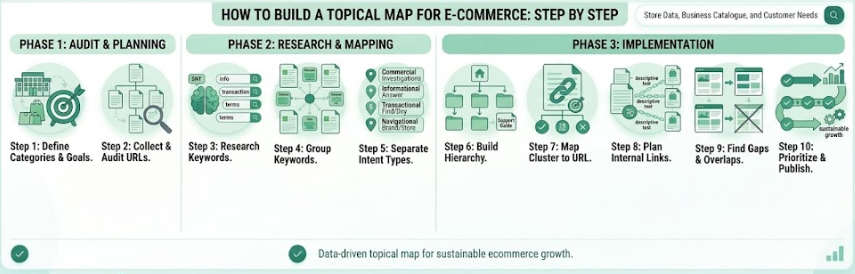
How to Build a Topical Map for E-commerce Step by Step
Build the map from the store’s actual business and catalogue, then use keyword research to discover what customers need. Review existing URLs before planning new pages.
Step 1: Define the Store’s Main Categories and Business Goals
Identify the products the store sells, the categories it wants to develop, and the customers it serves. Clarify whether the immediate goal is to improve an established category, support a new product range, or fix weak content coverage.
Business priorities should influence the map. A store should not spend most of its content resources on an unrelated topic simply because that topic appears to have search demand.
Step 2: Collect Existing URLs and Audit the Website
Export the current URLs from the sitemap, website crawl, CMS, and available analytics tools. Identify each URL’s page type, topic, indexability, and current purpose.
Look for:
- Important categories that are difficult to discover.
- Product pages with little useful information.
- Articles that cover the same subject.
- URLs generated by filters or sorting options.
- Pages receiving impressions but not meeting user needs.
- Useful existing content that can be improved instead of replaced.
Do not plan the entire map from keyword research alone. Existing pages and site constraints affect what should be created next.
Step 3: Research Keywords and Customer Questions
Collect relevant searches using keyword research tools, search suggestions, Search Console data, product reviews, customer-service questions, and competitor pages.
Look for different ways customers describe the same need. A shopper might search for a product type, a specific feature, a comparison, a sizing question, or a problem the product solves.
Record the source of the keyword data. Do not invent search volumes, difficulty scores, or rankings when reliable measurements are unavailable.
Step 4: Group Keywords by Meaning and Search Intent
Group keywords that express the same underlying need. Similar wording alone is not enough to decide whether two phrases belong on the same page.
For example, “trail running shoes” and “trail shoes for running” may belong to one category-page cluster if the results and intent are similar. A query such as “how to choose trail running shoes” may need an informational guide instead.
Review search results when possible to check whether Google appears to satisfy the queries with similar page types. Treat this as evidence for a mapping decision, not a guarantee that the queries must share a URL.
Step 5: Separate Commercial Pages from Informational Content
Decide which page type best serves each group.
- Transactional intent: The searcher wants to purchase or find a product. A product or category page may fit.
- Commercial investigation: The searcher is comparing options. A comparison or buying guide may fit.
- Informational intent: The searcher wants an explanation or answer. An educational article may fit.
- Navigational intent: The searcher wants a particular brand, store, or product. The relevant destination should be easy to find.
Some queries can have mixed intent. Review the actual search results and the user’s likely need rather than relying on a label alone.
Step 6: Build the Topic Hierarchy
Organize the map from broad topics to more specific ones. A typical store structure might look like this:
Homepage → Main category → Subcategory → Product page
Supporting guides can connect to relevant category and product pages where they help shoppers. They do not all need to sit in the same URL folder to be part of the same topical cluster. The relationship between pages and the site’s navigation matter more than forcing every URL into a rigid naming pattern.
Step 7: Map Each Keyword Cluster to an Existing or Planned URL
Assign one clear primary purpose to each target URL. Record the main keyword, supporting phrases, page type, and action.
Use the following decision rules:
- Keep: The existing page already satisfies the intent.
- Improve: The page is relevant but lacks useful information or clarity.
- Merge: Two pages overlap substantially and would serve users better as one resource.
- Differentiate: Two pages have legitimate, distinct purposes that need clearer separation.
- Create: No suitable page exists and the topic warrants its own destination.
- Redirect: A page is being retired and an appropriate replacement exists.
Do not create a new page simply because a keyword tool lists another phrase.
Step 8: Plan Internal Links
Identify links that help visitors move between related topics and products. A buying guide may link to a relevant category, while a product page may link to sizing or compatibility guidance.
Use descriptive anchor text that explains the destination. Avoid adding the same keyword-rich link everywhere when it does not help the reader.
Google’s Google’s recommendations for ecommerce navigation and internal links explains why crawlable links between categories, subcategories, and products matter for discovery.
Step 9: Find Gaps and Overlapping Pages
Compare the proposed map with the current site. Check for missing customer questions, weak category coverage, redundant articles, disconnected product pages, and topics that do not support the store’s actual range.
Prioritize gaps that matter to customers and the business. A page about an unrelated subject is not a useful addition just because a competitor has published it.
Step 10: Prioritize and Publish in Stages
Start with a manageable section of the catalogue. Improve the most important category and product pages, connect relevant existing content, and then add supporting resources where a real need remains.
A phased approach makes it easier to track the effects of changes and adjust the plan before expanding it across the entire store.
How the Pages Should Link to Each Other
The running-shoes category should make its subcategories and products easy to discover. The buying guide can link to the category or relevant products when a recommendation genuinely fits the topic. The comparison guide can link to both relevant product groups.
Product pages can link to useful sizing or care information. These links should help shoppers make decisions or use their purchases, not exist solely to repeat target keywords.
How to Organize Ecommerce Pages for Topical Authority
A useful ecommerce architecture lets customers move from broad product discovery to a specific item while also making relevant supporting information easy to find.
Homepage to Category to Subcategory to Product
A common structure is:
Homepage → Category → Subcategory → Product
This structure is a planning model, not a rule that every store must follow exactly. Smaller stores may not need many subcategory levels. Larger catalogues may require additional layers, filters, and carefully managed navigation.
Google recommends crawlable links between important ecommerce pages. See its Google’s ecommerce site structure documentation.
When to Create a Buying Guide Instead
A buying guide is more suitable when the searcher needs help choosing, understanding, or comparing products rather than simply browsing a catalogue.
For example, “how to choose a hiking backpack” suggests a need for guidance. “Hiking backpacks” may suggest a category page. These are initial hypotheses; validate them with search results and customer context.
When to Update Existing Pages
Improve an existing page when it already matches the intended query but lacks useful details. Merge pages when their purpose and content overlap and combining them would create a stronger resource. Keep separate pages when they answer genuinely different questions.
If a URL must be retired, evaluate whether a relevant replacement exists and implement an appropriate redirect when needed. Do not redirect unrelated pages simply to preserve a URL.
How Breadcrumbs and Contextual Links Help
Breadcrumbs help users understand where a page sits within the site. Contextual links connect related information where it is useful.
Together with clear navigation, these elements can make relationships between categories, products, and guides easier to follow. The actual implementation should be tested to confirm that links work and important pages are accessible.
Ecommerce Keyword Clustering and Search Intent
Keyword clustering is useful when it reflects the meaning and purpose behind a search. A topical map for ecommerce becomes less useful when it treats every wording variation as a separate content opportunity.
Commercial Investigation Keywords
A comparison or buying guide can help explain differences, trade-offs, and relevant selection criteria. Recommendations should be based on accurate product information rather than unsupported claims.
Transactional Keywords
Category and product pages often fit these needs. They should provide clear product information, navigation, pricing and availability where applicable, and a straightforward purchasing path.
Navigational Keywords
A navigational query seeks a particular brand, store, or product. Make relevant pages easy to discover, but do not create duplicate pages solely because the same brand name appears in several keyword variations.
How to Avoid Intent Overlap
Before creating a page, compare the proposed topic with existing URLs. Ask whether the new page answers a different question, supports a different stage of the customer journey, or provides information that the current page cannot reasonably cover.
When the distinction is unclear, inspect the search results and review the existing content before making a decision.
Internal Linking Strategy for an Ecommerce Topical Map
Internal links should connect pages that have a meaningful relationship and help visitors find their next useful destination.
Link Supporting Articles to Relevant Categories
A buying guide can link to the relevant category when readers are ready to browse available products. The link should appear where it naturally supports the explanation.
Find Orphan Pages
An orphan page has no meaningful internal links pointing to it from other pages on the site. Some pages may still be discovered through a sitemap, but important pages should generally be reachable through useful site navigation and contextual links.
Technical SEO Issues That Can Affect an Ecommerce Topical Map
A strong content plan can still underperform if important pages are difficult to crawl, duplicated, or poorly represented by URLs. Technical decisions should support the intended page structure.
Faceted Navigation and Filter-Generated URLs
Decide which filter combinations genuinely deserve search visibility. Manage other variations according to the site’s crawling and indexing strategy. Google’s documentation on Google’s guidance on faceted navigation and crawl management explains the potential crawling issues created by large numbers of filter URLs.
Product Variants and Canonical URLs
Product variants can represent different sizes, colours, or configurations. A store must decide whether these variations belong on one product page or on separate URLs.
Use canonical signals consistently with the intended page design. Check that internal links, sitemaps, and canonical tags do not send conflicting signals about the preferred URL. Google’s Google’s ecommerce URL structure recommendations discusses URL patterns and product variants.
Pagination and Product Discovery
Large category pages may split products across multiple pages or load more items as users interact. Confirm that important products can be discovered through crawlable links and that pagination uses accessible URLs where appropriate.
Review Google’s guidance on Google’s guidance on pagination and incremental page loading when designing or auditing these patterns.
XML Sitemaps and Indexable Pages
A sitemap can help search engines discover important URLs, but it does not replace internal linking. Keep the sitemap aligned with the site’s intended indexable URLs and review redirects, canonical tags, and unwanted parameter variations.
Product and Breadcrumb Structured Data
Relevant structured data can help search engines interpret product details and page relationships. Product structured data must match visible, accurate page information and follow Google’s requirements.See the official documentation for Google’s product structured data guidelines. Structured data does not guarantee a rich result or a ranking improvement.
Consider Business Relevance, Search Intent & Customer Needs
Start with categories and products that matter to the store’s goals. A topic related to an important product range may deserve attention before a loosely related subject with little commercial relevance.
Consider Existing Content and Technical Readiness
Improving a relevant category page may be more useful than publishing several new articles. Similarly, fixing a discovery or canonical issue can be more urgent than expanding content around pages that search engines cannot handle correctly.
How to Measure Ecommerce Topical Map Performance
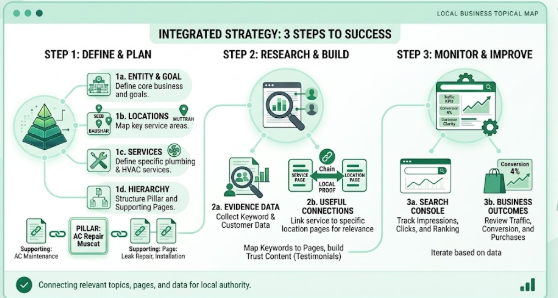
Track the performance of your topical map for ecommerce by focusing on user value and revenue rather than page volume:
-
Monitor Google Search Console metrics: Track impressions, clicks, CTR, and average position across page types and topic clusters, considering external context like seasonality and stock levels.
-
Review category and product page health: Verify indexing, organic traffic, and query relevance—improving product selections, specifications, or internal links where pages underperform.
-
Track business outcomes and revenue: Measure product views, add-to-carts, conversions, and assisted sales to evaluate how your topical map drives actual business results.
Update the Map as Evidence Changes
Review the map periodically. Update it when the catalogue changes, products are discontinued, customer questions shift, new search data becomes available, or existing pages overlap.
Common Ecommerce Topical Mapping Mistakes to Avoid
-
Creating pages for every keyword variation: Group similar phrases into single topic clusters and create new URLs only when a distinct user need exists.
-
Publishing unlinked blog posts: Always integrate supporting articles into your overall site structure by linking them directly to relevant product and category pages.
-
Cannibalizing category pages with blog content: Ensure guides focus on educational decision-making while category pages target product browsing to avoid internal keyword competition.
-
Ignoring technical filters and product variants: Plan your faceted navigation, canonical tags, and variant URLs early to prevent massive duplicate content and crawl issues in your topical map for ecommerce.
-
Prioritizing search volume over business relevance: Focus on high-intent topics that align with your actual catalog and audience goals rather than chasing irrelevant search traffic.
-
Leaving your topical map outdated: Regularly update your topical map to reflect current inventory, discontinued items, and evolving shopper behavior
How to Adapt an Ecommerce Topical Map for Oman
For an ecommerce store serving Oman, the map should reflect the actual audience, products, language needs, delivery arrangements, and commercial conditions of the business. Local details should be included when they help customers make a decision.
-
Analyze local language and search habits: Research whether Omani shoppers search in Arabic, English, or both, ensuring your topical map for ecommerce accommodates preferred terminology and multi-language page structures.
-
Map strictly to local inventory: Base your topical map exclusively on products available to Omani customers, avoiding pages for unsupplied stock.
-
Integrate local delivery and availability details: Clearly feature accurate shipping options, return terms, and local delivery zones on relevant product and category pages.
Advanced Ecommerce Topical Mapping for Large Catalogues
Managing seasonal, temporary, and discontinued products requires a strategic lifecycle approach in your topical map for ecommerce to preserve equity and avoid dead ends. Planning for product availability prevents duplicate URLs, protects hard-earned SEO authority.
Handling Product Lifecycles in Your Ecommerce Topical Map
-
Managing seasonal, temporary, and discontinued items in your topical map preserves link equity and prevents broken user journeys:
-
Reuse permanent seasonal URLs: Maintain stable landing pages for recurring events (e.g., Black Friday) instead of launching new URLs yearly.
-
Build seasonal clusters early: Prepare supporting guides, categories, and inventory well ahead of peak search demand.
-
Keep temporary out-of-stock pages active: Display clear restock timelines and recommend relevant alternatives rather than taking pages down.
-
Handle discontinued products strategically: Redirect retired items with backlinks or traffic to direct replacements; otherwise, use a 410/404 code or convert them into informational guides.
-
Audit performance post-season: Refine existing seasonal pages after peak periods finish to build authority for the next cycle.
-
Using Customer Questions to Expand the Map
-
Look beyond standard keyword research: Keyword tools miss many real-world customer inquiries—gather insights from customer service chats, product reviews, return reasons, site search logs, sales staff, and FAQs.
-
Collect raw wording, then group by core intent: Capture exact customer phrasing first, then combine similar queries under a shared underlying need to avoid creating multiple thin, low-value pages.
-
Place answers where they deliver maximum value: Feature sizing or compatibility info across category guides, size charts, or product pages based on where the shopper needs it most, ensuring each page maintains a distinct purpose.
A Practical Content Brief for Each Planned Page
-
Draft a concise content brief before writing: Whenever your topical map identifies a missing page, create a brief that outlines the page’s primary topic, target audience, search intent, proposed URL, page type, key questions, and user call-to-action.
-
Define internal link and product connections: Specify which related products, main categories, and supporting internal pages should link to and from the new page to maintain proper site hierarchy.
-
Tailor brief requirements by page type:
-
Category Pages: Request a clear intro, intuitive filters, key selection criteria, and answers to common category questions.
-
Buying Guides: Focus on product comparisons, key decision factors, real-world use cases, and links to relevant categories.
-
Product Pages: Prioritize precise specs, clear benefits, compatibility details, stock status, delivery times, and return policies.
-
-
Enforce reliable source requirements: Ensure critical details—such as dimensions, materials, care instructions, compatibility, and warranty terms—are sourced directly from verified manufacturer or business data.
-
Eliminate fluff and arbitrary word counts: Avoid asking writers to pad content just to meet length targets; pages should be as detailed as necessary to serve user intent without unnecessary repetition.
-
Audit content against the brief before publishing: Verify that the completed page matches the original brief, serves a distinct purpose, links to relevant pages, and doesn’t duplicate existing URLs.
-
Perform final technical and factual checks: Review title tags, headings, indexability, mobile usability, structured data (schema markup), and accuracy before pushing the page live.
A Final Pre-Publishing Checklist
1. Topic Relevance: Ensure every topic supports the store’s products, categories, and customer needs.
2. Keyword Mapping: Assign each keyword cluster to the most suitable existing or planned URL.
3. Search Intent: Confirm each page type matches the user’s intent, whether buying, comparing, or learning.
4. Content Gaps: Review existing pages to identify missing topics before planning new content.
5. Topic Overlap & Hierarchy : Identify competing topics and decide whether to merge, improve, and Organize the map from homepage to categories, subcategories, product pages, and supporting content
6. Internal Linking: Plan relevant connections between categories, products, buying guides, and related articles.
7. Technical SEO: Consider duplicate URLs, product variants, filtered pages, canonical tags, and indexing.
8. Content Prioritization: Prioritize topics by customer needs, business value, search demand, and available resources.
9. Final Review: Confirm every planned page has a clear purpose, target keywords, page type, and linking plan before implementation.
Build an effective topical map for ecommerce by focusing on core products, grouping keywords by intent, and mapping clusters to clear URLs. Connect categories, products, and guides with internal links while resolving technical issues like filtered pages and duplicate content. Finally, measure SEO performance at both page and topic cluster levels.
Conclusion
An ecommerce topical map connects keyword research, search intent, page planning, internal linking, and technical SEO. It helps prioritize topics, improve existing pages, fill content gaps, and build a useful, connected website that guides customers from research to products.
Get a Topical Map Audit
Want a clear, prioritized map for your business? Request a free topical map audit and I will review your current pages, find the gaps and show you what to publish first.
Frequently Asked Questions
What is a topical map for ecommerce?
How do I create a topical map for an ecommerce website?
What is the difference between an ecommerce topical map and keyword mapping?
How does topical authority work for ecommerce websites?
Should ecommerce category pages and blog posts target different keywords?
How many topics should an ecommerce topical map include?