Breadcrumbs and Site Navigation: A Practical Guide for Crawlable Websites
Breadcrumbs show where a visitor is, and the main menu shows where they can go. This guide covers breadcrumb types, planning, accessibility, Breadcrumb List markup, multilingual and right-to-left sites, common mistakes, and a 10-point checklist.

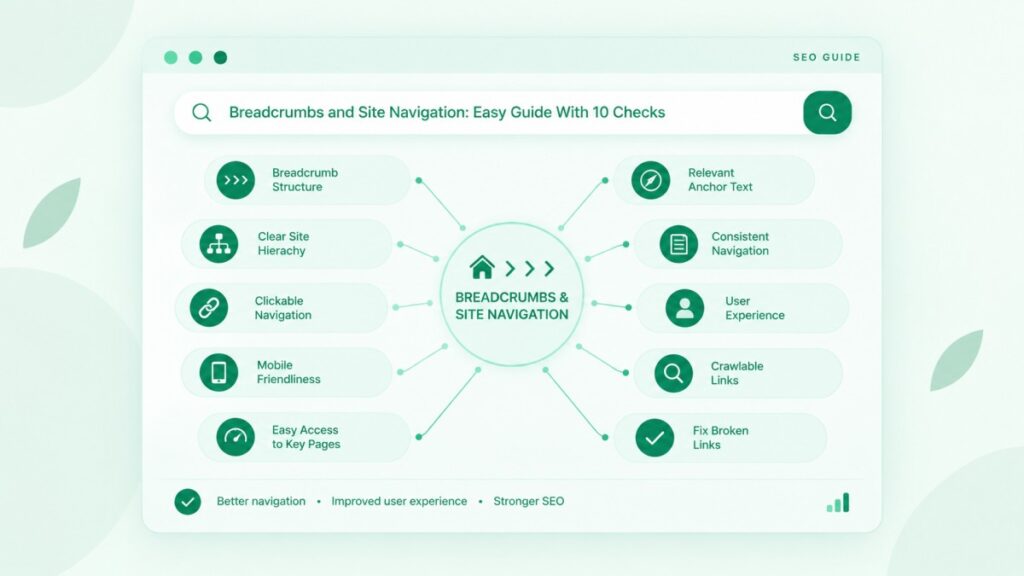
Breadcrumbs and site navigation work best as a pair: the main menu shows visitors where they can go, and the breadcrumb trail shows where they are now. Done well, the pair helps people move through a website without guessing, and it gives search engines a consistent picture of how pages relate. This guide explains the types, the planning, the markup, and the mistakes, with extra attention to multilingual and right-to-left websites in the Middle East, Europe, and Asia.
Use breadcrumbs as a secondary aid that shows a page’s place in your hierarchy, and keep the main menu as the primary route. Make the trail short, consistent, and accessible. Add Breadcrumb List markup only if it matches the visible trail. Google documents the markup rules, but it does not promise rankings, so treat breadcrumbs as a usability tool first.
I work with website structure, topical maps, and content briefs, and navigation problems usually start earlier than the menu: the site has no clear hierarchy to show. That is why this guide begins with structure and ends with an audit.
What Are Breadcrumbs and Site Navigation, and How Do They Work Together?
Breadcrumbs show the path from the home page to the current page, while site navigation is the full set of links that lets visitors move around the website. The two serve different questions. Navigation answers “where can I go?”, and breadcrumbs answer “where am I?”.
What are breadcrumbs?
Breadcrumbs are a row of links, usually near the top of a page, that shows where the page sits in the site hierarchy. A typical trail reads Home > Blog > Navigation, with each level linking to its parent page. Google describes a breadcrumb trail as an indicator of the page’s position in the hierarchy, and says it may help users understand and explore a site.
What is site navigation?
Site navigation is every route that helps visitors find pages, including the main menu, footer links, sidebars, search, and links inside the content. The main menu is the primary route. Other elements support it. A visitor may use more than one in a single visit, so they should not contradict each other.
How do breadcrumbs support the main menu?
Breadcrumbs support the main menu by giving a second, lighter way to move up the hierarchy without opening the menu or using the back button. They do not replace the menu. A visitor who lands on a deep page from a search result can use the trail to reach the parent category in one click. The menu then remains the primary route for moving across to other sections.
Do breadcrumbs help SEO? What Google says and does not say
Google presents breadcrumbs as a way to help users understand a page’s position and, through markup, to categorise the page in search results, but it does not claim that breadcrumbs raise rankings. Breadcrumb links also add internal links that reinforce your hierarchy, which is a sensible part of website SEO. Some blogs claim large gains in rankings or engagement. I could not verify those claims from Google, so I treat them as unproven. Judge breadcrumbs by usability first.
What Are the Types of Breadcrumbs?
There are three commonly described types: hierarchy-based, attribute-based, and path-based. Most guides use these names, and the choice depends on how your content is organised.
Hierarchy-based breadcrumbs
Hierarchy-based breadcrumbs show the page’s fixed position in the site structure, from the home page down to the current page. An example is Home > Services > Web Design. This is the most common type and the one most websites need. It works like folders on a computer: each level is broader than the one below it.
Attribute-based breadcrumbs
Attribute-based breadcrumbs show the categories, tags, or product features that describe the current page. They suit sites where one item can belong to several groups. A shop might show Shoes > Running > Waterproof, where the last two steps are attributes the visitor has chosen. For an e-commerce business, this type can help visitors narrow a large catalogue. Be careful with attributes that create many near-duplicate URLs.
Path-based breadcrumbs
Path-based breadcrumbs show the route a visitor took to reach the page, such as a “Back to results” link. The trail changes with each visit, so it does not describe the site hierarchy. It is less common, and it is better suited to search results than to content sites. Do not use it as a replacement for a hierarchy trail.
Which type fits your site?
Choose hierarchy-based breadcrumbs for most blogs, service sites, and corporate sites, and add attribute-based trails only where visitors filter large catalogues. If a page can appear under several parents, pick one main trail and keep it stable. Path-based trails rarely suit a site where visitors read articles or compare services.
[Image Placeholder – Paste Your image here]
When Should You Use Breadcrumbs, and When Should You Skip Them?
Use breadcrumbs when your site has several levels of pages, and skip them when the structure is flat enough that the menu already covers everything. A breadcrumb trail only helps when there is a hierarchy to show.
Sites that benefit from breadcrumbs
Sites with categories, subcategories, and many pages gain the most, including online shops, publishers, universities, and large service sites. On these sites, visitors often arrive on deep pages from search and need a quick way back to a parent category. A blog with topic categories also benefits, because the trail links each article to its topic hub.
Sites that do not need them
Single-page sites, simple brochure sites, and small sites with only a handful of top-level pages rarely need breadcrumbs. The menu already shows everything, and a trail would repeat it. Adding one can clutter the layout without helping anyone. Leave it out and spend the effort on a clear menu.
Breadcrumbs vs. search, filters, and menus
Breadcrumbs show location, search finds a specific page, filters narrow a list, and menus show the main sections. Each tool solves a different problem. A large shop needs all four. A small site may need only the menu. Choose tools by the visitor’s task, not by habit.
How Do You Plan Breadcrumbs and Site Navigation Around Your Site Structure?
Plan the structure first, then derive both the menu and the breadcrumb trail from it, so the two always agree. Navigation built page by page tends to drift. For background on how layout and structure connect, see these web design and architecture articles.
Start from your site architecture and topic clusters
Group pages by topic and by the way visitors think about them, and let each group become a level in the hierarchy. A topical map is a useful starting point because it already groups pages into clusters with a clear parent. Each cluster can become a category page, and each article beneath it can show that category in its trail. Keep the number of levels low, and avoid levels that exist only to hold one page.
Match breadcrumb labels to page titles and URLs
Use short labels that match the page’s main name, so the trail, the page heading, and the menu all use the same words. If the menu says “Web Design” and the trail says “Design Services”, visitors have to stop and think. Google’s guidance adds a useful point: it recommends breadcrumbs that represent a typical user path, not a copy of the URL structure. A clean URL still helps, and Google’s URL structure page explains how to write readable ones. The trail does not need to mirror every folder in the address.
What if a page sits in more than one category?
Choose one main trail for the visible breadcrumb, and use the same trail every time a visitor opens that page. Google’s documentation does allow multiple breadcrumb trails in markup when a page can be reached in more than one way. Even so, a visible trail that changes unpredictably confuses visitors. Decide which parent is the primary one, and link to secondary categories from the content instead.
How deep should a breadcrumb trail be?
Keep the trail to the levels that genuinely exist, and aim for three or four steps in most cases. This is a practical guideline, not a rule from Google. If a trail needs six or seven steps, the site structure is probably too deep. Cutting labels will not fix that. Review the structure instead.
Which Breadcrumb Design and Usability Best Practices Should You Follow?
Make the trail small, clear, and consistent: place it above the page heading, separate levels with a simple symbol, and keep it visually secondary to the main menu. If your team designs templates, a good web design service will plan the trail together with the layout. The points below cover the usual decisions.
Placement, size, and separators
Place the trail at the top of the page content, below the main menu, in smaller text than the menu. Most sites use a greater-than sign or a slash between levels. The exact symbol matters less than consistency. Put the home page first and the current page last, so the trail reads from broad to specific.
Why the current page should not be a link
The last item should show the current page as plain text, because a link to the page the visitor is already on adds nothing. It also invites a pointless click that reloads the page. Keep the text styled differently from the links so visitors can tell which items are clickable.
How should breadcrumbs work on mobile?
On mobile, keep the trail to one line, and show the nearest parent page first if the full trail does not fit. This is practical guidance rather than a Google rule. Make the links large enough to tap comfortably, and avoid wrapping that pushes the page heading far down the screen. Google’s breadcrumb page states that the search feature is available on desktop, so the on-page trail matters most for your visitors, not for the search listing.
Accessibility: nav landmark, label, and current-page marking
Accessible breadcrumbs sit inside a labelled navigation landmark, and the link to the current page carries aria-current=”page”. This follows the W3C breadcrumb pattern, which asks for a navigation landmark with a label. Use an ordered list, because the order carries meaning. Add the separators with CSS so a screen reader does not read each symbol aloud. If the current page is plain text rather than a link, the W3C says aria-current is optional.
How Do You Add Breadcrumb Structured Data?
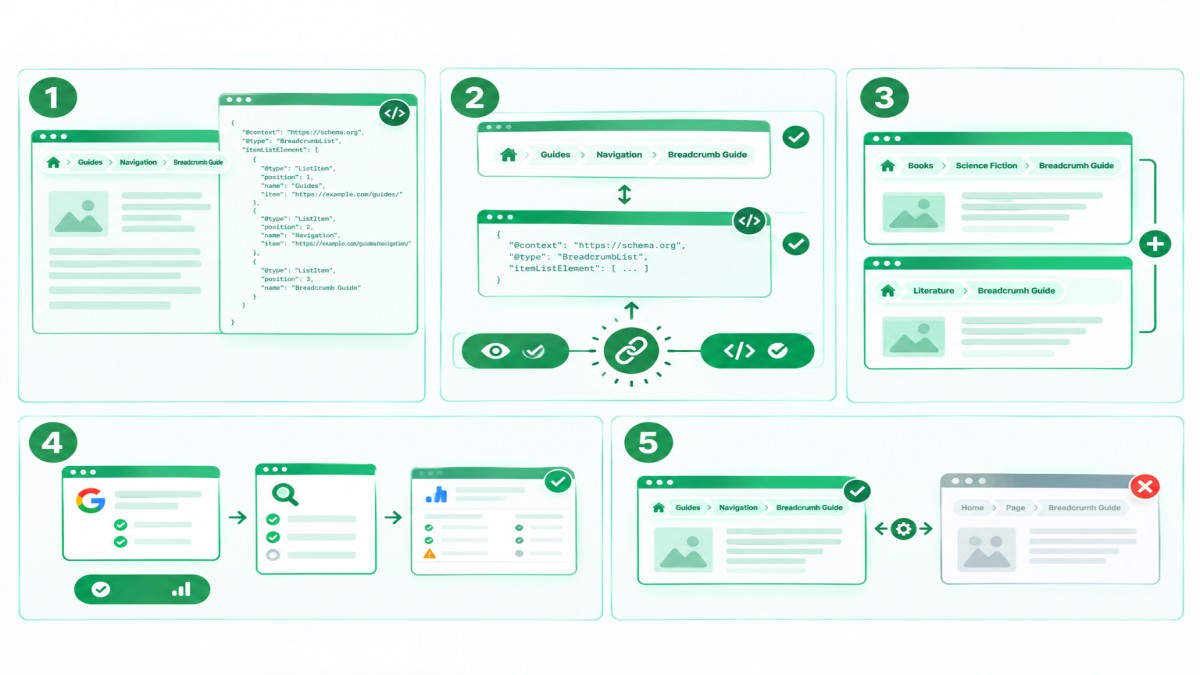
Add Breadcrumb List markup to each page with a visible trail, using JSON-LD, with at least two list items that match the trail visitors see. Google’s breadcrumb structured data page, last updated on 8 September 2026, is the source for this section.
Visible breadcrumbs vs. Breadcrumb List markup
Visible breadcrumbs are links on the page for visitors, while Breadcrumb List markup is code that describes the same trail to search engines. They are two separate things. A site can have a visible trail with no markup, or markup with no visible trail. Keep them aligned, because markup that describes something visitors cannot see goes against Google’s structured data guidelines.
A JSON-LD example for one breadcrumb trail
A single trail needs a Breadcrumb List with ordered List Item entries, each with a position, a name, and, except for the last item, a URL. The example below follows Google’s pattern for a page called “Breadcrumb Guide”:
{ “@context”: “https://schema.org”, “@type”: “Breadcrumb List”, “item List Element”: [
{ “@type”: “List Item”, “position”: 1, “name”: “Guides”, “item”: “https://example.com/guides/” },
{ “@type”: “List Item”, “position”: 2, “name”: “Navigation”, “item”: “https://example.com/guides/navigation/” },
{ “@type”: “List Item”, “position”: 3, “name”: “Breadcrumb Guide” } ] }
Google says you do not need a list item for the site’s top level or for the page itself. If the last item has no URL, Google uses the URL of the containing page.
Multiple breadcrumb trails for one page
If a page can be reached through more than one route, Google allows several Breadcrumb List blocks on the same page. Its example shows one trail through Books and Science Fiction, and another through Literature. Use this only when both routes genuinely exist on your site, and keep one visible trail as the main one.
How do you test breadcrumb markup?
Test with Google’s Rich Results Test, then use the URL Inspection tool and the rich result status report in Search Console. Google advises fixing critical errors before release, and it notes that re-crawling can take several days. It also says that structured data does not guarantee a rich result. Page markup that breaks the guidelines can lead to a manual action, so avoid adding breadcrumb code that does not match what visitors see.
How Do Breadcrumbs and Site Navigation Work on Multilingual and Right-to-Left Websites?
On multilingual and right-to-left websites, each language version should have its own complete trail, in the right direction, with labels and links in that language. Many sites in the Middle East, Europe, and Asia serve more than one language, and a trail copied from the English version is a common source of errors.
Right-to-left sites, such as Arabic
On a right-to-left page, the trail should start at the right with the home page and read leftwards, because it follows the reading direction. Set the page direction with the HTML dir attribute, and make sure the separator symbols face the correct way. A greater-than sign that points the wrong way suggests the trail runs backwards. These are practical points that I recommend testing with native readers, since I have not verified them against a single authoritative source.
Multilingual sites across Europe and Asia
Each language version needs its own labels, its own parent links, and its own markup, so a German page links to German parents and not English ones. Mixed-language trails confuse visitors, and they muddle the hierarchy. If the structure differs between languages, show the trail that matches the page the visitor is reading.
Labels and URLs for each language version
Write breadcrumb labels and URL words in the language of the page, and link each version to its matching alternatives. Google’s URL guidance advises using words in your audience’s language in URLs, and suggests a structure that makes geotargeting easy for multi-regional sites. Google also provides guidance on how to tell it about localized versions of a page. Read that guide before you add language folders.
How Do You Implement Breadcrumbs on Common Platforms and Custom Sites?
Most content management systems can output a breadcrumb trail through a theme setting or a plugin, while custom sites need a short piece of HTML and CSS. Check the platform’s settings first, because it is usually quicker than hand-coding.
CMS themes and plugins
Use the theme or plugin that your platform already provides, and then check what it outputs on the page. Google’s documentation notes that when you use a CMS, a plugin integrated into the CMS may be easier than writing markup by hand. Not every plugin outputs the markup in the same way, so test a few pages. Check that the trail matches your hierarchy, that the current page is not a link, and that the markup does not duplicate itself.
A simple custom HTML pattern
A custom breadcrumb is a labelled navigation element containing an ordered list of links, with the last item marking the current page. This is the structure that the W3C pattern describes:
<nav aria-label=”Breadcrumb”>
<ol>
<li><a href=”/guides/”>Guides</a></li>
<li><a href=”/guides/navigation/”>Navigation</a></li>
<li><a href=”/guides/navigation/breadcrumbs/” aria-current=”page”>Breadcrumb Guide</a></li>
</ol>
</nav>
Style the list so the items sit in a row, and add the separators with CSS.
What Breadcrumb and Navigation Mistakes Should You Fix?
The most common mistakes are trails that contradict the site structure, trails that are too long, markup that does not match what visitors see, and breadcrumbs used as the only navigation. These problems are easy to spot once you know where to look.
Breadcrumbs that do not match the site structure
A trail that shows a hierarchy your site does not actually have misleads visitors and confuses crawlers. An example is a trail that says Home > Products > Phones on a page that is not linked from either of those parents. Fix this by making sure every level in the trail is a real page that links onward, and that the page appears in that parent’s listing.
Trails that are too long or inconsistent
Long or inconsistent trails make the location harder to understand, so shorten them and apply one pattern across the site. Different sections should not use different separators, labels, or depths without a reason. If one template shows the home page and another leaves it out, visitors will notice. Agree a single pattern and apply it to every template.
Markup that differs from the visible trail
Markup that differs from the visible trail breaks Google’s guidance and creates a risk of errors. It often happens after a redesign, when the visible trail changes but the template’s markup does not. Run the Rich Results Test after every template change, and compare the markup against the page.
Using breadcrumbs as the only navigation
Breadcrumbs cannot replace the main menu, because they only show one path upwards and give no route to other sections. A visitor needs the menu to move sideways. Treat the trail as secondary, and keep the main menu complete and clear.
Breadcrumb and Navigation Audit Checklist Before You Publish
Before you publish, check that the trail is accurate, short, consistent, accessible, and backed by matching markup. This section gives a checklist for new pages and a method for auditing existing ones.
A pre-publish checklist
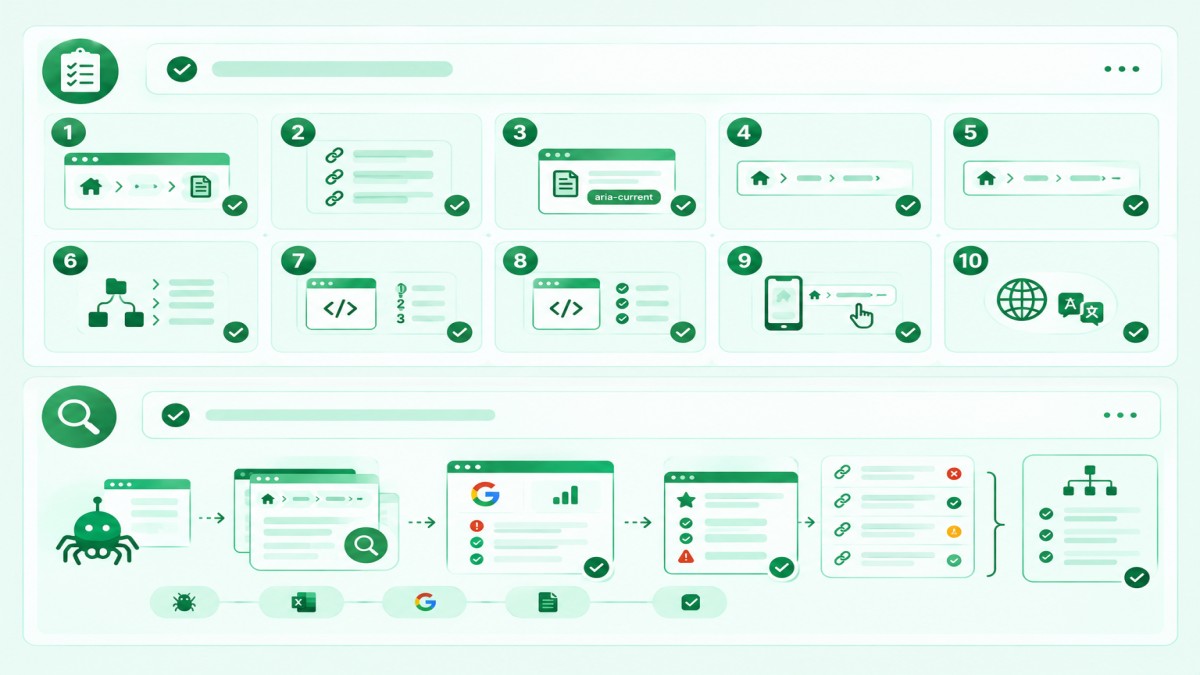
Answer yes to every item below before a page goes live.
- Does the trail start at the home page and end with the current page?
- Does every level link to a real, working page?
- Is the current page shown as plain text, or marked with aria-current=”page”?
- Are the labels short and the same as the page names used in the menu?
- Is the trail no more than three or four steps deep for a typical page?
- Does the page use one main trail, even if it belongs to several categories?
- Is the trail inside a labelled navigation landmark and an ordered list?
- Does the Breadcrumb List markup match the visible trail?
- Does the trail fit on one line on a phone, with links large enough to tap?
- On multilingual pages, are labels, links, and direction correct for that language?
How do you audit breadcrumbs with a crawler and Google Search Console?
Crawl the site with a tool such as Screaming Frog to see the breadcrumb links on every page, then check Google Search Console for markup errors. A regular technical SEO and audit routine can include these checks:
- Look for breadcrumb links that return errors or redirect.
- Find pages that have no trail, or a trail that differs from similar pages.
- Open the rich result status report for breadcrumbs in Search Console to see valid and invalid items.
- Use the URL Inspection tool on a sample page to check that Google can read the markup.
- Compare the trail on each page with your planned hierarchy, and note the pages that break the pattern.
Fix template-level problems first, because one change to a template can correct hundreds of pages.
How I Measure the Impact of Navigation Changes
I measure any structural change by fixing a baseline first, then comparing the same pages or locations over a set period. In a Brooklyn construction project, I tracked Google Maps rankings for “concrete contractor Brooklyn” using a 25-point geographic grid. Over 12 weeks, the average grid ranking improved from 17.08 to 2.00, and the share of grid points ranking in the top three rose from 0% to 88%, which is 22 of 25 points.
I compared ranking positions across the same locations to find weak areas and to measure progress. These figures come from local rankings, not from a breadcrumb change, so they do not show what breadcrumbs do. They show the method.
For breadcrumbs, apply the same method. Record the current trails, crawl errors, and markup status for a fixed set of pages, change one thing at a time, and compare after a set period using the checks in the audit section.
These results reflect one business, one target keyword, and a specific measurement period. They do not guarantee similar results for other businesses, or for any change to breadcrumbs or navigation.
Conclusion
Breadcrumbs and site navigation help visitors most when they come from one clear site structure and say the same thing in the menu, the trail, and the markup. Use breadcrumbs when your site has several levels, keep them short and secondary to the main menu, and make them accessible. Add Breadcrumb List markup only when it matches the visible trail, and test it. On multilingual and right-to-left sites, build each language version with its own trail. Treat breadcrumbs as a usability tool, and do not promise rankings from them. Start by reviewing your structure, then apply the checklist to every new page.
FAQs
What are breadcrumbs in website navigation?
Breadcrumbs are a row of links that shows the path from the home page to the page the visitor is on. Each level links to its parent page, so visitors can move up the hierarchy in one click. They support the main menu and do not replace it.
Do breadcrumbs help SEO?
Breadcrumbs can support SEO indirectly by clarifying your hierarchy and adding internal links, but Google does not say they raise rankings. Google describes them as a way to help users understand and explore a site. Treat them as a usability feature first.
Are breadcrumbs necessary for every website?
No, breadcrumbs are not necessary for every website, and small or single-page sites usually do not need them. They help most on sites with several levels of pages, such as shops, publishers, and large service sites.
What is the difference between breadcrumbs and primary navigation?
Primary navigation is the main menu that links to the main sections, while breadcrumbs show the current page’s position within one section. The menu helps visitors move across the site, and the trail helps them move up. Use both together.
Which breadcrumb type is best?
Hierarchy-based breadcrumbs are the best choice for most websites, because they show a stable position in the site structure. Attribute-based trails suit large catalogues with filters, and path-based trails are less common.
Should the current page be a link in the breadcrumb trail?
No, show the current page as plain text, because a link to the same page adds nothing. If you do make it a link, the W3C pattern asks you to mark it with aria-current=”page”.
Do I need breadcrumb schema if breadcrumbs are visible?
Visible breadcrumbs work without schema, but Breadcrumb List markup tells Google about the trail and may help it categorize the page in search results. The markup must match the visible trail, and Google does not guarantee that a rich result will appear.
How should breadcrumbs work on mobile?
On mobile, keep the trail to one line and show the nearest parent first if space is short. Make the links easy to tap. This is practical advice, and Google states that its breadcrumb search feature is available on desktop.
How do breadcrumbs work on right-to-left websites?
On a right-to-left site, the trail starts at the right with the home page and reads leftwards, with separators that face the correct way. Set the page direction in the HTML, and test the trail with native readers.
How long should a breadcrumb trail be?
A breadcrumb trail should show the levels that really exist, and three or four steps suits most sites. Google gives no fixed limit. If the trail needs many steps, review the site structure.