Topical Map for Local Business
Discover how a topical map for local business integrates core topics, entities, and search intent into a structured system that connects relevant pages and establishes authority

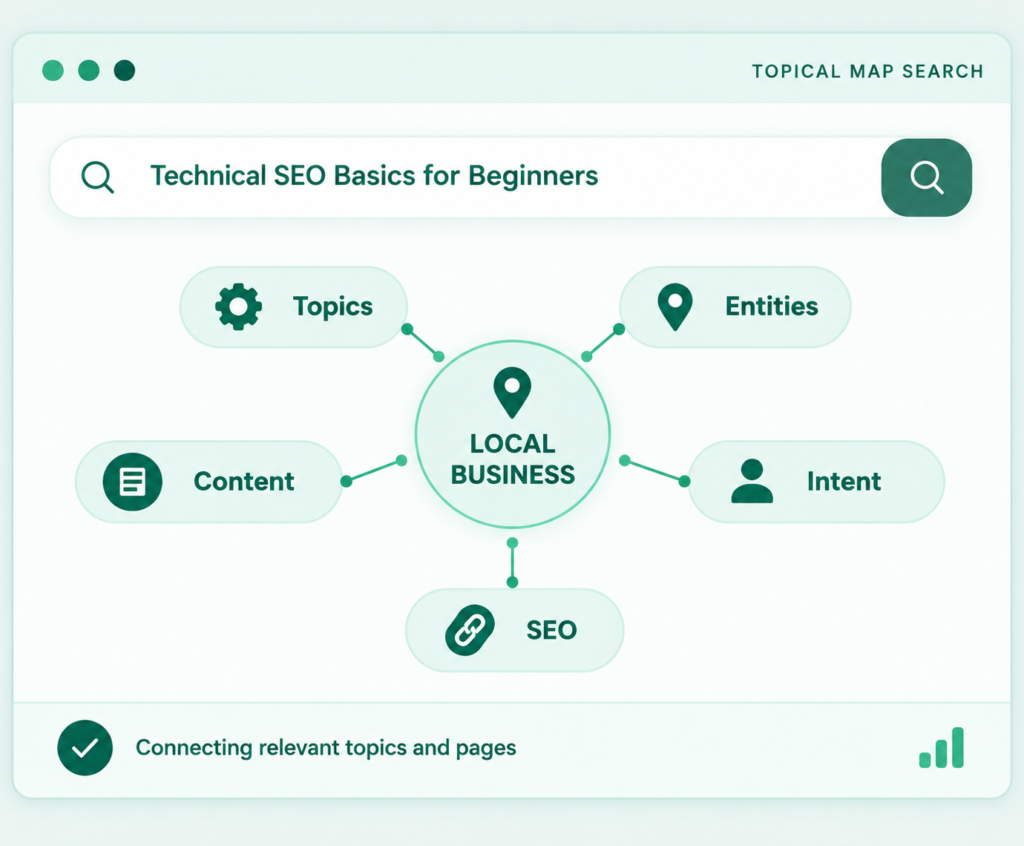
A topical map for local business is a visual blueprint organizing every service, location, supporting guide, and internal link around your central offering before creating content. It maps each page’s primary keyword, search intent, and site hierarchy, replacing keyword guesswork with a structured site blueprint.
Why Local Businesses Need a Topical Map
Modern search engines reward topical depth over isolated keywords. A structured topical map provides clear advantages over competitors with disorganized sites:
-
Strategic Clarity & Focus: Eliminates guesswork by defining exact publishing priorities and briefing guidelines for writers and developers.
-
Cannibalization & Waste Reduction: Assigns distinct intent to each URL, preventing near-duplicate pages from competing against each other.
-
Enhanced Relevance & Conversions: Builds strong topic authority across service niches while matching content to every stage of the customer journey.
-
AI Search Readiness: Structure, entity clarity, and explicit local facts make your site easier for Google AI Overviews and chat tools to extract and cite.
How Topical Authority for Local Business Works
Topical authority is an SEO concept describing how thoroughly and credibly a site covers a subject. It is not an official Google score. It is a practical way to describe what experience keeps showing: sites that cover a topic completely, accurately and with clear structure tend to perform better across related searches.
Topical authority for local business works on two levels at once.
Subject depth. Does your site cover the service the way a real expert would? Do you explain the process, materials, costs, common problems and alternatives?
Geographic relevance. Does the site clearly connect that expertise to the places you serve? This comes from location pages, local proof such as projects, reviews and photos, consistent name-address-phone details, local schema and a matching Google Business Profile.
Authority is never built by a single page. It accumulates when many well-linked pages answer related questions without contradicting each other. Do not expect overnight results. The timeline depends on competition, site age and publishing pace, which we cover in How Long Does It Take to Build Topical Authority?.
Topical Map vs Keyword Map vs Content Cluster vs City Pages
These terms get mixed up constantly, so here is how they differ.
Keyword map. A spreadsheet that matches keywords to URLs. It answers “which page targets which keyword?” It is one component of a topical map, not the whole thing.
Topical map. The full architecture. It decides which topics should exist, how they relate, which are core and which are supporting, and what order to publish them in. It contains the keyword map plus the hierarchy, entities, intent labels and internal links.
Content cluster (topic cluster). One pillar page plus supporting articles linked to it. A topical map usually contains several clusters. See Topic Clusters and Pillar Pages for details.
City pages. Individual pages for each location. They are one branch of the map, and a risky one when done badly. This is the city pages vs topical map debate. City pages alone are a tactic. A topical map is the strategy that tells you when a city page is justified, what unique content it needs and how it connects to your services. Template pages with only the place name swapped are what Google calls doorway pages. Our guide on location page content explains how to avoid that trap. Google’s spam policies explain why doorway pages created mainly to target similar queries can be problematic. Google’s guidance on doorway abuse
A simple way to remember the difference: the keyword map is the address book, the content cluster is one neighborhood, city pages are individual houses and the topical map is the whole city plan.
Anatomy of a Topical Map for Local Business SEO
A solid topical map for small business SEO has nine predictable parts.
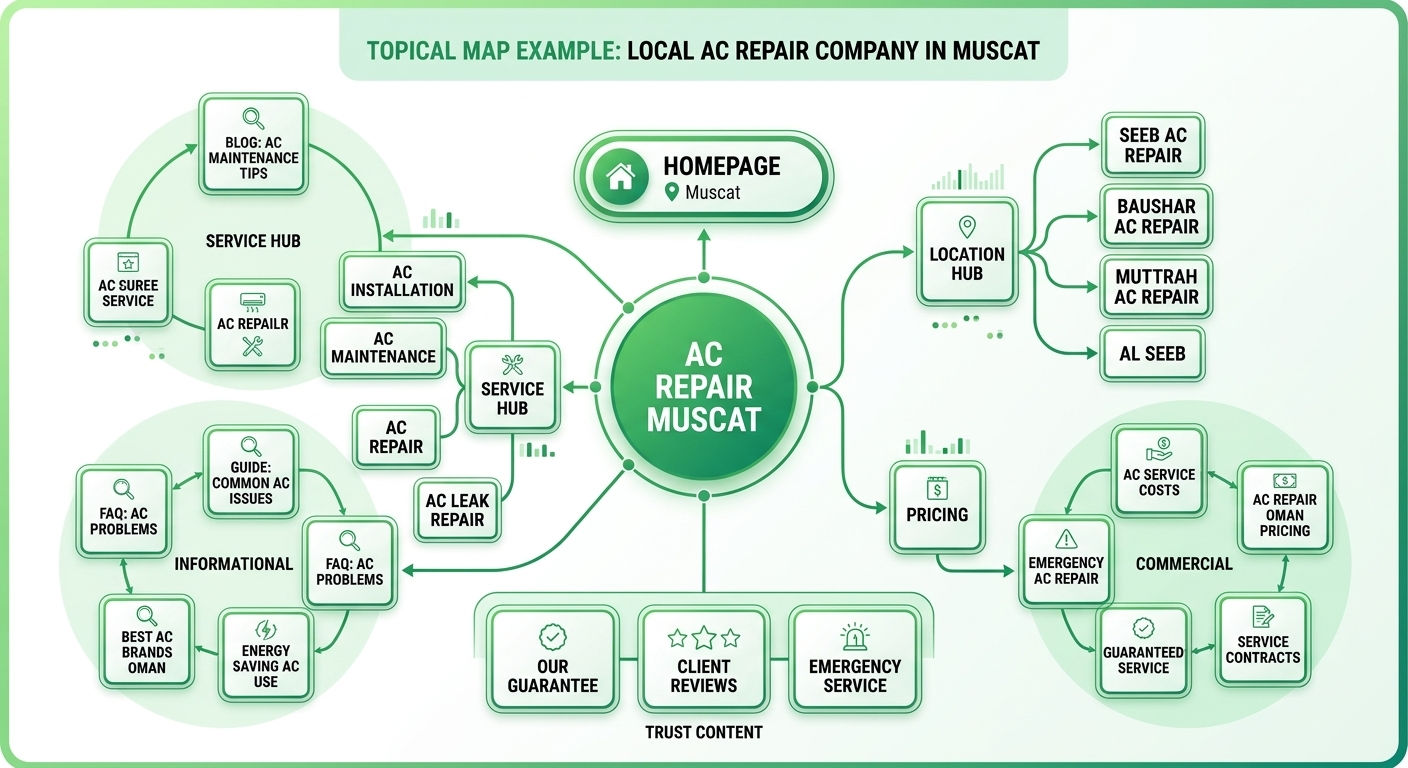
- Central entity. The thing the whole site is about, such as “AC repair company in Muscat” or “family dentist in Austin.” Everything should relate back to it.
- Core section. The pages that directly make money: service pages, location pages, pricing and quote pages, and the homepage. These get the strongest internal links and the most careful optimization. The structure is explained in Core vs Outer Section.
- Outer section. Supporting content that builds depth and trust: how-to guides, problem-solving articles, comparisons, case studies, FAQs and seasonal content. Outer pages capture early-stage searches and pass relevance and visitors toward core pages.
- Intent labels. Each topic is tagged informational, commercial investigation, transactional or navigational, so you never ask a blog post to do a service page’s job.
- Hierarchy. Parent, child and sibling relationships. For example: Services, then AC Repair, then Compressor Replacement, then Compressor Replacement Cost.
- Primary keyword and variants. One primary query per URL, plus the close variations the page should cover naturally.
- Entities and attributes. Services, brands, tools, certifications, neighborhoods, landmarks and team members that make the topic complete.
- Internal link plan. Which page links to which, and with what anchor text.
- Priority and status. What to publish first, what already exists and what needs updating.
When all nine parts are present, the map becomes a working document that the whole team can use every week.
Types of Topical Map for Local Businesses
A topical map for local business organizes content across five essential topic families to capture users at every decision stage:
-
Service-Based Mapping: Map core services down to sub-services, processes, materials, and specific problems
-
Location-Based Mapping: Plan pages for cities or districts only where you have a real physical presence, local projects, or unique regional data.
-
Informational Mapping: Target top-of-funnel customer questions sourced from FAQs, sales calls, and review language.
-
Commercial & Transactional Mapping: Focus core conversion pages on high-intent queries with prominent proof and booking triggers.
-
Customer Journey Mapping: Align content across awareness, consideration, decision, and retention stages to build trust before competitors enter the picture.
How to Build a Topical Map for Small Business (Step by Step)
Here is the process I use. It works in a spreadsheet, and tools can speed it up, but none of them replace judgment. For the general version, see How to Create a Topical Map.
Step 1: Define the Central Entity and the Goal
Write one sentence that says who you are, what you sell and where. For example: “Residential AC repair and maintenance in Muscat and Seeb.” Then add the business goal, such as phone calls, booking requests or quote forms. Every topic you add later must support this sentence.
Step 2: Do Local Keyword Research
Collect service keywords, modifiers (emergency, cost, best, near me, 24 hour) and locations. Group them by intent and record volume and difficulty where data exists. In smaller markets the volumes will look tiny. That is normal, and it is a reason to rely on topic coverage rather than volume alone. Broad terms like local business SEO and SEO for local business show healthy demand, but your own map should be built from the searches your customers actually use. The process is covered in detail in Local Keyword Research for Oman.
Step 3: Run a Competitor Topical Gap Analysis
Pick three to five competitors who appear in the local pack and the organic results. List their service pages, location pages and articles. Note the topics they cover that you do not, the topics nobody covers well and the places where their content is thin. Some tools can pull a competitor’s topical map or keyword set in minutes, which makes this step much faster. For a full walkthrough, read Content Gap Analysis.
Step 4: Add Entities and Attributes
Entity-based SEO means describing the real-world things your business relates to and staying consistent about them. List your services, equipment, brands, certifications, licenses, neighborhoods, landmarks and team members. Confirm them on the site through an About page, consistent name-address-phone details and structured data. Our guide to entity SEO explains the thinking behind this. For a practical starting point, review Google’s SEO Starter Guide. Google’s SEO Starter Guide
Step 5: Build the Content Hierarchy
Arrange everything in levels. A common local structure looks like this:
- Homepage links to service hubs, then to individual service pages, then to supporting guides.
- Homepage links to a locations hub, then to location pages, then to service-in-location pages only where they are justified.
- Keep important pages within three clicks of the homepage.
This is also where you decide on pillar pages and supporting pages. A pillar page covers a broad service comprehensively. Supporting pages go deep on one sub-topic and link back to the pillar.
Step 6: Map Keywords to Existing Pages
Audit the current website. Give every URL one primary keyword and one intent. Where a page already ranks, protect it. Where two pages target the same query, merge them, redirect one or re-differentiate them.
Step 7: Identify Missing Content
Anything in the map without a URL is a content gap, marked “to create.” Anything with a URL but weak content is marked “to improve.” This single list becomes your publishing backlog.
Step 8: Prioritize the Topics
Score each topic from one to five on revenue potential, ranking difficulty, effort and dependency . Then work in this order:
- Core service pages that earn leads now.
- Supporting content closest to those service pages.
- Location pages where you have real presence.
- Awareness-stage articles that widen reach.
Quick wins, such as updating an existing page that sits on page two, usually go first.
Internal Linking Strategy for Topic Clusters
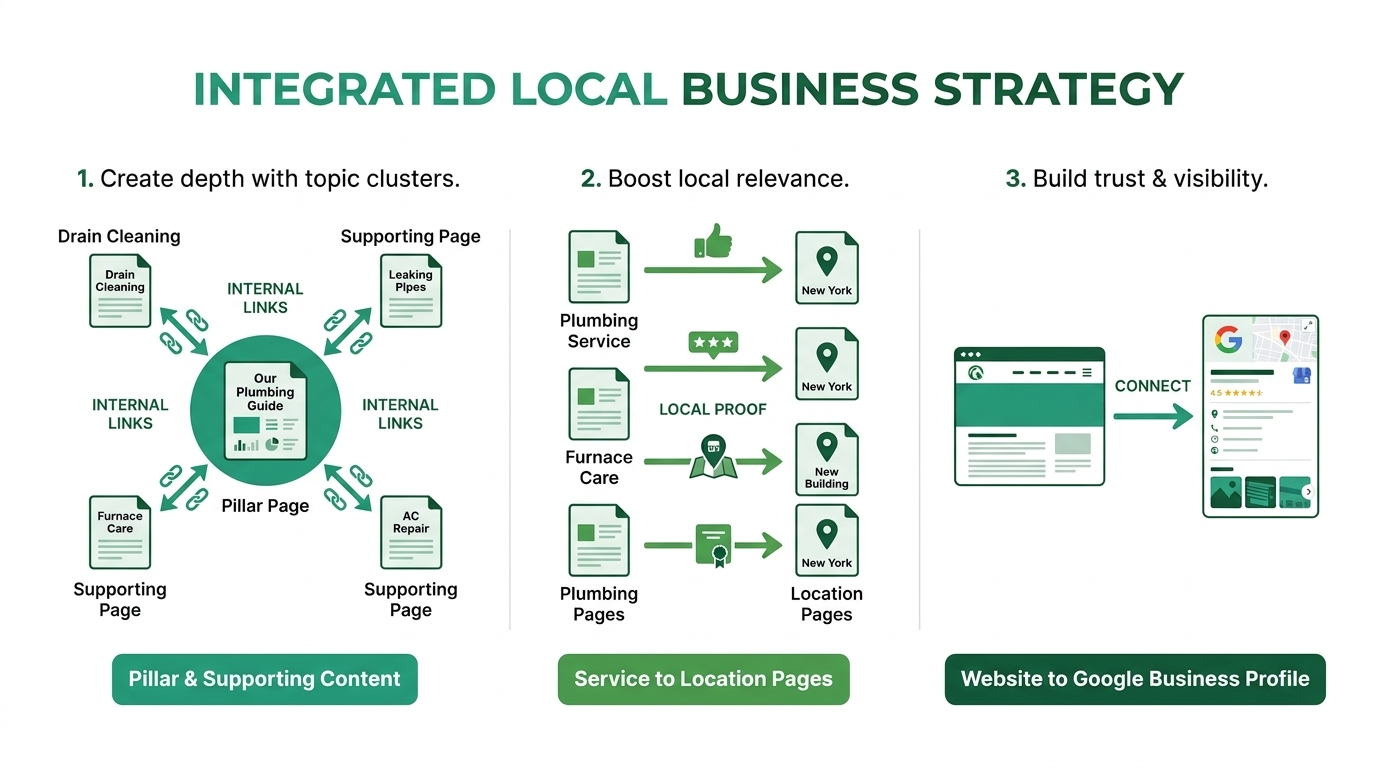
Internal links are how Google, and visitors, understand your map. Without them you have a list of pages. With them you have a structure. Use crawlable links with meaningful anchor text so visitors and search engines can follow the site structure. Google’s guidance on crawlable links
- Link from supporting pages to the pillar using descriptive anchor text, not “click here.”
- Link from the pillar down to each supporting page so authority flows both ways.
- Link sideways between related siblings when it helps the reader, for example from “AC not cooling” to “AC gas refill cost.”
- Add a clear call to action on informational pages that points to the relevant service page.
- Avoid orphan pages. Every page in the map should receive at least one contextual link.
The full method is in our internal linking strategy guide.
Connecting Service Pages with Location Pages
Service pages and location pages should reference each other without duplicating content. The service page explains the work. The location page proves you do it in that area, using local projects, area-specific details, nearby landmarks and local reviews. Each links to the other, and both link to relevant supporting articles. If a location has no real story to tell, cover it in a list of areas served instead of creating a thin page.
Integrating Google Business Profile with Website Content
Your Google Business Profile is part of the map, not a separate project. Match the primary category to your main service page. Link the profile to the most relevant landing page, which is often the homepage for single-location businesses and the location page for multi-location ones. Keep services, hours and descriptions consistent with the site. Publish content around the questions customers ask in reviews and Q&A. Keep profile information accurate and follow Google’s requirements for representing a business. Google’s business representation guidelines
Topical Mapping for Service-Area and Multi-Location Businesses
Service-area businesses travel to customers and may hide their address. Their map leans on service depth and a clear list of areas served. Group neighborhoods under one location hub and create dedicated pages only where you have proof of work. See Local SEO for Service-Area Businesses. A service area topical map should also include pages that answer coverage questions, such as response times and call-out fees.
Multi-location businesses need one consistent template for every branch, but unique content inside it: the branch team, local photos, local reviews, branch-specific offers and local FAQs. Each branch page should link to its own Google Business Profile, and the central service pages should explain the shared offering once instead of repeating it forty times.
Tools for Building a Topical Map
You do not need expensive software, but the right tools save hours.
- Google Search Console: your real queries and impressions, and the best source for finding pages to improve. A sitemap can help Google discover important URLs, although submitting one does not guarantee indexing. Google’s sitemap documentation
- Google Business Profile Insights: how customers find and contact you locally.
- Mind-mapping or diagram tools: to visualize the hierarchy for clients and writers.
- AI-assisted generators: useful for brainstorming topics quickly. Treat the output as a draft, since it knows nothing about your real services, market or competitors.
- Rank trackers and local grid trackers: to measure map results by area.
If you are comparing options, How to Create a Topical Map for small Business includes a longer look at generators and workflows.
Content Creation, Publishing and Maintenance
Content Creation and Publishing Workflow
A repeatable workflow protects quality:
- Pick the next topic from the prioritized map.
- Write a content brief with the primary keyword, intent, headings, questions and internal links .
- Draft with a real subject expert involved, then edit for accuracy and local detail.
- Add original proof: photos, prices, project notes, quotes.
- Publish, add internal links from existing pages and update the map status.
- Request indexing and monitor performance.
A steady rhythm, such as one to two quality pages per week, beats bursts followed by silence.
Updating and Maintaining Your Topical Map
A topical map for local business is a living document requiring monthly reviews and quarterly audits to maintain search visibility:
-
Expand intentionally: Add new topics only when launching services, entering new areas, or addressing real customer questions.
-
Consolidate & prune: Merge overlapping pages that compete for identical intent and remove obsolete URLs that lack value.
-
Prioritize user-first updates: Refresh slipping content by improving factual accuracy, local proof, and practical value rather than adding generic text solely to pad word counts (see Google’s helpful, reliable, people-first content guidance).
Measuring Topical Map Performance
Evaluate your topical map at the cluster level rather than analyzing isolated URLs:
-
Search Console Growth: Monitor rising impressions and clicks across entire topic clusters and regional query groups.
-
Keyword & Local Pack Breadth: Track primary rankings, long-tail query variations, and Local Pack visibility by service area.
-
Direct Lead Generation: Measure business actions—qualified phone calls, direction requests, and form submissions—driven by profile and site engagement.
-
Cluster Coverage & Link Health: Review internal link distribution and track the percentage of mapped topics successfully published.
-
Common Topical Mapping Mistakes
- Starting too broad. Trying to cover every service in the first month spreads you thin. Begin with your best-selling service.
- Creating thin city pages. Swapping place names is the fastest path to doorway-page problems.
- Ignoring intent. Blog posts targeting buyer keywords and service pages targeting questions both underperform.
- Skipping internal links. Unlinked pages do not behave like a cluster.
- Chasing volume only. A low-volume “emergency AC repair Seeb” page can outperform a high-volume generic article for revenue.
- Duplicating topics. Two pages for one keyword weaken both.
- Never updating. Services, prices and competitors change.
- Disconnecting the Google Business Profile from the website.
Industry-Specific Topical Map Examples
- Dental clinic: treatments, conditions , costs, insurance, dentist profiles and area pages.
- Law firm: practice areas, process explainers, fee guides, court and jurisdiction pages, case outcomes where permitted.
- Home services : emergency services, problem guides, pricing, maintenance plans and neighborhoods.
- Restaurant or cafe: menu categories, dietary pages, events, catering, local sourcing stories and area pages.
- Real estate agency: neighborhood guides, buying and renting processes, market updates and property types.
The pattern is identical every time: services, locations, questions, proof, then links.
Topical Map for Oman Business Websites
A topical map for Oman business sites has a few extras. Plan for bilingual coverage: many customers search in Arabic and English, and the two do not always translate directly. Map cities such as Muscat, Salalah and Sohar separately, and use local terms and currency in pricing content. Seasonal topics, like summer cooling or Ramadan service hours, are strong outer-section ideas. If you are building a bilingual site, read Bilingual Arabic-English Website Design, and for local context see Local SEO in Oman: A Practical Guide.
For a small or brand-new site, build your topical map for local business in staged phases rather than publishing dozens of thin pages at once:
Building a Local Topical Map for Small Websites
-
Start with core service pages: Focus first on your primary offering, detailing the service scope, process, pricing factors, limitations, and booking steps.
-
Add a small set of distinct supporting topics: Create dedicated articles that answer specific customer questions and link them back to your main service page.
-
Consolidate similar intent into single URLs: Combine close keyword variations onto one comprehensive page rather than creating duplicate URLs.
-
Expand your topical map in deliberate stages: First establish core services, then add high-value supporting guides, next introduce location pages with genuine local proof, and finally publish broader educational content as resources allow.
Local Proof: What Each Page Should Demonstrate
Building credibility into a topical map for small business requires grounding every URL in authentic, verifiable real-world evidence:
-
Incorporate real service & location evidence: Feature actual project photos, staff qualifications, local addresses, equipment specs, and regional landmarks rather than relying solely on city-name keywords.
-
Tailor proof to page intent: Match proof types to the page role—service credentials for service pages, local directions and branch details for location pages, and substantiated outcomes for case studies.
-
Use genuine reviews and customer language strategically: Integrate a select few authentic reviews where they build trust, avoiding repetitive review blocks across multiple URLs within your topical map for local business.
How to Map Local Keywords Without Creating Duplicate Pages
Organize local search variations into distinct, high-value pages by evaluating search intent rather than treating every keyword variant as a separate URL:
-
Group intent-matched variants: Cluster price queries, “near me” phrases, and close keyword variations into a single comprehensive page rather than creating duplicate URLs.
-
Separate genuinely distinct services: Create dedicated URLs only when a service has a distinct process, audience, or conversion goal Limit neighborhood location pages: Use city-level pages for general coverage and build sub-location pages only when you can provide unique, location-specific details within your topical map for business.
-
Audit and consolidate intent overlap: Flag competing or redundant topics early in your topical map for local business—merging near-duplicate pages or clearly differentiating their unique value propositions before writing.
Google Business Profile and Website Content: Keep Them Consistent
A strong topical map for business connects your Google Business Profile to your website, aligning high-level profile categories with in-depth service pages:
-
Maintain factual consistency: Ensure your business name, address or service area, phone number, hours, and URLs match identically across your profile and website landing pages without keyword-stuffing.
-
Mine profile data for content topics: Turn recurring customer questions, review themes, and profile search insights into localized FAQs, buying guides, and service page improvements within your topical map for local business.
-
Assign distinct roles to each asset: Keep facts consistent while avoiding duplicate text—use your profile for quick actions , service pages for in-depth explanations, and location pages for specific regional coverage.
Measuring Whether the Topical Map Is Working
Evaluate your topical map for local business through real user engagement and lead growth rather than vanity metrics like page volume or third-party scores:
-
Track Search Console metrics: Monitor impressions, clicks, CTR, and average positions for key queries to ensure pages rank for their assigned local topics and match search intent.
-
Focus on business lead metrics: Measure qualified calls, form fills, booking requests, and direction clicks rather than raw traffic, ensuring visitors are within your actual service area.
-
Analyze topic clusters holistically: Assess how supporting guides feed visibility and navigation into core service pages rather than judging individual URLs in isolation.
-
Diagnose before adding content: Fix technical indexing, weak internal links, or poor local proof on existing pages before expanding your topical map with new URLs.
A Quality-Control Checklist for Every Local Topic Cluster
Before publishing, validate your topical map for local business across four key areas to ensure maximum relevance, user trust, and technical health:
-
Cluster Structure & Intent: Ensure primary service pages offer clear next steps, supporting guides answer specific questions, and location pages feature distinct, local value—avoiding near-duplicate pages that only swap city names.
-
Accuracy & E-E-A-T: Verify pricing, credentials, service areas, and operational details; use qualified expert reviews for specialized advice while removing unsupported claims, fake reviews, or fabricated statistics from your topical map for local business.
-
Technical Foundations: Confirm stable URLs, proper canonical tags, mobile accessibility, indexability, XML sitemap inclusion, and working conversion paths along with valid structured data.
-
Customer Journey & Friction: Ensure visitors can easily understand services, compare choices, review transparent costs, examine social proof, and contact the business seamlessly without forced or unnatural internal links.
Building topical authority requires covering every service, location, and question within your niche through interconnected content clusters. By publishing well-linked, high-intent articles around a central topic, your blog becomes the definitive expert source for search engines and readers alike.
Conclusion
A topical map for local business turns scattered content into a system. It shows you which pages to build, how to connect services with locations, how to avoid cannibalization and how to measure progress. Start with one core service, map its questions, add the areas where you truly operate and link everything with intent. The sites that win local search are rarely the ones with the most pages. They are the ones whose pages clearly belong together.
Get a Topical Map Audit
Want a clear, prioritized map for your business? Request a free topical map audit and I will review your current pages, find the gaps and show you what to publish first.
Frequently Asked Questions
What is a topical map for Local Business in SEO?
A topical map in SEO is a structured plan of the topics a website should cover around its subject, including hierarchy, keywords, intent and internal links. It helps search engines and users see the site as a complete resource.
How do I create a topical map for my local business website?
Define your central entity, research local keywords, analyze competitors, add entities, build a hierarchy, map keywords to existing pages, list the gaps and prioritize. The steps above walk through each one.
How many pages should a topic cluster have?
There is no fixed number. A pillar page plus five to ten supporting pages is a practical starting point for most local services. Add pages only when each answers a distinct question.
How often should I update my topical map?
Review it monthly and audit it quarterly. Update sooner when you add services, open new locations or notice ranking drops.
Does a topical map replace keyword research?
No. Keyword research feeds the map. The map then organizes keywords into a structure with one target per page.