How to Optimize Existing Content: A Proven 7-Step Guide
Learn how to optimize existing content with a clear 7-step process: record a baseline, audit your pages, choose an action, update the substance and measure the result. The guide covers updating old blog posts, protecting rankings, AI search and extra care for YMYL topics.


To optimize existing content, audit your published pages, pick the ones with real potential, update their facts, intent match and structure, then republish on the same URL and measure the change. This guide walks through each step, from the content audit before updating to the final check in Search Console. It also covers how to update old blog posts without losing rankings, and where the limits of any refresh sit.
When you optimize existing content, start with data, not guesses. Keep the URL, change only what the evidence supports, and update the date only when the page changed in a meaningful way. Treat every result as likely, never guaranteed.
What Does It Mean to Optimize Existing Content?
To optimize existing content means improving pages that are already published so they match search intent better, stay accurate and earn more trust. People also call this content refresh SEO, content optimization or optimizing old content for SEO. The work can be small, like replacing an outdated statistic, or large, like rewriting a whole guide.
Definition: Content optimization is a repeatable review of a published page against its goal, its audience and the current search results, followed by changes that make the page more accurate, useful and easy to understand.
To optimize existing content is not the same as publishing a new post. A new post creates a new URL that must earn links, trust and visibility from zero. An updated post keeps its URL, its place in Google’s index and any links it has already collected.
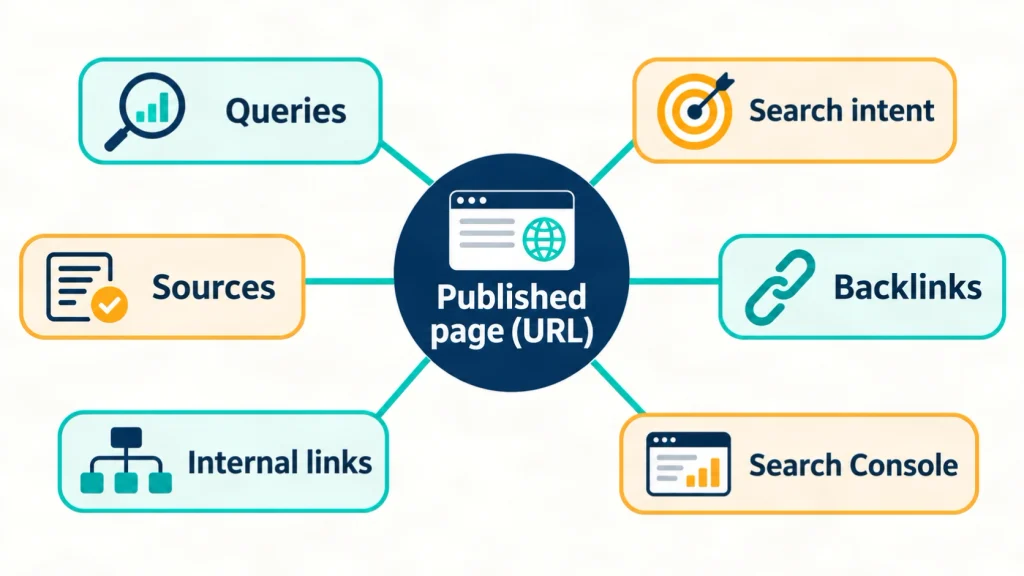
Three terms matter throughout this guide. The page is the URL you are improving. The query is the search phrase that page already appears for. The search intent is the task the searcher wants to finish, such as learning a process or comparing options.
You can optimize existing content on service pages too, and the same logic helps you optimize content for website sections beyond the blog. This guide focuses on blog posts because content decay shows up most clearly there. Content decay is the slow loss of rankings, clicks or accuracy as a page ages.
Why Should You Optimize Existing Content Before Publishing New Posts?
You should optimize content first because an old page already has an indexed URL, possible backlinks and proven topic fit, while a new page has none of these. Orbit Media lists five reasons to update rather than start fresh, including that the topic is already vetted, the writing is partly done and the URL is already indexed.
The research below shows why it pays to optimize existing content now. Orbit Media surveyed 1,042 content marketers for its 2026 report.
| Finding | Figure | Source and date |
|---|---|---|
| Marketers who say their blog delivers strong results | 14% (13.9%), an all-time low in the survey | Orbit Media, Blogging Statistics 2026, September 2026 |
| Share of bloggers who updated older articles at the peak | 73% during 2020 to 2022 | Orbit Media, Blogging Statistics 2026, September 2026 |
| Marketers using six or more of eight tracked strategies who report strong results | 39%, against a 14% benchmark | Orbit Media, Blogging Statistics 2026, September 2026 |
| Bloggers who update old articles, compared with those who do not | About twice as likely to report strong results | Orbit Media, How to Update Old Posts for SEO, updated September 2025 |
These figures come from a self-reported survey. They show a pattern, not proof that updating causes better results. Still, the pattern fits common sense: pages you maintain stay accurate, and accurate pages are easier to trust.
Google adds a warning. Its people-first content guidance treats changing page dates to look fresh, without substantial changes, as a warning sign. It also says adding or removing lots of content only to seem fresh will not help. A refresh must improve the page for readers, not only for a crawler.
The 7-Step Process for Updating Old Blog Posts
The process has seven steps: record, audit, decide, re-check intent, update substance, improve on-page elements, then republish and measure. Follow this order every time you optimize existing content, because each step prevents a mistake in the next one. For example, deciding what to do with a page before rewriting it stops you from polishing a post that should be merged. The order draws on my content optimization work with clients and on the sources linked below.
Step 1: What Should You Record Before You Change Anything?
Record the URL, title, main queries, clicks, impressions, average position, backlinks and last edit date before you touch the page. This baseline lets you prove a result later and undo a mistake if one happens.
The most important item is the list of queries the page already ranks for. Orbit Media warns that you can accidentally de-optimize a page by making it less relevant for queries where it already ranks well. In Google Search Console, open the Performance report, filter by the page URL and export the queries.
Also save a screenshot of the current search result and note the page’s word count. Treat this as the first rule when you optimize existing content: record before you edit.
Step 2: How Do You Run a Content Audit Before Updating?
A content audit before updating is a spreadsheet review of your pages, with traffic, rankings, links, accuracy and business value, scored so you can rank the work. Marketer Erin Balsa of Haus of Bold, quoted in Orbit Media’s guide, puts the first move simply: “Start by doing a content audit.”
Build the sheet in five passes:
- List every URL from your sitemap or a site crawl.
- Add clicks, impressions and average position from Search Console.
- Add landing page engagement from your analytics tool.
- Add the number of linking domains for each page.
- Add manual notes on accuracy, search intent, outdated screenshots and fit with your services.
Then look for the pages where it pays most to optimize existing content. Orbit Media names four types: articles that almost rank high, articles that rank well but slip, articles that created buzz, and research that has aged. To find the first group, filter the Search Console position report to “greater than 10.” Balsa’s own priorities in that guide include pages with ten or more backlinks and pages that rank, but not on page one, for valuable keywords.
The last column is one Google cannot fill in for you: does this page still fit what your business sells or teaches? If not, it may be a merge or removal candidate. Our technical SEO and audit guides cover the technical side of this review.
Step 3: Should You Keep, Refresh, Merge, Redirect or Remove a Page?
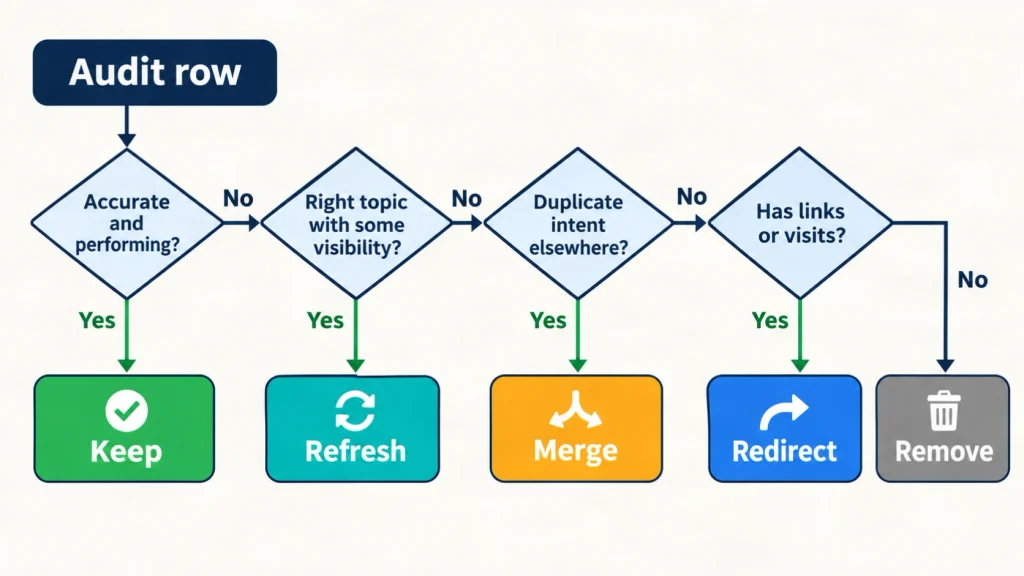
Choose one of five actions for each page: keep, refresh, merge, redirect or remove, based on its performance, accuracy and purpose. The table below is a rule of thumb from my own workflow, not a Google rule.
| Action | When it fits | What to do | Main risk |
|---|---|---|---|
| Keep | The page is accurate, performing and on purpose | Leave it alone and schedule a later check | Missing a slow decline |
| Refresh | The topic is right, but the page is slipping, thin or outdated | Update facts, structure and on-page elements on the same URL | Weakening queries that already rank |
| Merge | Several pages answer the same search intent | Combine the best parts into the strongest URL | Losing unique sections |
| Redirect | A retired or merged page still has links or visits | Send it to the closest relevant page | Choosing an unrelated target |
| Remove | The page has no value, no links and cannot be fixed | Remove it so it stops misleading readers | Deleting hidden value, so check links first |
Before you optimize existing content on a URL, check whether another page already owns the topic. A topical map shows which page should own each subject, so duplicate pages stand out. When two posts chase the same intent, one strong page usually serves readers better than two weak ones. That also supports topical authority, because each subject has a clear home.
Step 4: How Do You Re-Check Search Intent Before Rewriting?
Search your target query, read the current top results, and note which page type Google shows, what questions those pages answer and what your page lacks. Search intent can shift over time, so check it before you optimize existing content. A query that once returned long guides may now favor checklists, tools or short answers.
Compare four things: the format, the depth, the entities covered and the questions answered. Entities are the people, tools, concepts and places a topic naturally involves. A page about this topic, for example, should connect audits, Search Console, search intent, redirects and dates. Our guide to semantic SEO explains how entities and relationships shape coverage.
Keep one primary query per page. Mention close variations, such as “how to update old blog posts” or “improve blog post rankings,” where they fit naturally. Do not create separate pages for every variation. Google’s generative AI guide warns that doing so primarily to manipulate rankings violates its scaled content abuse policy.
Never copy competitor pages. Note the gaps, then fill them with information you can support.
Step 5: How Do You Update the Substance of an Old Post?
Replace outdated facts, add sourced numbers and real examples, remove claims you cannot support, and add information the post did not have before. Google’s generative AI guidance sets the standard: “Don’t just recycle what others on the internet have already said.”
Work through this list:
- Replace every statistic with a current one, and name the source, the year and what the figure measures.
- Fix broken links and outdated screenshots.
- Update steps that changed, such as menu names or tool settings.
- Add first-hand detail you can verify: what you tested, measured or observed.
- Add a short limitations note where advice depends on context.
Google’s people-first guidance also says that crediting other sources does not replace original effort. A refresh that only swaps links does not optimize existing content in any meaningful way.
Add the “Who, How and Why” from that guidance. Show who wrote the page with a byline that links to an author page. Explain how you made it and why it exists, including any AI assistance when readers would expect that. My author page shows how I present authorship on this site.
Step 6: Which On-Page Elements Should You Improve?
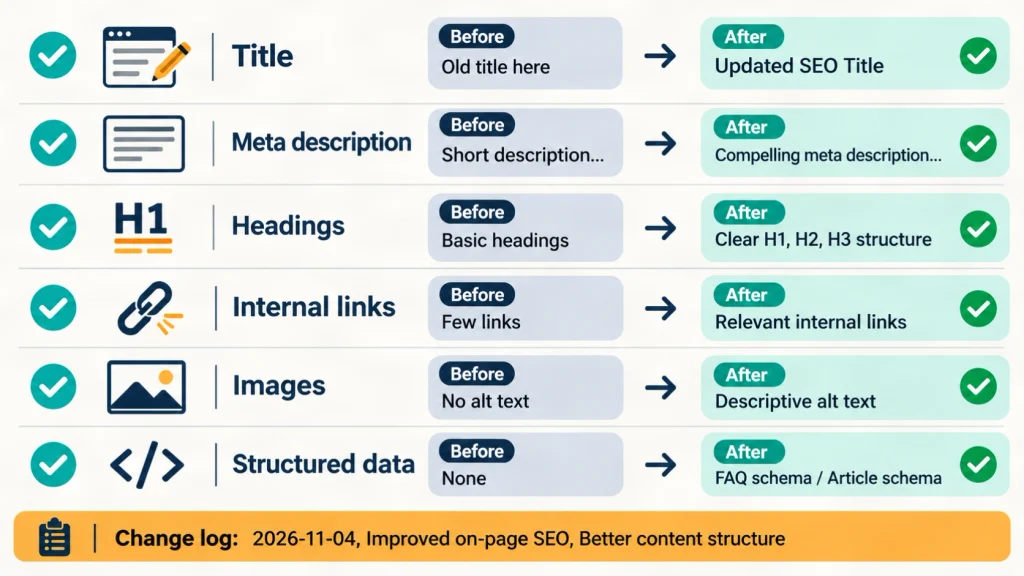
Improve the title, meta description, headings, opening answer, internal links, images and structured data wherever they no longer match the page. Each element has one job.
- Title and H1: Put the primary query near the start and keep the wording honest. Google’s guidance asks that a title does not exaggerate.
- Meta description: Describe what the page delivers in plain words. Search engines may rewrite it, so treat it as a target.
- Headings: Use clear, specific headings, and start each section with a direct answer.
- Internal links: Add links to newer related pages, and ask which older pages should link back. Use descriptive anchors. Our content briefs resources show how to plan links before writing.
- Images: Replace outdated visuals and write alt text that describes what the image shows.
- Structured data: Use Article markup with a
dateModifiedvalue that matches the visible date. Google says no special markup is required for its AI features.
When you optimize existing content for SEO, avoid repeating the focus keyword just to satisfy a plugin score. There is no fixed keyword density target, and Google’s guidance warns against writing to a word count. Write for readers first, then check the plugin.
Step 7: How Do You Republish and Measure the Update?
Republish on the same URL, update visible and structured dates only for real changes, then compare Search Console data over equal periods. Orbit Media explains why the URL matters: changing it throws away the value of links the page has already earned.
For dates, Google’s byline date guidance recommends a visible label such as “Last updated” and matching date values in structured data. It also says not to use future dates.
After publishing, you can ask Google to recrawl the URL through Search Console. Then wait. Google gives no fixed timeline, so judge the result over several weeks, not several days. Compare clicks, impressions, click-through rate and average position for the target queries, using date ranges of equal length.
Check engagement in your analytics tool and, where you can, leads or sales. Orbit Media notes that traffic is an imperfect measure and that CRM data, such as qualified leads, says more about business results.
Finally, keep a change log each time you optimize existing content: date, what changed, why, and what you expect. This habit turns every refresh into evidence for the next one.
Which Mistakes Hurt When You Optimize Existing Content?
The most damaging mistakes are changing the URL without need, faking freshness, rewriting pages that already rank, and publishing machine-written text without human review. Check these six first whenever you optimize existing content.
- Changing the URL. You lose the value of existing links. Orbit Media also recommends short URLs without numbers or formats, so they stay reusable after later updates.
- Changing the date only. Google lists this as a warning sign of search engine-first content.
- Retargeting a page blindly. If you shift the focus keyword without checking current rankings, you can weaken queries that already work.
- Adding words for length. Google says it has no preferred word count. Longer is better only when the extra text answers real questions.
- Deleting pages to look lean. Remove a page only when it is inaccurate, off purpose or useless, not to seem fresh.
- Judging too early or by traffic alone. Follow Step 7 and compare equal periods.
How Should You Update Old Content for AI Search and Answer Engines?
Update old content for AI search by making answers clear, sources visible and ideas original, because Google says its generative AI features rely on its core ranking and quality systems. In practice, you optimize existing content for AI search with the same fundamentals as classic SEO.
AEO stands for answer engine optimization, and GEO stands for generative engine optimization. Google’s guide says that from its perspective both are still SEO. It also lists tactics you can skip for Google Search. These include llms.txt files, splitting content into tiny chunks, rewriting text only for AI systems and chasing inauthentic mentions.
What helps is practical:
- Put a direct answer under each heading.
- Define the main term once and keep the definition consistent.
- Use a table when you compare options.
- Cite primary sources next to the claims they support.
- Add a point of view that a reworded version of other pages could not produce.
AI tools can speed up the work, but the data is clear on one point. Orbit Media’s 2026 survey found that 92.4% of marketers use AI for blogging, and AI use did not track with better results. Ann Handley of MarketingProfs, commenting on the data, called it a cautionary tale about “the value of the long road in a shortcut world.” So keep human editing and original input in every refresh.
To track visibility, Google points to the Generative AI performance report in Search Console. Google also states that no third-party tool has access to its internal ranking or AI systems, so treat tool scores as hints, not facts.
Which Content Needs Extra Care When You Update It?
Pages about health, money, legal rights or safety need extra care because Google gives more weight to strong E-E-A-T for topics it calls Your Money or Your Life, or YMYL. Google’s guidance says trust is the most important part of E-E-A-T. For YMYL topics, it also says content must be highly accurate and consistent with established expert consensus.
If your site covers these topics, follow five rules when you optimize existing content:
- Use current primary sources, such as government agencies, regulators and peer-reviewed research.
- Have a qualified professional review any change to a medical, legal or financial claim before you publish it.
- Show who reviewed the page and the date of the review.
- State the risks and limits: what the page does not cover, and when readers should speak with a qualified professional.
- Never present an SEO update as professional guidance.
I work in SEO, not medicine, law or finance, so I do not review those claims myself. An SEO refresh can improve structure, titles and links, but only a qualified professional can confirm the substance. If a claim cannot be verified, remove it rather than guess. Clinics and practices can read about SEO for healthcare and dental businesses on this site.
Google’s search quality rater guidelines explain how raters judge YMYL pages. Raters do not control rankings, but the document helps you review your own pages with the same questions.
How Do You Build a Routine to Optimize Your Content Strategy?
Build a routine by auditing on a fixed schedule, naming one owner per topic cluster, keeping a change log and reviewing your most valuable pages more often. A quarterly audit is a sensible starting point for many blogs, though that is my suggestion, not a research finding. Pages that bring leads, and pages on fast-changing topics, deserve shorter review cycles.
Work in clusters. When you optimize existing content on one page, check the related pages in the same cluster, update the links between them and look for gaps. This is where a topic plan turns a one-off cleanup into a system.
Orbit Media’s data points the same way. Marketers who used six or more of the eight strategies it tracks were nearly three times as likely to report strong results. None of the 1,042 respondents used all eight. A mix of habits, such as audits, keyword research, original input, human editing and measurement, looks stronger than a single burst of edits.
If you want help with the audit or the rewrite, my team offers an SEO content writing service and website SEO support.
How This Guide Was Prepared and What It Does Not Claim
This guide combines Google Search Central documentation, Orbit Media survey data and my own SEO experience, and it does not promise rankings, traffic or AI citations. It explains how to optimize existing content for SEO with evidence, not hype. I checked every source on November 4, 2026, and plan to review the guide again by May 2027.
I work in SEO with SERP Panda and manage much of my work from Oman. My core work includes Local SEO, Google Business Profile optimization, website structure, topical maps, content briefs and content optimization. I have about five years of experience with European clients and work with a team. This guide publishes no client results, because I have no verified case-study data to share here.
These limits apply:
- Orbit Media’s findings are self-reported by content marketers, so they show correlation, not cause.
- Google does not publish a ranking formula, so no refresh can guarantee a result.
- Plugin and tool scores, including keyword density, readability and E-E-A-T scores, are diagnostic aids, not Google metrics.
- The five-action table and the quarterly schedule are my working rules of thumb, not tested standards.
- Search results and Google documentation change, so check current guidance before you act.
Sources used:
- Google Search Central, “Creating helpful, reliable, people-first content” (last updated October 5, 2026): https://developers.google.com/search/docs/fundamentals/creating-helpful-content
- Google Search Central, “Optimizing your website for generative AI features on Google Search” (last updated July 10, 2026): https://developers.google.com/search/docs/fundamentals/ai-optimization-guide
- Google Search Central, “Influence your byline dates in Google Search” (last updated December 10, 2025): https://developers.google.com/search/docs/appearance/publication-dates
- Orbit Media, “Blogging Statistics 2026” (September 2026): https://www.orbitmedia.com/blog/blogging-statistics/
- Orbit Media, “How to Update Old Posts for SEO” (updated September 2025): https://www.orbitmedia.com/blog/update-old-blog-posts/
Conclusion
To optimize existing content well, record what a page does today, audit before you edit, pick the right action and improve substance before polish. Three takeaways matter most: keep the URL and the queries that already work, update the date only for real changes, and measure over equal periods. Start with one page that almost ranks, follow the seven steps and keep a change log. If you want a second opinion on your archive, contact me with your URL and your goal.
Frequently Asked Questions
How often should you update old blog posts?
Review important posts once or twice a year, and update them only when the content has changed in a meaningful way. Pages on fast-changing topics need checks more often. Google gives no fixed schedule, so let data lead. A drop in clicks, an outdated fact or a shift in search intent should trigger a review.
How long does it take to see results after you optimize existing content?
No fixed time exists, because Google must recrawl and reassess the page. Judge the update over several weeks in Search Console, comparing equal date ranges for your target queries. Seasonality, new competitors and changes to search features can also move the numbers, so note them in your change log before you draw a conclusion.
Should you change the URL when you update an old post?
No, keep the URL unless you have a strong reason. The existing address is already indexed and may hold backlinks, and Orbit Media explains that a new URL resets that authority. If you must change it, redirect the old address to the new one and update your internal links to match.
Is it better to update an old post or write a new one?
Update when the page covers the right topic, has some visibility and needs better accuracy or depth. Write a new post when the topic is new, the intent is different or the old page cannot be saved. A refresh is usually faster because the research, links and indexing already exist.
Does changing the published date help rankings?
No, not on its own. Google’s guidance lists changing page dates to look fresh, when the content has not substantially changed, as a warning sign of search engine-first content. Update the date only after a meaningful edit, and keep the visible date and the structured data consistent with each other.
How many old posts should you update at once?
Start with a small batch, such as five to ten pages, so you can measure the effect clearly. Choose pages with similar potential and log every change. Once the process works, scale it. A small batch also keeps quality high, which matters more than the number of pages you edit.
Can AI tools help optimize existing content?
Yes, for support tasks such as spotting outdated passages or drafting a first outline, but not as a replacement for human judgment. Orbit Media’s 2026 survey found no link between AI use and strong results. Review every suggestion for accuracy, add original input, and disclose AI assistance when readers would reasonably expect it.
What is the difference between a content audit and a content refresh?
A content audit reviews many pages to decide what to do, while a content refresh changes one page. The audit produces a ranked list with an action for each URL. The refresh carries out the “refresh” action by updating facts, structure and on-page elements. Run the audit first so your effort goes to pages with real potential.
What should you do with content that cannot be improved?
Merge it into a stronger page, redirect it to the closest relevant page or remove it, depending on its links, traffic and accuracy. Check backlinks and queries before you decide. Do not remove pages only to look fresh, and never redirect to an unrelated page just to keep visits.
Do you need paid tools to optimize existing content?
No, you can start with free tools: Search Console, your analytics tool and a spreadsheet. Paid tools add convenience, such as backlink data and rank tracking, but no third-party tool sees Google’s internal ranking systems. Treat their scores as hints and check any advice against Google’s official guidance.