Content Refresh: When and How to Update Old Posts
A content refresh updates an existing page so its facts, structure, and answers match today’s search intent. Learn when to update old posts, a 7-step process, a checklist, and the date rules.


A content refresh is the process of updating an existing page so its facts, structure, and answers match what searchers need today. Most blogs keep publishing and rarely go back, so older posts slowly lose accuracy, clicks, and trust. This guide explains when to update blog posts, how to run each step, and when a page needs a rewrite instead.
Run a content refresh on posts that already earn impressions or links but are slipping. Check search intent first, update facts and sources, fill missing answers, and fix links. Change the visible date only after a significant edit. Compare results against a matching period before you judge the outcome.
About the method: I have worked in SEO for around five years, mostly with European clients, on Local SEO, Google Business Profile optimization, topical maps, content briefs, and content optimization, together with a team. The steps below follow the process I use when I review client content. The figures in this guide come from the cited sources, not from my client results.
What Is a Content Refresh and Why Does It Matter?
A content refresh is a planned update to an existing page that improves accuracy, usefulness, and search match while keeping the page’s core topic and URL. It is smaller than a full rewrite and larger than a typo fix. Typical changes include current facts, new sources, missing questions, clearer headings, working links, and a better title and meta description.
The phrase “refresh content” can confuse people because it also describes reloading a screen in a browser or an app. In SEO, refresh content means editing a published page with real improvements, not pressing a reload button.
Old posts often carry most of a blog’s results, so updating them can return more value than publishing another new post. HubSpot reported that 76% of its monthly blog views and 92% of its monthly blog leads came from posts published before that month. At the time of that analysis, its blog held nearly 6,000 posts and published about 200 new ones each month. HubSpot also reported that updating and republishing old posts raised their monthly organic search views by an average of 106%.
Treat those numbers as one large publisher’s results, not a promise. A smaller site usually has fewer old posts, less search authority, and a smaller audience to promote updates to. HubSpot itself wrote that this work should be one piece of a blogging strategy, not the whole strategy.
Pamela Vaughan, who was responsible for optimizing HubSpot’s core blogs when she wrote that post, summed up the idea in one line: “we should optimize the past.”

When Should You Update Old Blog Posts?
Update a blog post when its facts are outdated, its clicks or rankings are falling, or its search intent has changed. Waiting for a traffic drop costs more than reviewing on a schedule. This table lists the signals I check first.
| Signal | Where to check | What it suggests |
|---|---|---|
| Outdated facts, prices, rules, or screenshots | Manual read and source dates | Update facts and cite current sources |
| Clicks falling across comparable periods | Search Console Performance report | Recheck intent, competitors, and snippet |
| High impressions with low click-through rate | Search Console queries | Rewrite the title and meta description |
| Average position between 8 and 20 | Search Console | Add depth and internal links |
| New result formats or new questions | Live Google results, People Also Ask | Add missing answers and sections |
| New service, offer, or location | Internal review | Align the page with the current business |
| Broken links or dead sources | Crawler or link checker | Replace or remove the links |
Position 8 to 20 is my working range, not a Google rule. Pages near the bottom of page one or on page two often need a smaller push than pages that sit far behind.
An accurate post that still matches intent and performs well can stay as it is. Every edit carries some risk, so every content refresh needs a reason.
How Often Should You Review Old Posts?
Review every post at least once a year, and review fast-changing topics such as software, pricing, regulation, or local rules every quarter. This is a practical schedule, not a Google requirement. A review means you read the page, check its data, and choose one outcome: leave it, refresh it, rewrite it, merge it, or remove it.
How Do You Pick Which Posts to Update First?
Start your content refresh with posts that already have impressions, links, or conversions and show a decline, because they have the most to recover. Use Google Search Console for clicks, impressions, and average position, Google Analytics 4 for engagement and conversions, and a spreadsheet to score each page.
Google does not provide a refresh content tool that edits your pages for you. Search Console reports performance data, and its URL Inspection tool lets you request a recrawl after an update. The editing itself stays manual.
A simple priority score keeps the list honest. Rate each page from 1 to 3 on five factors: search demand, ranking gap, business value, existing links, and low effort. Work on the pages with the highest total first. This scoring model is a template I suggest, not a Google metric.
Log every decision in one place. The row below is an example of the format, not client data.
| URL | Date reviewed | Problem found | Action | New date shown? | Check after |
|---|---|---|---|---|---|
| /blog/example-post/ | Review date | Outdated screenshots and weak title | Refresh | Yes, significant update | Compare matching periods after several weeks |
How to Run a Content Refresh Step by Step
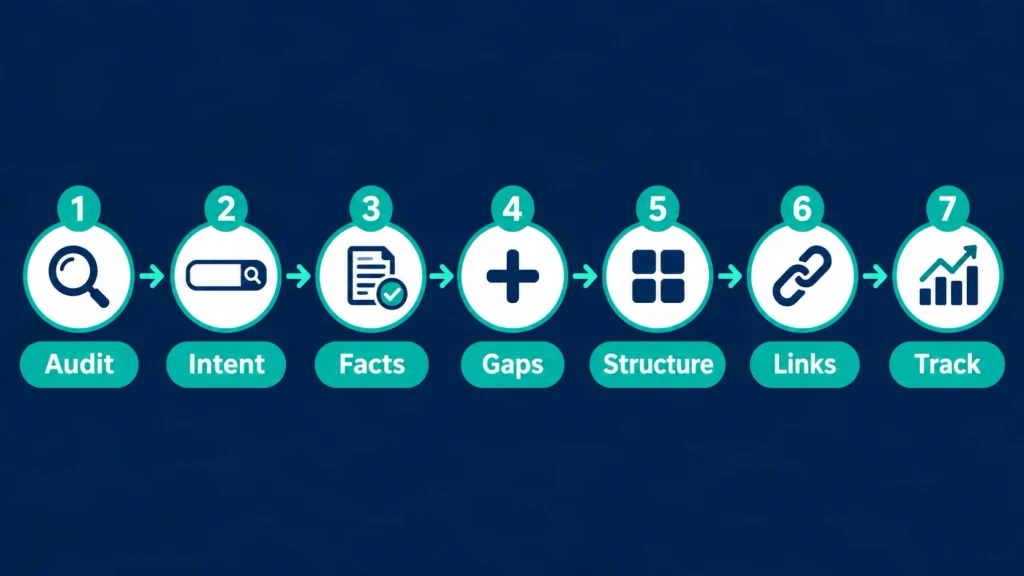
Run a content refresh in seven steps: audit the page, recheck intent, update facts, fill gaps, improve structure, update links and metadata, then publish and track. Save a copy of the old version before you start, so you can compare or roll back the content refresh.
Step 1: Audit the Current Page
List what the page does today before you change anything. Record the URL, target query, title, top queries from Search Console, traffic trend, backlinks, internal links, and the date of the last meaningful edit. If the page has indexing or canonical problems, fix those first. A technical SEO audit covers those checks.
Step 2: Recheck Search Intent
Search the main query and compare what Google shows now with what your page offers. Look at the page types, angles, and questions that appear. If searchers now want a comparison and your page is a definition, you need a rewrite, not a content refresh. Note the People Also Ask questions your page does not answer.
Step 3: Update Facts, Sources, and Examples
Replace every outdated claim with a current, verifiable source. Prefer official documentation, regulators, standards bodies, and original research. When you use a number, state what it measures, who published it, and when. Remove any claim you cannot verify. Changing “2025” to “2026” without checking the content is not an update.
Step 4: Fill Content Gaps and Add Missing Answers
Add the questions and subtopics that ranking pages answer and your page skips. Use People Also Ask, Search Console queries, and real customer questions. Define key terms and name the tools, standards, and entities involved. A post that gets a content refresh also performs better when it sits inside a clear topic cluster, which is the idea behind topical authority.
Step 5: Improve Structure for Scanning and Answer Engines
Make each section answer its heading in the first sentence, then support the answer with detail. Use descriptive headings, short paragraphs, tables for comparisons, and numbered lists for processes. Name the subject instead of writing “it”, so a passage still makes sense on its own. No formatting guarantees a citation in an AI answer. The real benefit is clarity for the reader.
Step 6: Update Links, Metadata, and Dates
Fix broken links, add relevant internal links, and rewrite the title and meta description if click-through rate is weak. Add one to three internal links with descriptive anchor text. If the page uses Article structured data, keep dateModified consistent with the visible date. The next section explains the date rules.
Step 7: Publish, Request a Recrawl, and Track
Publish the content refresh, request a recrawl in Search Console if the change is significant, and record the change in your log. A recrawl request is a request, not a command. Write down the date, the edits, and the day you will check results.
Content Refresh Checklist You Can Copy
Use this checklist before you press Update on any old post.
- Confirm the target query and the current search intent.
- Save the old version and note the performance baseline.
- Verify every fact, price, and statistic against a current source.
- Add the publisher and year next to each number.
- Replace broken, redirected, or outdated links.
- Add answers for missing questions from Search Console and People Also Ask.
- Start each section with a direct answer.
- Update screenshots, examples, and tool names.
- Add or fix internal links to relevant pages.
- Rewrite the title and meta description if the snippet is weak.
- Decide whether the edit is significant enough for a new date.
- Request a recrawl, log the change, and set a check date.
Build a Content Refresh Strategy for the Whole Site
A content refresh strategy sets which pages you review, how often, who does the work, and how you judge results. It has four parts: an inventory of URLs with performance data, a priority score, a review schedule, and a change log.
Common content refresh strategies include updating facts only, expanding thin posts, merging overlapping posts, and removing pages with no value. Pair the plan with content strategy and briefs, so new posts start with a clear intent and the log feeds lessons back into future briefs. Keep publishing new content next to your content refresh plan, because every new post is a future candidate for an update.
Content Refresh vs Rewrite: Which One Does the Page Need?
Choose a content refresh when a page’s topic and intent still fit but the details have aged. Rewrite it when the intent has changed, the structure is weak, or most sections need replacing. The table shows how I decide.
| Question | Refresh | Rewrite | Merge or remove |
|---|---|---|---|
| Does the page still match search intent? | Yes | No | Another page serves it better |
| How much content is still accurate? | Most of it | Little of it | Not worth keeping |
| Does the URL have rankings or links? | Keep the URL | Keep the URL if the topic stays | Redirect to the closest match |
| Typical work | Facts, gaps, links, metadata | New outline and new draft | Combine the best parts, then redirect |
A middle path often works: update the introduction, headings, and weakest sections, and keep the sections that already perform. If you merge or remove a page, redirect the old URL to the closest relevant page so visitors and links do not reach a dead end.
Should You Change the Update Date After Editing a Post?
Change the visible date only after a significant update, such as new facts, new sections, or a changed recommendation. Minor edits like typo fixes or swapping a year do not justify a new date.
Google’s byline date documentation defines a byline date as the date Google estimates a page was updated or published, and says its systems look at several factors, not one. Google recommends a visible date with a label such as “Last updated”. If you use structured data, the datePublished and dateModified values should match the visible dates. Google also advises against future dates and suggests minimizing other dates on the page.
For sitemaps, Google says the lastmod value should reflect the last significant update. A change to the main content, structured data, or links generally counts, while a copyright-date change does not. Google uses lastmod only when it is consistently and verifiably accurate.
John Mueller of Google gave a simple rule in late 2022, as reported by Search Engine Roundtable: “Is there significantly new content? Then update the dates.” He added that only tweaking a page and calling it still valid for a new year is not a significant update. Separately, Search Engine Journal reported that Mueller said changing dates without significant changes will not improve rankings.
| Edit | Change the date? |
|---|---|
| Typo or formatting fix | No |
| Year changed in the title only | No |
| One link replaced | No |
| New section, new data, or corrected advice | Yes |
| Rewritten page with a new recommendation | Yes, and keep the original publish date visible |
HubSpot publishes updated posts as new, which suits a publisher that promotes every update to a large audience. In my view, most business sites do better by showing both the published date and the last updated date.
How Do You Make Updated Posts Easier for Answer Engines to Use?
Write self-contained answers, name your entities, and cite sources, so a person or a system can understand a passage without reading the rest of the page. This covers both answer engine optimization and generative engine optimization.
Put a clear definition near the top. Use the same name for the same thing throughout the page. Give each statistic its source, publisher, and context. Add original synthesis, such as a decision table or a checklist, instead of repeating what other pages say. Finish with FAQs that match real questions.
No tactic guarantees a citation in Google AI features or other AI answers. These habits make the page clearer and easier to verify, which helps every reader.
What Mistakes Make an Update Fail?
An update fails when it changes the date or the year without changing the substance, or when it changes the page’s intent without a plan. These are the mistakes I see most often when I review old content:
- Changing only the year in the title.
- Showing a new date after a small edit.
- Deleting sections that bring traffic or links.
- Changing the URL without a redirect.
- Adding keywords instead of answers.
- Pasting unchecked AI-written text or unsourced numbers.
- Judging results after a few days.
What Are the Risks and Limits of Updating Old Posts?
A content refresh can lower performance when it removes useful content, shifts intent, or adds errors, and no content refresh guarantees higher rankings. Google does not publish a number that defines a “significant” update. HubSpot’s 106% average is its own result. Seasonality, other site changes, and ranking updates can also change your numbers, so correlation is not proof.
To reduce risk, keep a backup of the old version, change high-value pages in stages, and record every edit.
Pages on health, money, legal rights, or safety carry higher stakes. Update them only from current primary sources such as regulators, official guidance, or peer-reviewed research. State who reviewed the page and which sources it uses. As an SEO specialist, I can structure and source a page, but a qualified professional must check regulated advice. A marketing blog should not present itself as professional advice. When a decision could affect someone’s health, finances, or legal position, the reader should confirm details with a qualified professional or the official source.
How Do You Know the Update Worked?
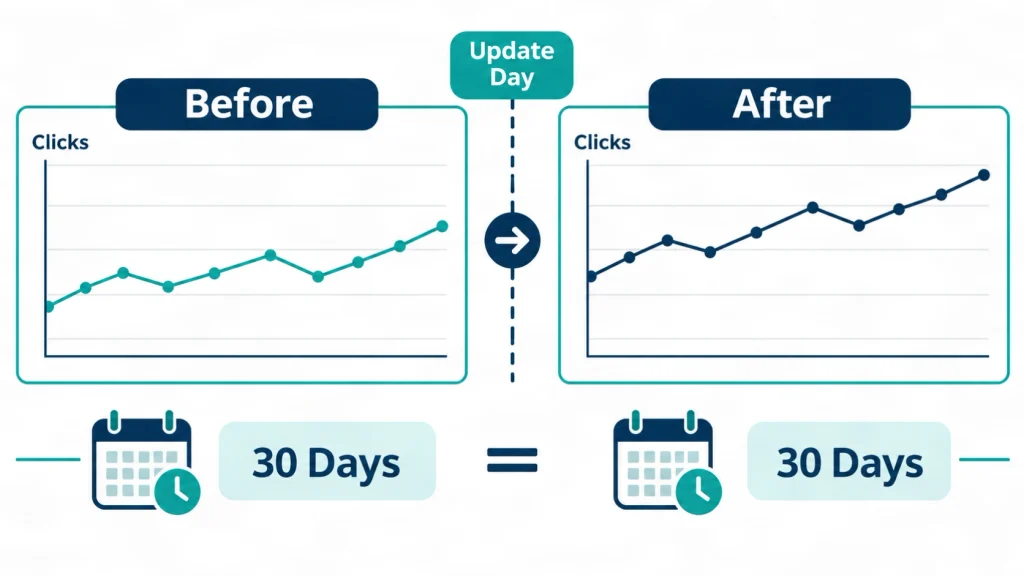
Compare clicks, impressions, average position, and conversions for the page across matching periods before and after the update. Use the date comparison in Search Console to measure the content refresh and keep the periods the same length.
Allow time before you judge the content refresh. HubSpot waited 30 days between its before and after measurements in its own tests, and Google gives no fixed timeline. If the numbers do not move, go back to Step 2 and check whether the intent still matches.
Conclusion: Start With Your Five Best Old Posts
A content refresh works best when you pick pages with existing value, update them for real reasons, and measure the result honestly. Three points matter most. Refresh when facts age, clicks fall, or intent shifts. Change the date only after a significant edit. Keep a log so every update teaches you something.
If you want a second pair of eyes on your old posts, I work with a team on content briefs and content optimization. You can explore my SEO content writing service or my website SEO service, or contact me to discuss which pages to update first.
Frequently Asked Questions
What does refresh content mean?
Refresh content means updating a published page with new facts, sources, answers, and structure so it stays accurate and useful. The phrase can also describe reloading a page or feed in a browser or app. The refresh button on Facebook, Instagram, TikTok, or X only reloads what you see. It does not edit your posts or improve your SEO.
How often should you refresh old blog posts?
Review each post at least once a year and review fast-changing topics every quarter. Then update only the posts that fail a check, such as outdated facts, falling clicks, or a changed search intent.
Does updating old content help SEO?
It can help when the update improves accuracy, intent match, and usefulness, but no update guarantees higher rankings. HubSpot reported an average 106% rise in monthly organic search views for old posts it updated and republished. That is one publisher’s result, and your outcome will vary.
Should I change the publish date when I update a post?
Change the visible date only after a significant update. Keep the visible date and any structured data dates consistent, as Google recommends, and avoid changing dates for typo fixes or small link edits.
What is the difference between a content refresh and a rewrite?
A content refresh keeps the page’s topic, intent, and most of its structure while updating the details, and a rewrite replaces most of the content. Choose a rewrite when the search intent has changed or the draft is weak.
How do I find posts that need a content refresh?
Use Search Console to find pages with falling clicks, high impressions with low click-through rate, or average positions between 8 and 20, then check each page for outdated facts. Add Google Analytics 4 data to see which pages also support conversions.
Is there a tool that refreshes content automatically?
No single tool can safely run a content refresh on its own. Search Console, analytics, a crawler, and a spreadsheet help you find and track pages. AI tools can draft text, but a person must verify facts, sources, and intent. Google does not offer a tool that edits your pages.
How long does a content refresh take to show results?
Google gives no fixed timeline, so compare matching periods after several weeks. HubSpot waited 30 days between its before and after measurements in its own tests. Account for seasonality and other site changes.
Can a content refresh hurt rankings?
Yes, a content refresh can hurt rankings if it removes useful sections, changes search intent, breaks URLs, or adds errors. Keep a backup, change high-value pages in stages, and review the results against a baseline.
Do health, finance, or legal posts need a different refresh process?
Yes, they need current primary sources, a qualified reviewer, and clear limits on what the page can advise. Do not present a blog post as professional advice, and send readers to a qualified professional or the official source for decisions that affect their health, money, or legal position.