Core vs Outer Section in Topical Maps: 7 Practical Rules for SEO
A topical map helps organize the subjects a website should cover and shows how related pages can support a broader topic. However, not every relevant subject deserves the…

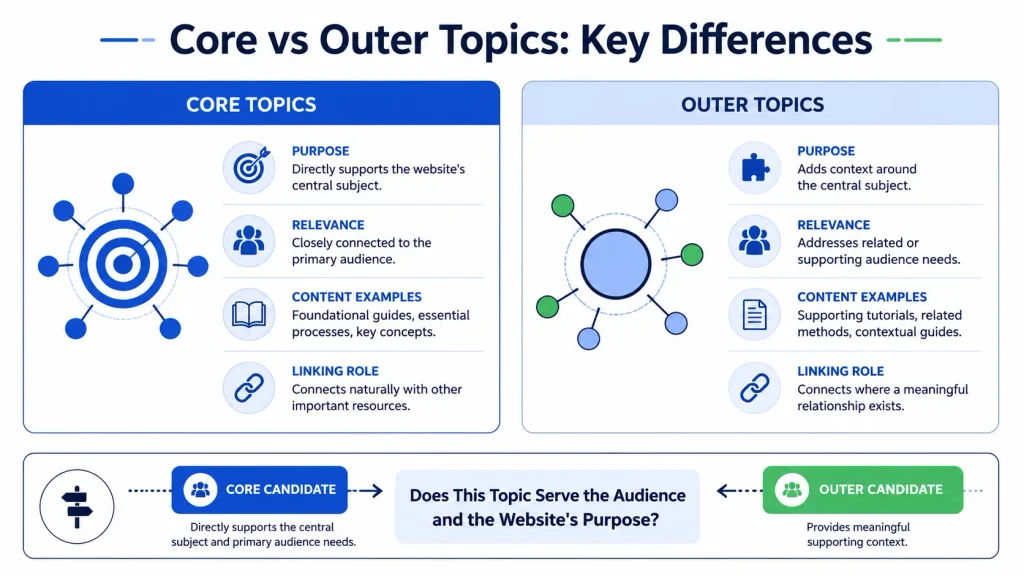
A topical map helps organize the subjects a website should cover and shows how related pages can support a broader topic. However, not every relevant subject deserves the same priority. Some topics directly support a website’s main purpose, while others provide useful context around it. Understanding the difference between the core vs outer sections helps you build a more focused content plan.
In this guide, you will learn how to classify topics, evaluate business relevance and search intent, connect related pages through internal links, and audit an existing topical map. The goal is not to publish the largest possible number of articles. It is to create a logical collection of useful pages that serves your audience and supports your website’s purpose.
What Are Core and Outer Sections in a Topical Map?
Core and outer sections are a practical way to group topics according to their relationship with a website’s central subject, audience, and purpose. They are planning concepts, not official Google-defined website categories.
What Is the Core Section?
The core section contains topics that directly explain or support the website’s primary subject and purpose. These topics are usually closely connected to the website’s main audience, key expertise, and primary products or services.
For example, a website offering topical-map services might include core topics such as topical map creation, topic classification, content coverage, and relationships between pages. These subjects help readers understand the central service and the problems it solves.
A topic is a strong core candidate when it meets several conditions:
- It directly relates to the website’s central subject.
- It addresses an important need of the intended audience.
- It supports the website’s main content or business purpose.
- It can be covered accurately and usefully.
- It connects naturally with other important pages.
Not every core topic must target a commercial keyword. Educational guides, definitions, and practical tutorials may be essential because they help readers understand the main subject.
What Is the Outer Section?
The outer section contains related topics that add context, answer supporting questions, or help readers understand the core subject from a broader perspective.
For a topical-map website, outer topics might include content brief creation, search-intent analysis, content audits, or the relationship between topical coverage and site architecture. These subjects may support the core topic without being the website’s central focus.
Outer topics should still have a clear reason to exist. A topic is not suitable merely because it mentions SEO or has attractive search volume. It should help the intended audience understand a relevant problem, complete a related task, or move naturally toward a core resource.
How Both Sections Work Together
The core establishes the main subject. The outer section provides relevant supporting context. Together, they can help readers move from basic understanding to more specific questions and practical tasks.
However, this relationship should not be treated as a rigid hierarchy in which every outer page must link to one core page or every core page must receive links from all supporting pages. Page relationships should reflect the actual meaning and usefulness of each connection.
For a broader introduction to related concepts, explore the site’s Semantic SEO resources. Use relevant resources from that category when they genuinely help explain the relationship between topics.
Core vs Outer Section in Topical Maps: Key Differences
The difference is mainly about how directly a topic supports the website’s central subject and audience, not whether the topic is important or capable of attracting traffic.
| Evaluation factor | Core section | Outer section |
| Main purpose | Covers the website’s central subject | Adds useful context around the central subject |
| Relationship to the website | Direct and central | Related but less central |
| Audience need | Addresses a primary audience need | Addresses a supporting or adjacent need |
| Content examples | Main guides, essential processes, key concepts | Supporting tutorials, related methods, contextual topics |
| Internal linking | Often connects directly to other important core resources | Links where a meaningful relationship exists |
| Publishing priority | Usually high when coverage is incomplete | Depends on relevance, demand, and available resources |
| Exclusion decision | Exclude if it does not fit the site’s purpose | Exclude if the connection is too weak to help readers |
Purpose and Business Relevance
Business relevance matters when the website exists partly to generate leads or support a commercial offering. A topic closely connected to the service may deserve more attention than a broad subject with little connection to the audience’s needs.
For example, a topical-map consultant may prioritize guides about topic selection and map construction. A general article about social media trends may be less relevant, even if it attracts a large audience.
This does not mean every page must sell something. Educational content can build understanding and help readers make informed decisions. The key question is whether the topic serves the website’s defined purpose.
Topic Relevance and Search Intent
Two keywords may share words but represent different needs. One searcher may want a definition, while another wants a tool, a comparison, or a step-by-step process.
Review the likely intent behind a query before classifying its topic. Ask what the reader expects to learn or accomplish and whether your site can provide a useful answer.
Page Types and Content Examples
Core topics may need comprehensive guides, service-related explanations, or foundational resources. Outer topics may be better suited to focused tutorials, troubleshooting articles, or supporting examples.
These are tendencies rather than fixed rules. A narrow tutorial can be core if it addresses an essential part of the website’s subject. A long guide can be outer if its relationship to the central topic is indirect.
Internal Linking and Content Relationships
Internal links should connect pages that genuinely help readers move between related ideas. Google’s link best practices documentation recommends descriptive anchor text that helps people and search engines understand the destination.
Core and outer labels can inform your linking plan, but they should not replace judgment about the context of each link.
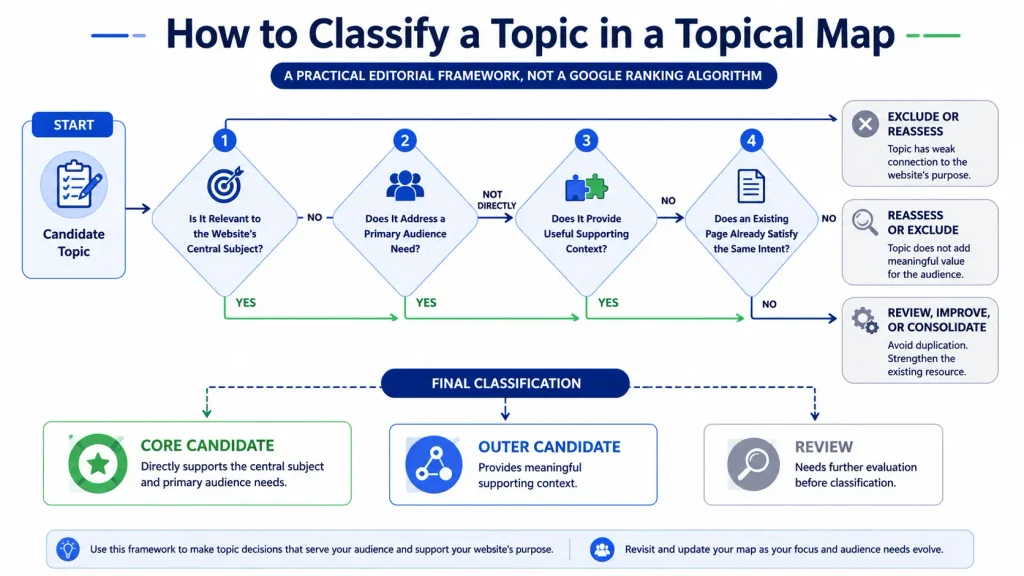
How to Decide Whether a Topic Belongs in the Core or Outer Section
Use the following decision process to classify topics consistently. It is a practical editorial framework, not a formula that guarantees rankings.
Step 1 — Define the Website’s Source Context
Start by explaining why the website exists, who it serves, and what it can credibly help that audience achieve.
Write a short description covering:
- The website’s primary subject.
- Its intended audience.
- The main problems it addresses.
- Its expertise, services, or useful resources.
- The boundaries of its coverage.
For example, a website focused on topical-map strategy may cover semantic SEO and content architecture. It does not automatically need to cover every digital marketing discipline.
Google’s SEO Starter Guide emphasizes useful content, clear organization, and helping visitors find and understand relevant information. Use those principles as guidance for the reader experience, rather than treating a particular topical-map structure as a Google requirement.
Step 2 — Identify the Central Entity
Identify the main subject, organization, service, product, or concept around which the website is built. Then list its important attributes and the questions the intended audience is likely to ask.
For a topical-map consultant, the central subject might be topical-map planning. Related attributes could include topic selection, content relationships, search intent, internal linking, and map auditing.
The central entity provides a reference point for classification. It does not mean every related entity or attribute deserves its own page.
Step 3 — Evaluate Topic Relevance
Ask how directly each candidate topic relates to the central subject.
A simple three-level rating can help:
- Direct: Essential to understanding or using the main subject.
- Supporting: Helps readers understand a related concept or complete a nearby task.
- Weak: Has only a loose connection and offers limited value to the intended audience.
Direct topics are strong core candidates. Supporting topics may fit the outer section. Weak topics should be reconsidered or excluded unless you can identify a specific reader need they serve.
Step 4 — Examine Search Intent
Review what people expect when they search for the topic. Consider whether they want to learn, compare options, complete a task, find a service, or navigate to a particular destination.
Do not assume that similar keywords need separate pages. If two proposed articles would satisfy essentially the same need with substantially the same answer, they may be better combined.
Conversely, a shared keyword theme does not automatically mean that two pages overlap. Distinct audiences or tasks may justify separate content.
Step 5 — Check Topic Overlap and Existing Coverage
Before adding a topic, review the pages already published or planned.
Ask:
- Does an existing page already answer this question well?
- Would a new page add meaningful information?
- Is the search intent different enough to justify another URL?
- Could the new material improve an existing page instead?
- Can the new page connect naturally to other useful resources?
This step reduces unnecessary duplication and helps you prioritize genuine content gaps.
Step 6 — Classify or Exclude the Topic
Record each topic, its likely intent, relevance rating, proposed section, existing URL if available, and reason for the decision.
If a topic is relevant but its placement is uncertain, keep it in a review list instead of forcing a decision. Classification can change when the website’s focus, audience needs, or content coverage changes.
For additional planning resources, explore the site’s Topical Authority content and Content Strategy & Briefs category where relevant articles are available.
Core vs Outer Section in Topical Maps: A Practical Example
Consider a hypothetical website that provides topical-map consulting for businesses and content teams. The example below illustrates the classification process; it is not a report of measured performance or a claim about a particular website’s rankings.
Define the Example Website and Its Central Entity
The site helps teams plan related content around a defined subject. Its audience may include SEO specialists, content strategists, and website owners who need a clearer content structure.
Its central subject is topical-map strategy. The site can credibly explain topic classification, content relationships, and the process of planning a map.
Identify Potential Core Topics
Possible core topics include:
- What a topical map is and how it works.
- How to create a topical map.
- How to identify the central subject and its attributes.
- How to classify core and supporting topics.
- How to connect related pages through internal links.
- How to review and improve a topical map.
These topics directly explain the central subject and the work the site helps its audience complete.
Identify Potential Outer Topics
Possible outer topics include:
- How to prepare a content brief.
- How to assess search intent.
- How to audit overlapping content.
- How to organize a content calendar.
- How to evaluate content performance in Search Console.
These subjects support topical-map planning, but each should be included only when it serves the intended audience and fits the website’s scope.
Identify Topics That Should Be Excluded
Broad topics such as celebrity news, unrelated consumer product reviews, or general travel advice would normally be excluded from this hypothetical site. They may attract visitors, but they have no clear connection to its central purpose.
A borderline topic requires closer examination. For example, a general guide to social media marketing may be too broad, while a focused guide to coordinating a content calendar with topical-map priorities may be useful.
Review the Final Topic Classification
The final decision should be based on the site’s purpose, the audience’s needs, the topic’s intent, and the information already available—not on a universal ratio of core to outer pages.
How to Connect Core and Outer Sections Through Internal Linking
Internal linking helps readers discover related information and helps search engines find pages. The purpose is to connect useful resources, not to make every page point to every other page.
Link Supporting Pages to Relevant Core Pages
When an outer article explains a concept that readers need to understand a core subject, link to the core resource where it adds value.
For example, a tutorial about preparing content briefs might link to a comprehensive topical-map guide when readers need to understand how the brief fits into the broader planning process.
A link should be supported by the surrounding sentence. Do not insert a link merely because the destination has been labeled “core.”
Use Descriptive and Contextually Relevant Anchor Text
Anchor text should explain what readers can expect after clicking. Prefer a phrase such as “how to create a topical map” over vague text such as “click here.”
Google’s guidance on crawlable links and anchor text explains why links need crawlable markup and descriptive wording. In a published article, make sure the links are implemented as normal HTML links with valid destinations.
Avoid using the same exact-match phrase for every link to a destination. Anchor text should fit the sentence and describe the linked page accurately.
Build Meaningful Topic Relationships
A page about search intent may link to topic classification if the relationship is explained. An audit guide may link to a content-overlap tutorial when readers need more detail.
Map relationships based on what helps the reader take the next step. Some outer pages may connect to several core resources; others may need only one relevant link. There is no need to force every page into a uniform linking pattern.
Avoid Forced or Excessive Internal Links
Too many links can interrupt reading and make the article feel like a directory. Review every link by asking whether it adds useful context, offers a relevant next step, or supports a claim.
For site-level work, the Website SEO service page may be relevant to readers looking for broader website optimization help. Include that link only if the surrounding content makes the service relevant to the reader’s needs.
Common Core and Outer Section Structuring Mistakes
Treating Search Volume as the Only Selection Criterion
Search demand can help prioritize content, but it does not establish topical relevance. A high-volume topic may be a poor fit for the website, while a narrower topic may address an important audience need.
Evaluate relevance, intent, business purpose, expertise, and existing coverage together. Do not invent search-volume or keyword-difficulty numbers when reliable data is unavailable.
Adding Unrelated Topics to Expand Coverage
Publishing more pages does not automatically create a better topical map. A broad collection of loosely related articles may distract from the website’s central purpose.
Google’s guidance on creating helpful, reliable, people-first content is useful here: prioritize content that serves people rather than creating pages primarily to attract search traffic.
Creating Multiple Pages for the Same Search Intent
If two pages answer the same question in nearly the same way, consider consolidating them or differentiating their purpose. Do not assume that every overlap is harmful; investigate what each page contributes.
The Ahrefs guide to keyword cannibalization offers additional context on pages competing for similar search terms. Use it as a secondary reference, not as a substitute for reviewing your own pages and search data.
Following a Fixed Core-to-Outer Page Ratio
There is no universal ratio that every website must follow. A specialized website may need a small, focused map. A broad publication may require many supporting topics.
Choose the size and structure based on the site’s purpose, audience needs, available expertise, and capacity to maintain useful content.
Ignoring Existing Content and Topic Gaps
Starting a new article without reviewing existing pages can create duplication and waste resources. Audit what already exists before expanding the map. Sometimes improving a strong existing page is more useful than publishing another article.
For technical issues, site structure, or content auditing, relevant material may be available in the site’s Technical SEO & Audit category.
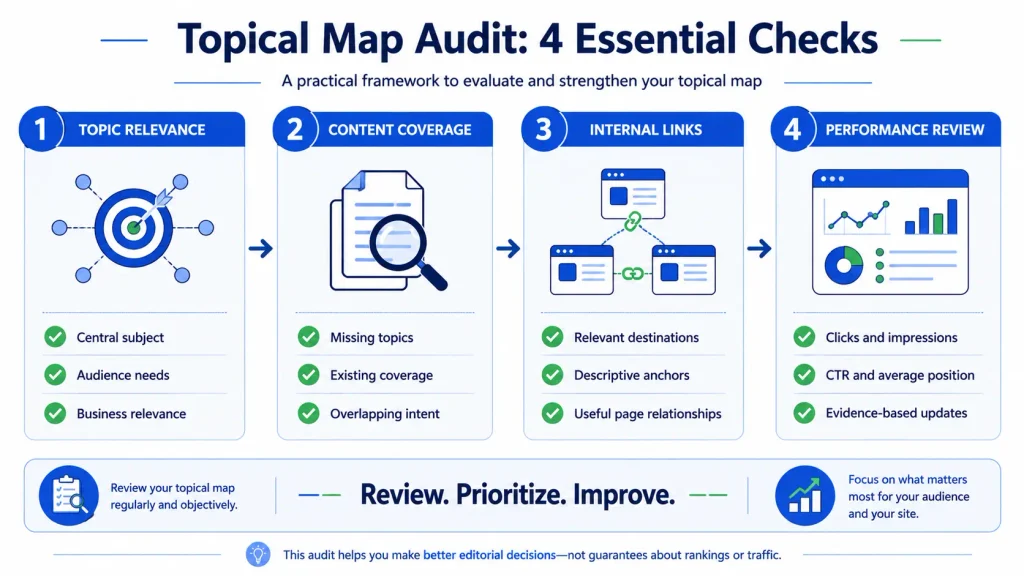
How to Audit and Improve an Existing Topical Map
An existing map should be reviewed periodically. The purpose is to improve relevance, clarity, coverage, and usefulness, not to keep changing labels without evidence.
Review Topic Classification and Business Relevance
Revisit the central subject and intended audience. Check whether each topic still supports the site’s purpose. Move, merge, or remove topics when the evidence and editorial rationale justify it.
Find Missing Topics and Overlapping Pages
Compare the map with existing URLs. Look for important questions that remain unanswered, pages that repeat the same information, and topics that no longer fit the site.
A gap is not simply a keyword for which the site has no page. It is an unmet need that the website can address usefully and credibly.
Review Internal Links and Page-Level Performance
Check whether important pages can be reached through relevant internal links. Review whether the anchors describe their destinations and whether links help readers navigate between related subjects.
Use the Google Search Console Performance report to examine available search metrics such as clicks, impressions, click-through rate, and average position. These metrics can help identify pages or queries that deserve investigation. They do not, by themselves, prove that a page belongs in the core section or that a topical map caused a performance change.
Prioritize Updates Based on Evidence
Create a short action list: update outdated information, improve weak pages, consolidate substantial overlap, add genuinely missing coverage, or improve contextual links.
Where possible, record the reason for each change and compare performance over an appropriate period. Avoid promising specific ranking or traffic gains from a structural change alone.
For content production support, the site’s SEO content writing service may be relevant when a review identifies a need for new or improved articles.
Implementation Checklist for a Balanced Topical Map
Before Publishing
- Define the website’s central subject, audience, and purpose.
- Classify topics by direct relevance and supporting value.
- Check search intent before assigning separate pages.
- Review existing content to avoid unnecessary duplication.
- Plan contextual internal links where they help readers.
- Confirm that every proposed topic can be covered accurately and usefully.
After Publishing
- Review whether important pages are easy to discover.
- Check internal links and destination accuracy.
- Use Search Console data to identify areas for investigation.
- Update, merge, or remove content when a clear reason exists.
- Reassess topic classifications when the website’s purpose or coverage changes.
Treat this checklist as a practical editorial tool, not a Google ranking checklist. A well-organized map should make sense to people first and remain maintainable over time.
Conclusion
Core and outer sections help you organize a topical map around the website’s central subject. Core topics address primary needs, while outer topics provide relevant supporting context. The best classification depends on the website’s purpose, audience, search intent, expertise, and existing content.
Avoid expanding a map simply to publish more pages. Instead, classify topics carefully, connect related resources with descriptive internal links, and audit the structure using real evidence. A focused and useful content plan is more valuable than a large collection of loosely related articles.
Frequently Asked Questions
1. What Is the Difference Between Core and Outer Sections in a Topical Map?
The core section covers topics that directly support a website’s central subject and primary audience needs. The outer section covers related subjects that add context or help readers complete supporting tasks. These are practical planning categories, not official Google-defined site sections.
2. How Do You Decide Which Topics Belong in the Core Section?
Start with the website’s purpose, audience, and central subject. Then evaluate each topic’s relevance, search intent, importance to readers, and relationship to existing pages. A topic is a strong core candidate when it directly supports the site’s main purpose and can be covered usefully.
3. Can a High-Volume Keyword Belong in the Outer Section?
Yes. Search volume does not determine whether a topic is core or outer. A high-demand topic may be related but secondary to the website’s main purpose. Classify it according to relevance, intent, audience needs, and the value your site can provide.
4. Does Every Website Need Both Core and Outer Sections?
Not necessarily. These categories are a planning framework, not a mandatory structure. A narrow website may have only a small group of closely related topics. A broader site may benefit from clearly separating central topics from supporting subjects.
5. How Many Topics Should a Core Section Contain?
There is no universal number. Include the topics needed to cover the website’s central subject and the important needs of its audience. The right scope depends on the subject’s complexity, the website’s expertise, and the content already available.
6. Is There an Ideal Core-to-Outer Topic Ratio?
No universal ratio applies to every website. A fixed percentage can encourage unnecessary content. Choose the number of core and outer topics based on the site’s purpose, useful coverage opportunities, and resources available to maintain the content.
7. Can an Outer Section Topic Become a Core Topic?
Yes. A topic’s role may change if the website’s focus, audience needs, or primary offering changes. Reassess the topic’s importance and relationship to the central subject before changing its classification. Update the map and internal links when necessary.
8. How Should Core and Outer Pages Be Internally Linked?
Link pages when the connection helps readers understand a related concept or take a useful next step. Use descriptive anchor text, ensure destinations are relevant, and avoid forced links. Not every outer page needs to link to every core page.
9. Can Too Many Outer Topics Weaken a Topical Map?
A large number of outer topics can make a map less focused when those topics have weak connections to the website’s purpose. The number alone is not the issue. Review each topic’s relevance, reader value, maintenance cost, and relationship to the central subject.
10. How Can You Measure Whether a Topical Map Needs Improvement?
Review topic gaps, duplicate intent, internal-link relationships, content quality, and audience needs. Use Search Console metrics such as clicks, impressions, CTR, and average position to identify pages or queries for further investigation. These metrics provide evidence to examine; they do not independently establish whether the map’s structure is correct.