Content Pruning: When to Delete Pages and When to Keep Them
Content pruning means choosing to keep, update, merge, redirect or delete each page. Learn the signs, the safe redirect rules and the risks before you delete anything.

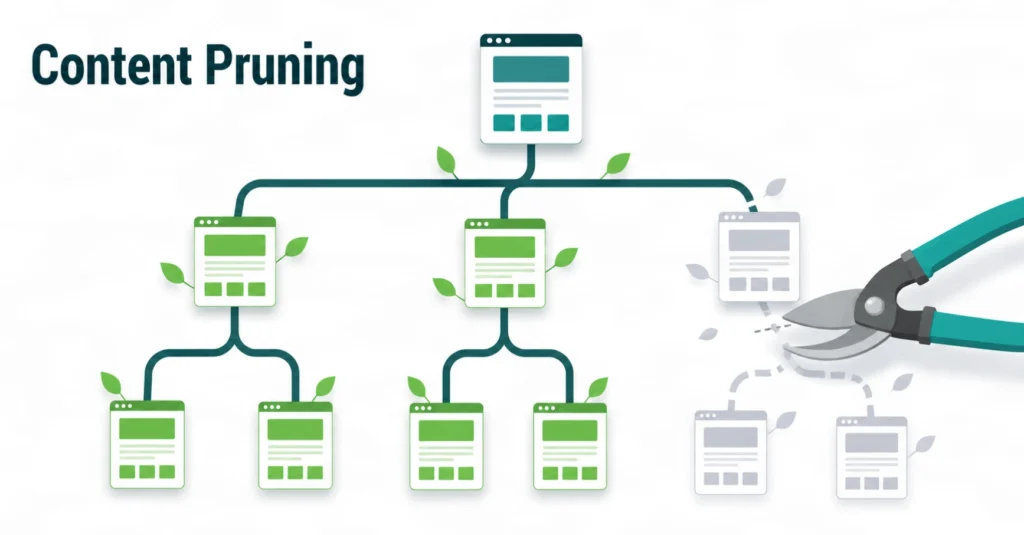
Content pruning means reviewing each page and choosing to keep, update, merge, redirect or delete it. Delete a page only when it has no unique value and no fair way to improve. Never delete from a traffic report alone. This guide gives a clear process, a decision table and safe redirect rules.
Content pruning is the careful review and removal of pages that no longer help your visitors or your website. A good plan does not delete everything that is old or quiet. It keeps what still serves a purpose, improves what can be saved and removes what cannot. In this guide, I explain when to delete pages, how to do it safely and where the risks sit. I work in SEO with a team on Local SEO, Google Business Profile optimisation, topical maps, content briefs and content optimisation, so I write from a practical, client-facing view.

What Is Content Pruning in SEO?
Content pruning in SEO is the process of reviewing existing pages and deciding to keep, update, merge, redirect or delete each one, so the site holds only useful content. The goal is a smaller, clearer site where every page has a job. Some people call this content deletion, a content cleanup or an audit with action. The names differ, but the task is the same: make a decision for each URL, based on evidence.
What Is Considered Pruning, and What Is Not?
Pruning is any action that removes or reduces a weak page: deleting it, merging it into a stronger page, redirecting it or setting it to noindex. Updating a page on its own is a refresh, not pruning, although both often happen in the same audit. Removing one outdated post is a small prune. A planned review of hundreds of URLs is a full project.
How Is a Content Purge Different From Pruning?
A content purge is a fast, bulk removal of many pages at once, while pruning is a slower, page-by-page decision. The word “purge” also appears in web hosting, where a cache purge clears stored copies of a page and deletes nothing from your site. For SEO, I avoid bulk purges. A blind purge removes good pages along with bad ones.
What Does Pruning Mean in Gardening and Computer Science?
Pruning means cutting away the parts that do not help the whole. A gardener removes dead or crowded branches so the plant grows stronger. In computer science, pruning removes branches of a decision tree, or parts of a model, that add little value. Cost complexity pruning is one method for decision trees. SEO borrows the same idea: remove the weak parts and protect the strong ones.
Does Content Pruning Help SEO? What Google Says
Content pruning can help SEO when it removes unhelpful pages, but deleting good pages can hurt. Google’s public guidance is careful on this point. It supports cleaning up unhelpful content, and it also warns against deleting pages for the wrong reasons.
What Does Google Say About Removing Unhelpful Content?
Google says removing unhelpful content may help your other pages. In its August 2022 helpful content update post, Google Search Central wrote that “removing unhelpful content could help the rankings of your other content.” The same post says people-first pages on a weak site can still rank well when other signals show they are helpful. Google’s ranking systems change over time, so check the current documentation before you act.
Why Is Page Age Not a Reason to Delete?
Page age alone is not a reason to delete a page, because older content can still help readers. Google’s Danny Sullivan put it plainly, as Search Engine Land reported: “Older content can still be helpful, too.” John Mueller of Google added that age, traffic and time on site can help you build a list of possible weak pages, but none should decide alone. He gave the About page as an example. Few people read it, yet it has unique value.
Who Needs to Think About Crawl Budget?
Crawl budget matters mainly for very large sites, so most small business sites gain little extra crawling from deleting pages. Google’s crawl budget guide is written for sites with more than 1 million unique pages that change about weekly, or more than 10,000 unique pages that change daily. Many local service sites sit far below those sizes. For them, the real gain is quality and focus. Google’s Gary Illyes has also said that normal 404 pages do not drain crawl budget, as covered by Search Engine Roundtable.
Content Pruning Case Study: What the CNET Cleanup Shows
The CNET cleanup is a public example of content pruning at scale, but its results are not verified, so it teaches process more than outcomes. In August 2023, Gizmodo reported that CNET removed thousands of old articles. According to Search Engine Land, CNET chose whether to redirect, repurpose or remove each page by looking at pageviews, backlink profiles and the time since the last update.
Google’s Danny Sullivan answered that removing a weak page may help Google crawl a massive site better, but it does not make the whole site rank better because of one page. Three lessons stand out:
- CNET used several data points, not one metric.
- CNET had three actions to choose from, not only deletion.
- Nobody should expect a sitewide lift from deleting pages alone.
I have no verified client numbers for this article, so I do not present any of my own work as a case study with traffic gains. I only share the method.
When Should You Delete Pages? 7 Clear Signs
Delete a page when it has no unique value, no fair way to improve and no useful replacement. These seven signs help you spot candidates. Each one is a signal to review, not an automatic order to delete.
1. The Page Duplicates Another Page
Delete or merge a page when another URL already answers the same query better. Keep the stronger page. If the weaker one has backlinks or traffic, redirect it to the stronger page with a 301.
2. The Page Is Thin and Adds Nothing Original
Delete thin pages that repeat common knowledge and offer no original detail. Examples include empty tag pages, near-empty category pages and short posts written only to target a keyword. If the topic matters, rebuild the page. If it does not, remove it.
3. The Page Is Outdated and Cannot Be Fixed
Delete an outdated page when the information is no longer true and no one can update it. Expired offers, old event pages and retired services are common examples. If a newer page covers the same need, redirect to it. If not, return a 404 or 410.
4. The Page Is Off Topic for the Website
Delete or move a page that sits far outside the topics your site wants to be known for. Off-topic pages blur the subject of the site. A topical map helps you decide which topics belong and which do not.
5. The Page Competes With Your Own Pages
Merge pages that target the same search intent, because they split links, clicks and attention. Choose one main URL, move the best parts of the other pages into it and redirect the rest.
6. The Page Is Low Quality or Auto-Generated
Delete pages that were mass-produced without review and have no value for a reader. Pages that are inaccurate, copied or built only for search engines fail Google’s people-first test.
7. The Page Has No Traffic, Links or Conversions After Review
A page with no traffic is a candidate for deletion, not a verdict. First check why. The page may be new, not indexed, missing internal links or useful for visitors who arrive from email or social media. If you still find no purpose after that review, remove it.
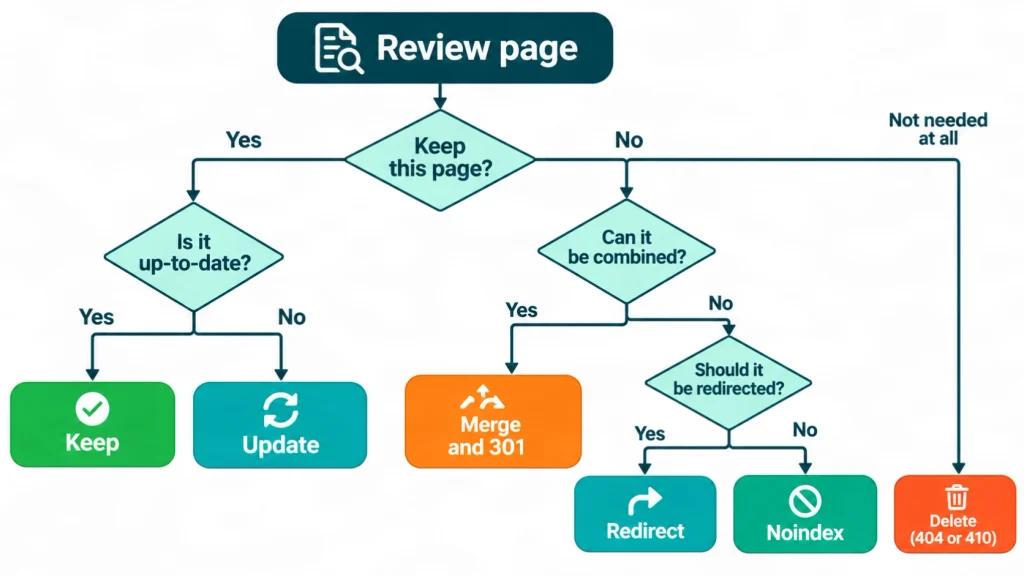
When to Keep, Update, Merge, Redirect or Noindex a Page
Choose the action that matches the page’s real situation, because deletion is only one of six options. This table is my working decision guide. It is an original overview of the options, not a rule from Google.
| Situation | Best action | Reason |
| The page ranks, gets visits and answers the search intent | Keep | It already does its job |
| The topic is useful but the content is weak or old | Update | You save the URL and its history |
| Two pages target the same intent | Merge and 301 redirect | One strong page beats two weak ones |
| The page has backlinks but the content is outdated | 301 redirect to the closest page | Visitors and link value move to a useful page |
| Visitors need the page, but search engines do not | Noindex | The page stays live but is not shown in search |
| The page has no value and no replacement | Delete with a 404 or 410 | The URL leaves the index over time |
Noindex needs care. Google must still fetch the page to read the tag, so noindex does not save crawling.
How to Build a Prune List Step by Step
A prune list is a spreadsheet that holds every URL, its data, its label and its planned action. It turns a vague clean-up into a clear plan. This is a simple content pruning guide that works for blogs, service sites and online shops.
Step 1: List Every Indexable URL
Start with a full export of indexable URLs from a crawler, your CMS and your XML sitemap. Compare the three lists. Pages that appear in one list but not the others are often orphan pages or forgotten pages.
Step 2: Add Performance and Link Data
Add clicks, impressions, conversions and backlinks for a fixed period, such as the last 12 months. Use Google Search Console, your analytics tool and a backlink tool. A 12-month window covers seasonal topics, so a summer page is not judged in winter.
Step 3: Review Each Page Against Search Intent
Read the page, search its main query and ask whether the page still deserves a place. Compare it with the pages that rank. Is it accurate, current and more useful than a quick recap of what already exists? Does it show real experience or original detail?
Step 4: Give Every URL One Action
Label every URL with one action: keep, update, merge, redirect, noindex or delete. A single clear label stops debate later and makes the work easy to hand to a developer or writer.
Step 5: Get a Second Review for Sensitive Pages
Ask a second person to review pages that earn leads, hold legal text or give advice on health, money or law. A fresh pair of eyes catches mistakes before they go live.
Step 6: Record the Baseline Before You Change Anything
Record the date, the action, the target URL and the current numbers before you touch a page. This record lets you measure the effect later and restore a page if the data says you made a mistake.
My Checklist Before Any Page Deletion
Before I delete any page, I run the same short checklist. In my content optimisation and content brief work for European clients, I use this list as a final gate. It is my working method. It is not a Google requirement, and I have not tested it in a controlled experiment, so I treat results as specific to each site.
- Does the page support a live service, product or lead, even with low traffic?
- Does any other website link to it?
- Is there a closer, relevant page I can redirect to?
- Which internal links, menus and sitemap entries point to it?
- Is the page legal text, such as a privacy policy or terms page, that the business needs?
- Does the page give health, money or legal guidance that needs an expert review?
- Have I saved a copy of the page and its baseline numbers?
If every answer points to “no value,” I move the page to the delete list. If any answer is unclear, I leave the page alone until I know more.
How to Delete Pages Safely: 301, 404 and 410
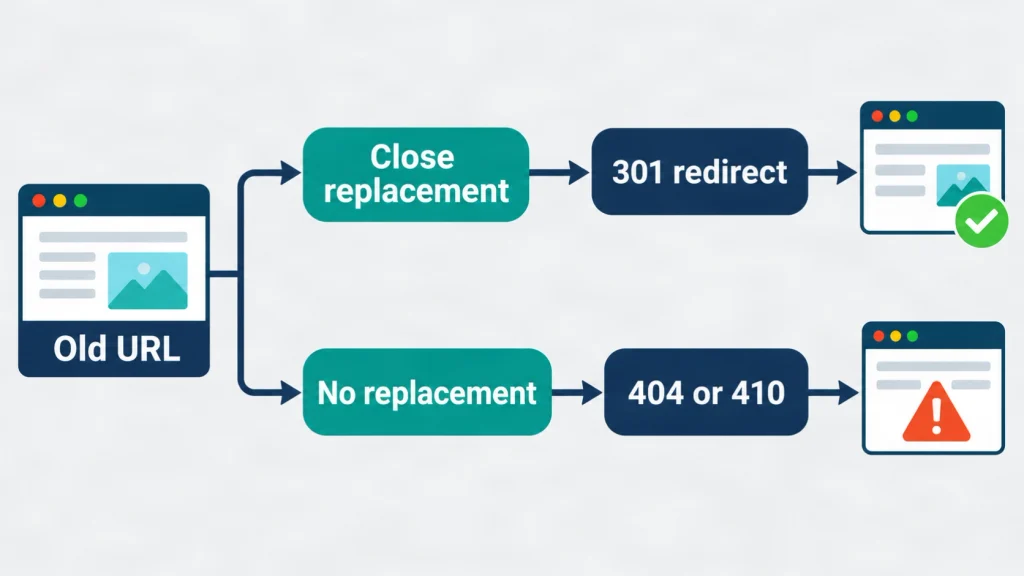
Redirect a deleted page with a 301 only when a close replacement exists, and return a 404 or 410 when none exists. Google’s crawl budget guide names 404 or 410 as the right response for pages removed for good.
When Should You Use a 301 Redirect?
Use a 301 redirect when another live page answers the same need as the deleted page. Sending every deleted URL to the homepage confuses visitors and can be treated as a soft 404. Match each old page to the closest relevant page instead.
Should You Use a 404 or a 410?
Both codes tell Google that a page is gone, and a 410 states more clearly that the removal is deliberate. Google’s guide lists either one for permanently removed pages. Use a 410 when you are sure the page will not return. Use a 404 when you are less certain.
What Is a Soft 404 and Why Should You Avoid It?
A soft 404 is a page that looks empty or missing to visitors but still returns a 200 OK status. Google’s crawl budget guide says soft 404 pages keep being crawled and waste budget. Return a true 404 or 410 instead.
What Should You Update After Deleting a Page?
Update every internal link, menu item, XML sitemap entry and profile link that points to the deleted URL. If the page was a service page linked from a Google Business Profile, change that link too. My Google Business Profile optimisation service covers this kind of check for local businesses.
Pruning Strategy Examples for Three Types of Site
These three examples are illustrative, not client results. They show how the same decision rules apply to different types of site.
Example 1: A Blog With Overlapping Posts
A blog with many overlapping posts should merge them into fewer, stronger guides. Imagine five short posts about the same topic. Pick the best URL, move the useful parts of the other four into it, update the date only because the content truly changed, and redirect the four old URLs. A clear content strategy and brief process stops the overlap from returning.
Example 2: An Online Shop With Discontinued Products
A shop should keep a discontinued product page only while it still serves a purpose, and redirect or retire the rest. If a close alternative exists, redirect to it or to the parent category. If none exists, return a 410. If the product will return, keep the page and mark it clearly as unavailable. My page on e-commerce SEO explains how I approach product sites.
Example 3: A Local Service Site With Near-Duplicate Area Pages
A location page earns its place only when it holds real local information. If ten area pages differ only by the town name, merge them into one strong page or add genuine local detail to each. Review the pages against your Local SEO goals before you remove any.
How to Prune YMYL Pages Safely
YMYL pages, which touch health, money, law or safety, need a qualified reviewer before you change or delete them. YMYL stands for “Your Money or Your Life.” It is Google’s term for topics that can affect a person’s health, financial stability, safety or well-being.
Content pruning is an SEO task, not professional advice. I am an SEO specialist with around five years of experience working with European clients. I work with SERP Panda and with a team. I am not a doctor, lawyer or financial adviser. If a page gives medical, legal or tax guidance, a qualified professional should confirm that it is accurate before you keep, update or remove it.
Outdated advice on these topics can do more harm than no page at all. When you keep a page, show who reviewed it, which sources you used and when. Do not change the date to look fresh when the content has not changed in substance. Google’s guidance on helpful content advises against that. Keep legal pages such as privacy and terms pages, because a business needs them. If you run a healthcare or dental site or a law firm site, involve your clinical or legal reviewer before any removal.
What Are the Risks and Limits of Pruning?
Content pruning carries real risks: lost traffic, lost backlinks and no guarantee of a ranking gain. Be honest about these limits before you start.
- Deleted pages can lose traffic and link value if you do not redirect them well.
- No one can promise a ranking or traffic result. Google has not published a number of pages to remove, and Danny Sullivan has said removing one page does not lift the whole site.
- Rankings can move for other reasons, such as updates or competitor changes, so it is hard to prove cause and effect.
- Small sites often have little to gain, and a mistake can cost more than it saves.
- A page you remove can be restored from a backup, but its lost visits cannot.
If a key page loses traffic after a change, check your record, review the action and restore the page when the data supports it. For help with a sensitive clean-up, you can contact me.
How to Measure Results and Keep Pruning Continually
Measure content pruning by comparing clicks, impressions, indexed pages and conversions before and after the change, over a period long enough to cover normal swings. Compare against the same season of the previous year where you can. Use the baseline you recorded in Step 6.
Continual pruning means a light review on a regular schedule instead of one large clean-up. The right schedule depends on site size and how often you publish. A small site might review twice a year. A busy blog might review each quarter. A steady rhythm stops weak pages from piling up again, and it works well alongside a plan for topical authority.
What Are the Most Common Pruning Mistakes?
The most common mistakes are deleting by age, deleting by traffic alone and skipping redirects. Others include sending every old URL to the homepage, forgetting to update internal links and the sitemap, and pruning sensitive pages without an expert review. Each mistake comes from acting on one data point instead of reviewing the whole picture.
Conclusion: Prune With Evidence, Not Habit
Content pruning works best as a careful, evidence-led review, not a bulk deletion. Keep pages that help readers. Update pages that have a useful topic but weak content. Merge pages that compete. Delete only pages with no unique value and no fair route to improve. Record every change and measure the result over time.
If you want a second opinion on a prune list, my team and I can review your pages as part of our Website SEO and content writing work. You can also learn more about me before you get in touch.
Frequently Asked Questions
1. What is content pruning in SEO?
Content pruning in SEO is the review of existing pages to keep, update, merge, redirect or delete each one. The aim is a site where every page is useful, accurate and has a clear purpose.
2. Does deleting pages improve rankings?
Deleting pages can help only when the pages are unhelpful, and it does not guarantee a ranking gain. Google has said that removing unhelpful content could help other pages, and it has also said that age alone is not a reason to delete.
3. How often should I prune content?
Most sites benefit from a light review once or twice a year, and busy blogs may review each quarter. The right pace depends on how many pages you publish and how fast your topics change.
4. Should I delete, redirect or noindex a page?
Delete a page with no value and no replacement, redirect it when a close replacement exists, and noindex it when visitors need it but search does not. Merge pages that target the same intent.
5. What is the difference between a 404 and a 410?
A 404 means a page was not found, and a 410 means the page is gone on purpose. Google’s crawl budget guide accepts either code for permanently removed pages.
6. How many pages can I delete at once?
There is no official limit, so delete in small batches you can measure. Start with the clearest cases, record the results, and then continue.
7. Will content pruning hurt my traffic?
It can, if you delete pages that earn traffic or links without a redirect. Review traffic, backlinks and conversions first, and keep a backup so you can restore a page.
8. Can small websites benefit from content pruning?
Small websites can benefit from removing duplicate, thin or outdated pages, but the gain is often modest. Crawl budget rarely matters at that size, so focus on quality and clarity.
9. Is a content purge the same as content pruning?
No. A content purge is a fast bulk removal, and a cache purge only clears stored copies. Content pruning is a slower review that decides the best action for each page.
10. What does pruning mean outside SEO?
Outside SEO, pruning means cutting away parts that add little value. Gardeners prune dead branches from plants, and computer scientists prune decision trees or models to remove parts that do not help.