Crawl Budget Optimization: How to Help Google Crawl the Pages
Crawl budget is the number of URLs Google can and wants to crawl on your site. Learn who needs crawl budget optimization, how to read Crawl Stats, run log file analysis, and fix faceted navigation and orphan pages.

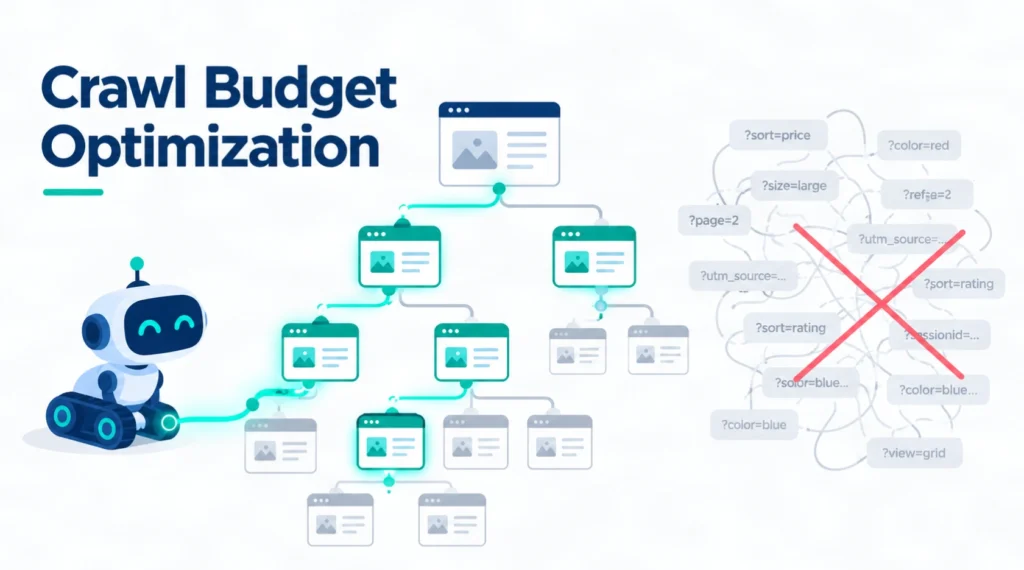
Crawl budget is the set of URLs Google can and wants to crawl on your website. Most small websites do not need to manage it closely. However, large stores, busy publishers, and websites with thousands of filter combinations can develop crawling problems that delay the discovery of important content.
The solution is not simply to make Googlebot send more requests. It is to make your website easier to crawl, reduce unnecessary URLs, and help Google find pages worth indexing.
This guide explains how crawl budget works, how to investigate crawling problems using Google Search Console and server logs, and which fixes to prioritize.
In brief:
- Crawl budget mainly matters for large, frequently updated, or URL-heavy websites.
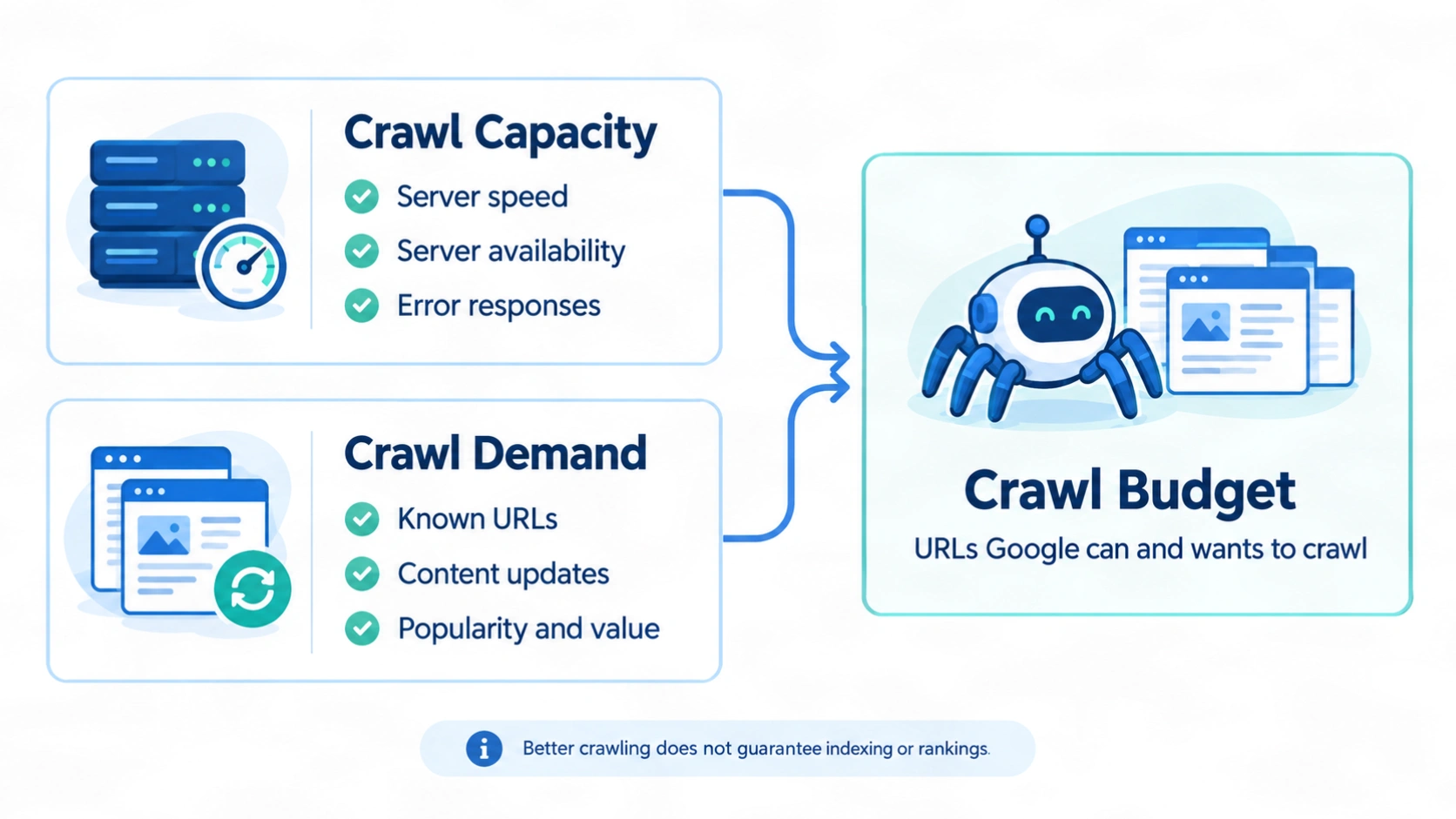
- Google determines crawling through crawl capacity and crawl demand.
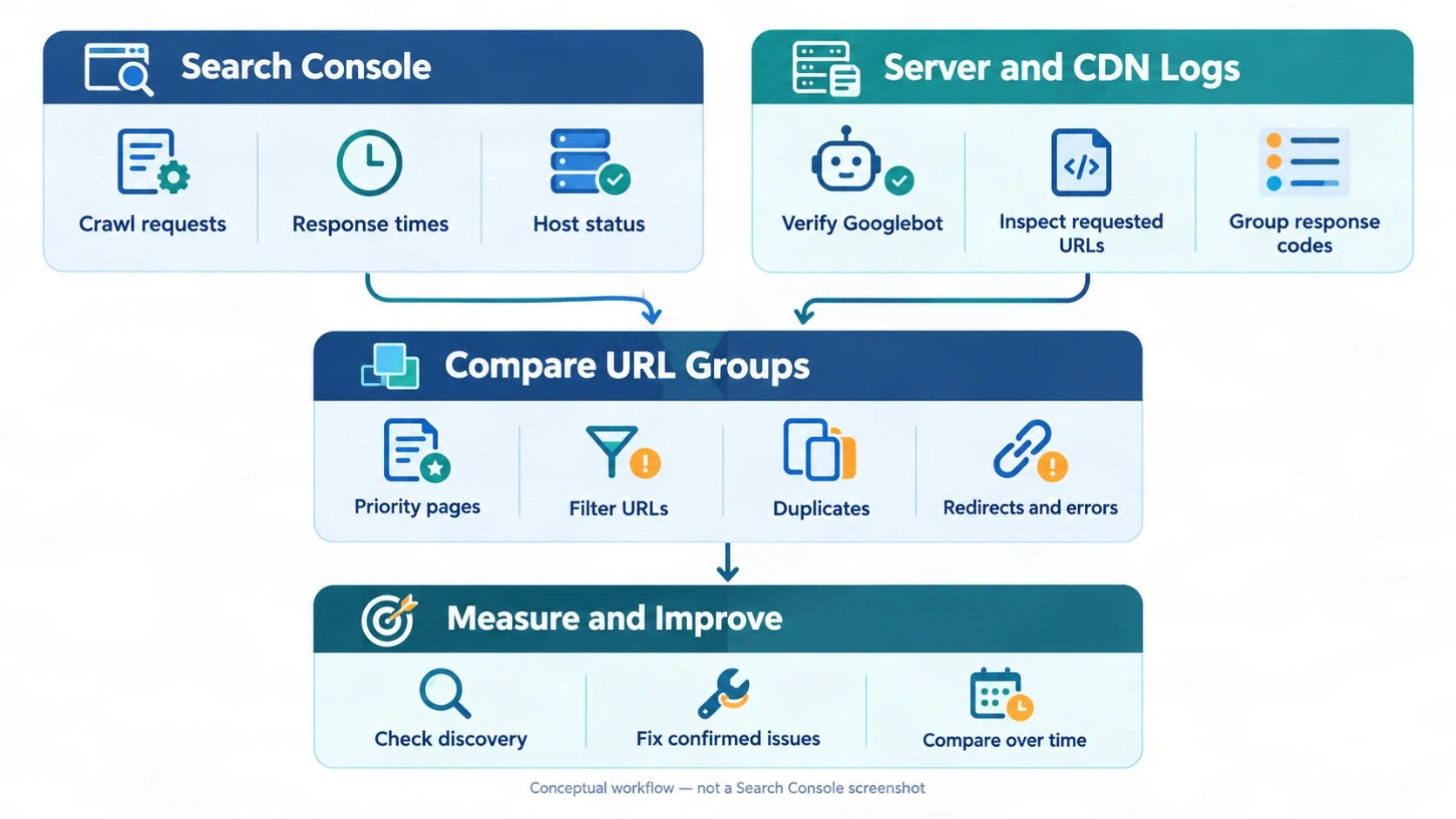
- Search Console shows broad trends; verified server and CDN logs provide more detailed evidence.
- Unnecessary filters, duplicate URLs, soft 404s, and redirect chains can create avoidable crawling.
- Better crawling supports discovery and updates. It does not guarantee indexing or higher rankings.
What Is Crawl Budget in SEO?
Google defines crawl budget as:
“The set of URLs that Google can and wants to crawl.”
— Google Search Central, Large site owner’s guide to managing your crawl budget
Two factors determine it:
| Factor | What it means | What influences it |
|---|---|---|
| Crawl capacity limit | How much crawling Google can perform without overwhelming your server | Response times, server availability, errors, and available infrastructure |
| Crawl demand | How much Google wants to crawl your website | Known URL inventory, update frequency, popularity, quality, and relevance |
Google generally treats each hostname separately for crawl-budget purposes. For example, www.example.com and shop.example.com are separate hostnames.
There is no single crawl-budget number in Search Console that tells you how many pages Google will crawl tomorrow.
What Is the Crawl Capacity Limit?
The crawl capacity limit helps Google avoid overloading your website.
When your server responds consistently and quickly, Google may increase crawling if there is enough demand. When responses slow down or errors increase, Google may reduce its activity.
Common constraints include:
- Slow server responses.
- Repeated
5xxerrors. - HTTP
429 Too Many Requestsresponses. - DNS or connection failures.
- Expensive application processes that struggle under concurrent requests.
Increasing server capacity can help when infrastructure is the bottleneck. It does not necessarily increase crawling when Google has little demand for the available content.
What Is Crawl Demand?
Crawl demand reflects Google’s interest in fetching or refreshing your URLs.
Google identifies three important considerations:
- Perceived inventory: The URLs Google knows about and may attempt to crawl.
- Popularity: More popular URLs tend to be crawled more often.
- Staleness: Google tries to revisit content often enough to keep its information current.
Your most direct opportunity is usually to manage the URL inventory. A website with useful pages mixed among millions of unnecessary filter combinations gives Google far more URLs to process than it needs.
Is Crawl Budget a Ranking Factor?
No. Google states:
“An increased crawl rate will not necessarily lead to better positions in Search results.”
— Google Search Central, Crawling and crawl-budget FAQ
Crawling helps Google discover and refresh content. Indexing and ranking are separate processes.
A page can be crawled without being indexed. An indexed page can also rank poorly despite being crawled frequently.
The goal is timely access to useful content—not a higher crawl count for its own sake.
Does Your Website Need Crawl Budget Optimization?
Most websites should focus on general technical SEO rather than advanced crawl-budget management.
Google’s crawl-budget guide is primarily intended for:
| Website profile | Google’s approximate guidance |
|---|---|
| Very large websites | Around 1 million or more unique pages, with content changing roughly weekly |
| Frequently updated websites | Around 10,000 or more unique pages, with content changing daily |
| Websites with substantial discovery backlogs | A large share of URLs reported as “Discovered – currently not indexed” |
These figures are Google’s rough examples, not strict thresholds or guarantees of a problem.
Google also says that if pages are generally crawled the day they are published, advanced crawl-budget management is probably unnecessary.
Signs Worth Investigating
Potential warning signs include:
- Important new URLs remain uncrawled for an unusually long time.
- Updated pages take too long to be revisited.
- Googlebot repeatedly requests large numbers of unnecessary parameter URLs.
- Server errors rise while crawling falls.
- Important sections receive little crawling despite being accessible and internally linked.
None of these signs proves a crawl-budget problem on its own.
For example, “Discovered – currently not indexed” can reflect crawl scheduling, server constraints, or Google’s assessment of the site. “Crawled – currently not indexed” means Google already fetched the page, so increasing crawling alone is unlikely to solve the underlying issue.
What Should Small Websites Do Instead?
For a small business website, prioritize the basics:
- Make important pages accessible through ordinary internal links.
- Maintain a sitemap containing canonical, indexable URLs.
- Remove accidental duplicates.
- Fix broken navigation and server errors.
- Publish useful pages with distinct purposes.
- Check that robots rules and indexing directives match your intentions.
These improvements usually matter more than trying to increase Googlebot activity.
How to Measure Crawl Efficiency
Before changing anything, compare the URLs Google crawls with the URLs you want it to prioritize.
For this guide, crawl efficiency means how well crawling activity aligns with your website’s useful content and necessary supporting resources. It is an audit concept, not an official Google metric.
Use two complementary sources:
- Google Search Console: Trends in crawling, responses, and host availability.
- Server and CDN logs: Detailed requests received by the infrastructure covered by those logs.
1. Review the Crawl Stats Report
In Search Console, open:
Settings → Crawl stats
According to Google’s Crawl Stats documentation, this report is available for root-level properties, including Domain properties and root-level URL-prefix properties.
Start with these sections:
| Report section | What to examine | Why it matters |
|---|---|---|
| Total crawl requests | Sustained increases, decreases, or unusual spikes | Shows changes in activity, but not whether that activity is useful |
| Average response time | Persistent increases | May indicate slower fetching or infrastructure problems |
| Host status | robots.txt availability, DNS, and server connectivity | Helps identify access problems |
| Response codes | 5xx, 429, redirects, and unexpected errors |
Highlights unreliable responses and unnecessary request paths |
| Crawl purpose | Discovery versus refresh | Separates first-time crawling from revisits |
| Googlebot type | Smartphone, desktop, image, and other crawler categories | Helps explain which activity changed |
Do not treat every drop in requests as a failure. If you remove an enormous duplicate URL space, fewer requests may be a positive outcome.
Likewise, a high proportion of 200 responses does not prove efficient crawling. A useless filter page can return 200 OK.
2. Analyze Server and CDN Logs
Logs help answer practical questions:
- Which sections does Googlebot visit most?
- How often are priority pages fetched?
- Which parameters generate repeated requests?
- Where do redirects and errors occur?
- Do important new URLs receive requests after publication?
Access logs commonly contain timestamps, URLs, status codes, user agents, and IP addresses. Response-time fields may also be available.
Important limitation: Origin-server logs may miss requests served entirely from a CDN cache. Ask your hosting provider which logs are needed for adequate coverage.
Search Console and logs may not match exactly because their coverage and reporting methods differ.
3. Verify Googlebot Requests
Do not trust the user-agent string alone. Other bots can claim to be Googlebot.
Follow Google’s crawler verification guidance:
- Match request IP addresses against the appropriate Google-published IP ranges; or
- Use reverse DNS verification, check the expected Google domain, and confirm the result with a forward DNS lookup.
Google documents different crawler categories. Keep Search Googlebot activity separate from other Google fetchers when your goal is to assess organic-search crawling.
4. Group Requests by URL Type
Useful groups include:
- Products.
- Categories.
- Articles.
- Faceted navigation.
- Internal search.
- Tracking or session parameters.
- Redirects.
- Removed URLs.
- CSS, JavaScript, images, and other resources.
Compare these groups with your canonical URL inventory, sitemap, and business priorities.
Logs alone cannot reliably identify every soft 404, duplicate, or non-indexable page. Combine them with a site crawl and relevant Search Console reports.
A Practical Crawl-Measurement Example
The following example is hypothetical, not a client result or a Google benchmark.
Suppose verified Googlebot logs contain 100,000 HTML-page requests during a 30-day period:
| URL group | Requests | Share |
|---|---|---|
| Priority canonical pages | 45,000 | 45% |
| Unnecessary filter combinations | 35,000 | 35% |
| Duplicate parameter URLs | 15,000 | 15% |
| Redirecting URLs | 5,000 | 5% |
For this audit, you could calculate:
Priority-page request share = Requests to priority canonical pages ÷ Total HTML-page requests × 100
Here, that share is 45%.
This does not mean Google wasted exactly 55% of its crawl budget. Some duplicate fetching and redirect checks are legitimate. However, the distribution suggests that filter combinations and duplicate parameters deserve investigation.
After making changes, repeat the analysis using the same definitions and a comparable time window.
Look for:
- Less repeated crawling of unnecessary URL patterns.
- Faster first crawls of important new pages.
- More reliable responses.
- Timely revisits to changed priority pages.
A percentage improves meaningfully only when the underlying discovery and refresh outcomes also improve.
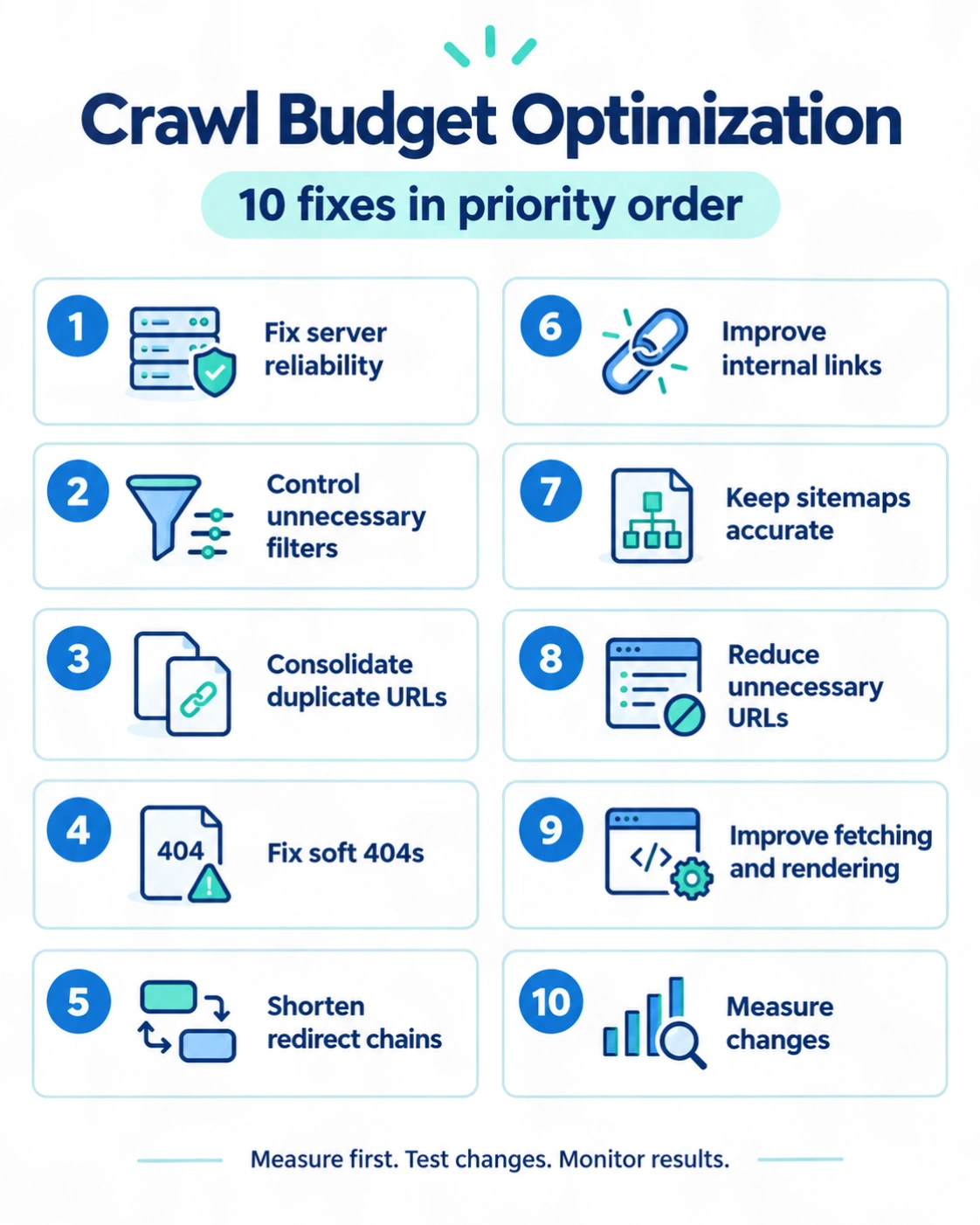
Crawl Budget Optimization: 10 Fixes in Priority Order
1. Fix Server Reliability Before Restricting URLs
Resolve persistent availability problems first.
Investigate:
- Repeated
5xxresponses. - Unintended
429responses. - Slow database queries.
- Overloaded application workers.
- DNS and connection failures.
- CDN or firewall rules blocking legitimate Googlebot requests.
Improve caching and infrastructure where the evidence supports it.
Do not deliberately serve errors to “optimize” crawling. Google documents temporary crawl reduction for overload situations, but prolonged errors can affect indexing. See its guidance on reducing crawl rate.
2. Control Unnecessary Faceted Navigation
Filters can create enormous URL inventories.
For example:
/shoes?color=black&size=9&material=leather&sort=price
Each additional filter can produce more combinations, even when the resulting pages have little independent search value.
First decide which filtered pages deserve to be search landing pages.
- Keep useful, intentional landing pages crawlable.
- Avoid exposing endless combinations without distinct value.
- Restrict crawling of patterns you genuinely do not need crawled.
Google’s faceted navigation guidance discusses using robots.txt for unnecessary faceted URLs.
An illustrative rule set is:
User-agent: Googlebot
Disallow: /*?*color=
Disallow: /*?*size=
Do not paste these rules into a live site without testing. They may block valuable URLs if your website uses those parameters for indexable landing pages.
Also remember:
- Robots.txt controls crawling, not guaranteed removal from search.
- Google cannot read a page’s canonical tag or
noindexdirective if crawling is blocked. - If an already indexed URL must be removed, plan that separately from crawl restriction.
For filtered pages you want indexed, use stable URLs, consistent parameter ordering, and meaningful content. Google recommends returning a real 404 for filter combinations with no results.
3. Consolidate Duplicate URLs
Common duplicate sources include:
- Tracking parameters.
- Session IDs.
- Multiple paths to the same product.
- Printable versions.
- Alternative URLs showing identical content.
Choose the appropriate method:
| Situation | Typical approach |
|---|---|
| A redundant URL can be retired | Permanent redirect to its replacement |
| Similar versions must remain accessible | Consistent canonical signals |
| Internal links use multiple versions | Update links to the preferred URL |
| Sitemaps contain duplicates | Retain canonical, indexable URLs only |
A canonical tag is a signal, not a crawl-blocking directive. Google may need to fetch duplicates before evaluating their relationship.
Avoid combining contradictory signals, such as declaring one canonical URL while consistently linking to another.
See Google’s canonicalization guidance.
4. Fix Soft 404s and Handle Removed Pages Correctly
A soft 404 occurs when a URL appears to be an error or empty page but does not return an appropriate error response.
Examples include:
- A deleted product page returning
200 OKwith “Product not found.” - An empty page with almost no meaningful content.
- An irrelevant redirect from a removed URL to the homepage.
Use:
404or410when content is permanently gone and has no suitable replacement.- A permanent redirect when there is a genuinely relevant replacement.
Google does not treat ordinary 404 and 410 responses as the crawl-budget problem that soft 404s can be. However, old URLs can still be requested again; a 404 is not a promise of zero future crawling.
Fix broken internal links for users and navigational clarity rather than trying to eliminate every historical 404 request.
5. Shorten Redirect Chains
A chain such as:
Old URL → Intermediate URL → Another URL → Final URL
requires more requests than a direct redirect.
Where possible:
- Redirect old URLs directly to the final destination.
- Update internal links to point to that destination.
- Remove redirecting URLs from sitemaps.
- Check canonical tags and other references for outdated addresses.
Keep necessary redirects that preserve access from external links and bookmarks. The aim is to remove avoidable hops, not all redirects.
6. Improve Internal Links and Fix Orphan Pages
An orphan page has no internal links pointing to it.
Google may still discover it through a sitemap or an external link, but it lacks the navigational context provided by your own website.
To find orphan candidates:
- Export intended live URLs from your CMS or database.
- Add the URLs in your XML sitemap.
- Crawl the website by following internal links from the homepage.
- Compare the lists.
- Investigate intended pages missing from the link-based crawl.
Some candidates may be missed because of crawler settings or rendering limitations, so confirm them before making changes.
For useful pages, add relevant contextual links from established pages. Use ordinary crawlable links, typically an <a> element with an href attribute, as described in Google’s link best practices.
If a page duplicates another, consider merging it. If it has no ongoing value, decide whether it should be removed.
7. Keep XML Sitemaps Accurate
A sitemap helps Google discover URLs. It does not guarantee crawling or indexing.
Include URLs that are:
- Canonical.
- Intended for search indexing.
- Accessible to Google.
- Returning the expected successful response.
Remove URLs that redirect, return errors, or are intentionally excluded from indexing.
Use lastmod only when it accurately reflects a meaningful page update. Do not automatically change every date whenever the sitemap is regenerated.
For large websites, separate sitemaps by section or content type to make monitoring easier.
See Google’s sitemap guidance.
8. Reduce Unnecessary URL Generation
Prevention is often more effective than managing an ever-growing backlog.
Review features that produce:
- Endless calendar pages.
- Internal search combinations.
- Session-specific URLs.
- Duplicate sorting options.
- Automatically generated pages with no distinct purpose.
Do not remove useful pages merely because they receive little traffic. Assess their audience, purpose, uniqueness, and place in the website.
A content map that assigns a clear purpose to each page can prevent overlapping content before publication.
9. Make Fetching and Rendering More Efficient
Beyond server availability, review how much work each page requires.
Potential improvements include:
- Caching reusable resources.
- Reducing unnecessary JavaScript requests.
- Avoiding repeated API calls during rendering.
- Removing redirecting resource URLs.
- Supporting valid conditional requests and
304 Not Modifiedresponses where appropriate.
Do not block essential CSS or JavaScript simply to reduce request counts. Google may need those resources to understand the page.
Distinguish slow server responses from slow browser rendering. Both deserve attention, but they are not interchangeable measurements.
10. Measure Again and Keep a Change Log
Repeat the baseline analysis after changes have had time to take effect.
Record:
- What changed.
- Which URL patterns were affected.
- When the change went live.
- Whether releases, migrations, or content launches happened at the same time.
Then compare:
- Priority-page request share.
- Requests to unnecessary URL patterns.
5xxand429rates.- Response-time trends.
- Time to first crawl for new priority URLs.
- Recrawl timing for important updated pages.
Do not judge success solely by total requests. A smaller crawl footprint with faster discovery of useful content can be an improvement.
Crawl Budget Myths to Avoid
| Myth | More accurate explanation |
|---|---|
| More crawling means better rankings | Crawling is not a ranking signal |
| Every small website needs a crawl-budget audit | Most need sound technical SEO fundamentals instead |
noindex immediately saves crawling |
Google must crawl the page to see the directive |
| Robots.txt guarantees deindexing | A blocked URL can still appear in search without its content being crawled |
| Canonical tags prevent duplicate crawling | Google may fetch duplicates to assess canonicalization |
nofollow guarantees a URL will not be crawled |
It is not a dependable crawl-control mechanism; URLs can also be discovered elsewhere |
Googlebot follows crawl-delay |
Google does not support this robots.txt directive |
| Query parameters are inherently bad | The problem is unnecessary URL proliferation, not the parameter format |
| Blocking URLs automatically reallocates crawling | Google does not promise to transfer those requests to your preferred pages |
| Changing publication dates creates crawl demand | Cosmetic freshness changes do not create substantive value |
Which Fixes Matter Most for Your Website?
| Website type | Common issue | Best starting point |
|---|---|---|
| Small business website | Missing links and accidental duplicates | Navigation, canonical URLs, and sitemap accuracy |
| Blog or publisher | Overlapping articles and excessive archive URLs | Content consolidation and archive review |
| Ecommerce store | Filter combinations and duplicate product paths | Faceted navigation and canonicalization |
| News website | Delayed discovery of frequently published content | Reliable servers, strong links, and current sitemaps |
| Marketplace | Rapid inventory changes and expired listings | Status codes, update signals, and regular log analysis |
| Large generated-page website | Many near-identical URLs | Publication criteria and URL-inventory control |
These are starting hypotheses, not diagnoses. Confirm them with your own crawl data.
How Often Should You Review Crawling?
There is no universal schedule.
A practical approach is:
- Small, stable websites: Review indexing and access issues periodically and after major changes.
- Large ecommerce sites: Review crawl patterns regularly, especially after filter or navigation changes.
- Frequently updated publishers and marketplaces: Monitor access problems closely and analyze discovery trends at a cadence that matches publication volume.
- Any website after a migration: Check redirects, robots rules, sitemaps, and crawler access promptly.
A monthly log review can be a useful starting point for a large website, but it is not a Google requirement.
When Should You Get Technical SEO Help?
Get help when the implementation risk exceeds your team’s experience.
Examples include:
- Changing robots.txt across a large store.
- Separating valuable filter pages from unnecessary combinations.
- Diagnosing persistent crawler access failures.
- Rebuilding canonical signals after a migration.
- Analyzing logs spread across multiple servers and CDNs.
Prepare Search Console access, your sitemap, a list of priority URLs, and representative logs before the review.
Implementation caution: Broad robots rules, incorrect redirects, and conflicting indexing directives can prevent Google from accessing important content. Test representative URLs, maintain a rollback plan, and monitor the affected sections after deployment.
No specialist can guarantee that Google will crawl, index, or rank a particular page.
Final Takeaways
Start by asking whether your website actually has a crawling problem.
For most small websites, clear navigation, useful content, accurate sitemaps, and reliable hosting are enough. Large or filter-heavy websites need closer attention to URL inventory and Googlebot behavior.
The most effective sequence is:
- Establish a baseline.
- Fix server and access problems.
- Reduce unnecessary URL generation.
- Consolidate duplicates and improve internal links.
- Measure discovery and refresh outcomes again.
Successful crawl-budget optimization helps Google reach useful pages reliably. It does not replace content quality, indexing eligibility, or broader SEO work.
Frequently Asked Questions
What is crawl budget in simple terms?
Crawl budget is the set of URLs Google can and wants to crawl on your website. It depends on your server’s capacity and Google’s demand for your content.
Is crawl rate the same as crawl budget?
No. Crawl rate describes the pace of requests, such as requests per second. Crawl budget describes the URLs Google can and wants to crawl, shaped by both capacity and demand.
How do I check my crawl budget?
There is no single budget figure in Search Console. Use Crawl Stats to understand trends and verified server or CDN logs to examine which URLs Googlebot requests.
Can I increase crawl budget?
You can address constraints that limit useful crawling, such as unreliable servers or an excessive duplicate URL inventory. Better content can also support crawl demand. Google still decides how much to crawl, so an increase is not guaranteed.
Should I use robots.txt or noindex?
Use robots.txt when you need to control crawling. Use noindex when an accessible page should not appear in search results. Google must be able to crawl a page to see its noindex directive.
Do 404 pages waste crawl budget?
Google distinguishes real 404 and 410 responses from soft 404s. Proper error responses are the correct way to handle permanently removed content without a replacement. Fix internal links to removed URLs, but do not redirect every missing page to the homepage.
Does improving page speed increase crawling?
Faster, reliable server responses can allow more crawling when server capacity is a constraint and demand exists. Improving user-facing speed remains valuable even when crawl frequency does not change.
Does blocking filters guarantee that product pages get crawled more?
No. Restricting unnecessary filters can reduce an excessive URL space, but Google does not guarantee that saved requests will be reassigned to product pages.