Internal Linking Strategy for SEO: A Practical Guide to Planning Internal Linking
Learn how to build an internal linking strategy for SEO, improve site structure, optimize anchor text, fix orphan pages, and audit internal links.

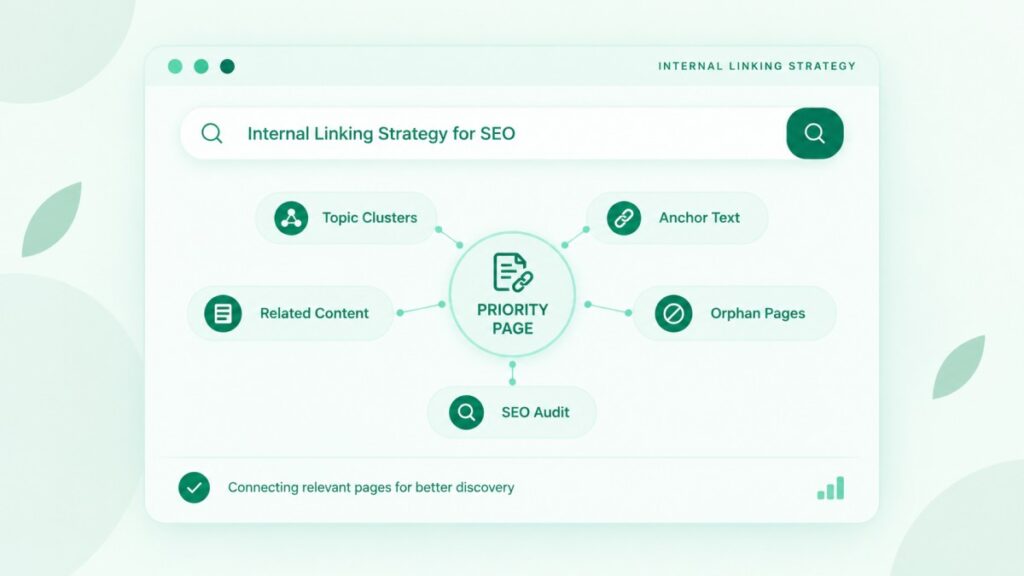
An internal linking strategy for SEO is a plan for how the pages on your own website link to each other, so search engines can find your content and readers can reach the next useful page. Most sites link by habit instead of by plan. This guide shows you how to plan links, write anchor text, add links to new and old content, audit problems, and measure the work.
Google can reliably follow links built as <a href> elements, and it says every page you care about should get a link from at least one other page. Plan links around your priority pages and topic clusters, write descriptive anchor text, and audit for orphan pages and broken links on a schedule. Internal linking is one part of website SEO, and no link count guarantees rankings.
What Is Internal Linking, and Why Does It Matter for SEO?
Internal linking means linking from one page on your website to another page on the same website. These links help visitors move between related pages, and they help search engines find and understand your content. The sections below explain the basics before moving to planning and auditing.
What counts as an internal link?
An internal link is any link that points from one page on your domain to another page on the same domain. Links in your main menu, breadcrumbs, footer, body text, and related-post blocks all count. A link that points to a different website is an external link, and it works differently.
Internal links vs. external links vs. backlinks
Internal links connect pages on your site, external links point from your site to other sites, and backlinks are links from other sites to yours. You control internal links fully, because you own both ends. You control external links partly, since you choose which sources to cite. You do not control backlinks at all. That is why internal linking is the most reliable link work a site owner can do.
How do internal links help crawling, discovery, and visitors?
Internal links give crawlers paths to follow and give visitors paths to useful content. Google states that it uses links as a signal when judging the relevance of pages and to find new pages to crawl, according to its link best practices documentation. For a visitor, a well-placed link answers the question “what should I read next?” without a search.
Do internal links affect rankings? What Google says and does not say
Google says it uses links as a signal, but it does not publish a formula for how internal links affect rankings. That means any claim like “add 20 links and your page will rank” has no support from Google. Treat internal linking as a way to make your site clearer for people and crawlers, and judge results with evidence, not promises.
Which Internal Linking Strategy for SEO Rules Come Straight From Google?
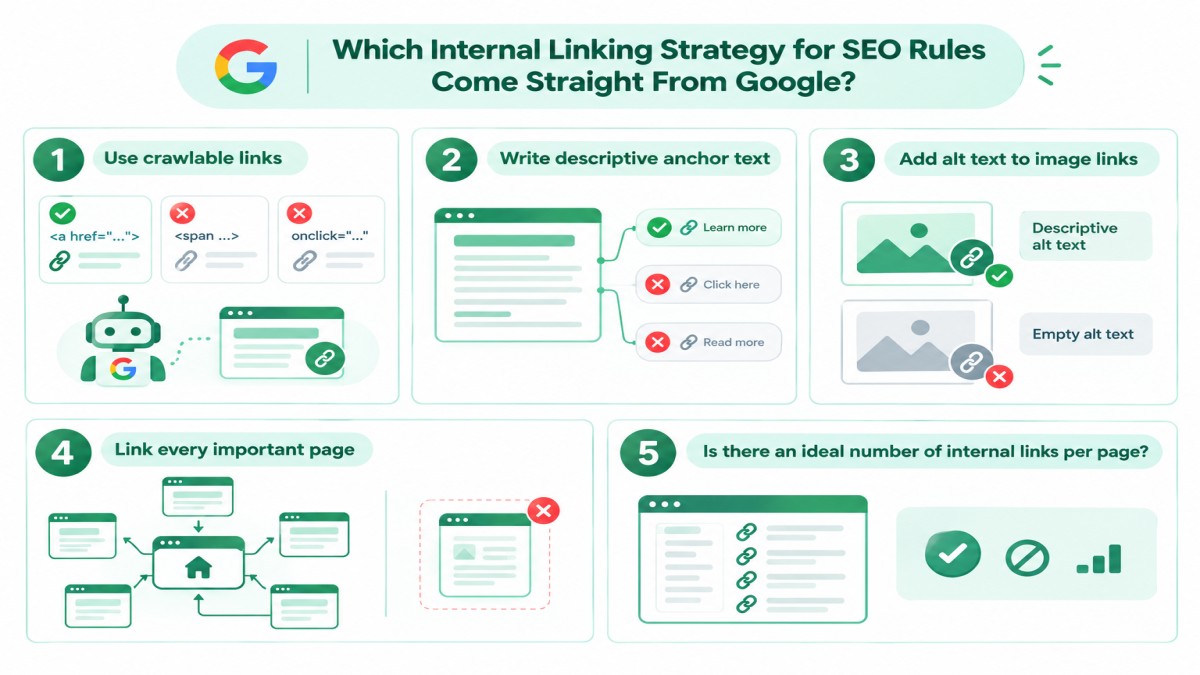
Google’s link guidance gives practical rules: use crawlable links, write descriptive anchor text, add alt text to image links, link every important page from another page, and avoid forced keywords. This section covers only what Google itself publishes. Later sections mix Google guidance with practical judgment, and I label the difference.
Use crawlable links with an a href attribute
Google can generally crawl a link only when it is an <a> element with an href attribute. Links that depend on script events, such as an onclick handler without an href, or a span styled to look like a link, are not reliable. Google notes that links added with JavaScript still work when they use the same markup. If JavaScript inserts your anchor text, Google recommends checking the rendered HTML with the URL Inspection Tool.
Write descriptive anchor text
Good anchor text is descriptive, reasonably concise, and relevant to both the page it sits on and the page it points to. Google suggests a simple test: read only the anchor text, out of context, and check whether it still tells you what the page is about. “Click here” and “read more” fail that test. A whole sentence used as a link also fails, because it is too long to scan.
Add alt text to image links
When an image is the link, Google uses the image’s alt text as the anchor text. An image link with empty alt text gives crawlers and screen reader users no clue about the destination. Write alt text that describes where the link leads or what it does, in plain words.
Link every important page from at least one other page
Every page you care about should receive a link from at least one other page on your site. That is Google’s own guidance. A page with no internal links is an orphan page. Google can sometimes find such a page through other routes, such as a sitemap, but you give it no context and visitors have no path to it.
Is there an ideal number of internal links per page?
No. Google says there is no ideal number of internal links per page. Its documentation puts it this way: “There’s no magical ideal number of links a given page should contain.” Google adds that if the number feels like too much, it probably is. Some SEO guides publish per-word link counts. Treat those as editorial guardrails from site owners, not as Google rules.
Which Types of Internal Links Should You Use?
Use navigation links for site-wide paths, contextual links for meaning, and hub or related links to connect topics. Each type does a different job, and a healthy site uses all three without leaning on only one.
Navigation, breadcrumb, and footer links
Navigation, breadcrumb, and footer links are site-wide links that show visitors and crawlers your main sections. The main menu points to top-level categories. Breadcrumbs show where a page sits in the hierarchy. The footer usually holds secondary pages such as contact details and policies. Because these links repeat on every page, they carry little page-specific meaning. They support website structure for SEO, but they cannot replace links written inside your content.
Contextual links inside the body
Contextual links sit inside the body text, right next to the idea they explain. They carry the most meaning, because the surrounding sentence tells the reader and Google why the link exists. Google also notes that the words before and after a link matter. These are the links you control most precisely, so they deserve the most care.
Related-post, hub, and call-to-action links
Related-post blocks, hub pages, and call-to-action links connect pages by topic or by next step. A related-post block is quick to add, but automatic lists tend to be generic. A hub page is a main guide that links to detailed pages, and each detailed page links back to the hub. A call-to-action link points to a service or contact page. It is commercial by nature, so place it where a reader is ready for that step.
How Do You Build an Internal Linking Strategy for SEO From Scratch?
Build it in five parts: set a goal, choose priority pages, group pages into topics, map the links, and add them in order of importance. The parts below follow that order. Each one produces something you can use, such as a page list or a spreadsheet.
Set a goal and pick your priority pages
Start by naming the pages that must be found and the action you want visitors to take there. Priority pages are usually service pages, product category pages, and cornerstone guides. List five to ten of them. Then open the Links report in Google Search Console, which shows your top internally linked pages, as Search Engine Land reported when Google added it. Priority pages with few internal links are your first targets. When I plan website structure and topical maps, I build this list before deciding where any link goes.
Map pages to topic clusters and a topical map
A topic cluster is a main page plus supporting pages that cover its subtopics, with links running in both directions. The main page links down to each supporting page. Each supporting page links back up to the main page, and to sibling pages when the topic overlaps. A topical map lists these topics and pages in advance, so links follow a plan instead of memory. People often call the result a topical authority map. Topical authority is an SEO industry term, not a metric that Google publishes.
How deep should important pages sit in your site?
Important pages should be easy to reach, ideally within a few clicks of the homepage. Click depth is the number of clicks needed to reach a page from the homepage. The “three clicks” rule is a common rule of thumb, not a Google rule, so I use it as a prompt to check a page, not as a pass or fail test. Linking from the homepage or from a main hub page reduces depth quickly. For the wider picture of site structure, see the web design and architecture articles on this site.
How do you build a simple link map in a spreadsheet?
Use a spreadsheet with one row per link: source page, target page, anchor text, location on the page, and status. The same sheet can later work as a basic SEO website audit template. Build it in this order:
- List every important URL in one column, and mark its page type and priority.
- For each priority page, find relevant source pages that could link to it in context.
- Write the anchor text for each link before you add it.
- Note where on the page the link will sit, such as an intro or a specific heading.
- Mark each row as planned, added, or checked.
Link patterns for blogs, service pages, and online stores
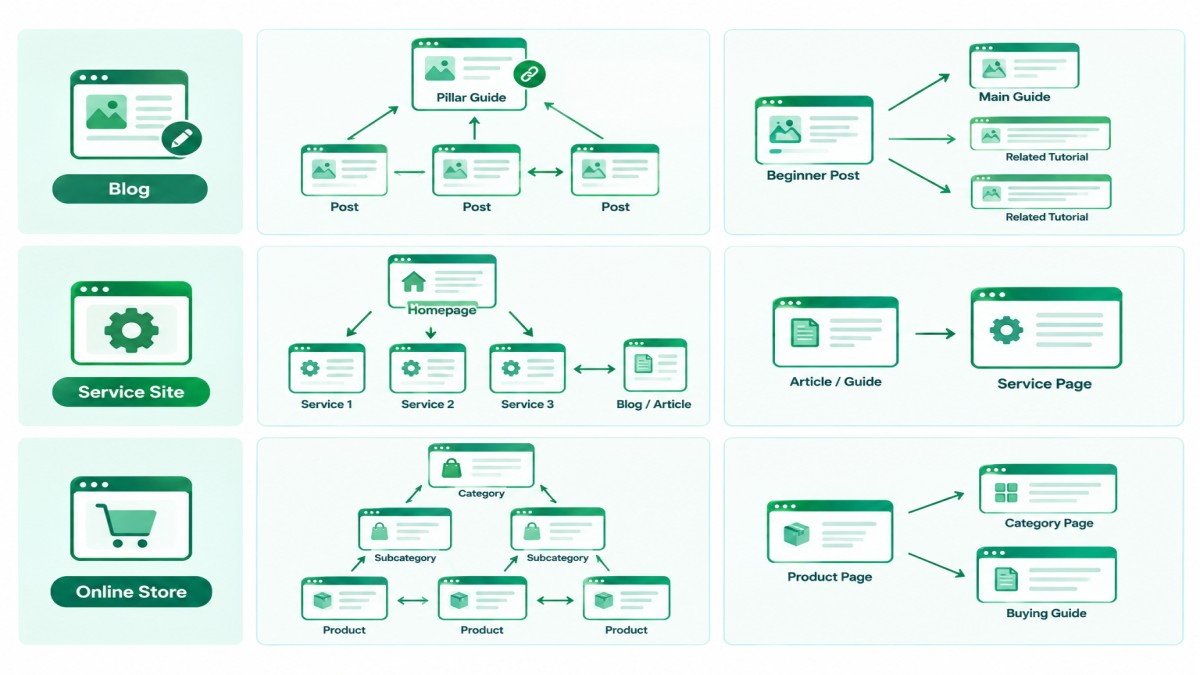
Blogs, service sites, and stores need different link patterns, because their pages do different jobs. The table shows a starting point for each.
| Site type | Main link pattern | Example |
| Blog | Posts link up to a pillar guide and sideways to related posts | A beginner post links to the main guide and two related tutorials |
| Service site | Homepage links to services, and articles link to the matching service | A guide on audits links to the audit service page |
| Online store | Categories link to subcategories and products, and products link back | A product page links back to its category and a buying guide |
For an e-commerce business, category pages usually carry most of the structure, so link to them from guides and from related products.
How Do You Write Anchor Text That Helps Without Over-Optimizing?
Write anchor text that describes the destination in a few natural words, and do not repeat the same exact keyword phrase everywhere. Google warns against cramming keywords into anchor text and notes that keyword stuffing violates its spam policies. If a link feels forced, it probably is.
Good vs. bad anchor text examples
Good anchor text names the topic of the destination page, and bad anchor text is generic, empty, too long, or stuffed with keywords. These examples are illustrative.
| Anchor text | Verdict | Reason |
| orphan page fixes | Good | Short and specific to the destination |
| internal link audit checklist | Good | Describes the page and sets expectations |
| click here | Bad | Says nothing about the destination |
| read more | Bad | Generic, and unclear out of context |
| (empty link or image with no alt text) | Bad | Gives no anchor information at all |
| best cheap seo link services tool pricing | Bad | Stuffed with keywords and unnatural |
Should you vary your anchor text?
Yes, vary the wording naturally, because different sentences need different phrasing. One destination can be linked as “audit checklist” in one place and “how to check your links” in another. Do not force variety for its own sake. Google advises writing as naturally as possible, and each anchor should stay accurate for the page it points to.
Why should two different pages not share the same anchor?
Two different pages should not share identical anchor text, because readers cannot tell which page the anchor describes. Google says anchor text helps people and Google understand what the destination is about. When two destinations share one anchor, that signal blurs, and it can also blur which page is meant to cover the topic. In my view, each page should have its own clear label.
How Do You Add Internal Links to New and Old Content?
Add links while you write new content, then revisit older content on a schedule so it points to your newer pages. Links need to run in both directions. A new page that links out to older pages is only half the job.
Add links while you write a new post
Decide your link targets before drafting, then place each link where the sentence naturally needs it. I add suggested link targets to the content brief, which keeps linking from becoming an afterthought. Teams that outsource SEO content writing can include the same targets in their brief. After publishing, pick a few older pages that should point to the new one.
How do you find link opportunities in older posts?
Search your own site for the topic of the new page, then link from older pages that already mention it. A search such as site:yourdomain.com “orphan pages” lists pages on your domain that use that phrase, and Google documents the site: operator for this kind of check. You can also sort older pages by clicks in the Performance report in Search Console and link from the busiest relevant ones. Add a link only where it helps the reader.
Should you use automatic linking plugins?
Use them with caution: automatic tools can suggest links, but a person should approve each one. Tools can add irrelevant links, repeat the same anchor, or insert links where a sentence does not need one. Those problems cut against the natural-writing advice in Google’s guidance. A suggestion list saves time, and a human review keeps the links useful.
How Do You Audit Internal Links and Fix Problems?
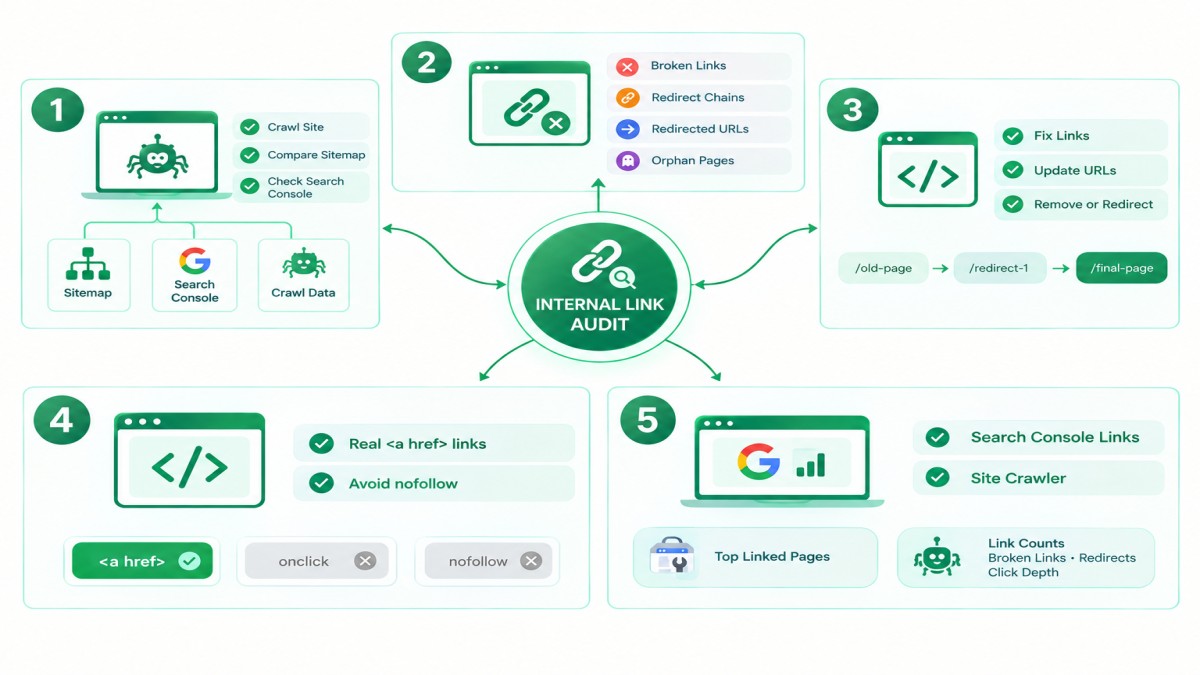
Audit by crawling your site, comparing the crawl with your sitemap and Search Console data, and fixing issues in order of page importance. For wider crawl and indexing checks, see these technical SEO audit guides. The steps below focus on links only.
How do you find and fix orphan pages?
Find orphan pages by comparing a list of all known URLs with the URLs a crawler reaches by following links; any page missing from the crawl has no internal links. Take your sitemap URLs, run a crawl, and look for URLs that appear in the sitemap but not in the crawl. Then decide whether each page should exist. If it should, add links from relevant pages. If it should not, remove it or redirect it.
Broken links, redirect chains, and links to redirected URLs
Fix a broken internal link by pointing it to the correct live page, or by removing it. A redirect chain happens when one URL redirects to a second URL, which redirects to a third. Update the link so it points straight to the final URL. The same fix applies to any internal link that points to a URL that now redirects. These changes save visitors and crawlers extra steps.
JavaScript links and nofollow on internal links
Check that menus and buttons use real <a href> links, and avoid nofollow on your own pages as a default. Google describes nofollow as a tool for sources you do not trust, which rarely describes your own pages. That is Google’s wording about external links, so using it on internal links is my judgment, not a Google rule. If a menu relies on script events instead of href, Google may not parse it.
Free audit tools: Search Console and a site crawler
Google Search Console’s Links report and a site crawler cover most internal link audits at no cost. The Links report lists your top internally linked pages. A crawler adds link counts, broken links, redirects, and click depth for every page it reaches. Put both outputs into your link map sheet. Any crawler you trust will work, and I am not recommending a specific brand.
Which Internal Linking Mistakes Should You Avoid?
Avoid generic anchors, link overload, forced links, and links to pages that should not appear in search. Each mistake makes your links less useful to readers, and it is easy to fix once you spot it.
Generic anchors, link overload, and forced links
Generic anchors hide meaning, too many links bury the useful ones, and forced links interrupt the reader. Google also advises against chaining links next to each other, because readers cannot tell them apart and each link loses its surrounding text. A simple test helps: if a reader would not want to click the link, remove it.
Linking to pages that should not be indexed
Do not point internal links at pages you do not want in search, such as thank-you pages, internal search results, or staging URLs. Those links send visitors to pages with no search value. They also draw crawler attention to URLs that do nothing for your goals. Keep your link map focused on pages that deserve to be found.
How Do You Measure Whether Internal Linking Works?
Measure with a mix of link-level checks and page-level performance, and treat the results as evidence, not proof. Link-level checks tell you if the plan was carried out. Page-level data tells you what happened to the pages you changed.
Which metrics should you track?
Track link coverage, click depth for priority pages, orphan count, broken link count, and clicks and impressions for the pages you changed. Link coverage means how many relevant pages link to each priority page. The Performance report in Search Console shows clicks, impressions, and queries for each page. If your analytics tool tracks clicks on links, you can also see which internal links readers actually use.
How do you run a before-and-after check, and what are its limits?
Record a baseline, change a defined group of pages, wait, and compare, but remember that other changes can affect the same pages. Seasonality, content edits, and search updates can all move your numbers. For that reason, a before-and-after check can suggest that a change helped, and it cannot prove why. Allow enough time for pages to be recrawled, which varies by site. Do not promise rankings or traffic to a client or to yourself.
Internal Linking Strategy for SEO Checklist Before You Publish
Use this checklist before every publish, and use the audit list every quarter. The quarterly rhythm is my suggestion, not a Google requirement. Adjust it to the size of your site.
A pre-publish link checklist
A pre-publish check confirms that the new page is linked in, links out usefully, and uses links Google can follow.
- The page has at least one planned link from another page on your site.
- The page links to a few relevant pages, each placed where it helps the reader.
- Every anchor is descriptive, short, and accurate.
- Links use <a href> markup, and image links have alt text.
- No two different pages share the same anchor text.
- No link is broken, and none points to a redirected URL.
A quarterly audit checklist
A quarterly audit checks the whole link network, not only the newest pages.
- Run a crawl and compare it with your sitemap to find orphan pages.
- Fix broken links and redirect chains.
- Review internal link counts for your priority pages.
- Add links from older pages to newer pages on the same topics.
- Review menus, breadcrumbs, and footer links for outdated pages.
- Record what you changed, so the next audit has a baseline.
Conclusion
A good internal linking strategy for SEO starts with a short list of priority pages, a clear set of topics, and links that readers would actually click. Follow Google’s published rules for crawlable links, descriptive anchor text, alt text on image links, and a link to every page you care about. Treat per-page link counts and the three-click idea as rules of thumb, not Google rules. Audit on a schedule, record a baseline, and judge results with evidence. Done steadily, this work makes your site easier to understand for people and for search engines, without promising any ranking.
FAQs
1. What is internal linking in SEO?
Internal linking in SEO is the practice of linking from one page on your site to another page on the same site. It helps visitors find related content and helps search engines discover and understand your pages.
2. How many internal links should a page have?
There is no ideal number. Google says there is no magical number of links a page should contain. Add a link when it helps the reader, and remove links that feel like too many.
3. What is the best anchor text for internal links?
The best anchor text is descriptive, short, and relevant to the page it points to. Avoid “click here”, empty anchors, and keyword-stuffed phrases. Reading the anchor text out of context is a quick test.
4. What is an orphan page, and how do you fix it?
An orphan page is a page with no internal links pointing to it. Fix it by adding links from relevant pages, or by removing or redirecting the page if it should not exist.
5. Do internal links help rankings?
Google says it uses links as a signal for relevance and to find pages, but it does not publish how much internal links affect rankings. Internal linking supports clarity and discovery, and it does not guarantee higher rankings.
6. How many clicks from the homepage should a page be?
There is no Google rule. The “within three clicks” idea is a common rule of thumb. Use it as a prompt to check how easy your priority pages are to reach.
7. Should internal links be nofollow?
Usually not. Google describes nofollow as a tool for sources you do not trust, which rarely describes your own pages. Using it on internal links is a judgment call, so test it before applying it widely.
8. Are footer and navigation links worth using?
Yes, for structure. They show visitors and crawlers your main sections and secondary pages. They repeat on every page, so they carry less page-specific meaning than links inside your content.
9. How often should you audit internal links?
A quarterly audit is a reasonable starting point for most sites. Audit sooner after a redesign, a URL change, or a large content update. This schedule is my suggestion, not a Google requirement.
10. Can you use plugins or AI to add internal links?
Yes, as a source of suggestions, but a person should review each link. Automatic tools can add irrelevant links or repeat the same anchor. Human review keeps each link accurate and useful.