SEO Audit Checklist: 25 Essential Checks and Free Template
A step-by-step SEO audit checklist with 25 technical, on-page, content, and off-page checks, a free spreadsheet layout, and an audit report template.

An SEO audit checklist is a step-by-step list of technical, on-page, content, and off-page checks that shows why a website is not earning search traffic. This guide gives you 25 checks, a free spreadsheet layout, and a simple way to turn your findings into a clear report.
Run the 25 checks in order: technical first, then on-page, content, and off-page. Score every issue by impact and effort, fix the high-impact items first, and record everything in the free template below. Repeat the audit every quarter and after any major site change.
I am Forkan Mahmud, an SEO consultant with around five years of experience working with European clients. I work with SERP Panda, and my daily work covers Local SEO, Google Business Profile optimization, website structure, topical maps, content briefs, and content optimization. This checklist follows the order I use when I review a site, and you can adapt it to your own website.
What Is an SEO Audit Checklist and Why Do You Need One?
An SEO audit checklist is a repeatable list of checks that reviews how well search engines can crawl, index, understand, and trust your website. It turns a vague question such as “why is my traffic low?” into a series of yes or no checks that you can fix one by one. Without a list, reviewers skip steps, repeat work, and miss simple problems such as an accidental noindex tag.
What does a website audit checklist cover?
A website audit checklist covers four areas: technical SEO, on-page SEO, content quality, and off-page signals. Technical checks decide whether Google can reach and index your pages. On-page checks decide whether each page matches the search query. Content and off-page checks show whether readers and other websites trust what you publish.
How is an SEO audit different from a site health score?
A site health score is a single number from a tool, while an SEO audit is a human review that explains why each issue matters for your goals. Tool scores are estimates and are not Google metrics. Use them to find problems quickly, then confirm each finding by opening the page and reading the evidence yourself.
How to Use This SEO Audit Checklist Step by Step
You use this checklist in three steps: set the scope, collect data, and score every finding. Working in that order keeps the audit short and the report useful. Each step below explains what to do and what to record, so another person can repeat your work later.
Step 1: Set the scope and goal
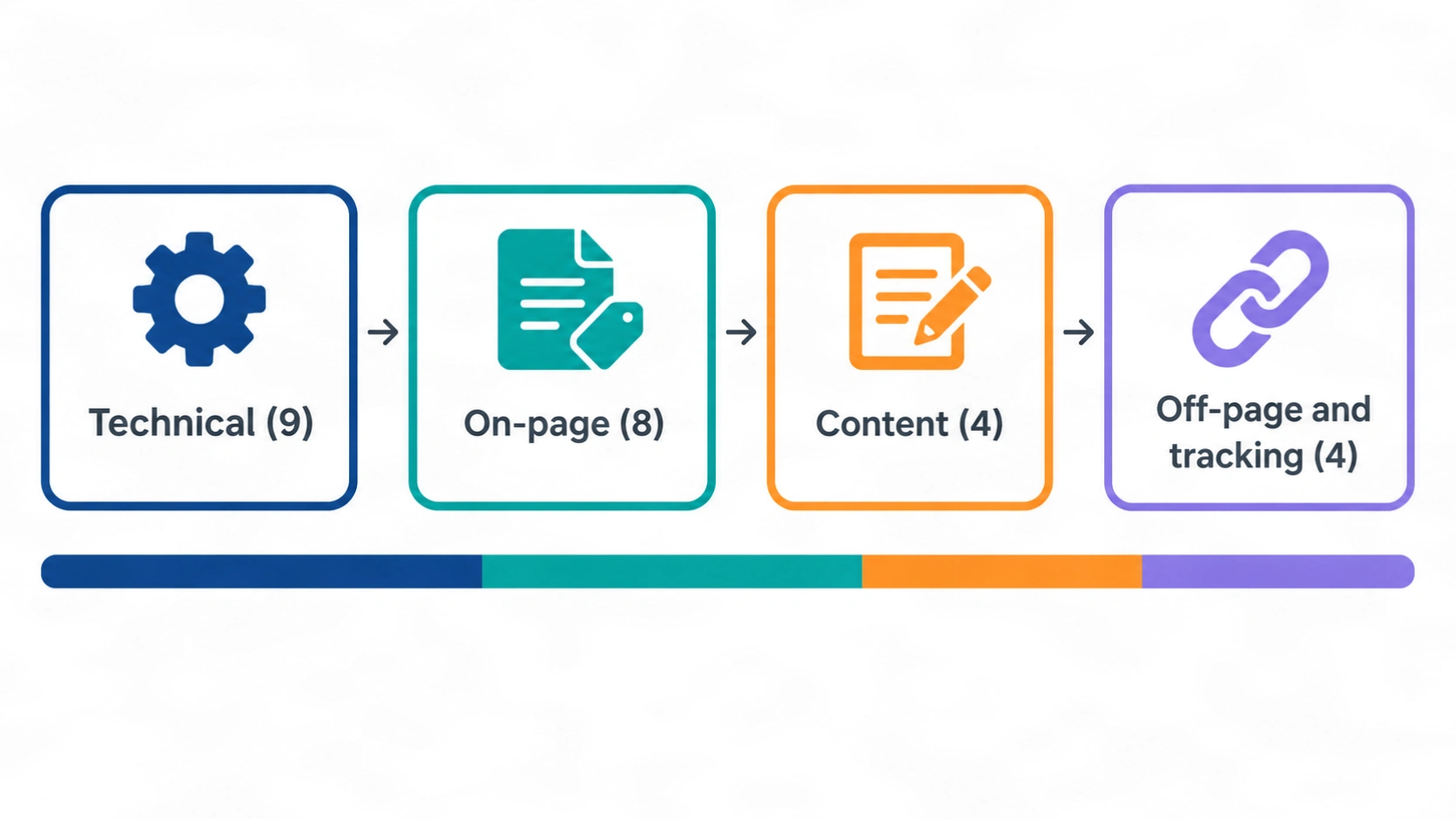
Start by writing down which pages, countries, and goals the audit covers. A local service business needs different checks from an online store. The 25 checks in this article split into 9 technical checks (36%), 8 on-page checks (32%), 4 content checks (16%), and 4 off-page and tracking checks (16%). Skip checks that do not apply to your site.
Step 2: Crawl the site and collect data
Crawl the site with a tool and export the results before you change anything. Pull indexing data from Google Search Console and speed data from PageSpeed Insights at the same time. This baseline lets you prove later which fixes worked, and it protects you from guessing about what changed.
Step 3: Score and prioritize every finding
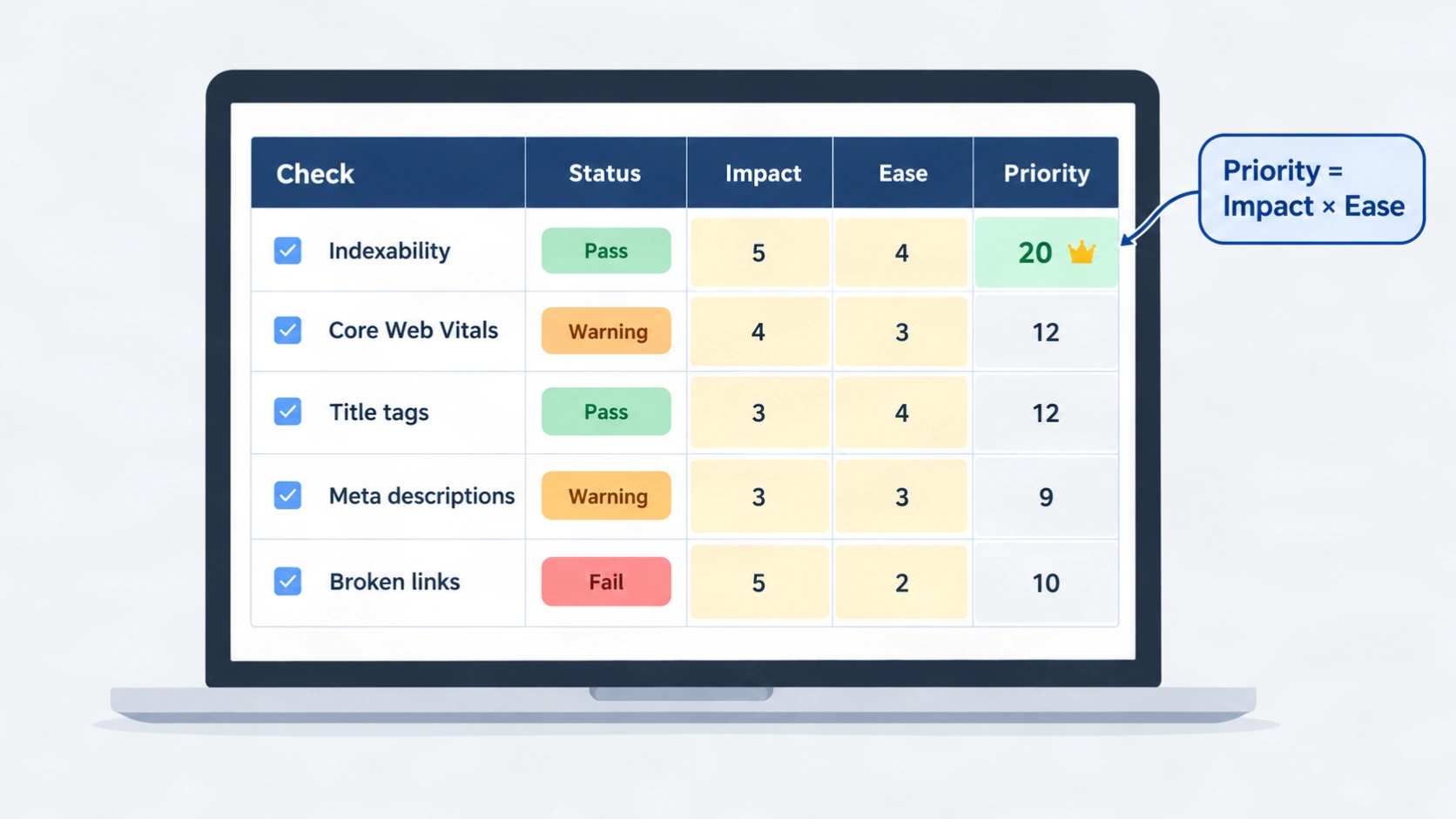
Give each issue an impact score and an ease score, then multiply them to find the first fixes. A blocked homepage with high impact and easy repair goes to the top. A small formatting issue with low impact goes to the bottom. The spreadsheet section later in this article shows the exact formula.
Website Audit Checklist: 9 Technical SEO Checks
Technical checks come first because a page that search engines cannot reach cannot rank, no matter how good the writing is. These nine checks cover indexing, crawling, security, speed, and structure. If you want more background on this topic, read my technical SEO and audit guides.
1. Check indexability and noindex tags
Confirm that every page you want in search results is allowed to be indexed. Google explains in its noindex documentation that a meta robots tag or an HTTP header can keep a page out of search. In WordPress, check the SEO plugin’s robots setting for the page and the site-wide search visibility option under Settings, Reading.
“…make sure that the noindex rule is visible to Googlebot.”
Source: Google Search Central, Block Search indexing with noindex
2. Review the robots.txt file
Make sure robots.txt blocks only the sections that should stay private, such as admin areas. Google’s help page on pages blocked by robots.txt explains that Google cannot see a noindex tag on a page it is not allowed to crawl. A wrong disallow rule can hide a whole folder of useful pages.
3. Validate the XML sitemap
An XML sitemap should list only indexable, canonical pages that return a 200 status code. Remove redirected, blocked, and noindex URLs from the file. Submit the sitemap in Google Search Console and compare the number of submitted pages with the number of indexed pages to spot gaps.
4. Confirm HTTPS across the whole site
Every page should load over HTTPS, and every HTTP address should redirect to its HTTPS version in a single step. Check for mixed content, where an HTTPS page loads an image or script over HTTP. Browsers warn visitors about insecure pages, and that warning damages trust before anyone reads your content.
5. Find broken pages and redirect chains
Use your crawl to list every 404 error, server error, and redirect chain. A redirect chain happens when one address redirects to another address that redirects again. Point each old URL straight to its final destination, and update internal links so they no longer rely on redirects.
6. Check canonical tags
A canonical tag tells search engines which URL is the preferred version of a page. Most pages should point to themselves. Look for canonical tags that point to the wrong page, to a redirected URL, or to a noindex page, because these conflicts send mixed signals about which address should appear in search.
7. Review site architecture and URL structure
Important pages should sit within a few clicks of the homepage and have short, readable URLs. Group related pages under clear categories, and use breadcrumbs where they help visitors. A page with no internal links pointing to it, called an orphan page, is hard for search engines to find and should be linked or removed.
8. Test Core Web Vitals
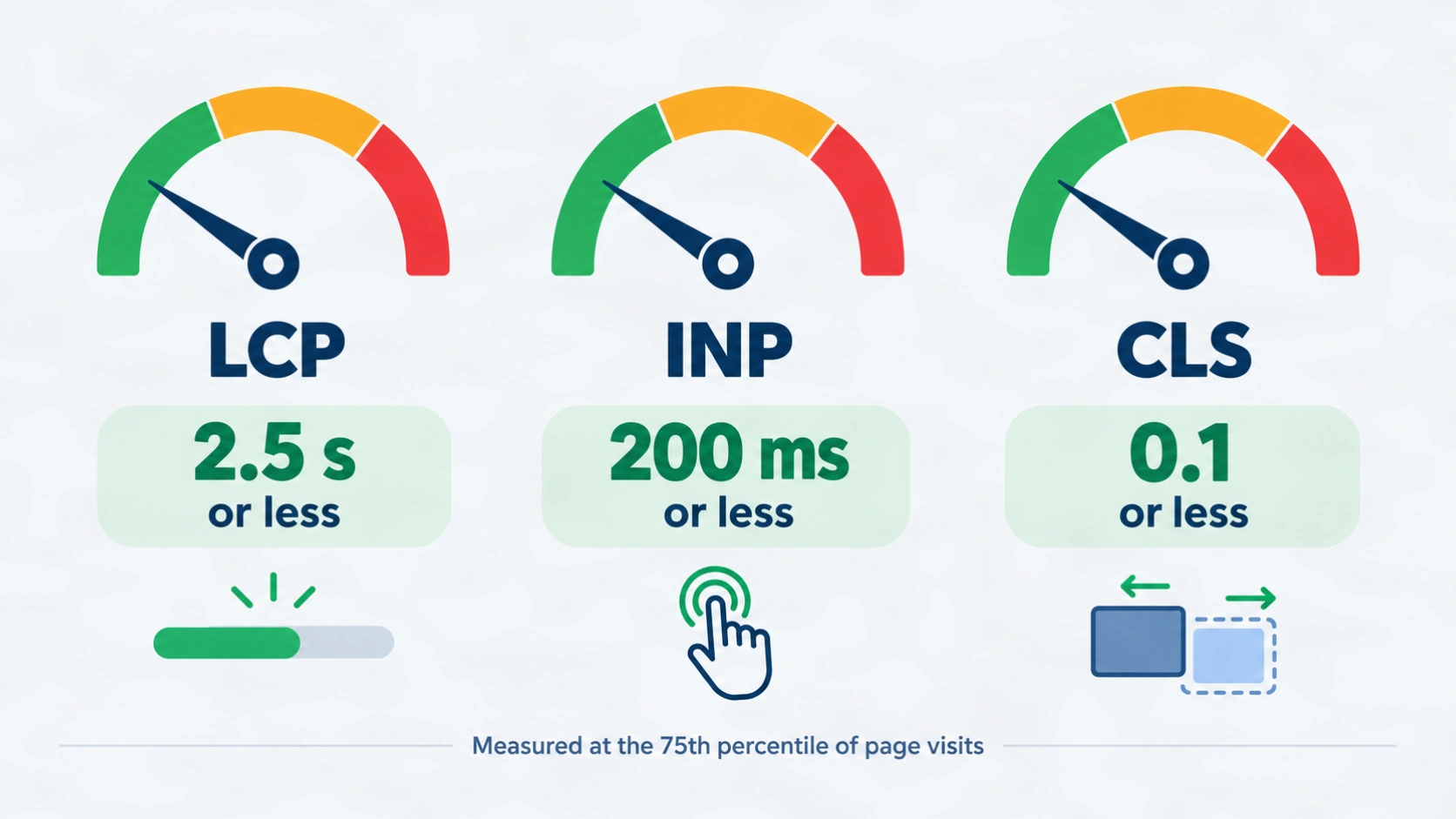
Core Web Vitals measure loading, responsiveness, and visual stability on real visits. According to Google’s web.dev documentation, a page passes when it meets the targets at the 75th percentile for all three metrics, which means at least 75% of page visits reach each target. Test your key pages with PageSpeed Insights and review the field data first.
| Metric | What it measures | Good threshold |
|---|---|---|
| Largest Contentful Paint (LCP) | Loading speed of the main content | 2.5 seconds or less |
| Interaction to Next Paint (INP) | Response time after clicks and taps | 200 milliseconds or less |
| Cumulative Layout Shift (CLS) | Unexpected movement of page elements | 0.1 or less |
According to web.dev, Interaction to Next Paint became a Core Web Vitals metric in place of First Input Delay on March 12, 2024. Lab tools are useful for debugging, but the same documentation makes a clear point about real users.
“Only field measurement can accurately capture the complete picture.”
Source: Google web.dev, Web Vitals
9. Test mobile usability
Check that every important template works well on a real phone. Buttons need enough space to tap, text needs to be readable without zooming, and the mobile page needs the same main content as the desktop page. Google mainly uses the mobile version of a page for indexing, so missing mobile content can cost you visibility.
On Page Audit Checklist: 8 Checks for Every Page
An on page audit checklist reviews the elements you control inside each page: titles, descriptions, headings, links, images, and markup. Run these eight checks on your most important pages first, such as the homepage, service pages, and top blog posts. Then repeat them on the rest of the site in batches.
10. Review title tags
Each page needs a unique title tag that names the main topic near the start and matches the search intent. Google may rewrite titles it finds unclear, so write a title that describes the page honestly. Flag missing titles, duplicate titles, and titles that repeat the brand name with no topic.
11. Review meta descriptions
A good meta description summarizes the page in one or two sentences and gives the searcher a reason to click. Google may choose a different snippet, but a clear description gives it a strong option. Flag missing descriptions, duplicates across many pages, and descriptions that promise something the page does not deliver.
12. Check the heading structure
Each page needs one H1, and the headings below it should follow a logical order: H2 first, then H3 inside it. Do not jump from H2 straight to H4. Theme widgets such as author boxes and sidebars often add stray heading tags, so inspect the final page, not only the editor.
13. Match the page to search intent
Search intent is the task a person wants to finish with a query, such as learning, comparing, or buying. Open the top results for your target query and note the page type, depth, and format they use. If your page is a sales page and the results are guides, the mismatch is a bigger problem than any meta tag. Learn more in my notes on semantic SEO.
14. Audit internal links and anchor text
Internal links should use descriptive anchor text that tells the reader what the destination page covers. Find links with empty anchors, such as icon links with no accessible name, and add visible text or an accessible label. Also check that your key pages receive links from related articles, not only from the menu.
15. Optimize images
Serve each image at about the size it displays, use a modern format such as WebP where your platform supports it, and set width and height attributes to prevent layout shifts. Every meaningful image needs descriptive alt text. Oversized images slow the largest element on the page, which can hurt the LCP result from check 8.
16. Validate structured data
Structured data should describe what is visible on the page and contain no errors. Use Google’s Rich Results Test or the Schema Markup Validator to test Article, FAQ, breadcrumb, and organization markup. Never add markup for content that readers cannot see, because mismatched markup creates trust problems instead of benefits.
17. Find duplicate content and keyword cannibalization
Keyword cannibalization happens when two or more pages target the same search intent and compete with each other. Search your own site for the main phrase and list every page that answers it. Merge the weaker page into the stronger one, redirect the old address, and update the internal links.
Content Checks to Add to Your SEO Audit Checklist
Content checks review whether your pages deserve to rank, not only whether they are technically correct. These four checks look at quality, trust, coverage, and answer structure. A strong SEO audit checklist always includes them, because a technically perfect page with weak content still disappoints readers.
18. Review content quality and freshness
List pages with thin content, outdated advice, or no clear purpose, then decide whether to update, merge, or remove each one. Show a visible last-updated date only when you have really reviewed the page. Compare your page with the top results and add the missing facts, examples, or steps that a reader would expect.
19. Check E-E-A-T signals
E-E-A-T stands for experience, expertise, authoritativeness, and trust. It is a quality framework used by Google’s raters, not a numeric ranking score. Check for a named author, a short author bio, an about page, contact details, and clear sources. Only claim credentials that you actually hold.
20. Find topical coverage gaps
A topical coverage gap is a subtopic that readers expect but your site does not cover. List the main entities, questions, and subtopics around your core service, then mark which ones already have a page. A topical map service can turn those gaps into a planned content cluster.
21. Check answer-first structure
Each section should answer its heading in the first sentence and then add detail. This helps readers scan, and it helps search engines and AI systems pull a clear passage from the page. No format guarantees a citation, but short and self-contained passages are easier to understand and easier to reuse.
Off-Page, Local, and Tracking Checks
Off-page and tracking checks show how others see your site and whether you can measure progress. These last four checks cover backlinks, local signals, analytics setup, and reporting. Skip the local check if your business serves only an online audience.
22. Review the backlink profile
Look at the quality and relevance of the sites that link to you, not only the total number. Check for sudden spikes of low-quality links, lost links from important pages, and anchor text that looks forced. Use more than one tool when possible, because every backlink index sees a different slice of the web.
23. Check Google Business Profile and local signals
For businesses with a physical location or service area, confirm that your business name, address, and phone number match across your website and your Google Business Profile. Review categories, services, photos, and review replies. My Google Business Profile optimization service covers this area in detail.
24. Confirm analytics and Search Console setup
Verify your Google Search Console property, connect your sitemap, and make sure analytics records the actions that matter, such as form submissions and calls. Without tracking, you cannot tell whether a fix helped. Record the setup date, because a later change in tracking can look like a sudden traffic drop.
25. Score issues and plan the fixes
Finish the audit by recording every issue with its evidence, impact, effort, owner, and deadline. Sort the list by priority score and group quick fixes together. A long list with no order creates stress, while a ranked list gives your team a clear first week of work.
Free SEO Audit Spreadsheet: Columns and Example Rows
A free SEO audit spreadsheet is a table where each row is one check and each column records the evidence, status, and next step. You can build it in Google Sheets or Excel in a few minutes. Copy the columns below, then add one row for each of the 25 checks in this SEO audit checklist.
| ID | Area | Check | Where to look | Status | Impact (1-5) | Ease (1-5) | Priority |
|---|---|---|---|---|---|---|---|
| 1 | Technical | Indexability | Page source, Search Console | Fail | 5 | 5 | 25 |
| 8 | Technical | Core Web Vitals | PageSpeed Insights | Warning | 4 | 3 | 12 |
| 15 | On-page | Image optimization | Crawl export, page inspector | Warning | 3 | 4 | 12 |
Use this formula in the Priority column: Priority = Impact × Ease. An issue with impact 5 and ease 5 scores 25 and goes first, while an issue with impact 2 and ease 1 scores 2 and waits. Add Owner, Deadline, and Notes columns so each fix has a person and a date.
SEO Audit Tools: What Each Tool Checks
SEO audit tools collect the data that you then review by hand, and no single tool covers all 25 checks in the SEO audit checklist. Pick a small set that covers indexing, crawling, speed, and links, and learn it well. More tools do not make a better audit, only a more confusing one.
- Google Search Console: Free. Shows indexing status, sitemap data, search queries, and Core Web Vitals field data for your own site.
- PageSpeed Insights: Free. Reports Core Web Vitals field data and lab diagnostics for a single URL.
- A site crawler: Tools such as Screaming Frog SEO Spider or Sitebulb crawl your pages and list titles, headings, status codes, canonicals, and links.
- All-in-one platforms: Ahrefs and Semrush offer site audit and backlink features in one account.
- WordPress SEO plugins: Rank Math and similar plugins give on-page hints while you edit, but they do not replace a full audit.
Treat every score from these tools as a diagnostic estimate. The score may flag a problem that does not matter, or miss one that does.
Audit Report Template: What to Include
An audit report template turns the results of your SEO audit checklist into a document that a client, manager, or developer can act on. Keep it short, specific, and ordered by priority. A good report answers three questions: what is wrong, why it matters, and what to do next.
- Overview: The goal, the scope, the date, and the three most important findings.
- Method: The tools and data sources you used, so the work can be repeated.
- Findings table: Issue, evidence, impact, recommended fix, owner, and deadline.
- Priority roadmap: A short plan split into the first week, the first month, and the first quarter.
- Next audit date: The date when you will re-test the fixes and compare the results with your baseline.
Common SEO Audit Mistakes to Avoid
The most common audit mistake is trusting a tool score without checking the page. Other mistakes include fixing low-impact issues first, forgetting to record a baseline, ignoring noindex tags on important pages, and never re-testing after the fixes go live. Each mistake wastes time and hides the real problem.
Another mistake is copying a long list of fixes from a generic report. Every site has a different goal, so a local business, an online store, and a personal blog need different priorities. Use the SEO audit checklist as a guide, then adjust the order to match your own business.
Conclusion
This SEO audit checklist gives you 25 clear checks, a priority formula, and a report structure that you can reuse every quarter. Start with indexability and Core Web Vitals, then move through on-page, content, and off-page checks, and record each result in your spreadsheet.
If you want a specialist to run the audit and plan the fixes, see my website SEO service or contact me with your website address.
FAQs
These ten questions cover the most common doubts about running an audit, choosing tools, and building a report. Each answer is short, so you can scan it quickly and then return to the SEO audit checklist above. If your question is not listed, send it through the contact page and I will add it to this guide.
What is an SEO audit checklist?
An SEO audit checklist is a list of technical, on-page, content, and off-page checks that you complete to find problems that limit a site’s search visibility. Each check has a clear pass or fail result, so you can fix issues in a logical order instead of guessing.
How often should I run an SEO audit?
Run a full SEO audit at least once every quarter and after any large change, such as a redesign, a migration, or a change in your URL structure. Smaller sites can run a lighter monthly check of indexing, speed, and traffic in Google Search Console.
What should an on page audit checklist include?
An on page audit checklist should include title tags, meta descriptions, heading structure, search intent match, internal links, image optimization, structured data, and duplicate content checks. Run it on your most important pages first, then repeat it across the rest of the site.
How long does a website audit take?
The time depends on the size of the site and the depth of the review. A small site can be reviewed in a few hours, while a large store or publisher may need several days. Crawling and data collection usually take less time than analyzing the findings.
Which SEO audit tools are best for beginners?
Beginners should start with Google Search Console and PageSpeed Insights because both are free and come directly from Google. Add one crawler such as Screaming Frog SEO Spider when you need page-level data for titles, headings, status codes, and internal links.
Can I do a free SEO audit myself?
Yes, you can run a useful free SEO audit with Google Search Console, PageSpeed Insights, a manual review of key pages, and the spreadsheet layout in this article. A paid crawler or an expert review becomes helpful when your site has hundreds or thousands of pages.
What is the difference between a technical SEO audit and a full SEO audit?
A technical SEO audit reviews crawling, indexing, speed, security, and site structure. A full SEO audit includes those checks and adds on-page, content, off-page, local, and tracking reviews. This article covers the full version, with nine of the 25 checks focused on technical SEO.
What should an audit report template include?
An audit report template should include the goal and scope, the method, a findings table with evidence, a priority roadmap, and the date of the next review. Write each recommendation in plain language so a developer, editor, or business owner can act on it without extra explanation.
How do I prioritize SEO audit findings?
Score each finding by impact and ease, then multiply the two numbers. Fix the highest scores first. Always handle indexing blocks, broken key pages, and security problems before smaller issues such as a missing alt attribute or a slightly long meta description.
Is a free SEO audit spreadsheet enough for a large website?
A free SEO audit spreadsheet works well for tracking findings, but a large website also needs crawler exports and filtered data from Search Console. Use the spreadsheet as the central record, and connect it to crawl files so each issue links to a list of affected URLs.