Technical SEO Basics for Beginners: Best 12 Step Checklist
Technical SEO basics for beginners explained simply: how crawling and indexing work, a 12-point technical SEO checklist, and what HTML websites need.


Technical SEO basics for beginners come down to one idea: make your website easy for search engines to find, read, and store. If Google cannot crawl or index a page, even excellent content stays invisible. This guide explains what technical SEO is, shows where it fits in SEO website development, and gives you a technical SEO checklist that works on WordPress, custom-built, and plain HTML sites.
Technical SEO is the work that lets search engines access and understand your site. Start with crawling, indexing, mobile usability, speed, URLs, and HTTPS. Then check each item on the checklist below, and repeat the check after every major site change.
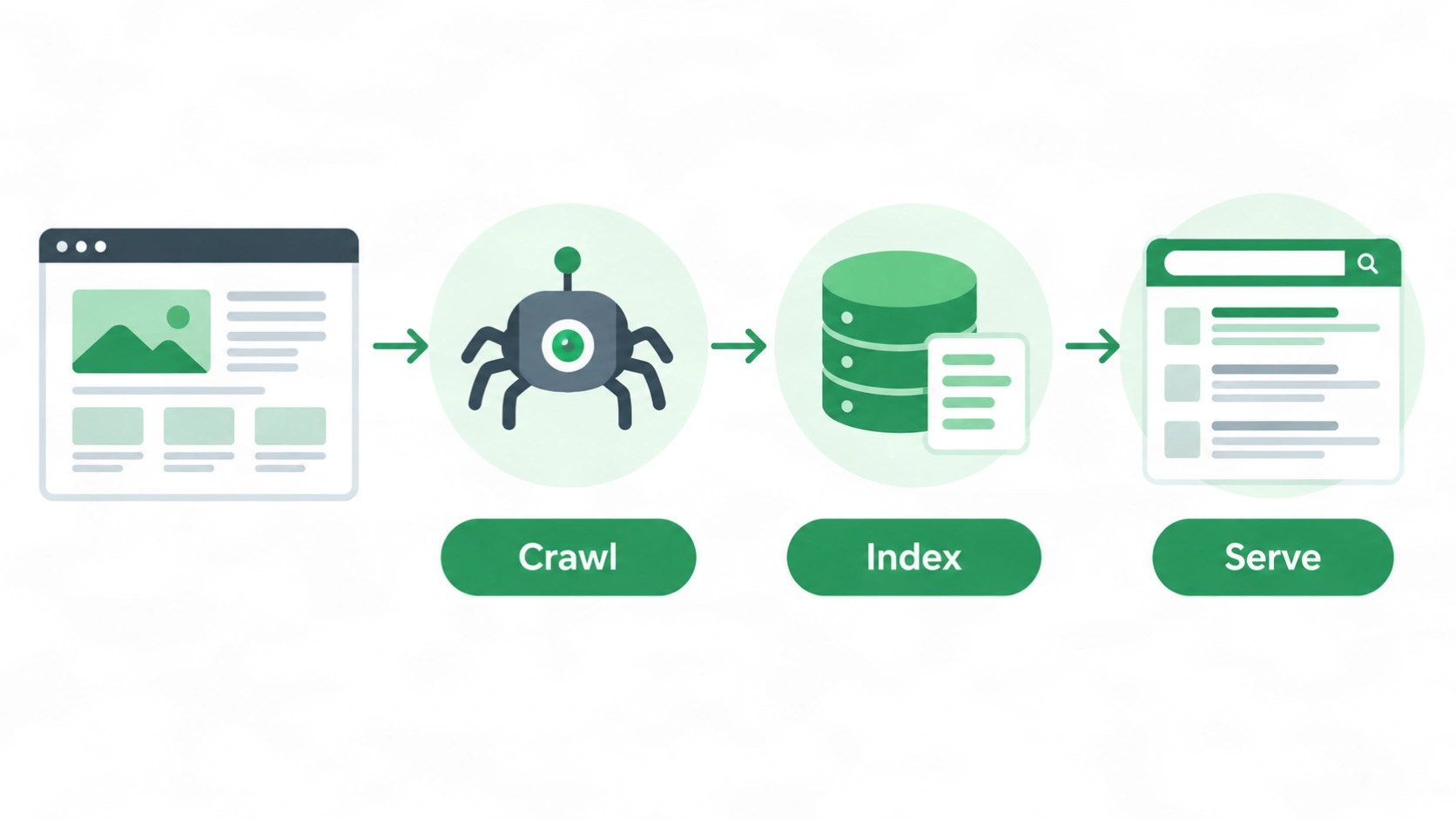
Technical SEO helps search engines crawl, index, and understand your pages
What Is Technical SEO?
Technical SEO is the practice of improving your website’s technical setup so search engines can crawl, index, and render your pages. It deals with how your site is built and served, not with what your articles say or who links to you.
Think of a shop. Your content is the products on the shelves. Technical SEO is the unlocked door, the clear signs, and the well-lit aisles. Without them, customers (and search engines) cannot get to the products.
Technical SEO covers robots.txt, XML sitemaps, canonical tags, URL structure, HTTPS, mobile usability, page speed, structured data, redirects, and internal links. Each item answers the same question: can a search engine reach this page, understand it, and trust it?
How Does Technical SEO Differ From On-Page and Off-Page SEO?
Technical SEO fixes how a site works, on-page SEO improves what each page says, and off-page SEO builds trust outside your site. All three support each other, but technical problems can block the other two.
| Type | Main focus | Example tasks |
|---|---|---|
| Technical SEO | Site infrastructure | robots.txt, sitemaps, speed, HTTPS, canonical tags |
| On-page SEO | Page content and markup | Titles, headings, copy, images, internal links |
| Off-page SEO | External signals | Backlinks, brand mentions, local citations |
A page with great copy but a stray noindex tag will not appear in search results. That is why beginners should check the technical layer first.
Why Technical SEO Basics for Beginners Start With Crawling, Indexing, and Serving
Google Search works in three stages: crawling, indexing, and serving results. Every technical SEO task supports one of these stages, so learning them first makes the rest of the checklist easier to follow.
According to Google Search Central, crawlers download text, images, and video from pages they find. Google then analyzes that content and stores it in its index. When someone searches, Google returns the pages it considers most relevant.
Crawling is how Google discovers your pages. Google finds URLs by following links from known pages and by reading sitemaps you submit. If a page has no internal links pointing to it, crawlers may never reach it.
Indexing is how Google stores and organizes a page. During indexing, Google also decides whether a page duplicates another one and which version is the canonical copy. Google’s own documentation says it directly:
“Indexing isn’t guaranteed; not every page that Google processes will be indexed.”
Source: Google Search Central, How Search works
A page can be crawled and still left out of the index. That is why you check indexing status in Search Console instead of assuming a published page is live in Google.
Serving is how Google picks pages to show for a query. Technical SEO cannot force a ranking. It removes barriers so your pages are eligible to compete.
Robots.txt vs Noindex: The Mistake Beginners Make Most
Blocking crawling and blocking indexing are different actions, and mixing them up causes real problems. Google’s documentation explains the difference:
“It is not a mechanism for keeping a web page out of Google.”
Source: Google Search Central, Introduction to robots.txt
That sentence describes robots.txt. It manages crawler traffic. To keep a page out of search results, use a noindex directive or password protection. There is also a trap: if robots.txt blocks a page, Google cannot read the noindex tag on it. So never block a page in robots.txt when you want its noindex tag to work.
SEO in Website Development: Where Technical SEO Fits in the Build
SEO in website development means making technical SEO decisions while the site is being planned and built, not after launch. Fixing structure later usually costs more time than choosing it correctly at the start.
Developers and SEO specialists decide many things together: URL patterns, page templates, navigation, heading structure, mobile layout, and how fast pages load. Each of these affects crawlability and user experience. If you are planning a new build, a web design service built with SEO structure from the start can save rework later.
What Is Website Development SEO and What Should You Decide Before Launch?
Website development SEO is the set of technical choices a team makes during a build so the finished site is crawlable, fast, and consistent. Decide these items before going live:
- URL structure: short, lowercase, hyphen-separated, and logical.
- Page templates: every template outputs a unique title, one H1, and a self-referencing canonical tag.
- Navigation and internal links: important pages sit within a few clicks of the homepage.
- Mobile layout: content and links are the same on mobile and desktop.
- Redirect plan: old URLs point to new ones if you are rebuilding an existing site.
- Staging protection: test sites are blocked from indexing, and that block is removed at launch.
The last point catches many sites. A launch with the staging noindex setting still active quietly removes pages from search.
Technical SEO Checklist: 12 Basics to Check on Every Website
A technical SEO checklist is a practical list of checks for crawlability, indexing, speed, mobile usability, security, URLs, redirects, and structure. Work through the items below in order. The first four decide whether search engines can see your site at all.
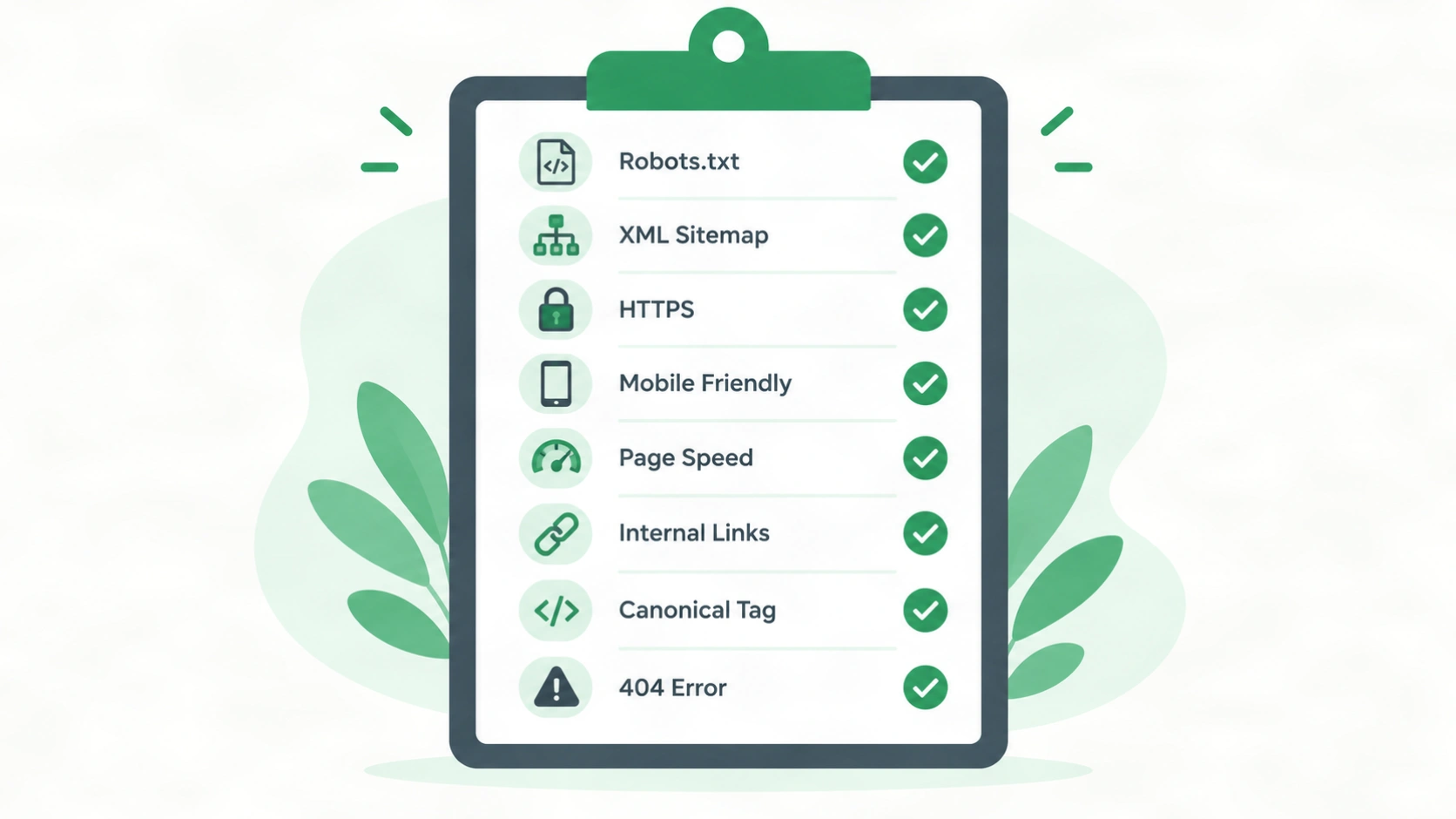
1. Check That robots.txt Is Not Blocking Important Pages
A robots.txt file tells crawlers which parts of your site they may visit. Open yourdomain.com/robots.txt and confirm it does not block key pages, CSS, or JavaScript files. Add your sitemap location to the file too.
2. Create and Submit an XML Sitemap
An XML sitemap is a file that lists the URLs you want search engines to discover. Include only indexable, canonical pages. Leave out redirected, broken, and noindex URLs. Submit the sitemap in Google Search Console and reference it in robots.txt.
3. Confirm Important Pages Are Indexable
An indexable page is one that search engines are allowed to store and show. Look for accidental noindex tags, wrong canonical tags, and login walls on pages that should be public. In Search Console, the Page indexing report shows which URLs are indexed and why others are excluded.
4. Fix Duplicate URLs With Canonical Tags
A canonical tag tells search engines which URL is the preferred version of a page. Duplicate versions appear easily, for example with and without www, with and without a trailing slash, or with tracking parameters. Give each page a self-referencing canonical tag and keep the preferred version consistent in internal links and your sitemap.
5. Use Clean, Readable URLs
A good URL is short, lowercase, descriptive, and separated by hyphens. Compare /services/technical-seo/ with /index.php?id=482&cat=7. The first tells users and crawlers what the page is about. Once a URL earns traffic or links, avoid changing it without a redirect.
6. Serve the Whole Site Over HTTPS
HTTPS encrypts the connection between your site and its visitors. Install a valid SSL certificate, redirect all HTTP URLs to HTTPS with 301 redirects, and fix mixed content, where an HTTPS page loads images or scripts over HTTP.
7. Make the Site Mobile-Friendly
A mobile-friendly site shows the same content and works well on small screens. Google primarily uses the mobile version of a page for indexing, so hidden content, tiny tap targets, and missing links on mobile can hurt you. Use a responsive layout and a viewport meta tag.
8. Improve Page Speed and Core Web Vitals
Core Web Vitals are three user-experience metrics: Largest Contentful Paint (LCP), Interaction to Next Paint (INP), and Cumulative Layout Shift (CLS). The thresholds below come from web.dev, Google’s web developer documentation.
| Metric | What it measures | “Good” threshold |
|---|---|---|
| LCP | How fast the main content loads | 2.5 seconds or less |
| INP | How fast the page responds to interaction | 200 milliseconds or less |
| CLS | How much the layout shifts while loading | 0.1 or less |
Source: web.dev, Core Web Vitals thresholds. A page is rated good when it meets each threshold at the 75th percentile of real visits.
Speed gains often come from compressing images, reducing unused JavaScript and CSS, using caching, and reserving space for images so the layout does not jump. Treat these metrics as part of user experience. A good score does not replace relevant content.
9. Build a Clear Site Architecture and Internal Links
Site architecture is how your pages are grouped and linked, and it should let users and crawlers reach any important page in a few clicks. Group related pages under hub pages and link between them with descriptive anchor text. This is the same idea behind a topical map, where each page has one purpose and a place in the structure. For the meaning-based side, read What Is Semantic SEO?.
10. Write Unique Titles, Meta Descriptions, and Headings
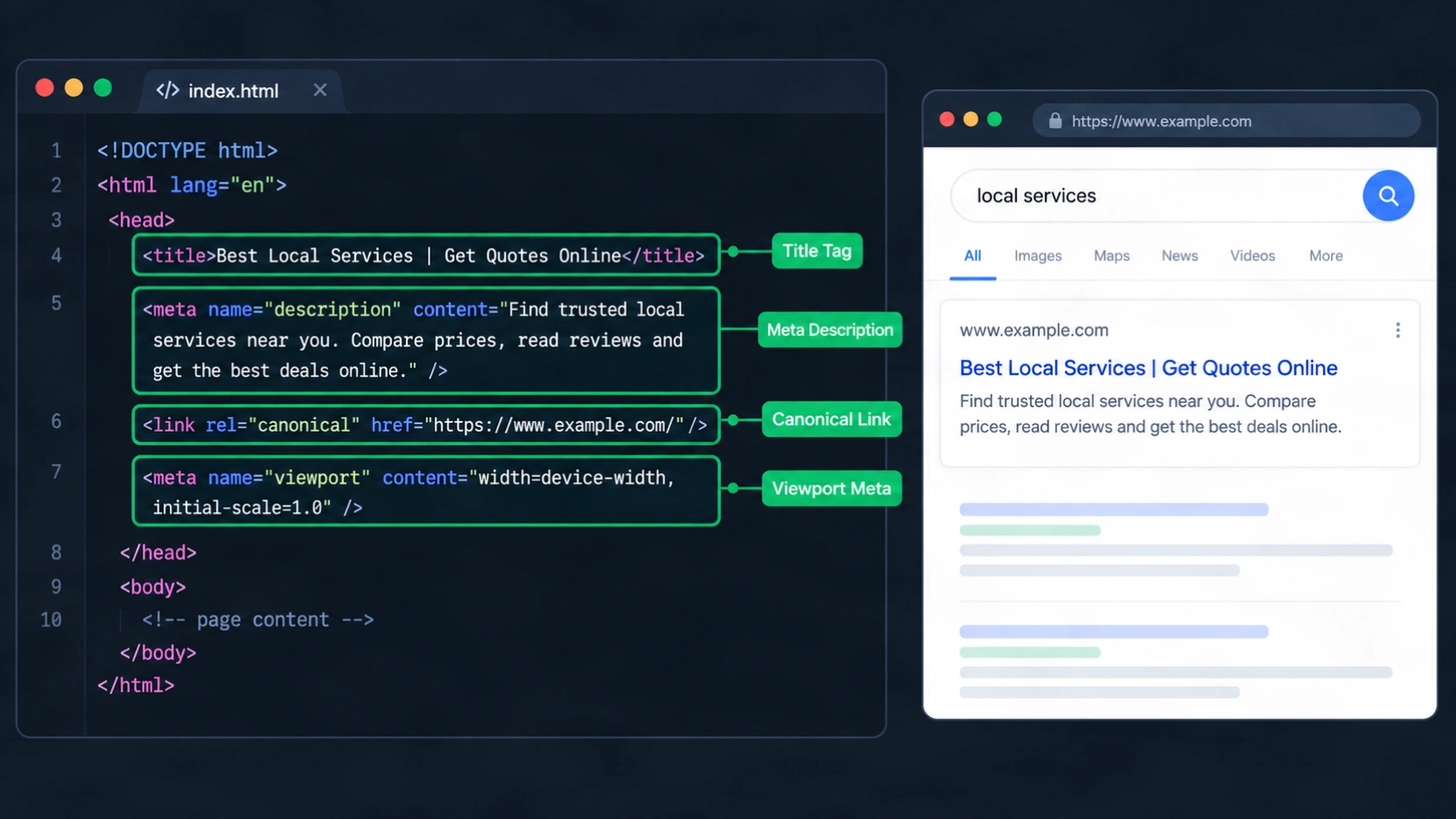
Every page needs its own title tag, meta description, and a single H1 that match the page topic. Titles under about 60 characters tend to display fully in results. Duplicate titles across many pages are a typical sign of a template problem.
11. Add Structured Data Where It Fits
Structured data is code that labels the content of a page so search engines can interpret it. Common types include Article, FAQ, Breadcrumb, LocalBusiness, and Product. Add only markup that matches visible content, then test it with Google’s Rich Results Test.
12. Fix Broken Links, Redirect Chains, and 404 Errors
Broken links and long redirect chains waste crawl effort and frustrate visitors. Update internal links to point straight to final URLs. Use 301 redirects for permanently moved pages, and make sure genuinely missing pages return a proper 404 status.
Try It Yourself: A 10-Minute Technical SEO Test
You can check the four most important basics in about ten minutes with free tools. Here is a simple test any beginner can repeat on their own site:
- Open
yourdomain.com/robots.txtand look for a line that saysDisallow: /. If it exists, your whole site may be blocked. - Open one important page, right-click, choose “View page source,” and search for
noindex. If you find it on a page you want in Google, remove it. - Paste that page’s URL into the URL Inspection tool in Google Search Console. Note whether it says the URL is on Google.
- Run the same URL in PageSpeed Insights and note the LCP, INP, and CLS values against the table above.
Write down what you find for each step. If two or more steps show a problem, fix those before working on content or backlinks.
What I found when I ran this test: [ADD: your real result from a real site, for example the site type, the issue found in steps 1 to 4, and how long the fix took. Only add what you actually did. If you did not run the test, delete this block.]
SEO for HTML Website: What a Static Site Needs You to Add by Hand
An HTML website can rank well, but you must add most technical SEO elements yourself because there is no plugin or CMS doing it for you. The site is fast by nature, yet it can still suffer from duplicate URLs, missing files, and inconsistent tags.
For SEO for HTML website projects, check these items on every page:
- A unique
<title>and<meta name="description"> - One H1 and a logical heading order
- A self-referencing canonical tag
- A viewport meta tag and a
langattribute on the<html>tag - Descriptive alt text on images, with width and height set
- A robots.txt file and an XML sitemap in the site root
- A consistent trailing slash and a single preferred domain version
A minimal head section looks like this:
<!DOCTYPE html>
<html lang="en">
<head>
  <meta charset="UTF-8">
  <meta name="viewport" content="width=device-width, initial-scale=1">
  <title>Technical SEO Basics for Beginners | Your Brand</title>
  <meta name="description" content="Learn technical SEO basics for beginners with a simple checklist.">
  <link rel="canonical" href="https://www.example.com/technical-seo-basics/">
  <meta name="robots" content="index, follow">
</head>
Static sites often repeat the same head code across many files. A copy and paste mistake can leave every page with the same title or the same canonical URL, so crawl the site with an audit tool after launch. For a deeper look at common static site problems, see Ahrefs’ guide to SEO for static sites.
Technical SEO Basics for Beginners: Free Tools That Make Checks Easier
Google Search Console, PageSpeed Insights, and a site crawler cover most beginner technical SEO checks. You do not need a paid stack to start.
- Google Search Console: shows indexing status, sitemap submissions, mobile usability, Core Web Vitals reports, and manual actions. Verify your site here first.
- PageSpeed Insights: reports field data and lab data for speed and Core Web Vitals on a given URL.
- A site crawler: tools such as Screaming Frog (free for small sites) or Ahrefs Webmaster Tools crawl your pages and flag broken links, missing titles, redirect chains, and duplicate content.
- Browser developer tools: let you inspect the rendered HTML, response codes, and loading order.
Do not fix every warning a tool shows. Judge each issue by how many pages it affects and whether it blocks crawling, indexing, or users. A missing alt attribute on a decorative icon matters far less than a noindex tag on your services page.
Common Technical SEO Mistakes Beginners Make
The most common beginner mistakes are blocking pages by accident, leaving duplicate URLs, and ignoring mobile and speed problems. Most are easy to prevent once you know where to look.
- Leaving noindex or a “discourage search engines” setting on after launch
- Blocking CSS or JavaScript files in robots.txt, which stops Google from rendering the page properly
- Putting redirected, broken, or noindex URLs in the XML sitemap
- Changing URLs during a redesign without 301 redirects
- Creating orphan pages that no other page links to
- Using one title tag and meta description across many pages
- Uploading large, uncompressed images
- Treating an audit tool score as the goal instead of fixing real crawling and indexing problems
A Simple 5-Step Starter Workflow for Technical SEO Basics for Beginners
A beginner can run a useful technical check in five steps: verify, crawl, fix blockers, improve experience, and monitor.
- Verify the site in Google Search Console and submit your sitemap.
- Crawl the site with a tool and export errors, redirects, and duplicate titles.
- Fix blockers first: robots.txt rules, noindex tags, canonical errors, broken pages, and HTTPS issues.
- Improve experience next: mobile layout, image sizes, Core Web Vitals, and internal links.
- Monitor monthly with Search Console, and run a full review after any redesign, migration, or large content launch.
Technical SEO is ongoing. Sites change, plugins update, and new pages create new issues. For more on this topic, browse the Technical SEO and Audit section of the blog, or consider website SEO support if you would rather have someone audit and fix the technical layer for you.
Conclusion
Technical SEO gives search engines a clear path to your content. Start with the basics: let crawlers in, keep important pages indexable, use one clean URL for each page, secure the site with HTTPS, and make every page fast and usable on mobile. Build these choices into your website development process, and use the checklist above for audits and launches. Good technical SEO does not guarantee rankings, but it removes the problems that stop good pages from competing.
Frequently Asked Questions
1. What is technical SEO in simple words?
Technical SEO is the work of making your website easy for search engines to crawl, index, and understand. It covers site speed, mobile usability, security, URL structure, sitemaps, and similar behind-the-scenes elements.
2. What are the main elements of technical SEO?
The main elements are crawlability, indexability, site architecture, page speed, mobile usability, HTTPS, canonical tags, structured data, and redirect management. These elements decide whether search engines can access your pages and interpret them correctly.
3. Is technical SEO hard for beginners to learn?
No, the basics are manageable if you learn them in order. Start with crawling, indexing, robots.txt, sitemaps, and Search Console. Developer-level topics such as JavaScript rendering and server configuration can wait until you need them.
4. What is a technical SEO checklist?
A technical SEO checklist is a structured list of checks for crawlability, indexing, speed, mobile usability, security, URLs, redirects, and internal links. Use it for new site launches, quarterly reviews, and after redesigns.
5. How is technical SEO different from on-page SEO?
Technical SEO improves how the site is built and delivered, while on-page SEO improves the content and markup of individual pages. Fixing a robots.txt block is technical, and improving a heading or title is on-page.
6. Does website development affect SEO?
Yes, development choices such as URL structure, templates, navigation, mobile layout, and page speed directly affect crawlability and user experience. Planning SEO in website development avoids expensive fixes after launch.
7. Can an HTML website rank on Google?
Yes, an HTML website can rank if search engines can crawl and index it and the content satisfies the search intent. You must manually add titles, descriptions, canonical tags, a sitemap, and a robots.txt file.
8. What is the difference between crawling and indexing?
Crawling is when Google discovers and downloads a page, and indexing is when Google analyzes the page and stores it in its database. A page can be crawled without being indexed.
9. Do Core Web Vitals affect rankings?
Core Web Vitals are part of Google’s page experience signals, but a good score does not override relevant, helpful content. Treat them as a way to improve user experience, and fix severe problems first.
10. How long does technical SEO take to show results?
There is no fixed timeline because results depend on how quickly Google recrawls and reprocesses your pages. Fixing a blocking issue can help pages get indexed within days or weeks, while ranking improvements depend on competition and content quality.